
Use your own Google Sheets API quota in Make
Many teams hit shared Google Sheets connector limits in Make, causing 429 errors that stop automations during peak runs. This guide shows how to use your own Google Sheets API quota in Make by routing requests through Make HTTP modules and verifying billing to your Google Cloud project.
Our Sheet Gurus API is a platform that turns Google Sheets into production-ready RESTful JSON APIs without backend code. It issues live CRUD endpoints after Google sign-in and adds API key auth, per-sheet permissions, configurable rate limits, optional Redis caching to cut Sheets API calls (see our Google Sheets API quotas guide for quota background), and MCP support for AI assistants. Follow the integration steps to move Make workflows off the shared connector, verify billing association, and learn the verification check most teams miss.
What changes when you switch Make to use your Google Cloud project quota?
Switching Make to your Google Cloud project makes your workflows consume your project-level Google Sheets API quota instead of Make's shared connector quota. This reduces contention from other Make users and gives your team direct control over quota increases, monitoring, and escalation. You also assume operational responsibility for pacing, retries, and quota-aware scenario design.
How does quota scope change (per project, per user, per 100 seconds)? 🔎
Quota scope depends on the Sheets API endpoint: some limits are counted per project per 100 seconds while other limits are counted per user per minute. Per-project quota is a quota type that counts API requests against your Google Cloud project and often uses a rolling window such as "per 100 seconds." Per-user quota is a quota type that counts requests by the end user or service account and usually limits sustained per-minute throughput.
Map these scopes to common Make patterns to predict failures. If your Make scenarios use a single service account or a shared OAuth credential, most reads and writes hit the project quota. If each human signs in via OAuth for personalized flows, per-user caps will matter during bursts. For webhooks that fan out into parallel modules, per-100-seconds limits create short-time-window bottlenecks even when daily totals look safe. Use the Google Sheets API Quotas and 429s guide to calculate refill windows and plan pacing for high-throughput scenarios.
What operational benefits and risks should I expect after the switch? ⚠️
You gain visibility and escalation paths but take on pacing, monitoring, and retry budgets. Benefit: you can request quota increases from Google and create Cloud Monitoring dashboards tied to your project to detect approaching limits. Benefit: reducing shared-connector contention often lowers unpredictable 429s caused by other Make users sharing a connector.
Risk: your team must design Make scenarios to respect per-100-second and per-user caps, or you will generate 429s during burst hours. Risk: ad-hoc parallel modules or simultaneous scenario runs can exhaust quota quickly, causing downtime for automations and lost throughput. For practical pacing patterns, batching writes, adding fixed delays in critical branches, and using scenario-level concurrency controls work well. See our Root‑Cause Playbook for Cloud Monitoring dashboards, alert thresholds, and retry-budget strategies to reduce incident time.
💡 Tip: Create Cloud Monitoring alerts for "Requests per 100 seconds" and a separate alert for "Errors/429" so ops can throttle Make scenarios before user-facing failures.
How does Sheet Gurus API fit this workflow and when should you consider it? 🚀
Sheet Gurus API is a managed API platform that turns Google Sheets into REST endpoints with API-key auth, configurable rate limiting, and optional Redis caching to reduce direct Google Sheets API calls. Use Sheet Gurus API when you want to avoid building and maintaining custom OAuth flows, duplicate quota orchestration, and per-scenario retry logic in Make.
Practical example: instead of implementing a custom OAuth Google Sheets API Make HTTP module flow in every scenario and handling per-user vs per-project quota mapping yourself, create a Sheet Gurus endpoint and call it from Make's HTTP module with an API key. Configure per-key throttles to enforce per-client quotas and enable optional Redis caching to cut read volume against your Google Cloud project. For connection patterns and 429-safe retries in Make, see Connect a Google Sheets REST API to Zapier, Make, Relay.app, and Clay and Stop Google Sheets 429s in Zapier, Make, and n8n for ready-to-import recipes and pagination examples.
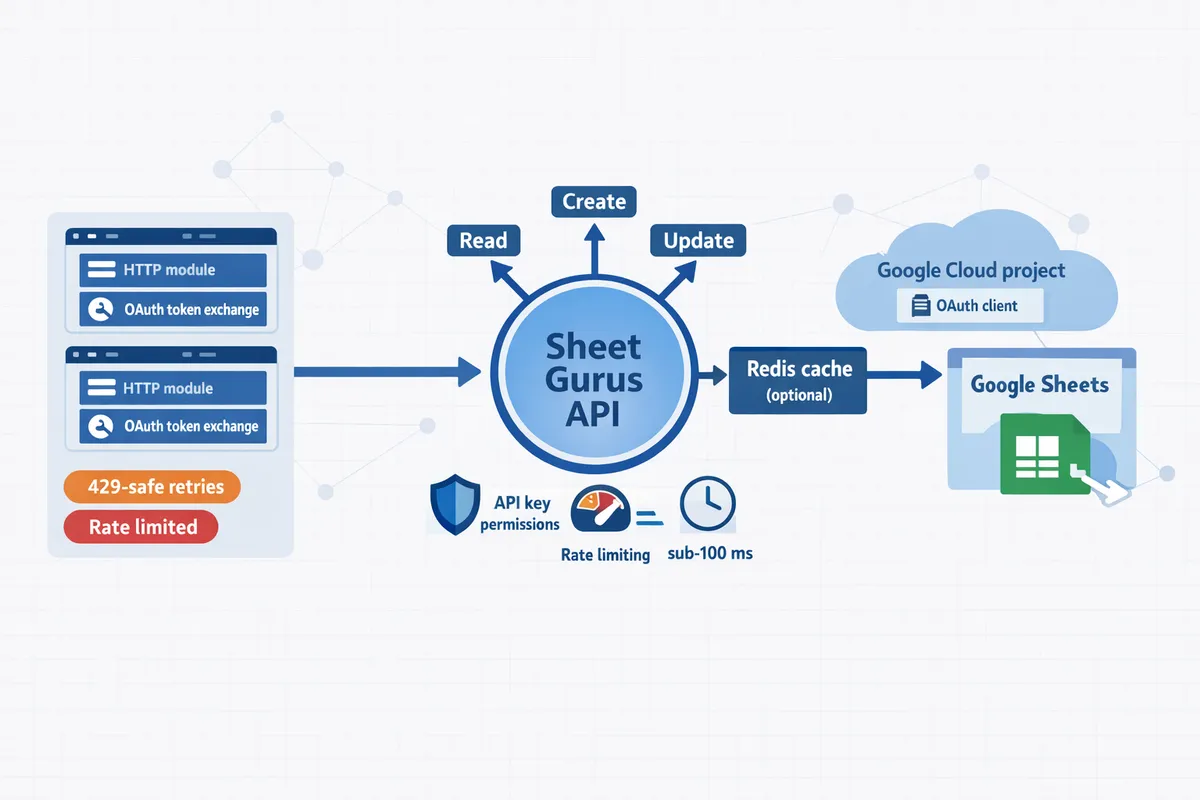
How do you set up a Google Cloud project and connect it to Make using the HTTP module?
Create a Google Cloud project, enable the Google Sheets API, add OAuth client credentials, and implement an OAuth token exchange inside Make's HTTP module so requests count against your project quota. Follow the exact console settings below, then run end-to-end tests and watch the API dashboard to confirm requests land under your project.
🔑 What prerequisites and permissions do you need before starting?
You must have a Google account with billing enabled and Project Owner or Editor rights on the Google Cloud project. You also need rights to edit Make scenarios and to create or update connections in Make.
Required OAuth scopes are https://www.googleapis.com/auth/spreadsheets and https://www.googleapis.com/auth/drive.file. Use the narrower drive.file scope when your workflow only needs access to files the authenticating user has opened with your app. If you consider a service account, note service accounts cannot access personal user Drive files without domain-wide delegation and administrator setup.
⚠️ Warning: Do not publish an OAuth consent screen as External to broad user bases before verifying the app; Google may limit unverified apps to test users only.
🛠️ Step-by-step: create the Google Cloud project, enable the Sheets API, and create OAuth credentials
Create a project, enable APIs, and produce OAuth client ID and secret in exactly this order so the consent settings validate correctly. Follow these numbered steps and keep screenshots or a password manager entry for client ID/secret storage.
- Create project. In Google Cloud Console, choose or create a project and set a meaningful project ID for quota tracking (example: my-company-make-quota). Confirm billing is attached in Billing > Overview.
- Enable APIs. Go to APIs & Services > Library and enable Google Sheets API. Optionally enable Drive API if you will use drive.file scope or file discovery.
- Configure OAuth consent. In APIs & Services > OAuth consent screen select Internal for G Suite orgs or External for users outside your organization. Add the two scopes above and list test users if External and unverified.
- Create credentials. In APIs & Services > Credentials click Create Credentials > OAuth client ID. Choose Web application and add redirect URIs. Copy the client ID and client secret to a secure vault or Make variables.
Expected outputs: a client ID and client secret pair, the Sheets API enabled on the project, and the OAuth consent screen published to the appropriate user set.
🔗 How to configure Make's HTTP module with custom OAuth for Google Sheets (custom OAuth Google Sheets API Make HTTP module)
You perform the OAuth authorization and token exchange inside Make's HTTP module and attach the access token to subsequent Sheets API requests. Use these steps to implement the flow and store tokens securely.
- Store credentials. Place client_id and client_secret in Make's encrypted Variables or use a secure external vault that Make can call.
- Build the auth URL. In a Make scenario use an HTTP module to open the authorization URL: https://accounts.google.com/o/oauth2/v2/auth with query params: client_id, response_type=code, scope (space-separated spreadsheets and drive.file), access_type=offline, prompt=consent, and redirect_uri equal to the callback URL you will register. Present this URL to the user to grant access.
- Capture the code. Use a webhook or the redirect URI provided by your integration flow. The user will return an authorization code to that callback.
- Exchange the code for tokens. POST to https://oauth2.googleapis.com/token with grant_type=authorization_code, code, client_id, client_secret, and redirect_uri. Save access_token and refresh_token in Make variables or a vault.
- Use tokens on requests. Attach Authorization: Bearer
to each HTTP request to the Sheets API endpoint (for example, GET https://sheets.googleapis.com/v4/spreadsheets/{spreadsheetId}). Implement automatic refresh by POSTing grant_type=refresh_token when the access token expires.
Practical Make details: store refresh tokens encrypted and run a scheduled scenario that refreshes tokens before expiry. For high-throughput scenarios, keep one token per service account or user session to avoid unexpected quota attribution across multiple projects.
💡 Tip: Use the drive.file scope to reduce consent friction and to limit access to files users explicitly open with your app.
✅ How do you verify the quota switch and test end-to-end?
Verify that API calls appear under your Google Cloud project by running test scenarios and watching the API Dashboard and Quotas page in Cloud Console. Execute the tests below and confirm requests, error rates, and quota usage map to your project.
- Single-call smoke test. Run a single Sheets API read (spreadsheets.get) from your Make scenario and inspect the HTTP response in Make. Expect 200 and the sheet metadata. In Cloud Console go to APIs & Services > Dashboard and confirm the request shows in the Sheets API metrics for your project.
- Concurrency test. Run parallel requests that match your intended production concurrency (for example, 5 parallel reads and 2 parallel writes). Watch Quotas > Sheets API > Requests per 100 seconds and per-minute metrics. Record when 429s occur and which operation caused them.
- Log inspection. In Cloud Console use APIs & Services > Metrics Explorer or Logs Explorer to filter by methodName like spreadsheets.get or spreadsheets.values.batchUpdate and verify entries attribute to your project ID.
- Alerting. Create Cloud Monitoring alerts for increasing quota consumption or for 429 spikes. See our root‑cause playbook and monitoring guidance for example dashboards and alert rules: Google Sheets API 429s and Quotas (2026): Root‑Cause Playbook + Cloud Monitoring Dashboards and Alerting.
If you see requests still attributed to Make's shared connector, re-check the client ID/secret being used by the scenario and ensure tokens were obtained via your client credentials rather than Make's built-in connector. For quota planning and which calls to prune first, consult the quota and 429 guide: Google Sheets API Quotas and 429s: How to Increase Limits and Prevent Errors (2026 Guide + Calculator).
📦 When should you choose Sheet Gurus API instead of building a custom OAuth flow?
Choose Sheet Gurus API when you prefer a managed REST front end with API keys, configurable rate limiting, and optional Redis caching to reduce direct Google Sheets API calls. Sheet Gurus API removes most of the OAuth and quota management burden and exposes sheets as production-ready JSON APIs.
Consider Sheet Gurus API when your team wants to shorten time-to-production, avoid handling refresh tokens and consent verification, or needs per-sheet API key controls and built-in rate limiting. If your automation runs high-frequency reads or serves external clients, Sheet Gurus API's caching and per-key throttling reduce the number of Google calls you must manage. See the guide on connecting a Sheets REST API to automation platforms for integration patterns: Connect a Google Sheets REST API to Zapier, Make, Relay.app, and Clay (2026): API‑Key Auth, Pagination, and 429‑Safe Retries.
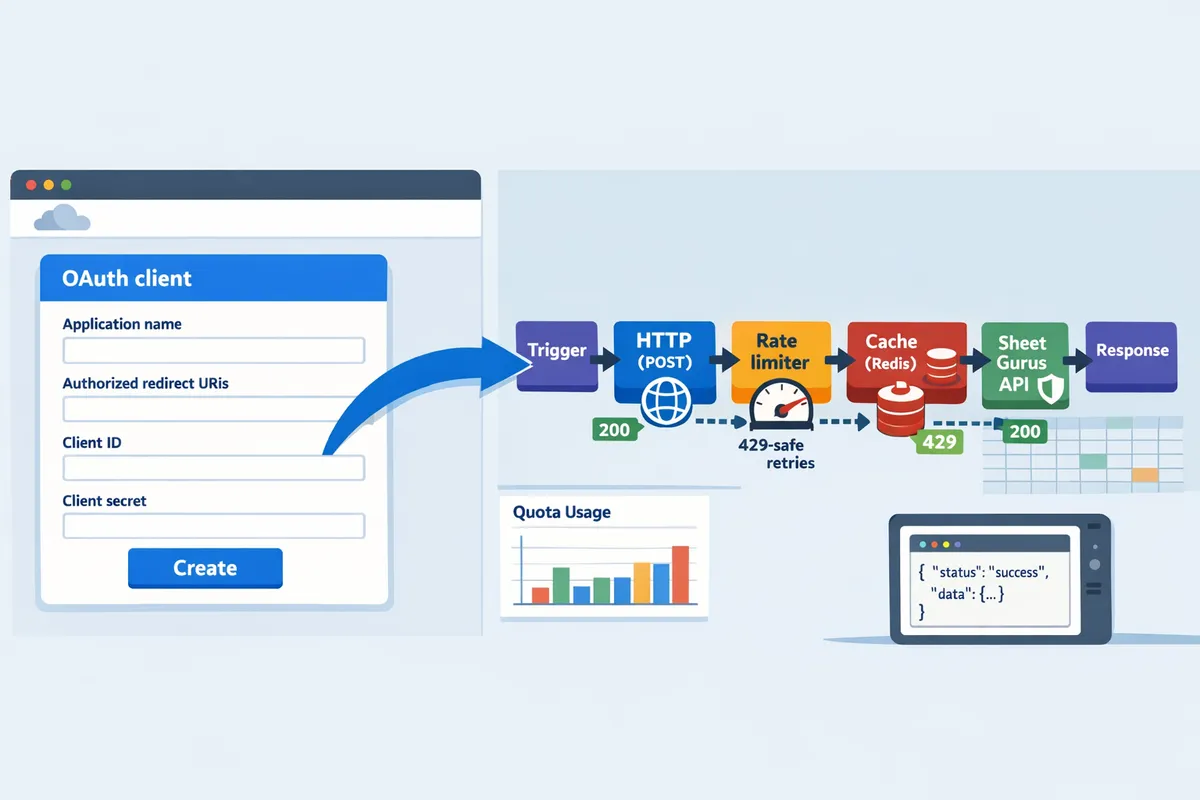
How do you prevent 429s and optimize throughput after moving to your own quota?
You prevent 429s by pacing requests, limiting concurrency, caching frequent reads, and actively monitoring quota metrics. These controls reduce burst traffic that triggers per-project and per-user limits and keep Make scenarios running during peak windows.
What pacing and concurrency patterns work in Make to avoid 429s? ⏱️
Pacing and concurrency control in Make require batching writes, inserting short delays between high-volume branches, and limiting parallel scenario runs to match your per-project and per-user quotas. Token-bucket is a rate-control algorithm that allows short bursts up to a bucket size while refilling at a steady rate. Implement a token-bucket pattern in Make by centralizing write traffic into a single "pacer" scenario that accepts queued jobs and releases N requests per second using the Delay module.
Practical steps:
- Batch writes with Array aggregator or a single multi-row update call rather than dozens of single-row updates. Example: aggregate 50 rows and send one update call every 2 to 5 seconds.
- Insert short delays between parallel branches. Use the Delay (Sleep) module to space heavy branches by 500–2000 ms depending on your observed spike behavior.
- Limit scenario concurrency in Make by setting the scenario to single or small parallel runs and using a webhook queue to absorb bursts.
- If you use a custom oauth google sheets api Make HTTP module, route writes through a single HTTP call path so requests count against the same project quota rather than many separate connectors.
Sheet Gurus API complements these patterns by providing per-key throttling gates you can call instead of hitting Google directly. Route high-frequency writes through an API key with a controlled rate so Make workflows never flood the Sheets API.
How can caching and Sheet Gurus API rate limits reduce Google Sheets API calls? 🧰
Caching and per-key rate limits on Sheet Gurus API cut direct Google Sheets API calls by serving frequent reads from cache and smoothing peak demand. Sheet Gurus API offers optional Redis caching and configurable per-key rate limiting that you call from Make using API key auth.
Practical setup:
- Configure read-heavy endpoints in Sheet Gurus API with a short TTL (for example, 10–60 seconds) to serve dashboards and bots from cache. Cache-warm by priming hot endpoints on schedule during low traffic.
- Use per-key rate limits to protect the upstream Sheets API. Assign separate API keys for background syncs and user-facing queries so a heavy analytics job cannot throttle interactive workflows.
- In Make, switch GET steps to call Sheet Gurus API endpoints via the HTTP module rather than the Google Sheets connector. That gives you predictable rate control and reduces 429 risk against your Google Cloud project.
See our guide on how to connect a Google Sheets REST API to Zapier, Make, Relay.app, and Clay for examples of API-key auth and 429-safe retries.
Quota types and practical throughput mapped to Make scenarios ⚖️
Per-project, per-user, and per-second quota types each impose different practical throughput limits for Make scenarios. The table below translates those quota kinds into example Make configurations and safe request patterns you can test against your project quota.
| Quota type | What it limits | Example Make scenario settings | Recommended safe pattern (example) |
|---|---|---|---|
| Per-project (per-100s) | Total requests from your Google Cloud project across all users | Centralize all API calls through a single HTTP module using your custom OAuth project. Use a pacing scenario to throttle global throughput. | Batch 50 operations and release at a steady rate (e.g., one batch every 2–5s). Cap concurrent scenario runs to 2–4. |
| Per-user (per-minute) | Requests from a single Google account or OAuth grant | If many flows use the same service account or user OAuth, reduce per-user bursts with delays and distributed API keys via Sheet Gurus API. | Limit parallel user-scoped flows to 1–2; add 1–3s delay between user-scoped write bursts. |
| Per-second / per-minute API resources | Method-specific limits (reads vs writes) | Group read-only work into cached endpoints; route writes to a controlled write pipeline. Monitor method-level 429s. | Route frequent reads to cached API endpoints; group writes and release in small bursts with a Delay module. |
Use these mappings to configure Make scenario concurrency and batching. If you need precise quotas mapped to your project, run a short load test and compare actual QPS to the safe pattern above, then adjust delays and batch sizes.
What steps fix "google sheets 429 zapier make fix" style errors in Make and Zapier? ❗
Immediate fixes for 429 errors are to back off, reduce concurrency, batch operations, and switch frequent reads to cached endpoints. Longer-term remedies include requesting quota increases, moving heavy reads to Sheet Gurus API, and scheduling non-urgent syncs off-peak.
Quick action checklist:
- Pause or throttle offending scenarios. Reduce the number of parallel runs and add Delay steps.
- Implement exponential backoff with jitter in your retry logic. In Make, use the router with conditional delays to grow wait time after each 429.
- Convert many single-row edits into batched updates. Replace many small writes with one multi-row call.
- Route read-heavy requests to Sheet Gurus API endpoints with caching enabled to prevent repeated Google calls.
- For Zapier, use similar batching and schedule-based triggers rather than immediate per-row triggers.
- If errors persist, collect request logs and open a quota increase request with Google while you keep traffic paced.
For an importable fix kit and step-by-step recipes, see our Stop Google Sheets 429s in Zapier, Make, and n8n guide.
💡 Tip: When you get 429s, do not only add retries. Retries multiply request volume unless you also add progressive delays and cap concurrency.
How do you monitor, alert, and request quota increases effectively? 📈
Monitor Sheets API quota by wiring Cloud Monitoring dashboards to record requests and 429s, set alerts on sustained error spikes, and prepare quota increase requests with traffic graphs and business justification. Good monitoring shows sustained high QPS windows, not just single spikes.
Practical monitoring and escalation steps:
- Create Cloud Monitoring charts for total requests, successful responses, and 429s for the Google Sheets API. Log these at 60s granularity to spot short bursts.
- Set alerting rules for a sustained 429 rate over a 3 to 5 minute window. Use PagerDuty or Slack integrations for immediate operator response.
- Capture representative traffic graphs, timestamps of peak windows, average QPS per minute, and concrete business impact (e.g., slowed onboarding flows) before requesting quota increases.
- Open the quota increase request in the Google Cloud Console and attach your traffic charts and a clear plan showing you will enforce pacing and retries.
- While waiting for approval, move high-read endpoints to Sheet Gurus API with caching and per-key rate limits to preserve production flows.
Our Root‑Cause Playbook for Google Sheets API 429s and the 2026 quota increase guide show sample dashboards and the exact diagnostic graphs to include with your request.
Frequently Asked Questions
Switching Make to use your own Google Cloud project raises operational questions about quota scope, retries, and monitoring. The answers below give concise, actionable guidance for teams moving automations off Make's shared connector quota and onto their own project quota. Each answer points to practical next steps and relevant Sheet Gurus API capabilities.
Does Make count Google Sheets API quota per project or per user? 🤔
Requests made with your project's OAuth credentials count against your Google Cloud project quota, while some endpoints also enforce per-user limits. Check the Sheets API documentation and Cloud Console metrics for which endpoints impose per-user windows (writes and certain batch calls commonly do). For Make workflows this means a single misbehaving scenario can exhaust project quota or push a single service account into per-user caps. See our guide on mapping quotas and 429s for help interpreting project vs user limits: Google Sheets API Quotas and 429s: How to Increase Limits and Prevent Errors (2026 Guide + Calculator). Sheet Gurus API can sit in front of your sheet to centralize authentication and reduce direct Google calls, which simplifies quota scope and isolation.
Can I use custom OAuth in Make to apply my project quota to Sheets API calls? 🔐
Yes. Create OAuth client credentials in your Google Cloud project, implement the token exchange in Make's HTTP module, and attach the returned access token to each Sheets API request so calls count against your project quota. Use a web application client, include the appropriate scopes (sheets and drive.file), and set Make's redirect URIs exactly as documented. For field mappings and an example flow, follow the configuration steps in our section on using the HTTP module and also see the connector patterns in Connect a Google Sheets REST API to Zapier, Make, Relay.app, and Clay (2026). If you prefer to avoid OAuth handling inside Make, Sheet Gurus API offers API keys and built-in auth that remove the need for custom token exchanges.
How do I fix repeated 429s in Make or Zapier? 🚑
Short-term fixes are retries with increasing delays, lower concurrency, and batching writes; medium-term fixes are caching frequent reads and shifting polling patterns; long-term fixes are quota requests supported by usage evidence. Immediately add exponential backoff retries (start small and double delays), cap concurrent scenarios or threads in Make, and combine multiple small writes into single batch updates. For a recipe of pacing patterns and importable fixes aimed at Make and Zapier, see Stop Google Sheets 429s in Zapier, Make, and n8n (2026). Sheet Gurus API reduces retry volume by serving cached reads and enforcing per-key rate limits so your automations see fewer 429s while you rework workflow patterns.
Will switching to my own quota eliminate all rate limits? ⚖️
No. Moving to your Google Cloud project gives control and telemetry, but Google still enforces per-project and per-user rate limits and short time-window quotas. You gain visibility in Cloud Monitoring but still must pace traffic to match documented limits per endpoint and per user. Use quotas plus pacing (throttles, batching) and caching to create an effective sustained throughput that stays below those windows. Our root-cause playbook shows how to map those limits to Make scenario behavior: Google Sheets API 429s and Quotas (2026): Root‑Cause Playbook + Cloud Monitoring Dashboards and Alerting.
How long does Google take to approve a Sheets API quota increase? ⏳
Approval times vary: small increases can take several days, while larger requests often take weeks and require usage graphs and business justification. When you apply, include Cloud Monitoring charts that show peak traffic, details of remediation already applied (batching, caching), and a clear projected request rate to speed review. If a quota increase is urgent, combine a conservative temporary increase request with immediate application-level fixes and consider using caching or a gateway while Google processes the request; our quota increase playbook explains what evidence reviewers expect: Google Sheets API Quotas and 429s: How to Increase Limits and Prevent Errors (2026 Guide + Calculator).
Can Sheet Gurus API help reduce Google API usage and simplify quota management? 🛡️
Yes. Sheet Gurus API exposes your spreadsheet as a RESTful JSON API with API key auth, configurable per-key rate limits, and optional Redis caching so many reads never hit Google Sheets. For example, a workflow polling a sheet every minute (1,440 requests per day) can become a cached request with a 60-second TTL that dramatically cuts direct Google calls and centralizes throttling per API key. Sheet Gurus API also provides per-sheet permissions and traffic isolation so heavy automation workloads do not consume your Google project quota directly. See the product overview for setup patterns and migration steps: About Sheet Gurus API and the connector guide for integration examples: Connect a Google Sheets REST API to Zapier, Make, Relay.app, and Clay (2026): API‑Key Auth, Pagination, and 429‑Safe Retries.
💡 Tip: Monitor Cloud Console metrics and create alerts for 429 spikes; include those graphs when requesting quota increases to shorten review times.
Next steps to move Make workflows onto your own Google Sheets API quota.
Switching Make flows from the shared connector to your Google Cloud project gives you predictable quota and fewer 429 interruptions. If you want to use your own Google Sheets API quota in Make, rewire the Make scenario to use the HTTP module with your OAuth client, run the verification steps, and test under realistic traffic to confirm per-second and daily limits. For quota planning and which calls to prune first, review our Google Sheets API Quotas and 429s guide and the root-cause playbook for monitoring and alerting.
Sheet Gurus API turns Google Sheets into production-ready RESTful JSON APIs in minutes, requiring no backend code. Users sign in with Google, select a spreadsheet, and immediately receive a live API endpoint that supports full CRUD (create, read, update, delete) operations with changes syncing back to the original sheet in real time. Try the getting-started guide to create your first endpoint and compare the effort of custom OAuth Google Sheets API Make HTTP module wiring versus an out-of-the-box API. Subscribe to our newsletter for implementation tips and quota-management updates.