
Sheets APIs for AI Agents (2026): MCP vs Zapier/n8n vs Composio vs REST API — Decision Framework and Setup Paths
Small teams often spend 8+ hours per week fixing spreadsheet integrations, delaying AI projects. Google Sheets API for AI agents is a REST interface that exposes spreadsheet rows and columns as structured JSON so assistants can read, filter, and write data. Our best-practices guide compares MCP-enabled servers, low-code workflows (Zapier, n8n), Composio, and custom REST paths, and recommends the fastest, lowest-risk setup for production use. Sheet Gurus API turns Google Sheets into production-ready RESTful JSON APIs in minutes without backend code; users sign in with Google, select a spreadsheet, and get live CRUD endpoints that sync to the original sheet. Our infrastructure typically achieves up to 99.9% uptime. Which path saves the most developer hours while keeping security and scale intact?
What core patterns should teams follow when exposing Google Sheets to AI agents?
Treat spreadsheets as typed, stable records with clear access controls and operational limits so agents read and write predictable data. Our website's Sheet Gurus API maps those patterns to production controls (scoped tokens, per-sheet permissions, rate limits, and optional Redis caching) so teams can move from brittle prototypes to reliable services.
What is the Model Context Protocol (MCP)? 📡
Model Context Protocol (MCP) is a protocol that lets AI assistants read and write structured context from data sources using scoped tokens and contextual controls. MCP defines a data-access contract so agents request table-level context and submit updates in a predictable JSON shape. According to our MCP Server docs, enabling MCP on a spreadsheet creates a server endpoint that enforces token scopes and table access rules. For example, an assistant can request "orders where status = pending" and receive typed rows with stable IDs rather than scraped CSV blobs. Our Sheet Gurus API exposes spreadsheets as MCP servers and issues scoped tokens that tie an assistant to specific tabs and allowed operations; see the MCP Server documentation for step-by-step setup and token examples.
How should you model data in Google Sheets for reliable CRUD 🧩
Model each sheet as a typed table with one header row, a readonly unique ID column, and consistent row-level semantics. Use explicit column types (ISO 8601 for dates, integers for counters, enumerated text for status), avoid cross-tab formulas that rewrite rows, and keep lookup/reference data on separate tabs. Example: an Orders sheet uses columns: order_id (readonly), created_at (2026-04-01T12:00:00Z), customer_id (lookup), total_cents (integer), status ("pending","shipped","cancelled").
Practical patterns to follow:
- One header row only. API row mapping assumes header-to-field correspondence.
- Stable IDs. Generate client-side or via Sheet Gurus API on insert and never recalc.
- Normalized reference tabs. Use lookup tabs for customers, SKUs, and enums.
- Explicit formats. Validate date and numeric formats before writing.
If you prefer templates, see our Google Sheets to REST API templates for ready starters and the 15 production-ready use cases that illustrate schemas for orders, inventory, and CRM.
What authentication and permission models keep AI agents safe 🔐
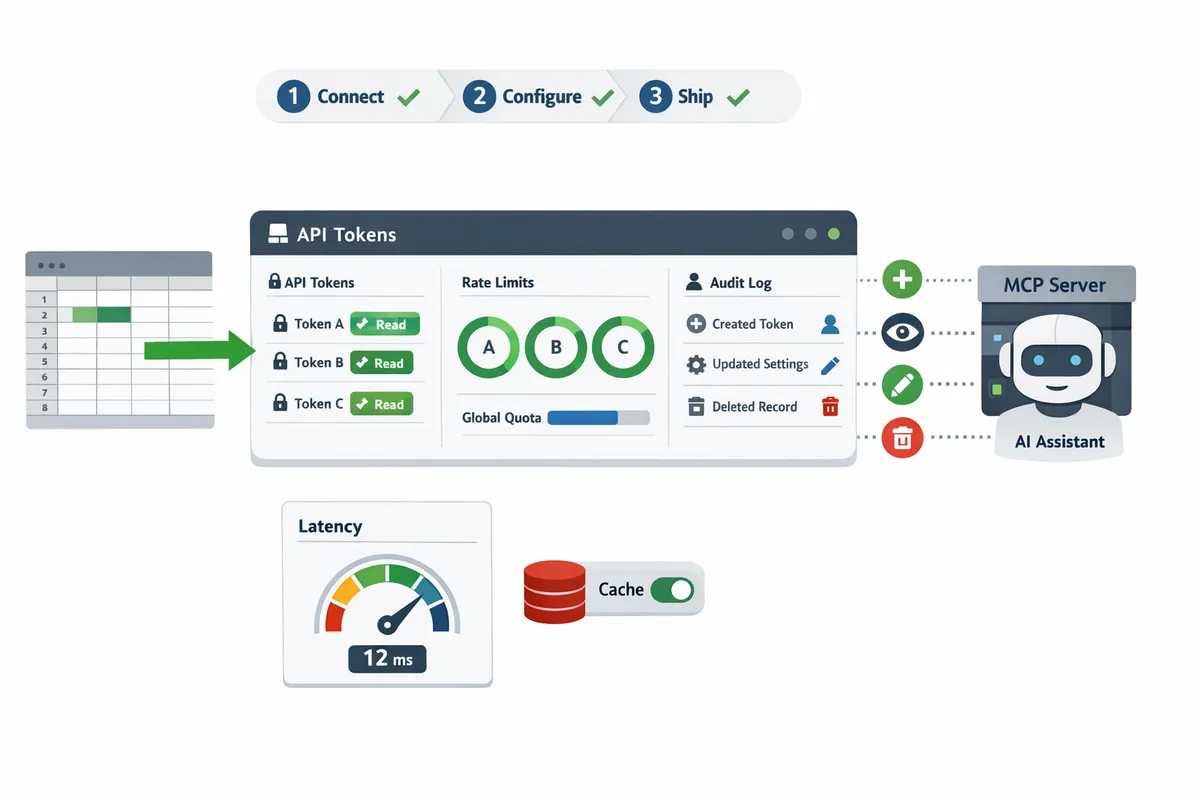
Use least-privilege scoped tokens or API keys with per-sheet permissions, rate limits, and auditable change logs. Grant agents read-only access where possible and separate write-only endpoints for intake flows to limit blast radius. Our Sheet Gurus API supports API key authentication with fine-grained per-sheet permissions, per-key rate limiting, and token scoping; consult the API reference for examples of creating keys and configuring permissions.
Operational controls to enforce:
- Scoping. Issue keys that can only read the Products tab or only append to an Orders tab.
- Rate limits. Apply per-key quotas to prevent a single agent from exhausting Google API quotas.
- Short TTLs and rotation. Use expiring tokens for temporary assistants.
- Audit logs. Track who wrote which row and when for rollback and compliance.
⚠️ Warning: Never provision a single full-access key for multiple agents. A leaked full-access key can cause data loss and prolonged quota exhaustion.
For a hands-on walkthrough that ties auth, MCP, and rate limits together, see our step‑by‑step CRUD API guide that shows how to Connect → Configure → Ship with scoped keys and quotas.
Which integration path fits your needs: MCP, Zapier/n8n, Composio, or a custom REST API?
Choose the integration path based on required control, latency, engineering capacity, compliance needs, and expected scale. This section compares direct MCP servers, low-code automations, marketplace connectors, custom REST builds, and our website's Sheet Gurus API so you can map needs to effort and risk. Sheet Gurus API typically achieves average response times under 100 ms, helping teams that need low latency without building a backend.
Decision table: MCP vs Zapier/n8n vs Composio vs custom REST API vs Sheet Gurus API 📋
The table below compares effort, ownership, latency, auditability, rate limiting, caching, and recommended scale for each option.
| Option | Effort (estimate) | Engineering ownership | Latency expectations | Auditability | Rate limiting | Caching support | Recommended scale / use cases |
|---|---|---|---|---|---|---|---|
| MCP (DIY server) | Days–weeks (prototype) to weeks–months (hardened) | Full; team owns server & tokens | Low if optimized; depends on infra | High if you build logging; often custom | Custom; you must implement | Optional (you implement) | Medium–high when you need custom agent logic or private infra |
| Zapier / n8n (low-code) | Hours–days | Minimal; business owners manage flows | Medium; extra hop adds latency | Low; limited detailed audit logs | Limited; depends on platform | Rare or limited | Small–medium automation tasks, alerts, lightweight syncs |
| Composio (marketplace connector) | Days | Shared; connector maintained by vendor | Medium; connector performance varies | Medium; vendor logs but may lack row-level detail | Vendor-managed; varies | Varies by connector | SMBs that prefer packaged connectors and managed updates |
| Custom REST API (full build) | Weeks–months initial | Full; long-term ops & monitoring | Low to very low depending on infra | Very high if designed with audit trails | You design and enforce | You design or use Redis/CDN | High scale and strict compliance or unique business rules |
| Sheet Gurus API (hosted) | Hours (Connect → Configure → Ship) | Platform-managed; product handles ops | Low; production-ready endpoints | Built-in audit trails and per-sheet permissions | Built-in configurable rate limits | Optional Redis caching | Small–large where sheets are source of truth and teams want low ops |
The table shows trade-offs clearly: low-code tools get you running fast but add latency and weak audit trails. A custom REST API gives total control at the cost of weeks of engineering and ongoing maintenance. Sheet Gurus API sits between those poles by offering production controls without a backend build. See our comparison with a Claude MCP DIY server and other approaches for deeper latency and quota trade-offs: Claude MCP + Google Sheets CRUD API comparison.
When to build DIY and when to choose Sheet Gurus API ⚖️
Build a custom REST service only when you need unique transaction logic, synchronous third-party calls on commit, or specialized compliance controls and you have engineering bandwidth to operate it. For example, invoice workflows that require complex locking, multi-step approvals, or integration with an ERP often justify a full build because those scenarios demand custom transactional guarantees and deep logging.
Choose Sheet Gurus API when you want to avoid building and operating backend services while retaining production controls such as per-sheet permissions, configurable rate limiting, and optional Redis caching. Typical outcomes: teams save days to weeks of developer time, avoid handling Google quota errors themselves, and remove ongoing token and credential maintenance. If you need starter templates or a hybrid approach, our templates roundup helps accelerate DIY parts: Google Sheets to REST API Templates: 10 Free Starters.
When DIY causes pain. Expect at least 2–8 weeks of initial development for a hardened REST service plus continuous ops (monitoring, retries, quota handling). Missed quotas or a schema change often means emergency fixes and lost time. If those operational costs matter to your business, Sheet Gurus API reduces that risk and time to market—see the step‑by‑step guide to compare paths: Create a CRUD API from Google Sheets for AI Agents.
How to connect Claude to Google Sheets API for bi-directional workflows 🤖
Use MCP tokens or scoped API keys to grant Claude limited read and write permissions while keeping full auditability and rate control. Scoped tokens let the agent query structured rows, propose edits, and write back only where you permit.
- Create a sandbox spreadsheet and mirror production schema for safe testing.
- Enable MCP on your sheet via our MCP Server docs and create a scoped token with minimal privileges: read across tabs, write to a specific tab or row range only. See our MCP Server guide for token examples: Sheet Gurus MCP Server docs.
- Add rate limits and mutation caps to the token (max writes/minute) so a misbehaving agent cannot exhaust quotas.
- Connect Claude with the scoped token and run non-destructive sanity checks (fetch, validate, dry-run write).
- Review audit logs for every agent action before promoting the token to production.
- Rotate tokens on schedule and revoke scopes when workflows change.
💡 Tip: Always test agent outputs in a sandbox sheet and issue the narrowest scope tokens possible before granting production access.
For a side-by-side of connecting Claude to a DIY MCP server versus using a hosted approach, refer to our comparative analysis that highlights latency, auth, and quota handling: Claude MCP + Google Sheets CRUD API comparison.
How do you implement, test, and measure Google Sheets APIs for AI agents in production?
Implementing, testing, and measuring a google sheets api for ai agents in production requires a repeatable pipeline that covers credential scoping, schema enforcement, CRUD validation with synthetic data, and operational monitoring. This section gives step-by-step setup paths, a testing checklist tied to measurable KPIs, and governance patterns you can apply across teams to reduce emergency fixes and quota surprises.
Three-step setup path using Sheet Gurus API (Connect → Configure → Ship) ⚙️
Use a three-step flow: Connect a Google account, configure per-sheet permissions and optional caching, then ship a live REST endpoint that syncs back to the spreadsheet.
- Connect. Sign in with Google and select the spreadsheet. Use scoped OAuth permissions so the API only accesses the sheets and ranges required.
- Configure. Define row schema rules, enable per-sheet API keys, set rate limits per key, and enable optional Redis caching to reduce Google calls. Map columns to typed fields (date, currency, enum) to prevent schema drift.
- Ship. Activate the live REST endpoint and enable MCP server mode if an AI assistant needs structured context. Run the API Reference CRUD examples against the endpoint to validate reads, creates, updates, and deletes.
Sheet Gurus API removes days of backend work by providing sign-in, key management, rate limiting, and optional caching in one flow. For a step-by-step DIY comparison and latency notes, see our writeup comparing MCP approaches and tools.
Testing, monitoring, quotas, and cost control 📊
Track request latency, error rate, quota consumption, and cache hit rate, and set alerts and per-key rate limits to maintain reliability and predictable cost.
- Core KPIs to monitor: 95th-percentile latency, 5xx error rate, Google Sheets API quota usage, Redis cache hit ratio, and unexpected write volume.
- Alerts and thresholds: alert on error-rate increases above three standard deviations or on write volumes that exceed daily baselines. Enforce per-key rate limits to isolate rogue clients.
- Cost controls: enable caching to reduce Google Sheets API calls, apply quota caps per project, and use centralized billing alerts to prevent surprise charges.
Testing checklist (run before production launch):
- Validate CRUD flows with synthetic data that mirrors edge cases (empty cells, large text, locale date formats).
- Run concurrency tests to ensure rate limits and retries behave as expected.
- Simulate permission revocation and confirm graceful failures.
💡 Tip: Run a nightly synthetic test that performs one full CRUD cycle per sheet and fails the pipeline if the cache hit rate drops below your target.
Use the MCP server docs when testing AI assistant reads/writes so token scopes and context windows align with agent needs. For sample test scripts and starter templates, consult our CRUD API step-by-step guide and the templates roundup.
Scaling patterns and governance for many sheets and teams 🗂️
Scale by issuing per-sheet API keys, centralizing billing and audit logs, and enforcing schema templates and an onboarding checklist that prevents data drift.
- Access model: assign one API key per team or sheet and restrict scopes to only the tabs the team needs. Rotate keys on a schedule and keep an audit trail of key creation and usage.
- Onboarding checklist: schema validation, test-data run, scoped token issuance, rate-limit assignment, and a rollback plan that restores the last known-good CSV snapshot.
- Billing and audits: centralize billing statements and export API access logs daily to a SIEM or log archive for compliance reviews.
Operational templates that scale: create OpenAPI stubs for common sheet types (invoices, inventory, CRM) and publish them as team templates so new sheets inherit validation and permission guardrails. Without these patterns, teams face wasted hours troubleshooting schema mismatches and costly emergency fixes when a production column changes.
Sheet Gurus API supports per-sheet keys, centralized access controls, and audit logging to simplify scaling across teams. See our use-cases post for templates and real-world examples of production-ready sheet APIs.
Frequently Asked Questions
This FAQ answers the most common buyer and implementer questions about Google Sheets API for AI agents with short, practical guidance. Use these answers to decide between MCP, low-code tools, Composio, or a REST-first product like Sheet Gurus API and to speed secure setup and testing.
How do I connect Claude to Google Sheets API securely? 🔒
Use least‑privilege, scoped MCP tokens or per‑sheet API keys with regular rotation and sandboxed writes. Sheet Gurus API supports MCP tokens and per‑sheet API key permissions so you can restrict an assistant to specific tabs and actions. Test writes in a sandbox sheet before enabling production writes, enforce per‑key rate limits, and enable audit logging to track every agent action. For a stepwise comparison of MCP approaches and tradeoffs with low‑code tools, see the comparison on Claude MCP and Google Sheets CRUD.
💡 Tip: Always test write flows in a cloned sandbox sheet and keep audit logs enabled while onboarding any new assistant.
What is MCP server Google Sheets CRUD and when should I use it? 🤖
An MCP server for Google Sheets CRUD is an API pattern that exposes sheet tables as structured create, read, update, and delete resources for model context workflows. Use it when an AI assistant needs reliable contextual reads plus controlled writes, table semantics (unique IDs, validation), and auditability. Sheet Gurus API can enable MCP servers for selected spreadsheets so assistants like Claude query structured rows directly while you keep per‑sheet permissions and change history. Choose MCP server CRUD when an assistant will:
- Read many rows for context with stable schema.
- Write back (status updates, annotations) that must preserve table integrity.
- Require traceable audit trails for compliance.
Can I use Zapier or n8n instead of a direct API for AI agents? ⚙️
You can use Zapier or n8n for simple, low‑volume automations, but they introduce higher latency, lower concurrency, and limited audit controls versus an API-first approach. Low‑code flows work for prototypes or single‑user automations where occasional delays and brittle error handling are acceptable. For production AI agents that need predictable latency, granular auth, and quota control, a RESTful API or an MCP server is a better fit; our comparison of DIY MCP, Sheet Gurus API, Composio, and n8n highlights these tradeoffs.
⚠️ Warning: Avoid pushing mission‑critical agent writes through Zapier or n8n if you need strict auditability or high concurrency.
How does Sheet Gurus API handle rate limiting and caching? 🧭
Sheet Gurus API supports configurable rate limits per API key or globally and offers optional Redis caching to reduce Google Sheets API calls and speed responses. Configure per‑key limits to protect your Google quota and set cache TTLs based on how fresh your agent context must be. For example, set a short TTL for fast‑changing dashboards and a longer TTL for mostly static reference tables. See the API reference for details on read/write endpoints, pagination, and cache options.
How do I measure ROI for using a productized Sheets API versus building my own? 📊
Measure ROI by comparing upfront engineering hours and ongoing ops costs to the subscription and time‑to‑market benefits of a managed product. Build a simple worksheet: 1) Estimate dev hours to build auth, MCP, rate limiting, retries, monitoring, and deployment. 2) Estimate monthly ops and incident remediation hours. 3) Estimate business impact of a 24‑hour outage or data incident. 4) Compare that total to the product subscription plus reduced onboarding time. For a practical step‑by‑step ROI workbook and build vs buy checklist, see our step‑by‑step CRUD guide and the templates roundup that lists starter options and their hidden costs.
Does Sheet Gurus API require writing backend code? 🧩
No. Sheet Gurus API provides a live RESTful JSON API for a selected spreadsheet without custom backend code. Sign in with Google, select a spreadsheet, configure permissions and rate limits, and receive an endpoint that syncs changes back in real time. The platform also includes optional MCP server enablement, API key management, and Redis caching so teams avoid building and operating the glue code that typically consumes weeks of engineering time. For a quick how‑to, see How to Turn Google Sheets into a REST API in Minutes.
Recommended path and next steps
Choose the approach that minimizes time to production while protecting against Google Sheets quotas and auth failures. For small teams weighing MCP, low-code tools, Composio, or a custom REST path, prioritize ops safety and predictable latency over DIY convenience. For many use cases, a managed MCP-enabled API reduces development hours and stops quota surprises that stall agents. Sheet Gurus API turns Google Sheets into production-ready RESTful JSON APIs in minutes, requiring no backend code. Users sign in with Google, select a spreadsheet, and immediately receive a live API endpoint that supports full CRUD with changes syncing back in real time. The platform also exposes sheets as MCP servers so AI assistants can query structured data directly.
💡 Tip: Start with one critical sheet and enable MCP tokens to validate agent behavior before scaling to more data sources. Compare options using our hands-on comparison of Claude MCP vs DIY vs Sheet Gurus in the Claude MCP + Google Sheets CRUD API guide and follow the step-by-step setup in Create a CRUD API from Google Sheets for AI Agents for practical implementation. Schedule a consultation with Sheet Gurus API to review your architecture and next steps.