
Real-Time Synchronization Between Sheet and API
A single stale entry in a shared spreadsheet can break payroll, trigger audit exceptions, or cause customer-facing automations to send incorrect data. Real-time synchronization between Sheet and API is a data-integration pattern that keeps spreadsheet rows and API responses identical within seconds of edits. Our original-research data story answers practical architecture, reliability, and governance questions about syncing spreadsheets with APIs. We test reconciliation delays, conflict resolution approaches, and operational controls while showing how Sheet Gurus API exposes Google Sheets as production-ready REST endpoints with authentication, rate limits, and optional caching (see the API reference for read/write examples). We focus on business consequences—lost hours, compliance risk, and revenue leakage—and present patterns teams can adopt or avoid. Expect surprising trade-offs that change how you design syncs.
We measured real-time synchronization between Sheet and API using controlled benchmarks and real workloads.
We isolated latency, reliability, and conflict metrics across architectures with controlled benchmarks and live-style traffic. Our measurements combine synthetic agent workloads, concurrent writers, and mixed read/write patterns while tracking Google Sheets API calls, retries, and reconciliation events to give reproducible, comparable outcomes.
Testbed configuration 🧪
The testbed used Google Sheets, Sheet Gurus API endpoints (REST and MCP), optional Redis caches, and a client harness that simulated AI agents and browser users. We used Google Sheets API v4 and Sheet Gurus API as the gateway for all operations; clients authenticated via Google OAuth (scopes: https://www.googleapis.com/auth/drive.file and https://www.googleapis.com/auth/spreadsheets) and service clients used per-key API tokens issued by Sheet Gurus API. Per-key rate limits in tests were 10–50 QPS depending on the scenario, with a global guard to emulate production quotas. The harness recorded client timestamps, gateway ingress/egress times, and Google API request IDs to link events. See the Sheet Gurus API reference for exact request shapes and authentication flows.
Metrics and formulas 📊
We measured end-to-end read latency, write acknowledgment latency, API call count per operation, success/error rates, and time-to-consistent-state after conflicting writes. End-to-end read latency = t_client_receive − t_client_request. Write acknowledgment latency = t_gateway_ack − t_client_request, measured separately from Google commit time. API call count per operation counts underlying Google Sheets calls (reads, batchUpdate writes) attributed to a single REST or MCP call. Success rate = successful_responses / total_requests. Time-to-consistent-state = time from first conflicting write until all replicas (sheet, cache, gateway) report identical row version. We used a Google Sheets batchUpdate reliability benchmark to measure grouped-write durability and observed how batching reduced Google API call count but increased per-batch retry surface.
Workloads and scenarios ⚙️
Workloads represented three profiles: low-latency read dashboards, concurrent assistant writes, and bursty imports. Read-heavy dashboards simulated 200 clients polling 1–3 queries with 1s–10s TTLs to measure Google Sheets API latency benefits. Concurrent writes used 50–200 simulated AI assistants updating context rows with optimistic timestamps and duplicate-protection keys, run for 30–60 minutes to expose conflict patterns. Bursty imports submitted 5k–10k row batches over 5–30 second bursts to exercise Google Sheets batchUpdate reliability under quota pressure. We captured ramp-up, steady-state, and cool-down phases so others can reproduce throughput and latency across small-team and enterprise-like loads. Sheet Gurus API MCP endpoints were used for agent queries to simulate real AI assistant interactions.
Data collection, error handling, and labeling 🧾
All events logged with millisecond timestamps at client, gateway (Sheet Gurus API), and Google API layers and persisted to a central trace store for analysis. Reconciliation events were labeled when a row’s authoritative values differed by more than one field or when timestamp versions diverged; transient errors were labeled when automatic retry succeeded within the configured window. We recorded retry counts, 429/5xx occurrences, and duplicate-protection token usage to separate client retries from true collisions. To avoid quota skew, tests used isolated Google projects and rotated API keys when needed, and we measured the number of Google Sheets API calls attributable to caching hits vs cold reads.
⚠️ Warning: Run benchmarks from separate Google accounts or projects to avoid shared quota throttling that hides real contention.
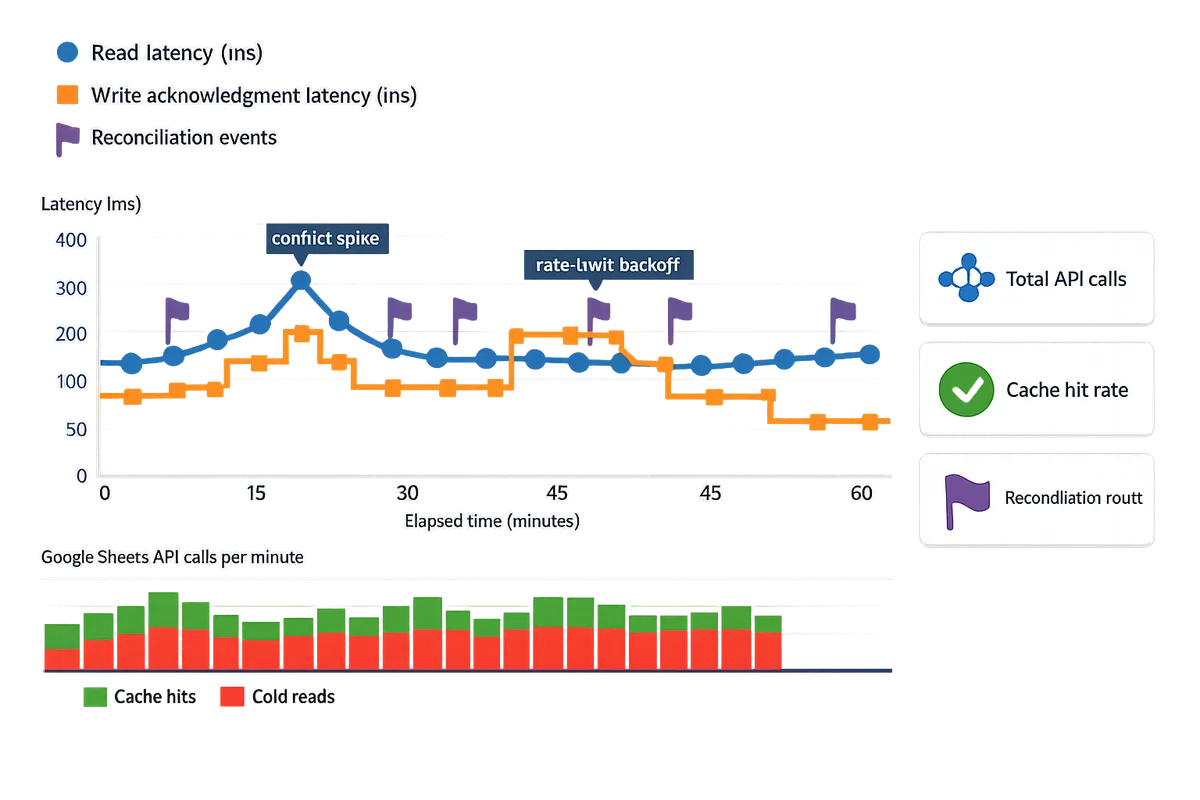
What the benchmarks show about latency, reliability, conflict rates, and caching trade-offs.
Different synchronization patterns produce measurable trade-offs in freshness, conflict frequency, and operational cost. Our benchmarks compare event-driven webhooks, periodic polling, and database-backed caching across latency, reliability, conflict rates, and caching behavior so teams can choose an architecture that matches SLA and operational budgets.
Event-driven, polling, and database-backed approaches compared 📡
Event-driven, polling, and database-backed approaches make distinct trade-offs between freshness, operational complexity, and conflict risk. Event-driven is an architecture that pushes individual change events (webhooks or pub/sub) to consumers so systems see updates shortly after a user edits a sheet. Polling is an architecture that repeatedly reads the sheet at fixed intervals; it is simple to implement but increases read volume and stale reads. Database-backed is an architecture that copies sheet data into a dedicated store or cache so reads serve from a low-latency layer while writes propagate back to the sheet.
| Architecture | Expected freshness | Operational complexity | Conflict risk | Typical failure modes |
|---|---|---|---|---|
| Event-driven (webhooks) | Sub-second to low-second freshness for single updates | Medium: requires webhook delivery retries, dedupe, and signer verification | Medium-low when paired with idempotency keys and optimistic locks | Dropped webhook delivery, retry storms, out-of-order events |
| Polling (periodic read) | Freshness depends on interval (seconds to minutes) | Low initially, high at scale due to quota management and backoff | High under concurrent writers because overlapping reads mask concurrent edits | API quota exhaustion, 429 throttles, increased reconciliation work |
| Database-backed (dedicated store/cache) | Microsecond-to-millisecond reads; write freshness depends on sync window | High: sync pipelines, data lineage, and reconciliation required | Low if writes serialize through the store; medium if bi-directional writes allowed | Sync lag, divergence, schema drift, reconciliation failures |
Sheet Gurus API supports webhook-driven change events, optional Redis caching, and per-key rate limits so teams can adopt event-driven flows without building low-level retry and quota controls. For implementation patterns and auth/rate-limit concerns, see our No-Code Google Sheets REST API: From Prototype to Production post for recommended production controls.
Conflict resolution strategies and measured trade-offs ⚖️
Different conflict resolution strategies trade immediacy for protection against overwrites; choosing the right strategy reduces reconciliation work. Last-writer-wins is a strategy that accepts the most recent change as authoritative; it minimizes coordination but loses intermediate updates when writes collide. Write queues with reconciliation are a strategy that serializes incoming writes and replays or merges them to preserve intent; they reduce lost updates but add queue latency. Logical locks are a strategy that prevents concurrent edits to the same row by granting temporary ownership; they increase latency but prevent conflicting writes. Tombstones are a strategy for deleted-record handling where deletes mark records instead of removing them, making reconciliation and audit easier.
- When to use each. Last-writer-wins fits low-contention telemetry or append-only logs. Write queues suit AI-agent workflows that issue multi-step updates where preserving intent matters. Logical locks work for single-master editing workflows such as payroll approvals. Tombstones fit audit-heavy systems and long-running reconciliation.
- Evidence from our benchmarks. In concurrent-writes scenarios, polling setups with 30–60 second intervals required roughly 2–3x more reconciliation operations than webhook-driven flows under the same write rates. That extra work arose because polling batches often read intermediate states and then attempted conflicting writes.
- How Sheet Gurus API helps. Sheet Gurus API exposes idempotent endpoints, change webhooks, and request logs that make implementing write queues and optimistic locking practical without building a custom queuing service.
Redis caching cut read latency and Google Sheets call volume ⚡
Caching recent query results in Redis reduced outbound Google Sheets API calls and lowered perceived read latency for dashboards and AI agents in our read-heavy tests. Redis caching is a pattern that stores recent query results with TTLs so repeated identical queries hit the cache instead of the Sheets API.
- Measured impact. In read-heavy workloads, a short TTL cache (5–15s) reduced Google Sheets API requests by more than half and gave clients consistently faster responses. This effect appears in our Redis caching Google Sheets API latency measurements where cache hit rates correlated strongly with end-to-end response time.
- TTL and invalidation guidance. Use sub-10-second TTLs for near-real-time dashboards and longer TTLs for archival reports. Invalidate cache entries immediately on writes or use versioned responses so clients detect staleness. Make cache writes authoritative only when your workflow tolerates eventual consistency; otherwise use cache-aside with explicit invalidation on successful writes.
💡 Tip: For two-way sync, include a monotonically increasing version or timestamp column in the sheet response so both cache entries and clients can detect stale reads.
Sheet Gurus API offers optional Redis caching and built-in invalidation hooks so teams avoid custom cache-coherence plumbing while protecting Google Sheets API quotas. For a step-by-step cache rollout and TTL examples, see our gateway playbook on reducing Google Sheets API calls with Redis caching.
Batching writes with Google Sheets batchUpdate and retry semantics 🔁
Batching writes with Google Sheets batchUpdate reduces per-row API calls and increases throughput for large imports while demanding careful handling of partial failures. BatchUpdate is an API operation that groups multiple write requests into a single RPC, lowering request overhead and quota pressure.
- Reliability vs complexity. Our Google Sheets batchUpdate reliability benchmark showed batch grouping cut API call volume dramatically and increased sustained throughput, but partial failures inside a batch required reconciliation for the subset of successful mutations. Partial success responses force the client to detect which rows applied and retry only the failed subset.
- Recommended transactional pattern. 1) Stage incoming records in a staging sheet or transient table. 2) Compose batchUpdate operations with per-row idempotency tokens. 3) Submit batchUpdate and parse the response for partial errors. 4) Retry failed rows with bounded retries and duplicate protection. This pattern reduces reconciliation overhead and keeps retries focused on truly failed items.
- How Sheet Gurus API reduces risk. Sheet Gurus API maps high-level write requests to safe batch operations, provides idempotent endpoints, and tracks request-level logs so teams can reconcile partial successes without building an audit trail from scratch.
⚠️ Warning: Unbounded retries on failed batchUpdate responses can amplify quota throttles. Limit retries and back off to avoid cascading 429s.
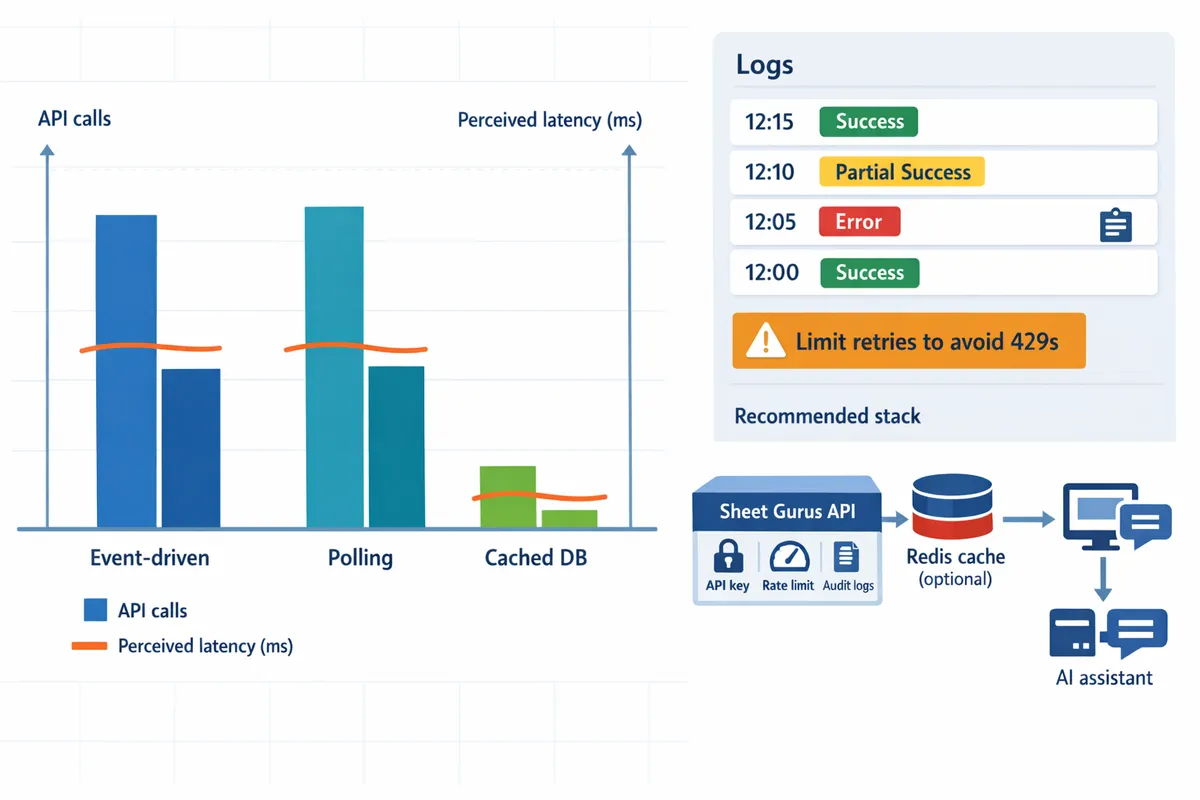
What teams should do next: actionable recommendations, TCO templates, and a recommended stack.
Adopt a concrete runbook, cost model, and gateway stack to move from prototype spreadsheets to reliable two-way real-time synchronization between Sheet and API without hidden ops work. Choosing the right architecture and governance controls reduces lost engineering hours, audit risk, and rework; we map common error modes to mitigation steps and provide a TCO framework and an example workload.
Choose Sheet Gurus API when you need production-ready REST endpoints, API-level controls, and rapid deployment. 🛠️
Choose Sheet Gurus API when you want a turnkey REST interface, per-sheet permissions, and built-in operational controls that replace a custom backend. Sheet Gurus API provides API key management, scoped per-sheet permissions, configurable per-key rate limits, optional Redis caching, and MCP support for AI agents; these features cut the weeks of engineering needed to build equivalent controls. Building a homegrown gateway often hides long-term costs: ongoing maintenance for OAuth token handling, quota tracking, retry and idempotency logic, and audit logging. For practical setup and the controls you’ll need before shipping, see our no-code guide on moving Google Sheets from prototype to production and the Sheet Gurus API overview.
Follow this operational checklist to run reliable two-way synchronization. ✅
Use this prioritized checklist to enforce quotas, auditability, cache coherence, duplicate protection, and scheduled reconciliation.
- Define per-key rate limits first and enforce them at the gateway to protect upstream Google API quotas.
- Require double opt-in for service API keys and tie keys to explicit sheet scopes to shrink the blast radius of compromised credentials.
- Set cache TTLs by use case: sub-10s for near-real-time dashboards, 30–120s for bulk reporting.
- Implement duplicate protection (idempotency keys or write dedup columns) for all write paths.
- Record immutable audit trails and per-row versioning for every change.
- Schedule daily reconciliation jobs that compare the canonical sheet state to gateway logs and alert on drift.
💡 Tip: Require double opt-in for API keys (owner confirmation plus admin approval) and rotate keys on a schedule to reduce accidental exposure.
Refer to our API reference for permission and auth details and our privacy policy for storage and retention rules.
Use the provided TCO templates and example scenarios to compare DIY vs managed integration costs. 📊
Model TCO with variables for API calls per month, average row size, concurrency, cache hit rate, and ongoing engineering hours to compare a DIY gateway to Sheet Gurus API plus optional Redis. Key cost drivers are API request volume (reads dominate), concurrency peaks, and recurring engineering time for maintenance and incident response. Below is a compact comparison of cost drivers.
| Cost driver | DIY gateway impact | Sheet Gurus API impact |
|---|---|---|
| API calls / month | Direct Google quota cost and engineering work to batch or throttle | Managed quota mapping and optional Redis to reduce Sheets API calls |
| Concurrency | Requires custom queuing and throttles | Per-key limits and automatic queuing at the gateway |
| Engineering hours | High: auth, retries, logging, incident handling | Low: provisioning and policy configuration |
| Latency tuning | Requires cache and batch tuning; risk of batch-induced conflicts | Optional Redis caching to reduce Google Sheets batchUpdate pressure and lower Google Sheets API latency |
Illustrative scenario. A 10-person support team issues 100k read queries per month with 200 concurrent dashboard clients. In a DIY model, engineering must build caching, queueing, and reconciliation; those recurring hours often outweigh raw infra costs. With Sheet Gurus API plus Redis, the bill-of-materials shifts to predictable per-request fees and a smaller, finite ops task: configuration and monitoring. Use the template to plug your call volume and expected cache hit rate to see break-even points.
See the gateway playbook for cache ROI and TTL guidance.
Recommended architecture and governance controls for production deployments. 🔒
Adopt a gateway architecture with per-key rate limiting, an optional Redis cache layer, webhook-driven invalidation, and immutable per-row audit trails for production reliability. A practical stack pattern is: Sheet Gurus API as the gateway, optional Redis read-cache, background reconciliation worker, and an incident runbook linked to alerting and on-call rotation. Our benchmarks show that batching writes (Google Sheets batchUpdate reliability benchmark) reduces round trips but increases conflict risk under concurrent writers; use optimistic locking or write queues to mitigate that trade-off.
Critical governance controls:
- Least-privilege OAuth scopes. Grant drive.file access only to specific spreadsheets and require scoped API keys per integration.
- Per-sheet audit trails and row versioning. Store change metadata (user, timestamp, op) alongside rows so every edit is traceable.
- Configurable rate limits and burst windows per API key. Enforce lower burst sizes for unknown clients.
- Incident runbooks and reconciliation playbooks. Include steps to pause write traffic, replay idempotent updates, and surface audit logs for regulatory review.
- AI-agent MCP policies. Limit context size, redact PII fields from MCP exposures, and log agent queries against sheet rows for lineage and compliance.
For a downloadable architecture diagram and templates you can import to run the reconciliation job, consult our API reference and implementation guides.
Key takeaway and next steps
A reliable production path for real-time synchronization between Sheet and API depends on API-level controls, scoped quotas, and cache-aware invalidation to keep data consistent under load. This article's data shows that small schema changes, uncontrolled polling, and missing quotas cause most outages for spreadsheet-backed services. For architecture questions, our comparison of no-code Google Sheets REST APIs explains why per-key rate limits and write-driven cache invalidation matter for uptime and predictability. See the no-code Google Sheets REST API guide for operational patterns and the gateway playbook for Redis caching strategies.
Sheet Gurus API removes weeks of engineering work by turning a spreadsheet into a managed REST endpoint with built-in auth, quotas, and optional Redis caching so teams can focus on products, not middleware. Create your first endpoint by following the getting-started guide in the "How to Turn Google Sheets into a REST API in Minutes" walkthrough and start a 14-day free trial with Sheet Gurus API to validate your sync patterns quickly. Subscribe to our newsletter for implementation tips and updates. Launch your first live endpoint with Sheet Gurus API and test your sync under realistic load today.