
Is Google Drive API Free in 2026? Pricing and Billing
An unexpected Drive API quota overage can add hundreds of dollars to a monthly bill for a small automation app. Many developers ask: is google drive api free for basic use in 2026, or do quotas and storage billing create charges sooner than they expect? The Google Drive API is a web API that lets applications read, write, and manage files in Drive, and its quota limits and storage billing operate separately from standard Google Drive storage fees. This article clarifies when projects usually incur costs, how quota thresholds differ from storage billing, and which usage patterns trigger bills. Our guide also shows when using a managed endpoint like About Sheet Gurus API or reviewing Sheet Gurus API pricing saves engineering time and reduces billing surprises. Want to see the exact quota signals that matter?
Is the Google Drive API free in 2026 and what exactly is billed?
Yes. Google Drive API request traffic is free within standard quotas; Drive storage and some Google Cloud services can incur charges. Google Drive API is an interface that apps use to list, read, write, and manage Drive files, and API request volume and storage are separate billing considerations. This distinction matters because teams that assume "API free" also means "no bill ever" often get surprised by storage or Cloud feature charges.
How are API requests and Drive storage billed? 💲
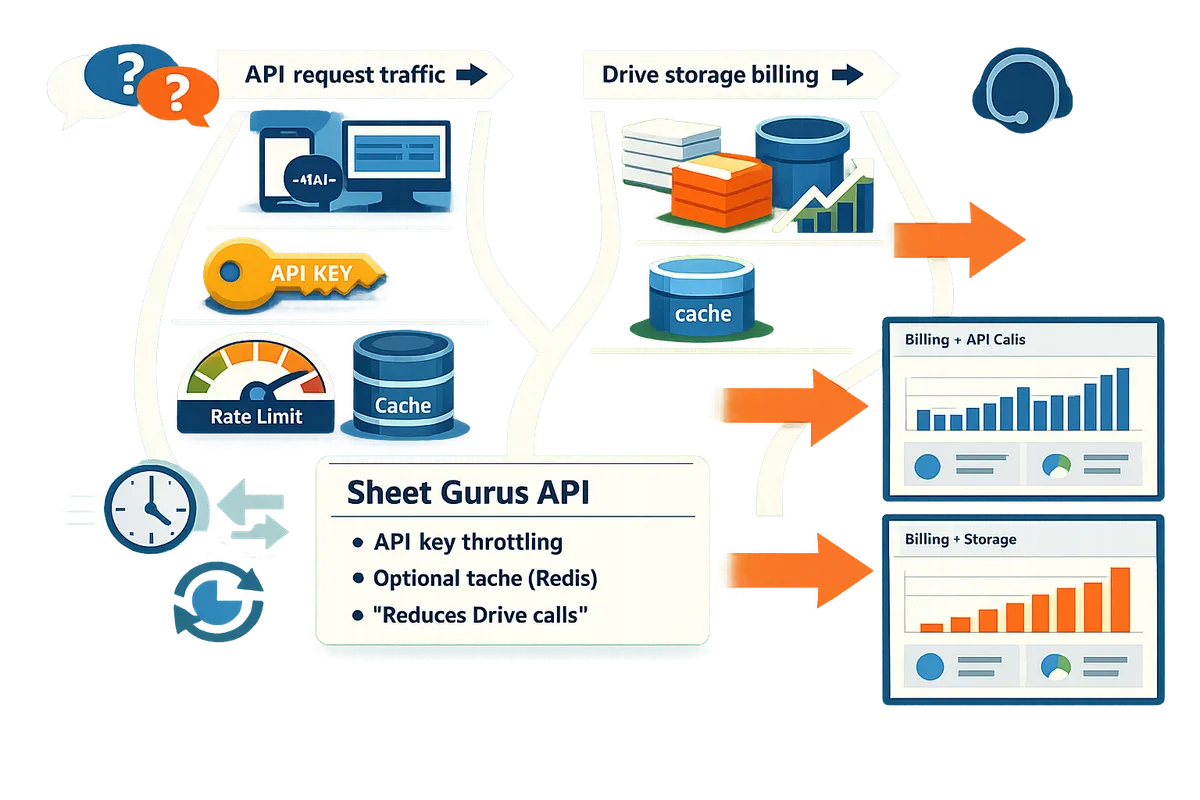
API request traffic is not billed directly while you remain inside Google’s published quotas. Google’s public documentation shows quotas and rate limits; normal reads and writes that stay below per-minute and per-day caps do not create direct API charges. Drive storage is billed under Google storage plans once you exceed the free 15 GB per account or your organization’s Workspace allotment. For example, 1,000 API reads per hour that only list metadata will not cost money, but storing many multi-GB files across users can push the account past the free storage tier and generate a monthly Google One or Workspace charge. Our website’s Sheet Gurus API reduces Sheets and Drive calls through configurable rate limits and optional Redis caching, which lowers the chance that storage growth and repeated reads drive costs. See our comparison on Google Drive vs Google Sheets API quota for how per-user and per-project limits differ.
When does Google require billing or charge for Drive API use? ⚠️
Google requires a billing account when you exceed free quota thresholds or enable billable Cloud features on a project. Typical triggers include high sustained request rates (for example, thousands of reads or writes per hour from a single project), enabling Cloud Storage, Vision, or other billable Google Cloud products to process Drive files, or persistent storage beyond free allowances across many users. If your project requests a quota increase, Google will ask for a billing account to map costs. Monitor the Cloud Console pages: APIs & Services > Quotas to watch limits and Billing > Budgets & alerts to stop runaway spend. Our website’s Sheet Gurus API can be configured with per-key rate limits and throttling so production traffic does not unexpectedly push you into billable territory.
💡 Tip: Create a budget and set multiple notification thresholds in Google Cloud Billing so you receive email alerts before charges escalate.
What are common misconceptions about "API free" versus storage or quota costs? 🤔
Saying the API is "free" inside quotas does not mean a production app will have zero cost. The three frequent confusions I see are:
- Free API usage vs storage billing. Example: a support portal that stores 500 customer-uploaded videos may hit storage fees even though API calls to list those files stayed within quotas.
- Per-user quotas vs project quotas. Example: automated agents running under one service account can exhaust a project quota even when individual human users remain below per-user caps. See our Google Drive vs Google Sheets API quota article for the difference.
- Temporary surges and quota increases. Example: a nightly batch that spikes 2000 requests in 10 minutes can trigger 429 errors or force you to request higher quotas, at which point Google may require billing details.
Read our Sheet Gurus API privacy policy and terms of service to understand how a third-party service handles Drive-scoped data and billing-related access. If you do not want to build rate controls yourself, our website’s Sheet Gurus API includes API key throttling and optional caching to reduce calls and limit the operational risk that leads to unexpected bills.
How do Google Drive API quotas differ between free and paid use and how do I avoid overage?
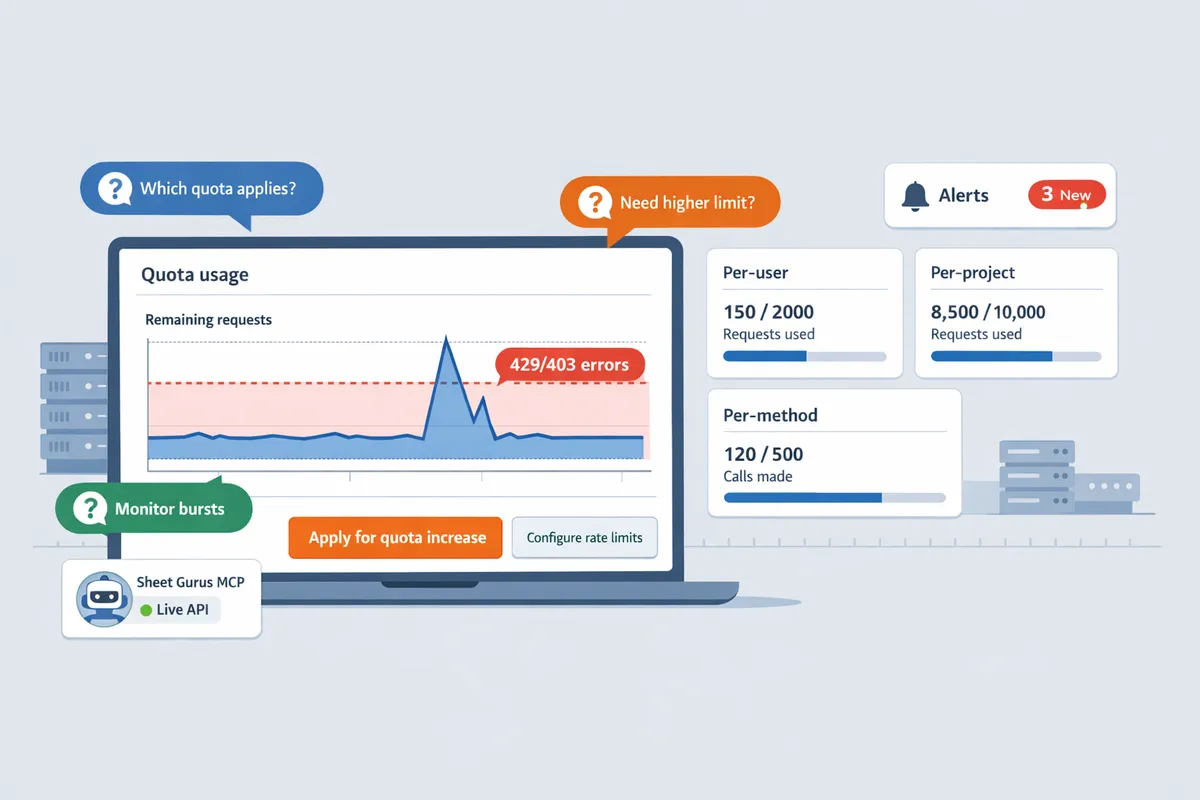
Drive API quotas apply per-project and per-user, and most request traffic is free inside Google’s standard quotas while higher allocations require billing or an approved quota increase. Projects that expect bursts or sustained high traffic must monitor quotas and apply for higher limits before traffic grows; otherwise services degrade with 429/403 errors and manual work to catch up.
What quota types apply to the Drive API (per-user, per-project, per-method)? 🧭
Drive API quotas include per-user limits, per-project limits, and method-specific limits that cap how many requests run in a time window. Per-user quota is a limit that restricts how many calls a single account or OAuth user can make to prevent one user from consuming all capacity. Per-project quota is a limit that groups requests from your API key, service account, or project and prevents a single application from overwhelming Google’s backend. Method-specific limits are caps on particular endpoints (for example, file metadata reads or file writes). For most automation and internal apps, read/list calls and metadata calls create the heaviest load; a nightly sync that lists thousands of files or polls every few seconds is the common trigger for quota exhaustion. Compare Drive quota behavior with Sheets-specific rules in our Google Drive vs Google Sheets API Quota (2026) article.
How do I monitor remaining quota and request increases? 🔎
Use the Google Cloud Console metrics and quota pages to view current usage, set alerts, and request quota raises well before you hit limits. Step-by-step checklist:
- Open the Cloud Console API metrics page and filter by Drive API and your project. Check both QPS (queries per second) and daily totals.
- Identify which quota name is approaching its limit (per-user, per-project, or a method-specific entry). Link the metric to the exact endpoint pattern that creates the traffic.
- Set an alert at a safe threshold (for example, 60% of the quota) so engineering or ops get notified.
- Document expected growth and submit a quota increase request from the Console with traffic samples and a rollout plan.
⚠️ Warning: Do not wait until production errors occur; quota requests take time to approve and emergency requests often require justification from Google.
For detailed monitoring examples and alert templates, see our Google Sheets API Pricing and Quotas Guide.
What practical steps reduce Drive API calls and the risk of exceeding quotas? ⚙️
Reduce Drive API calls with caching, batching, selective polling, server-side aggregation, and per-key throttling to stay within free quotas. Practical tactics:
- Cache file metadata and list results for as long as your workflow tolerates stale data; each cached read avoids an API call.
- Batch multiple updates into a single write where the API supports it, and consolidate repetitive metadata reads into one request.
- Replace frequent polling with push notifications or webhooks where possible to drop steady request volume.
- Set per-key rate limits so a noisy client does not exhaust the project quota.
Sheet Gurus API offers configurable rate limiting and optional Redis caching to reduce Drive/Sheets API calls and isolate noisy clients with per-key limits. For teams that need a production-ready JSON endpoint without building custom backend controls, using Sheet Gurus API reduces the operational time spent building throttles and caches. For more rate-limit strategies and examples, read Google Drive API Rate Limit: Sheets, Drive, Docs (2026).
💡 Tip: Set per-key rate limits to isolate a noisy client before it impacts the whole project.
How to estimate costs, run scenarios, and decide between Drive API or a managed solution
Estimate costs by modeling request volume, storage growth, and quota triggers so you can see whether free quotas suffice or a paid account or a managed API like Sheet Gurus API makes more sense. Sheet Gurus API is a managed service that turns Google Sheets into RESTful JSON APIs with built-in API key auth, per-key rate limits, and optional caching to cut Drive and Sheets calls. Small automation tools often remain inside free quotas; sustained, high-volume services hit quota or storage billing and incur operational costs for custom controls.
Quick cost scenarios for 1k / 10k / 100k daily requests 📈
Small volumes usually stay inside free quotas, medium volumes approach quota windows and may need billing, and very high volumes almost always require paid billing or a managed platform. For each bracket below, the bullets show typical consequences and when a managed solution pays back.
1,000 requests per day. Most projects with sporadic reads (for example, 100 users making 10 reads each) remain inside Google’s standard quotas and Drive’s free 15 GB storage in many cases. Operational pain: low. Recommended action: monitor per-minute bursts and test with real traffic; use Sheet Gurus API caching only if you observe repeated identical reads.
10,000 requests per day. This level often approaches per-minute quotas or per-user limits during peak windows and can trigger 429 rate rejections. Operational pain: moderate (you’ll need batching, per-key throttling, or request quota increases). Cost drivers: quota increase approvals, possible billing attachment, and engineering time to implement throttles. Managed benefit: Sheet Gurus API’s per-key rate limits and optional Redis cache cut API calls and remove hand-built throttling.
100,000 requests per day. This level almost always requires a production architecture: attached billing, quota increases, and robust retry/backoff and caching. Operational pain: high (engineering time, monitoring, incident response). Cost drivers: quota overage risk, storage if you persist copies, and maintenance. Managed benefit: moving to Sheet Gurus API reduces operational risk by adding rate limiting, caching, and API key controls out of the box so you avoid building and running a custom backend.
Refer to our comparison of Drive vs Sheets quota behavior for patterns that cause sudden 429s: Google Drive vs Google Sheets API Quota (2026).
Comparison: Google Drive API vs Sheet Gurus API vs custom backend 🧾
For production apps with sustained traffic, managed APIs reduce quota risk, shorten time to launch, and add built-in caching and access controls compared with raw Drive API or a custom backend. Below is a side-by-side view to help decide which path fits your project.
| Option | Pricing model | Quota risk | Built-in caching | Access controls | Time to launch | Recommended use case |
|---|---|---|---|---|---|---|
| Google Drive API | Free within standard quotas; storage billed separately | High for sustained volume or bursts; per-user and per-project limits can cause 429s | None (you must build caching) | OAuth scopes; coarse-grained | Days to weeks (requires backend) | Low-traffic admin tooling or one-off automations where you control traffic patterns |
| Sheet Gurus API | Subscription or usage tiers; reduces Drive/Sheets calls via caching | Lower: per-key rate limits and throttling reduce quota exposure | Optional Redis caching to cut backend calls | API keys, per-sheet permissions, OAuth for connectors | Hours to days (Connect → Configure → Ship) | Productionizing spreadsheet-backed services, dashboards, AI assistants, or small portals |
| Custom backend (Drive + your servers) | Infrastructure + engineering cost; storage billed via Drive or cloud | Medium to high depending on engineering quality | Developer-managed (you add caching) | Fine-grained if you build it | Weeks to months (build, test, secure) | Large teams needing full control or integrating complex business logic |
If quota behavior is a primary risk factor for your app, see our rate-limit mitigation guide: Google Drive API Rate Limit: Sheets, Drive, Docs (2026).
Step-by-step: enable Drive API, create credentials, and monitor billing 🔧
Enable the Drive API, create OAuth or API key credentials, configure consent, and attach a billing account if you expect to exceed free quotas. Follow this checklist to reduce surprise charges and quota failures.
- In Google Cloud Console go to APIs & Services > Library and enable the Drive API.
- Create credentials: choose OAuth client for user-facing apps or API key/service account for server-to-server flows.
- Configure the OAuth consent screen if using OAuth; restrict scopes to drive.file when possible.
- Attach a billing account before you request quota increases or expect sustained high traffic.
- Monitor quotas at APIs & Services > Quotas and add alerts for usage thresholds (for example, 70% and 90%).
- Load-test with realistic burst patterns and a small dataset to reveal per-minute caps.
- If you need production-grade controls, test moving the same workload to Sheet Gurus API to compare time-to-launch and quota behavior.
💡 Tip: Test peak bursts, not average load; quota rejections occur during short windows. Use a small, realistic dataset for load tests to expose per-minute and per-user limits early.
Also audit third-party handling of credentials and data: review Sheet Gurus API terms and privacy details before granting access—see the Sheet Gurus API terms of service and privacy policy. For quick technical setup references, consult our quickstart and quotas resources: Google Sheets API Documentation: Quickstart, Quotas, Examples, and a Faster JSON API Alternative and Google Sheets API Pricing and Quotas Guide.
Frequently Asked Questions
This FAQ answers whether the Google Drive API is free in 2026 and clarifies when usage or storage generate charges. Short Q&A below covers quotas, per-request billing, storage costs, when to enable billing, how to avoid quota errors, and how Sheet Gurus API can reduce Drive calls.
Is the Google Drive API free to use for developers? ✅
Yes. Developers can call the Drive API for free inside Google's published quotas. Google charges only when you exceed those quotas or use billable Google Cloud services tied to your project. For example, a small automation that stays under per-minute and daily request caps and keeps files within the free storage allowance typically incurs no Drive API charges. Our website shows how quota behavior differs between Drive and Sheets in the Google Drive vs Google Sheets API Quota (2026) comparison so teams can pick the best API pattern for read-heavy or write-heavy workflows.
Do I pay per Drive API request? 🧾
No. Google does not charge a fixed per-request fee for Drive API calls while you remain within the standard quota limits. Costs usually come from Drive storage or any additional Google Cloud resources you enable, such as Cloud Functions or BigQuery. High-volume projects often enable billing to request higher quotas; enabling billing raises quota ceilings but does not change the basic pricing model into a per-request charge. See our Google Drive API Rate Limit: Sheets, Drive, Docs (2026) guide for common scenarios that trigger quota increases.
Does Google charge for files stored by the Drive API? 🗄️
Yes. Files uploaded or created through the Drive API count toward your Google account's storage and are billed under Google's storage pricing after you pass the free allowance. The method of upload—web UI, mobile app, or the Drive API—does not change whether storage counts against your quota. If your app programmatically stores large user backups or automatically saves many attachments, storage costs can outgrow free tiers faster than request volumes do.
When should I enable billing for my Drive API project? 💳
Enable billing before you expect request volume or storage growth to exceed free quotas or when you need quota increases tied to a billing account. Projects that plan frequent bursts, background bulk writes, or heavy user uploads should enable billing during testing so quota increase requests and cost alerts work before production traffic starts. Enabling billing also lets you add other billable Google Cloud services; monitor charges and set billing alerts in the Cloud Console to avoid surprises. For quota planning and request timing, consult our Google Sheets API Pricing and Quotas Guide.
How can I prevent quota errors in production? ⚠️
Prevent quota errors by monitoring usage, setting early alerts, batching requests, caching results, applying rate limits, and implementing automatic retries with progressive delays. Practical steps: set Cloud Console alerts at 70–80% of quota, batch write operations into fewer calls, cache frequent reads to avoid repeat Drive hits, and throttle client requests so a single user cannot exhaust per-project limits. > 💡 Tip: Create a staging quota and test realistic traffic bursts before going live; use monitoring alerts to catch growth trends early. Our rate-limit and caching strategies are detailed in Google Drive API Rate Limit: Sheets, Drive, Docs (2026) and Google Sheets API Quota: Limits & Best Practices (2026).
Can Sheet Gurus API reduce my Drive API usage and related costs? 🧰
Yes. Sheet Gurus API reduces Drive and Sheets API calls with optional Redis caching, configurable per-key rate limiting, and API-level access controls. The platform exposes spreadsheet data as a RESTful JSON endpoint so frequent reads can be served from cache instead of hitting Drive; that lowers quota pressure and shortens response times. Sheet Gurus API also enforces per-key throttling so a single client cannot exhaust your project quota, and it provides simple controls for moving spreadsheet-backed workflows into production without building custom backend caching. Learn more on our About Sheet Gurus API page and the getting started guide.
Key takeaway on Drive API costs
Google Drive API calls can remain free at low volume, but projects incur charges once storage, quota limits, or billing-enabled features exceed free thresholds. If your question was "is google drive api free," the practical answer is conditional: light, occasional reads often stay free, while sustained writes, large storage, or enabled billing features can produce charges. Refer to the specific quota comparisons for where costs appear and which operations hit limits first. For quota behavior and mitigation tactics, see our Drive vs Sheets quota comparison and the Google Sheets API Pricing and Quotas Guide for concrete examples and request patterns.
💡 Tip: Enable billing alerts and monitor per-project quotas so a single spike does not cause unexpected charges.
Try Sheet Gurus API to test real usage without building a backend: follow the getting started guide to connect a sheet and observe how quotas and billing affect your workflows. Subscribe to our newsletter for practical billing updates and quota best practices.