
Google Sheets Push Notifications: Push vs Poll (2026)
Polling a shared Google Sheet every 30 seconds can trigger API quota limits and generate 429 errors that break automations. Google Sheets push notifications are a method that delivers spreadsheet change events to downstream services so apps avoid constant polling. This best-practices guide compares push and poll approaches, outlines practical implementation patterns, and shows how to choose the right approach for production workflows for Sheets for AI Agents with low quota impact. Our Sheet Gurus API makes push-based integrations practical by exposing spreadsheets as RESTful endpoints with API key controls, configurable rate limits, and optional Redis caching. See the API reference for implementation details. Which approach keeps AI agents responsive without blowing quota?
How do push and poll differ for Google Sheets push notifications?
Push sends event-driven updates when a change occurs; poll repeatedly queries the sheet on a fixed schedule to detect differences. Push minimizes unnecessary API reads but needs a receiving endpoint and subscription management; poll is simple to implement but increases Google API usage and latency to the poll interval. Sheet Gurus API typically achieves average response times under 100 ms, and it offers both webhook delivery and a managed API to avoid custom polling infrastructure.
Push and poll, defined 🎯
Push is an event-driven pattern that delivers notifications as changes happen; poll is a scheduled query pattern that checks for differences at regular intervals. For example, a Drive webhook or files.watch callback pushes a change notice the moment Google registers an edit. By contrast, polling every 30 seconds issues an API read twice a minute and compares results to detect edits. Polling a single sheet every 30 seconds creates about 2,880 reads per sheet per day, which multiplies quickly across multiple sheets or agents. That quota impact is why small teams often prefer push for real-time workflows and poll for low-change, low-cost monitoring.
Sheet Gurus API removes manual polling work by exposing sheets as REST endpoints and delivering webhook events, so teams avoid running cron jobs and reduce their Sheets API footprint. See our guide on how teams use sheets with AI agents in Google Sheets for AI Agents (2026) for agent-specific patterns and pitfalls.
How Google native notifications work ⚙️
Google Sheets only supports built-in email notification rules and does not provide a native webhook for arbitrary endpoints. The sheet UI offers "notify" rules for comments and edits with two frequency choices: right away or daily digest, but "right away" often batches changes and can delay delivery by minutes. Teams building apps or AI integrations need programmatic delivery, JSON payloads, and authentication, so they move to Drive webhooks or a managed API for reliable programmatic events. Native rules do not scale to agent-driven workflows because they produce human-readable emails rather than structured change payloads.
💡 Tip: Use batched notifications or rate limits to avoid notification fatigue for human editors and noisy AI agents.
If you are worried about quota or production readiness, review our Google Sheets API Quota: Limits & Best Practices (2026) before choosing a polling strategy. For production-grade programmatic access, our website's Sheet Gurus API provides REST endpoints and webhooks so you can get JSON events without building subscription renewal logic yourself.
What Google Drive changes.watch and files.watch do 🔁
Google Drive changes.watch and files.watch register push notification channels to send HTTP callbacks for Drive-level or file-level changes. files.watch targets a single file (useful when one spreadsheet backs an AI agent), while changes.watch monitors change events across Drive or a startPageToken range (useful for folder monitoring). Both require you to create a channel, host an HTTPS endpoint to receive callbacks, and handle channel expiration and renewals; many teams underestimate the operational work of keeping that endpoint available and renewing channels.
A typical integration pattern uses files.watch to detect a file change, then issues a read to fetch only the modified ranges, which balances latency and API calls. Sheet Gurus API can host webhook endpoints, queue inbound change notifications, and surface them as reliable webhooks and REST reads, removing the need to run a public endpoint and renew channels yourself. For AI assistant use cases, files.watch plus a lightweight read is often the lowest-latency, lowest-quota path to feed updated context into an agent.
Comparison table: native email alerts, Drive webhooks, and API endpoints 🧾
| Option | Delivery type | Typical latency | Google API calls per event | Setup complexity | Best use cases |
|---|---|---|---|---|---|
| Native email alerts | Email to editors | Minutes to hours. Right-away rules may batch changes | 0 (email only) | Very low. UI-only | Human editors who want simple change notices and audits |
| Drive webhooks (changes.watch / files.watch) | HTTP push callback to your endpoint | Seconds to minutes. Dependent on endpoint availability | 1 for subscription setup, typically 1 read per change to fetch details | Medium. Requires HTTPS endpoint, renewals, security verification | Apps or agents requiring near-real-time change signals for specific files or folders |
| API endpoints (Sheet Gurus API) | Managed REST + webhooks delivered by provider | Sub-second to seconds for reads, seconds for webhook delivery | 0 for clients on push events; reads on demand. Provider reduces Google API calls via caching | Low to medium. No public endpoint or channel renewal needed on your side | Production apps, dashboards, AI agents that need JSON, auth, rate limits, and caching |
Use the table to match requirements: pick native alerts for low-effort human workflows, Drive webhooks when you have dev resources to run endpoints, and a managed API like Sheet Gurus API when you need production controls, authentication, and reduced quota risk. Our articles on Google Sheets Node.js Production Best Practices (2026) and No-Code Google Sheets REST API: From Prototype to Production explain operational trade-offs and migration steps for each path.
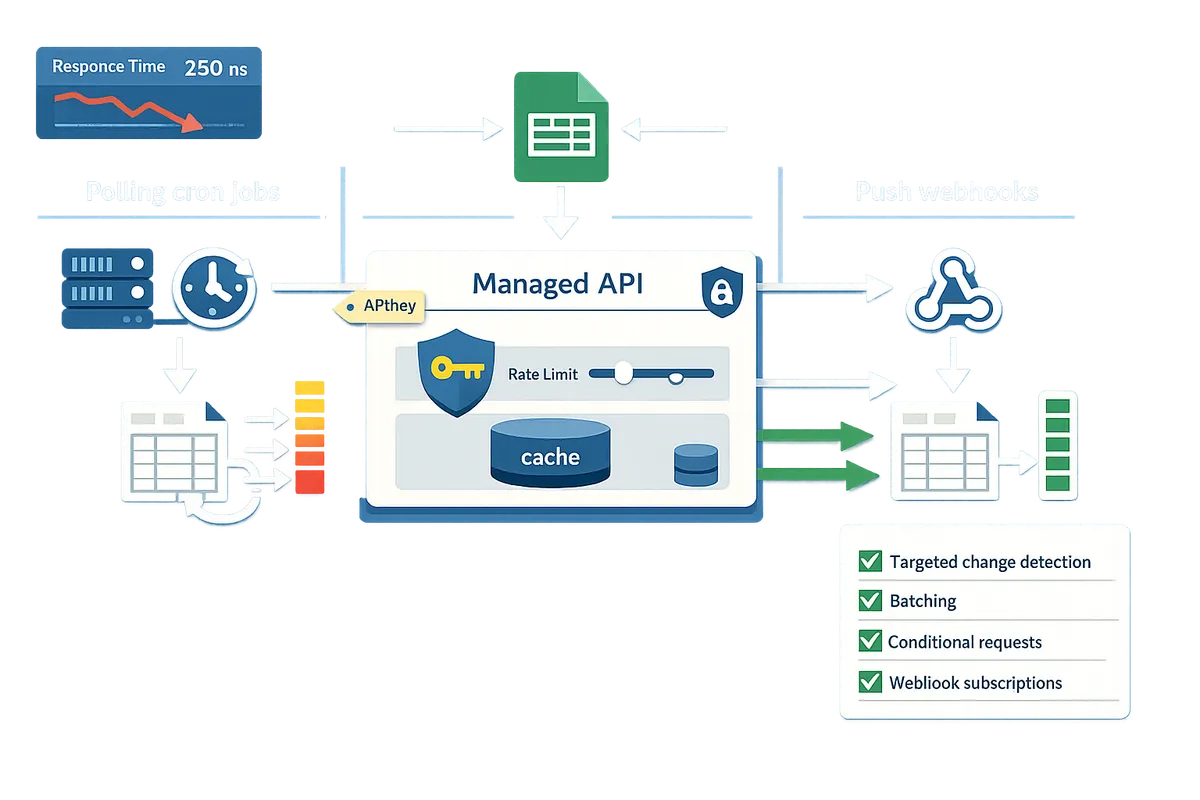
Which strategies reduce latency and quota use when sending Google Sheets push notifications?
Targeted change detection, batching, conditional requests, and webhook subscriptions cut latency and Google API quota use. These techniques reduce notification noise and lower the chance of hitting Sheets API limits by consolidating reads and avoiding irrelevant events. Use the patterns below to decide what to do in production and when our Sheet Gurus API should replace DIY polling.
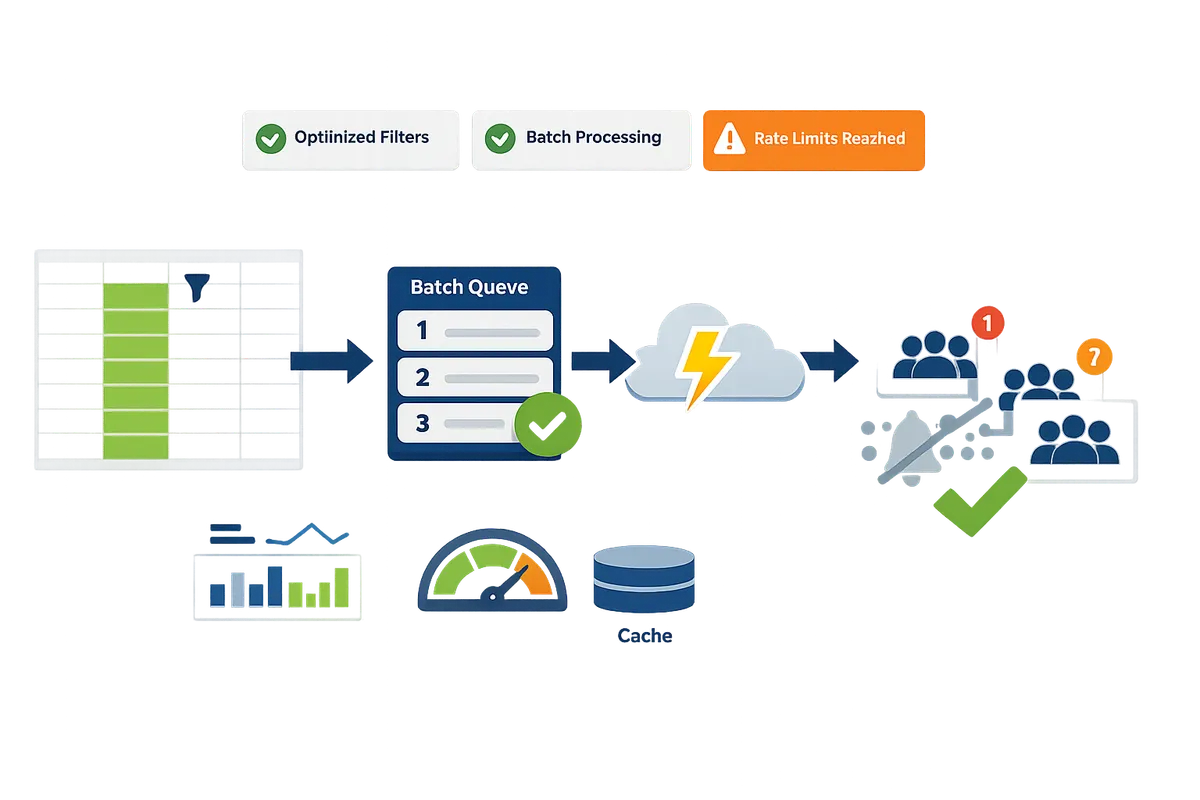
Target edits to ranges or columns to cut noise 🔎
Targeting edits to specific ranges or columns reduces false positives and notification volume. Use Google Sheets notification rules for basic cases, and add light Apps Script checks when you need column-specific filters. For example, a support queue that only cares about the "status" column should ignore edits to comment columns; a single onEdit filter that checks the edited column cuts event processing by the number of unrelated edits.
Practical non-code steps: enable native notification rules for comments or row changes for low-volume sheets. Lightweight Apps Script filters work for small teams: check the edited column, skip if unrelated, then append a single change-log row or call your webhook. The business impact is immediate: fewer interruptions for staff, less downstream processing, and lower API calls for automation tools.
Sheet Gurus API supports filtered subscriptions and row-level webhooks so you receive only relevant events without building and maintaining Apps Script filters. See how this fits AI workflows in our Google Sheets for AI Agents (2026) post.
Batching and debouncing updates to reduce API calls ⏱️
Batching edits and debouncing frequent changes convert many small reads into fewer API operations and fewer notifications. Collect rapid edits for 30 to 60 seconds and emit one summary event, or write a single change-log row your automation polls less often to reduce traffic.
Implementation patterns:
- Debounce window. Buffer edits for a short window, then send one payload. This converts dozens of edits into one notification.
- Change-log row. Append a timestamped summary row that downstream systems poll every minute instead of per-edit.
- Batch writes. Accumulate updates and send them as a single API call when possible.
Real-world example: a sales intake sheet where multiple reps edit details during an import can produce 80 edits in a minute; batching those into a single summary reduces notification volume and processing time.
💡 Tip: Use a 30–60 second debounce for high-collaboration sheets and 5–15 seconds for near-real-time dashboards; choose the window based on user workflow and acceptable latency.
Sheet Gurus API accepts batched requests and offers caching options to reduce downstream Google Sheets API calls, which simplifies moving from an ad-hoc script to an operational webhook flow. For quota tradeoffs and planning, consult our Google Sheets API Quota: Limits & Best Practices (2026).
Use Drive webhooks where possible, but plan for renewal 🔔
Google Drive webhooks (changes.watch and files.watch) provide true push notifications that avoid polling but require subscription renewal and reliable endpoints. Webhooks eliminate repeated reads but introduce operational tasks: renewing expiring channels, validating incoming requests, and monitoring endpoint availability.
Operational checklist:
- Automate renewal. Track channel expiry and renew before it lapses to prevent silent gaps.
- Secure endpoints. Validate request headers and enforce TLS so only authentic Drive notifications are accepted.
- Monitor delivery. Alert on missed heartbeats and backfill changes if your endpoint was down.
⚠️ Warning: If you do not automate channel renewal you will experience silent notification gaps that look like data loss and trigger costly manual triage.
Our Sheet Gurus API handles webhook lifecycle and delivers durable change events to your integrations, removing the need to run custom renewal jobs or host always-on endpoints. For implementation examples and Node.js considerations, see Google Sheets Node.js Production Best Practices (2026).
Avoid notification fatigue and add smart filters 🛑
Smart filters that only notify on meaningful state changes prevent notification fatigue and reduce wasted processing. Notify only on state transitions (for example, "pending" to "paid"), threshold crossings, or final approvals instead of every cell edit.
Step-by-step rule design:
- Define meaningful events. List the exact state transitions or numeric thresholds that require action.
- Filter at the source. Apply the rule in your webhook layer or in a lightweight Apps Script so early filtering prevents downstream work.
- Summarize and escalate. Send summaries for low-priority events and immediate alerts for high-priority ones.
Example: for invoices, notify only when the status column changes from pending to paid or when amount > $10,000. That reduces alerts from frequent edits to a handful of business-relevant events per day.
Sheet Gurus API supports server-side filtering and rule-based subscriptions so your integrations only receive business-significant events, which reduces quota use and keeps teams focused. For use cases where AI agents act on spreadsheet data, read Google Sheets for AI Agents (2026) to see how a single mis-synced row can cause hours of triage.
How do you implement and measure push notifications for Google Sheets in production?
Implement production push notifications by choosing a delivery pattern, adding quota and retry controls, and instrumenting delivery and duplicate detection. Production systems require reliable delivery, observability for missed events, and controls that stop client bursts from exhausting Google API quota. The steps below cover low-effort native email rules, an Apps Script plus Drive API webhook flow, and a production-ready path using Sheet Gurus API.
Native Sheets notification rules and limits 📝
Native notification rules are a Sheets feature that sends email alerts for human-facing updates and should be used only when teammates want simple, low-effort messages. Enable them from Tools > Notification rules, pick which edits or comments trigger notices, and route to collaborators. Use cases: approval requests, manual review signals, and low-frequency status updates where a person will act on the email.
Limitations matter for automation: native rules do not provide webhooks or structured JSON payloads, notifications can be delayed, and they offer no delivery metrics for programmatic consumers. If you need AI agents or automated workflows to react to changes, native rules force an intermediate manual step and increase risk of missed processing or duplicate human actions. For more on production use with agents, see our Google Sheets for AI Agents (2026) article.
Lightweight webhook with Apps Script and Drive API 🧩
Apps Script is a server-side scripting platform that can forward sheet edits to an external webhook, while Drive API files.watch provides file-level change events but requires channel lifecycle management. Typical flow: (1) use an onEdit trigger or installable trigger in Apps Script to capture row-level edits, (2) POST a compact JSON payload to your webhook, (3) use Drive API files.watch to detect external edits or permission changes, and (4) implement retry and deduplication on the receiver.
Step-by-step implementation:
- Create an installable onEdit trigger in Apps Script with the minimal drive.file scope.
- Build a small webhook endpoint that accepts JSON and returns idempotency tokens.
- Send a short payload (sheetId, range, timestamp, changeType, idempotencyKey).
- Use Drive API files.watch to detect non-editor changes; record channelId and expiration.
- Automate channel renewal before expiration and persist metadata in a small durable store.
- Add request signing or a secret header to authenticate incoming posts.
Typical failure modes include expired Drive.watch channels, Apps Script execution timeouts, quota-driven 429s on bursty writes, and duplicate deliveries when retries occur. Plan for idempotent processing and persistent logs. ⚠️ Warning: Drive.watch channels expire and permission changes can drop notifications; automate renewal and alert if channel renewal fails.
Sheet Gurus API provides an alternative that removes much of this lifecycle work by exposing change webhooks and handling rate limiting for you; compare this approach with our Google Sheets Node.js Production Best Practices (2026) for DIY operational trade-offs.
Use Sheet Gurus API to expose sheets as production REST endpoints ⛳
Sheet Gurus API is a service that exposes Google Sheets as production-ready RESTful JSON APIs that add API key authentication, configurable rate limiting, optional Redis caching, and Model Context Protocol support for AI agents. Instead of building webhook renewal, idempotency stores, and quota mapping, teams sign in with Google, pick a spreadsheet, and receive stable HTTP endpoints and webhooks backed by operational controls.
Practical benefits for teams:
- API key access control with per-sheet permissions for service integrations.
- Configurable per-key and global rate limits to prevent single clients from exhausting Sheets API quota.
- Optional Redis caching to reduce repeated Google API calls for high-read workloads.
- Webhooks and event streams so your services and AI agents get structured change events rather than email digests.
When you need predictable latency, audit trails, and out-of-the-box throttling for multiple integrations, Sheet Gurus API cuts weeks of backend work. See the API reference for endpoint examples and the About page for MCP server support and usage scenarios. Also review our No-Code Google Sheets REST API guide for a comparison of DIY vs managed approaches.
Decision flow: choose push, poll, or a hybrid approach 🧭
Choose push when you need low-latency alerts and can operate a receiving endpoint; choose poll when volume is tiny and read-only latency is acceptable; choose hybrid when channels are flaky or quota risk is moderate. Use this checklist to decide:
- Criticality and latency. If edits must trigger downstream automation within seconds, pick push. Example: an approval row that kicks off a provisioning workflow.
- Team size and ops capacity. Small teams with no backend prefer native rules or Sheet Gurus API to avoid maintaining webhook renewal and retries.
- Quota exposure. If hundreds of clients will read the sheet, polling multiplies Sheets API calls; prefer push or a managed API with caching.
- Consumer type. Human inboxes tolerate delays; AI agents and programmatic consumers require JSON and idempotency keys.
Decision examples:
- Small internal dashboard read by one user per minute: poll with a short TTL.
- Multi-service pipeline that triggers deployments: push webhooks or Sheet Gurus API webhooks with strict rate limits.
- Unreliable external sources: hybrid—push for primary events and occasional polling to reconcile state.
For detailed quota trade-offs, read Google Sheets API Quota: Limits & Best Practices (2026) and the Google Sheets to API use cases post for scenarios that should become REST endpoints.
Metrics and dashboards to measure success 📈
Track delivery rate, processing latency, Google API quota consumption, error rates, and duplicate events to validate reliability and cost. Those five metrics reveal whether notifications reach consumers, whether processing keeps up, and whether your sheet-backed system risks hitting Google API limits.
Suggested KPIs and dashboard panels:
- Delivery success rate (percentage of events acknowledged by consumer). Alert if it drops below an agreed SLA.
- Mean and p95 processing latency for events from time-of-change to processed state.
- Sheets API QPS and daily quota consumption with trend lines and 429 spike alerts.
- Error rate by HTTP status and source (Apps Script, webhook receiver, Sheet Gurus API).
- Duplicate detection rate measured by repeated idempotencyKey values.
Dashboard layout recommendation:
- Top row: delivery success and p95 latency.
- Middle row: API quota usage and 429/503 error spikes.
- Bottom row: recent failed deliveries, top failing clients, and duplicate event table.
Alert rules to configure:
- Delivery success < 98% sustained over five minutes.
- Any 429 spike above baseline for more than two minutes.
- Duplicate event rate above 0.5% over an hour.
💡 Tip: Record an idempotencyKey per change and surface duplicates in the dashboard; catching duplicates early prevents downstream data corruption and saves hours of manual fixes.
For monitoring integration, Sheet Gurus API ships request logs and rate-limit metrics that fit directly into the dashboard above, reducing the manual instrumentation burden you would face with an Apps Script-based solution.
Frequently Asked Questions
This FAQ answers the most common operational questions teams face when choosing push versus poll for Google Sheets updates. Read these items to avoid quota surprises, silent webhook gaps, and noisy alerts that waste teammate time.
Can I get desktop push notifications from Google Sheets? 🖥️
No. Google Sheets does not natively send desktop push notifications to programmatic endpoints. Google only offers email-based change notifications for human users inside the Sheets UI. To get desktop or browser push, forward change events to a push provider or browser push service using a webhook or an intermediary. For example, an Apps Script or a Drive changes.watch webhook can post to a small endpoint that then calls a browser Push API service or a desktop push app. Using Sheet Gurus API removes much of the manual plumbing: our webhooks and filtered endpoints let you route sheet changes to a push provider without building your own channel-management layer.
Does Google Drive changes.watch act like a webhook? 🔔
Yes. changes.watch and files.watch behave like webhooks by sending push-style notifications from the Drive API to a registered HTTPS endpoint. The messages tell you that a resource changed but do not include cell-level diffs; you must fetch the sheet to see the exact edits. Watch channels require explicit creation, include an expiration timestamp, and return verification headers you should validate. For production systems, centralize channel handling and verification so you do not duplicate renewal logic across services; Sheet Gurus API can accept Drive events and surface them as reliable webhooks for your apps.
How long do Drive watch channels last and how do I renew them? ⏳
Drive watch channels expire and must be renewed before the API-provided expiration time to avoid silent notification gaps. The Drive API returns an expiration field when you create a watch. Run a scheduled job that checks channel expirations and issues a new watch request at least a few minutes before expiry. If you miss renewal, your system will stop receiving events until you recreate a channel, which produces blind spots for downstream automations. ⚠️ Warning: Relying on manual renewal invites multi-hour outages when channels lapse; automate renewal and add alerts for failed renewals.
Our Sheet Gurus API handles webhook lifecycle and delivers durable change events to your integrations, removing the need to run custom renewal jobs or host always-on endpoints. For implementation examples and Node.js considerations, see Google Sheets Node.js Production Best Practices (2026).
Can I trigger alerts only for a single column or range? 🎯
Yes; you can trigger alerts for a single column or range, but native Sheets email rules do not support programmatic webhooks scoped to a range. Use one of these practical approaches:
- Apps Script onEdit filter. Check e.range and column indexes, then call your webhook only when the edit matches the target range. This is lightweight but requires careful authorization and deployment.
- Change-log row approach. Append a single audit row with metadata for every write, and have the watcher read that row to decide whether to notify.
- Intermediary API filter. Send all change events to a filtering layer that inspects changed cells and forwards only relevant notifications.
Sheet Gurus API supports server-side filters and webhook routing so you can define column- or range-based alert rules without maintaining scripts across multiple owner accounts. That reduces noise and the time your team spends triaging irrelevant alerts.
Will polling quickly exhaust my Google API quota? ⚠️
Frequent polling can exhaust Google API quota depending on request rate, sheet size, and concurrency. Simple examples: a dashboard polled by dozens of clients or a cron job that reads a large sheet every few seconds can trigger 429 responses. Reduce quota risk by using conditional requests, caching, aggregated reads, or by shifting to event-driven webhooks. For a detailed estimation and mitigation checklist, see our guide on Google Sheets API quota and best practices. Sheet Gurus API can also cut direct Google calls by serving cached JSON endpoints and enforcing rate limits so a burst of clients does not translate into thousands of Google API requests.
How does Sheet Gurus API reduce polling and quota usage? 🚦
Sheet Gurus API reduces polling and quota usage by exposing spreadsheets as RESTful JSON endpoints with optional Redis caching and configurable rate limiting. The API centralizes authentication and request throttling so client apps query a single endpoint instead of each client polling Google. Configure short TTLs or write-driven invalidation to keep data fresh while serving high-read workloads from cache. Sheet Gurus API also offers webhook events and server-side filters so you can react to edits rather than polling continuously. For production patterns that move spreadsheets into reliable APIs, see Google Sheets for AI Agents and our getting-started docs in the API reference.
Push or poll: pick the option that keeps data fresh without burning quota.
Push is the preferred pattern for production workflows because it reduces repeated API calls and delivers near-real-time updates; poll when push is unavailable or for simple, low-scale checks. Google Sheets push notifications cut read volume and make single-row consistency easier to guarantee for AI agents and dashboards. See our guidance on using sheets with assistants in the Google Sheets for AI Agents (2026) article.
💡 Tip: Start by wiring a Google Sheets webhook or provider-side webhook to stop frequent polling and validate a single-row sync before scaling.
If you want to move from experimentation to a maintainable API faster, try Sheet Gurus API and create your first endpoint with the getting-started guide. That first endpoint helps you test push events, throttle client traffic, and confirm freshness without building middleware. Subscribe to our newsletter for implementation tips and updates. Start with the getting-started guide to enable push-based workflows and reduce quota risk.