
Google Sheets Node.js Production Best Practices (2026)
A single 429 error from the Google Sheets API can stop a Node.js service for hours during peak syncs. Google Sheets Node.js Production Best Practices are a set of operational rules that help teams evaluate, deploy, and operate Google Sheets-backed services and expose spreadsheets as reliable REST APIs via Sheet Gurus API. Sheet Gurus API turns Google Sheets into RESTful JSON APIs: users sign in with Google, pick a spreadsheet via the getting started guide, and get a live CRUD endpoint with API key authentication, configurable rate limits, optional Redis caching, and MCP support for AI assistants. According to Sheet Gurus API, production deployments typically achieve average response times under 100 ms. Which three configuration choices matter most for reliability?
What core principles make Google Sheets suitable for Node.js in production?
Google Sheets can be production-ready for Node.js when you enforce strict data modeling, stable identifiers, access controls, and governance from day one. These principles limit accidental data drift, reduce operational firefighting, and make programmatic reads and writes predictable for services and AI agents. Our website's Sheet Gurus API converts spreadsheets into RESTful JSON endpoints so teams can apply those controls without building a custom backend, and it typically achieves up to 99.9% uptime.
How should you decide whether Sheets is the right primary data store? 🤔
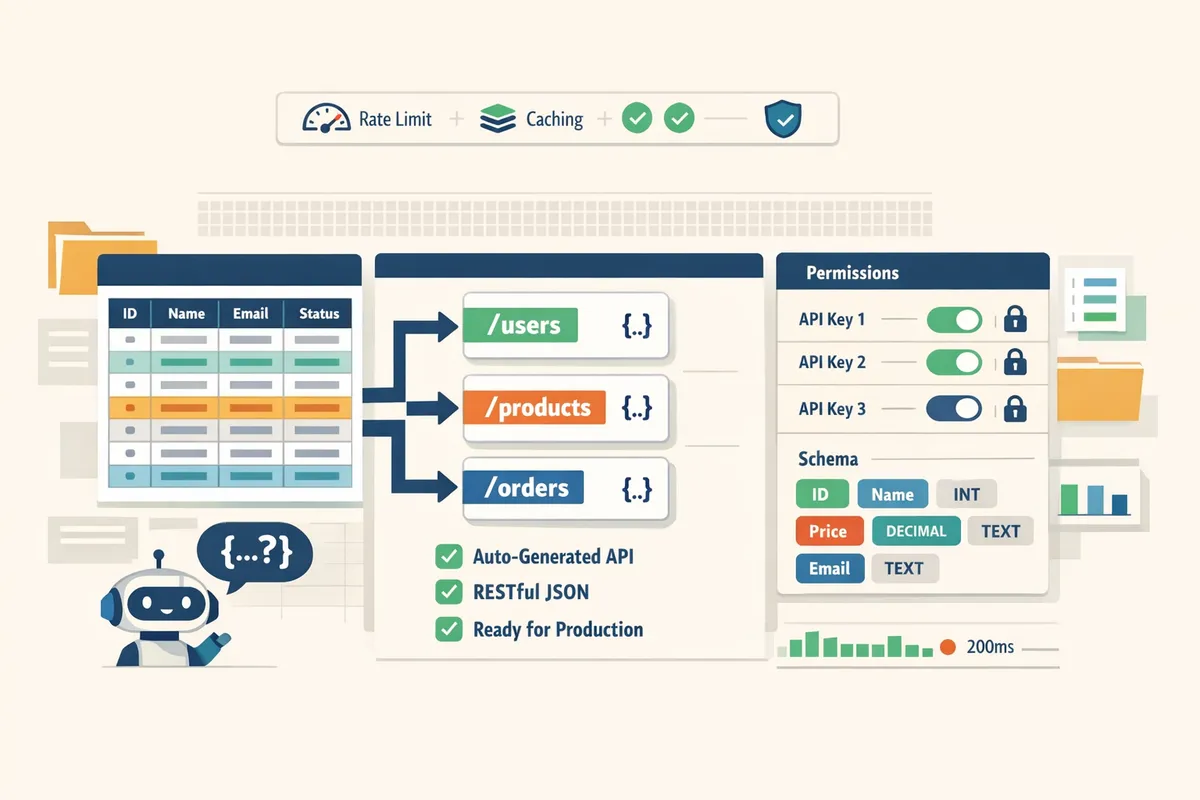
Choose Sheets as the primary store when write volume is low-to-moderate, humans must edit the source, and the spreadsheet must remain the single source of truth. For example, internal dashboards that update a few hundred rows per hour, a customer portal with under 5,000 rows, lightweight CRMs, and automation lookup tables fit this model because the business expects direct sheet edits and simple query patterns. Our website's Google Sheets as Database Node.js (2026) post outlines migration signals and shows which workloads should stay on Sheets and which need a dedicated database. If your integration needs programmatic CRUD with operational controls, use our Sheet Gurus API to expose the sheet as a CRUD endpoint with per-sheet permissions, configurable rate limits, and optional Redis caching so your Node.js services avoid building and maintaining a custom REST layer.
How do you design a schema and enforce a stable row identifier? 🆔
Design a schema with an immutable stable row id column that acts as the primary key for all programmatic updates. Use UUIDs or collision-resistant strings rather than row numbers. Store created_at and updated_at timestamps and an owner or changed_by column to make audits and merges deterministic. For example, a small CRM storing 1,200 contacts should use uuid v4 strings in the stable_id column, keep created_at timestamps, and never issue programmatic deletes without validating the stable_id mapping first. Our website's API Reference explains how Sheet Gurus API maps a stable id column to row-level endpoints so Node.js services can GET/PUT by stable_id rather than by fragile row index. Also implement a safe-delete pattern: mark rows as archived and run periodic reconciliations instead of immediate row deletions.
💡 Tip: Before any programmatic delete, export the target rows to a timestamped CSV or a backup sheet so human errors can be restored quickly.
What is the Model Context Protocol (MCP)? 🤖
Model Context Protocol (MCP) is a specification that exposes typed, column-mapped context from spreadsheets so AI assistants can query and act on sheet data safely. MCP maps sheet columns to typed fields (for example invoice_id:string, total:decimal, status:enum) and exposes them as queryable, typed endpoints that AI agents can request without scraping raw cells. Our website's Sheet Gurus API exposes MCP endpoints so assistants like Claude can request typed rows, make filtered queries, and submit controlled updates while the API enforces schema and permissions. For example, an automation can ask for rows where status=unpaid and total>500, then create follow-up tasks without risking schema drift because the MCP contract preserves types and field names.
How do you set access controls and auditing for shared sheets? 🔒
Enforce least-privilege access, require API keys for programmatic access, and maintain an immutable audit trail of API operations and user edits. Avoid shared service accounts that hide who changed data. Instead use per-key credentials and per-sheet permissions so you can revoke a single key without disrupting other integrations. Our website's Getting Started guide shows how to generate API keys and assign per-sheet permissions in the Sheet Gurus API console. Operational steps to follow: rotate API keys on a schedule, export API logs to your SIEM or S3 daily, and require user-based OAuth for any admin UI that edits sensitive columns. Use rate limiting per key to stop noisy clients from causing quota errors.
⚠️ Warning: Do not use a single shared service account credential for multiple production clients. Shared credentials make incident response and audit trails ineffective.
Related reading: our website's Google Sheets API Node.js Developer Handbook outlines quota-safe patterns and when to route changes through Sheet Gurus instead of calling the Sheets API directly. For a catalog of production use cases, see Google Sheets to API: 15 Production-Ready Use Cases.
Which operational strategies prevent conflicts, rate limits, and data corruption when Node.js apps use Google Sheets?
Use stable row identifiers, batched or per-row write patterns tuned to your throughput, idempotent requests with optimistic checks, and short-term caching to avoid quota errors and merge conflicts. These strategies reduce failed jobs, accidental overwrites, and the risk of long incident windows during peak syncs. Below are concrete rules of thumb, step-by-step practices, and a comparison table to pick the right integration pattern for your workload.
How do you implement a stable row id for reliable updates in Node.js? 🧷
A stable row id is an immutable identifier that you write once to a dedicated column so updates match rows by id rather than sheet position. Write the id on creation (example: a UUID in an sg_id column) and never use the Google Sheets row index for updates. On every update, read the row by sg_id and compare an updated_at timestamp or a lightweight checksum to detect concurrent edits before applying changes. For example, set sg_id and updated_at at insert; when updating, fetch sg_id, verify updated_at matches the client copy, then issue the write. If the timestamps differ, merge only non-overlapping fields or surface a conflict to the user.
Sheet Gurus API makes this pattern simple because its REST endpoints return JSON rows and support filtering by column values; see the API Reference for examples of read-by-field and filtered writes (https://sheetgurusapi.com/docs/api-reference). This approach prevents the most common production bug: a collaborator inserting a row that silently shifts indexes and causes incorrect overwrites.
When should you batch writes versus perform per-row updates? 🗂️
Batch writes reduce API call volume but increase the window where conflicts can occur; per-row updates reduce merge scope but use more API calls. Use these rules of thumb: for interactive apps or user-driven edits that touch fewer than ~10 rows per user action, prefer per-row updates to minimize merge surface. For scheduled syncs or ingestion of tens to hundreds of rows, use micro-batches (10–100 rows) and apply short waits between batches to avoid bursts of 429s. For bulk backfills, prefer large batchUpdate-style writes performed during low-usage windows and follow a reconciliation step that reads the final sheet state and reconciles differences.
If you do not want to build throttling or caching, route writes through Sheet Gurus API. Its configurable rate limiting and optional Redis caching reduce direct Google Sheets API pressure and simplify batch vs. per-row tradeoffs; see our batchUpdate guidance for when direct Sheets batchUpdate still makes sense (https://sheetgurusapi.com/blog/google-sheets-batchupdate-nodejs-guide-2026).
Integration patterns comparison: Sheet Gurus API vs custom backend vs direct Google Sheets API 📊
| Option | Maintenance cost | Time to ship | Security & auth | Scalability & rate control | Observability |
|---|---|---|---|---|---|
| Sheet Gurus API | Low — no backend code to maintain | Minutes to hours using the Connect → Configure → Ship flow | API key auth, per-sheet permissions managed for you | Built-in rate limiting and optional Redis caching for read-heavy workloads | API logs, request metrics, and easy tracing via the dashboard (no custom infra) |
| Custom backend | High — credential rotation, hosting, and CI/CD | Weeks to months depending on team | You must implement OAuth/service accounts and key management | You must design rate limiting, retries, and caching yourself | Full control but requires building logging, metrics, and alerting stacks |
| Direct Google Sheets API from Node.js | Medium — no extra service but fragile at scale | Hours to days for a PoC | Uses OAuth or service accounts; keys need secure storage | Rate-limited by Google quotas; you must handle 429s and batching | Limited unless you add external monitoring and audit trails |
For most teams that treat spreadsheets as the single source of truth and want fast, low-risk production APIs, Sheet Gurus API reduces operational work while providing API key auth, per-sheet rate controls, and optional caching. See our guide on using Google Sheets as a database with Node.js for signals on when to keep Sheets versus move to a dedicated DB (https://sheetgurusapi.com/blog/google-sheets-as-database-nodejs-2026).
How do you handle retries, duplicate requests, and conflict resolution? 🔁
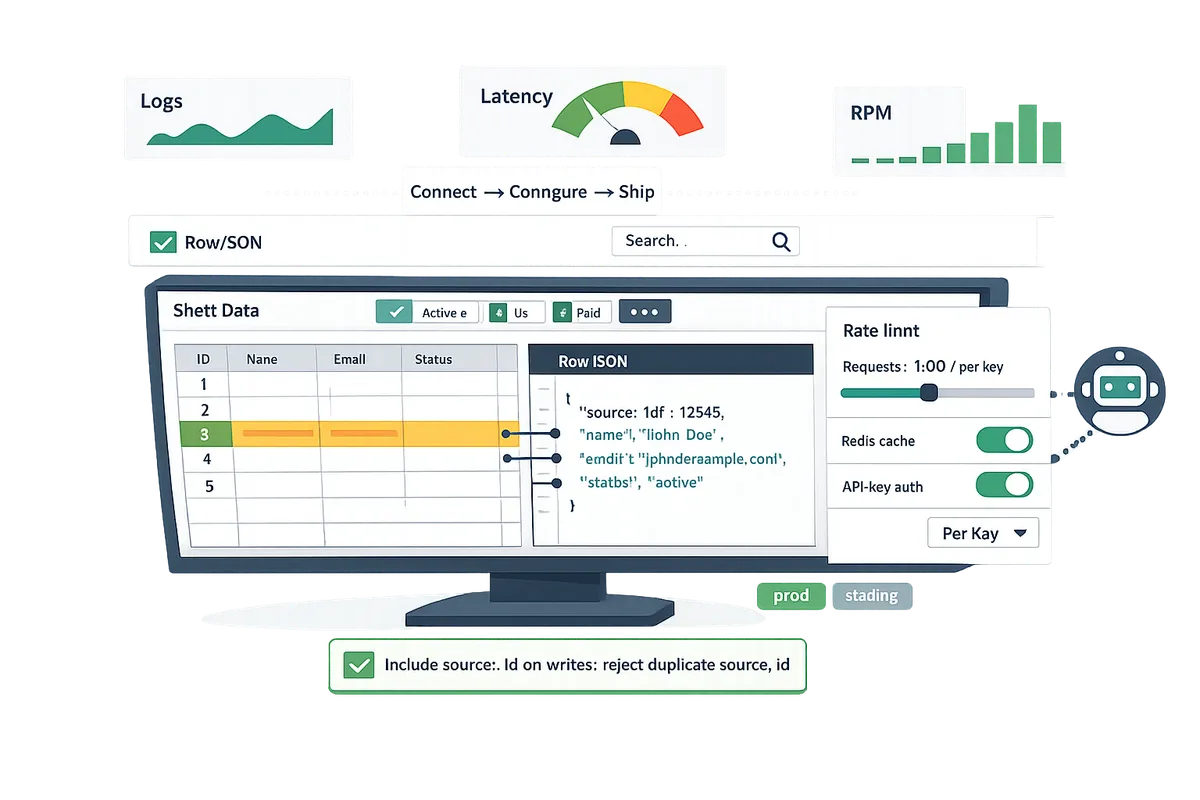
Use idempotency tokens, optimistic checks, and controlled retry loops to prevent duplicates and resolve conflicts without full row overwrites. Start by including a client_op_id or source_id in each write and persist that value in a dedicated column; on a retry, the system first queries for the source_id to detect duplicate operations. Next, use an optimistic update pattern: read the row by stable id, compare updated_at or checksum, and only apply non-conflicting field changes or reject the write with a conflict error.
When you receive transient errors (429 or 5xx), apply a short, capped backoff and re-check whether the operation completed by querying for the client_op_id before retrying. If multiple writers actively edit the same row, prefer field-level merges over blind overwrites: read the latest row, merge fields that do not conflict, and persist the merged row with a new updated_at. Sheet Gurus API supports row filtering and read-before-write flows that simplify server-side deduplication and conflict detection; see the Getting Started guide to map these steps into requests (https://sheetgurusapi.com/docs/getting-started).
💡 Tip: Include a source_id in every client-generated change and reject writes that repeat the same source_id. This prevents accidental double processing from UI retries or network retries.
How do you deploy, observe, and measure a production Google Sheets + Node.js integration?
Deploy, observe, and measure a production Google Sheets + Node.js integration by centralizing secrets, instrumenting logs and metrics, testing against staging sheets, and documenting runbooks for quota and rollback. These controls limit downtime from 429 spikes and accidental writes. Below are deployment patterns, monitoring checklists, webhook guidance, and testing strategies you can adopt immediately.
Secure credentials, rotate keys, and manage permissions 🔐
Store service credentials in a secrets manager and use narrow, revocable API keys with automated rotation. Use a cloud secrets store such as AWS Secrets Manager, GCP Secret Manager, or Vault to hold service account keys and API keys. Assign least-privilege IAM roles to service accounts and create per-environment sheets with different permissions so production keys only access production sheets. Our website's Sheet Gurus API adds per-sheet API key management so you can issue keys scoped to a single spreadsheet and revoke them without reissuing service accounts. Automate rotation in CI/CD pipelines and require human approval for permanent key grants.
💡 Tip: Store a key rotation script with your deployment pipeline and schedule rotation monthly for service accounts and weekly for high-risk keys.
Provide an audit trail that links API key IDs to owners. Capture key creation, revocation, and last-used timestamps in logs. If a key is compromised, revoke it and re-issue a scoped replacement through Sheet Gurus API rather than exposing broader service account credentials.
How do webhooks and Drive push notifications work with Node.js? 🔔
Google Drive push notifications send change signals only; your Node.js endpoint must acknowledge the callback and then fetch the sheet delta to reconcile row-level changes. The notification includes channel and resource identifiers, not cell diffs, so treat it as a trigger to fetch updated rows. Implement a lightweight HTTP endpoint that responds with 200 quickly, validates the X-Goog-Channel-Token or signed header, and enqueues a short-lived job to fetch changes. Use debouncing to collapse bursts of notifications into a single reconcile job and include idempotent processing so re-delivery does not create duplicates.
Validate callback origin and expiration before acting. Store channel metadata (channelId, resourceId, expiration) and reject requests that do not match. If you expose a public webhook, verify signatures and require TLS. Prefer pulling deltas through our website's Sheet Gurus API where possible, because the API exposes JSON rows and reduces the number of direct Sheets API calls your service must make.
⚠️ Warning: Do not rely on webhook payloads for row-level reconciliation; Drive notifications are signals, not diffs.
How do you monitor, log, and alert for Sheets-specific failures? 📈
Monitor request and response logs, error rates, quota usage, and caching metrics, and create alerts for sustained 429/5xx spikes and recurring write conflicts. Log structured events that include API key ID, spreadsheet ID, operation (read/write), row identifier, latency, and upstream status codes. Track these metrics in a time-series system and create alerts for: sustained error rate over 5 minutes, 429 rate exceeding a percentage of request volume, cache hit rate below a threshold, and repeated optimistic lock failures.
Map API keys to owner teams in your audit trail so alerts include a responsible contact. Instrument Redis or other cache metrics like hit rate and eviction count when you use caching. Our website's Sheet Gurus API offers built-in rate limiting and optional Redis caching, which can reduce upstream Sheets API calls and surface quota pressure before it impacts your service. Include an incident playbook that lists immediate actions: revoke offending key, engage the owner, enable rate limit increases via our dashboard, and fail writes to a durable queue until the issue resolves.
How should you test, stage, and roll back spreadsheet-backed features? 🧪
Use isolated staging spreadsheets, deterministic fixtures, and mocked Sheet Gurus API responses in CI, and keep snapshot exports for rapid rollback. Maintain duplicate sheets for dev, staging, and production with identical column schemas. Run unit tests against mocked JSON endpoints and run a small set of end-to-end tests against staging sheets during CI to catch schema drift and permission errors. For load tests, limit scope to representative row counts to avoid exhausting quotas.
Automate snapshot exports (CSV and Google Sheets copy) of critical production sheets hourly or before major releases. Store snapshots in versioned storage so restores are predictable. Keep a rollback runbook with steps: revoke API key, import snapshot to a recovery sheet, update app configuration to point to the recovery sheet, and run smoke tests. If you use feature flags, disable write paths first to reduce rollback scope. See our website's Getting Started guide for secure onboarding and our blog post on Google Sheets batchUpdate Node.js Guide (2026) for guidance about safe batching strategies.
How does Sheet Gurus API reduce ops and speed time to production? 🚀
Sheet Gurus API exposes spreadsheets as live RESTful JSON endpoints with API key auth, per-sheet permissions, configurable rate limits, and optional Redis caching so teams avoid building and operating a custom backend. The Connect → Configure → Ship flow lets you sign in with Google, select a spreadsheet, and generate a production-ready API key that respects per-sheet access. Using Sheet Gurus API removes day-to-day operational tasks like token rotation, quota management, and basic caching, so your Node.js team focuses on business logic and UI.
If you need examples or a full reference for read/write operations, see our API Reference and follow the step-by-step flow in our Getting Started guide. For a broader migration checklist and production patterns that contrast DIY risk versus managed APIs, read Google Sheets as Database Node.js (2026) and Google Sheets to API: 15 Production-Ready Use Cases for Internal Tools, Portals, and AI Agents.
Frequently Asked Questions
This FAQ gives short, production-ready answers Node.js teams ask when they run Google Sheets-backed services. Each reply highlights practical trade-offs and points you can act on immediately.
Can I use Google Sheets as my primary database in production? ❓
Google Sheets is appropriate as a primary store only for low-write, human-edited datasets and not for high-concurrency transactional systems. Use Sheets when humans make most edits (example: editorial content lists, small inventory managed by a team). Expect increased risk when write volume exceeds a few hundred updates per minute or when concurrent writers need strict transactional guarantees. Our website's Google Sheets as Database Node.js (2026) guide lists decision signals and migration triggers that help pick the right backend. If your workload grows, consider moving write-heavy components to a database and keeping Sheets as the human-facing canonical view, or expose Sheets through Sheet Gurus API to get API controls without building a custom backend.
How do I ensure updates map to the right row reliably? 🧾
Use a stable row id column as the canonical key and match update or delete operations against that id rather than sheet row index. Add a secondary column such as updated_at to detect stale writes and reject or reconcile requests when timestamps differ. For example, send {id: "sku-123", updated_at: "2026-06-01T12:00:00Z"} with an update; reject the update if the sheet shows a later updated_at. Sheet Gurus API exposes row-based CRUD operations that reference canonical ids and return the row-level result, which simplifies mapping and reduces the risk of off-by-one or index-shift bugs. Treat row ids as immutable once created; if you must change them, run a controlled migration script and lock concurrent writers.
How do Drive push notifications and webhooks integrate with Node.js? 🔄
Drive push notifications tell you a file changed but do not provide row-level diffs, so your Node.js service must fetch the sheet and reconcile differences after notification. Implement a fetch-and-compare flow: when you receive a notification, pull the sheet state, compare canonical ids and updated_at values, and apply a deterministic reconciliation (upsert, skip, or raise a conflict). Do not rely on Drive notifications for ordering or delivery guarantees; queue notifications and deduplicate by file revision id before reconciling. ⚠️ Warning: Drive push notifications are not a substitute for change events; if you need granular, row-level webhooks, use Sheet Gurus API webhooks where available or build a lightweight polling reconciler that checks updated_at.
What quotas and rate limits should I watch for with Google Sheets? ⏱️
Monitor per-minute and per-user Sheets API quotas and design batching, caching, and backoff to avoid quota errors. Prefer grouped writes (carefully batched) for bulk updates and single-row writes for high-concurrency user actions; measure which pattern hits per-minute quotas first in your workload. Use caching to reduce read volume for dashboard and AI query paths. Our Google Sheets batchUpdate Node.js Guide (2026) explains when batchUpdate reduces round trips and when it triggers quota spikes. If you route traffic through Sheet Gurus API, you can use its configurable rate limiting and optional Redis caching to smooth bursts and cut direct calls to Google.
How does Sheet Gurus API help with security and operational controls? 🔒
Sheet Gurus API is a hosted service that exposes a spreadsheet as a RESTful JSON API with API key authentication, per-sheet permissions, configurable rate limiting, and optional Redis caching. Manage access with short-lived API keys scoped to specific sheets and roles rather than sharing service account credentials across team members. The platform reduces credential handling, centralizes rate-limit policies, and provides an audit trail for API requests so teams avoid building their own key management and quota protections. See our Getting Started guide and the API Reference for details on key creation, permission models, and caching configuration.
How should I test integrations that write to spreadsheets? 🧩
Run tests against isolated staging spreadsheets or mocked Sheet Gurus API endpoints and include end-to-end checks for stable row id behavior and conflict resolution before deploying to production. Set up a staging sheet per CI pipeline run, seed it with representative data, and run automated tests that exercise create, update (with updated_at), delete, and conflict scenarios. Use Sheet Gurus API test keys with limited permissions or a local mock that mirrors API responses for fast unit tests, then run a small number of full end-to-end tests against a live staging sheet to validate reconciliation logic under realistic latencies. > 💡 Tip: Keep a read-only production snapshot for automated smoke tests and never run destructive writes against the real production sheet from your CI system.
You can move a spreadsheet-backed Node.js service to reliable production.
Treat Sheets as a managed API with authentication, rate limits, and optional caching to reduce downtime and quota failures. For google sheets node.js production best practices, start by enforcing API-level controls and immutable row identifiers instead of building a custom REST backend. Sheet Gurus API turns Google Sheets into production-ready RESTful JSON APIs in minutes, requiring no backend code.
Use stable row id for google sheets updates in node.js to prevent conflicting writes and simplify retry logic. Small teams often save days by adding a stable ID column before exposing a sheet to concurrent clients.
💡 Tip: Add a dedicated, immutable ID column and validate it in client requests before you go live.
Start a free trial and create your first live endpoint with the getting started guide to try the Connect → Configure → Ship flow. For architecture patterns and migration signals, see our Google Sheets as Database Node.js guide and the Google Sheets batchUpdate Node.js Guide for write-heavy scenarios.