
Google Sheets API Quotas & 429s (2026): Official API vs Apps Script vs Third‑Party REST Wrappers — Limits, Costs, and Scale Benchmarks
A sudden burst of 1,000 requests per minute can trigger Google Sheets 429 errors and freeze critical spreadsheet-backed services. Google Sheets API quotas comparison is a guide comparing quota behavior, rate limits, and operational choices across the official Sheets API, Apps Script, and third-party REST wrappers. You will learn which option reduces 429s, cuts ops time, and keeps latency predictable. Our Sheet Gurus API exposes Sheets as production-ready RESTful JSON endpoints with Google sign-in, per-sheet API keys, configurable rate limits, optional Redis caching, and MCP support. See practical benchmarks in our Sheets API 429s and quotas guide. Which path avoids intermittent 429s while preserving throughput?
How do quota rules differ between Google Sheets API, Apps Script, and third-party REST wrappers?
Quota enforcement differs by scope: the Google Sheets API applies project-level and per-user request limits, Apps Script applies per-user and per-script execution and service quotas tied to Google accounts, and third-party REST wrappers apply provider-side rate limits while proxying Google API calls. Choosing the right surface requires mapping common spreadsheet operations to the quota buckets they consume so you can predict 429s and capacity needs.
What is the Google Sheets API? 🔢
Google Sheets API is a REST API that exposes spreadsheet operations and enforces per-project and per-user quota controls. The common quota types to watch are requests per 100 seconds per user, requests per 100 seconds per project, and write-rate limits that are measured per-minute; you view these in Google Cloud Console under APIs & Services → Quotas for the Sheets API. spreadsheets.values.get and spreadsheets.values.update are single HTTP requests that count against the per-user and per-project request counters. spreadsheets.batchUpdate is a single HTTP call but contains multiple sub-requests; using one batchUpdate to change five ranges is usually much cheaper than five separate HTTP calls because you reduce request-count overhead. Example: fetching A1:E100 with spreadsheets.values.get consumes one read request. Example: issuing 100 single-cell spreadsheets.values.update calls consumes 100 write requests and will hit per-user limits far sooner than a single range update.
💡 Tip: Use range updates (spreadsheets.values.update) or aggregated batchUpdate payloads instead of loops of single-cell updates to cut request counts.
What is Apps Script? 🧩
Apps Script is a hosted scripting platform that runs code as a Google account and enforces per-user and per-script quotas tied to account and Workspace tiers. Important quotas for Sheets workflows include total script runtime per day, maximum concurrent executions, number of URL fetches, and service-specific limits such as reads/writes through the Spreadsheet service. Consumer Google accounts have lower daily and per-minute allowances than Workspace accounts, so the same scheduled job can work under Workspace but hit limits on consumer accounts. Practical consequence: a time-driven trigger that processes 1,000 rows with one execution per row will run into execution-time and per-user call limits and produce 429s or delayed triggers. For guidance on diagnosing those errors and building monitoring, see our root-cause playbook and Cloud Monitoring dashboards in the troubleshooting guide.
What is a third-party REST wrapper (example: Sheet Gurus API)? 🛠️
A third-party REST wrapper is a hosted service that exposes Google Sheets as JSON endpoints and applies provider-side rate limits while proxying Google API requests. Sheet Gurus API is a hosted product that turns spreadsheets into RESTful JSON APIs and adds API key authentication, per-key and global rate limiting, optional Redis caching, and configurable request shaping to reduce direct Google API traffic. Operationally you face two layers of limits: the provider's limits and the underlying Google Sheets API quotas. Example: if Sheet Gurus API serves a frequently read dashboard from cache, the provider serves thousands of reads from Redis without hitting Google, but large write bursts still pass through and consume Google write quotas. Use the Sheet Gurus API documentation and API reference for implementation details and to configure per-key throttling and caching.
How does Google count reads versus writes for quota usage? 📊
Google counts many bulk operations as single HTTP requests but counts each separate HTTP call against request quotas, so a single spreadsheets.values.get over a 100-row range is one read request while 100 individual single-cell updates count as 100 write requests. Example 1: spreadsheets.values.get for A1:E100 returns 100 rows and consumes one read unit against per-user and per-project request counters. Example 2: updating A1:E20 with one spreadsheets.values.update call is one write request; performing 100 spreadsheets.values.update calls for 100 single cells is 100 write requests and risks per-minute write limits. spreadsheets.batchUpdate reduces round trips by packing many edits into one HTTP call, but batch payloads still generate internal write operations and can bump internal write-rate counters faster than a simple range update. Metadata calls such as spreadsheets.get (spreadsheet properties or sheet list) count as read-type requests and should be cached where possible.
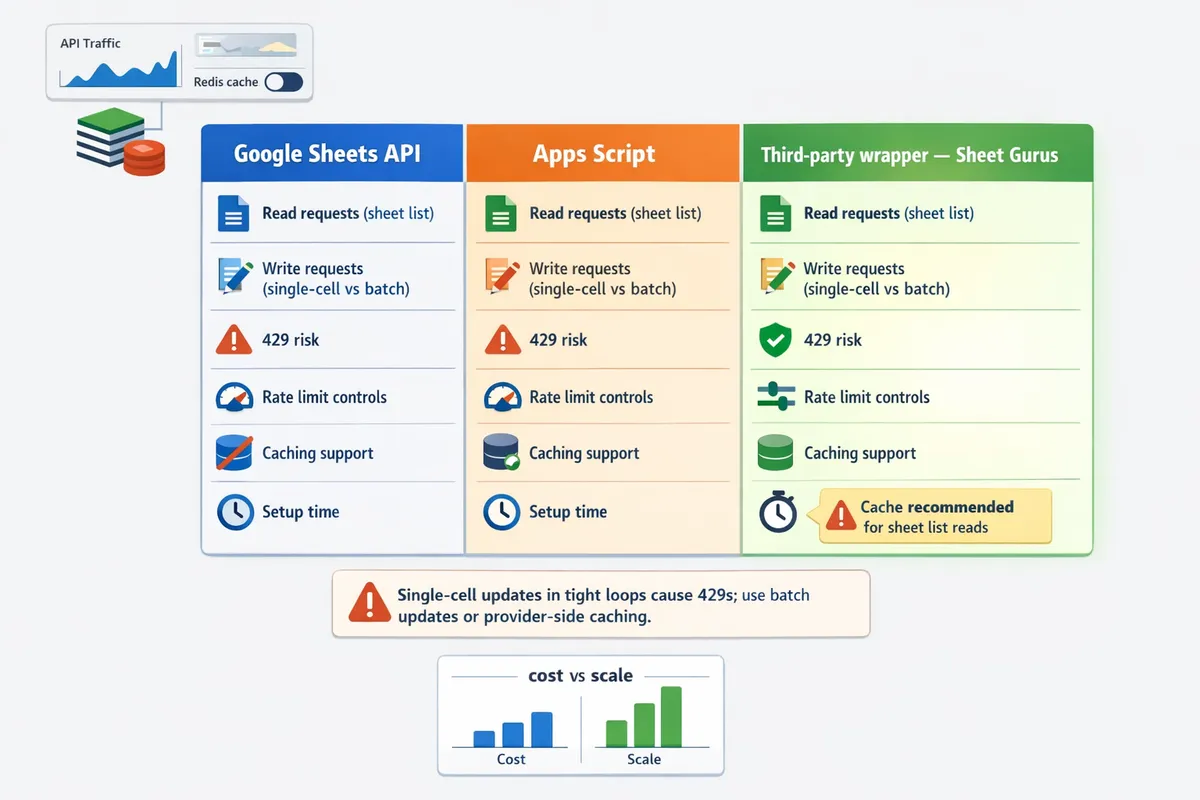
⚠️ Warning: Single-cell updates in tight loops are a common source of 429s; batch or range updates and provider-side caching avoid most accidental quota exhaustion.
Useful further reading: read our quota increase playbook and calculator for steps to request higher limits and forecasting templates, the root-cause playbook for monitoring and alerts, and the quickstart plus faster JSON API alternative guide to compare building with raw Google APIs versus using a ready REST wrapper.
Which option handles scale and 429s best and what do real benchmarks show?
Third-party REST wrappers with caching and configurable rate limiting handle sustained high throughput and reduce 429 frequency more effectively than raw Google Sheets API or Apps Script. Sheet Gurus API adds provider-side rate limiting, optional Redis caching, and production-grade operational controls, and offers enterprise infrastructure with 99.9% uptime and average response times under 100 ms. Use the table and worked examples below to compare quota granularity, expected failure modes, and the cost trade-offs for each approach.
Side-by-side quota matrix (table) 🧾
The table below compares quota granularity, what counts toward quota, burst tolerance, and where to monitor limits for the Sheets API, Apps Script, and third-party wrappers.
| Option | Quota type | Typical ranges / descriptor | What counts (reads, writes, batch) | Where to view limits | Practical notes (why you hit 429s) |
|---|---|---|---|---|---|
| Google Sheets API (official) | Project-level and per-user request buckets enforced by Google | Project buckets and per-user short-interval limits that can throttle bursts | Individual reads and writes, batchUpdates, batchGet calls all count; repeated calls to the same ranges still consume quota | Google Cloud Console -> APIs & Services -> Quotas; Sheets API docs | Fine for moderate steady traffic. Bursty patterns often trigger per-user or per-project 429s. See request-increase playbook for escalation steps. (Request quota increases guide) |
| Apps Script (serverless scripts) | Per-user, per-script, and daily execution quotas enforced by Google | Stricter per-user/day and per-script-execution limits; lower headroom for concurrent users | Script executions, calls to Advanced Services (including Sheets) and writes performed by the script count toward quotas | Apps Script Quotas docs and GCP Quotas page | Good for scheduled jobs and light automations. Apps Script commonly hits per-user daily limits or execution-time caps under concurrent user load. |
| Third-party REST wrappers (example: Sheet Gurus API) | Provider-controlled per-key and global rate limits; configurable throttles | Configurable per-key rate limits and tiered throughput; provider may offer burst windows and caching tiers | Wrapper-level inbound requests count to the provider; provider-to-Google calls are reduced by caching and batched operations | Provider dashboard and logs (Sheet Gurus dashboard and API Reference) | Configurable rate limiting spreads bursts. Optional Redis caching reduces direct Google calls which lowers 429 frequency and operational complexity. See API reference for details. (API reference) |
💡 Tip: If multiple clients share one OAuth credential, plan for per-project 429s even if per-user counts look safe.
Real 429 rate limit benchmarks and community reports 📈
Community benchmarks show 429s most often appear first on per-user per-minute limits during sudden bursts and then on per-project short-interval buckets when several clients share credentials. Community posts and controlled tests repeatedly report that short, concurrent bursts (hundreds of simultaneous requests) trigger per-user and per-100-seconds limits faster than steady throughput.
Anecdotal patterns and controlled tests explain why raw Sheets API gets 429s under bursty traffic. Without caching or request shaping, identical GETs produce identical Google calls. Users report 429s after concentrated bursts even when daily totals seem modest. By contrast, wrappers that add caching and per-key throttles convert many rapid identical requests into cached responses and queued outgoing calls, which reduces observed 429s.
Practical evidence from community threads and incident reports shows two common scenarios:
- Burst reads from dashboards or AI agents cause repeated identical reads. Caching at the wrapper layer eliminates most repeat calls. See our guide to preventing quota errors for actionable fixes. (How to increase Google Sheets API quota and prevent 429s).
- Multiple clients using the same service account exhaust project-level short-interval buckets. Splitting traffic across API keys or applying provider-side throttles spreads load and delays or prevents 429s. Our root-cause playbook includes monitoring dashboards and alerting patterns for these cases. (Root-cause playbook and monitoring).
⚠️ Warning: Shared credentials amplify per-project limits. If you run multiple services from one Google Cloud project, assume project-level throttles will be your bottleneck before daily quotas.
Capacity-planning calculator and worked example 🧮
Capacity planning converts user behavior into calls per minute, applies cache hit rates and background jobs, and compares the result to quota buckets to estimate 429 risk. Follow these steps to size traffic.
- Count API calls per user action. Example: a dashboard refresh = 1 read request; a form submit = 1 write request.
- Multiply by concurrent users and actions per minute. Concurrent users = active users issuing requests in the same minute.
- Subtract cache hits: Effective Google calls = Raw calls * (1 - cache hit rate).
- Add background churn: scheduled syncs, webhooks, and full-sheet exports.
- Compare effective calls to the relevant quota buckets shown in Google Cloud Console and provider dashboards.
Worked example.
- Business inputs: 50 concurrent users. Each user does 4 read actions/min and 1 write action/min. Raw calls = 50 * (4 + 1) = 250 calls/min.
- With Sheet Gurus API Redis caching at a 70% hit rate, outgoing Google calls = 250 * 0.3 = 75 Google calls/min.
- Add a background sync that runs once per minute and causes 10 Google calls. Total Google calls = 85 calls/min.
- Interpret results: 85 Google calls/min is a small fraction of most project-level buckets, but if all traffic flows through a single per-user credential with a low per-minute slot, you may still see 429s. Using per-key rate limits and distributed API keys reduces the risk.
Recommendation based on the math above: if your traffic pattern includes bursts or many identical reads, use Sheet Gurus API with Redis caching and per-key throttles to reduce Google calls and avoid the complexity of managing retries and quota increase requests. For hands-on planning, use the calculator in our quota guide to plug your own numbers. (Quota and 429s calculator).
💡 Tip: Run synthetic burst tests with realistic cache-hit profiles and monitor project-level quota metrics in Cloud Console before committing to a production rollout.
Cost vs throughput: hidden charges and operational trade-offs 💸
Operational cost equals the sum of development hours, quota management time, provider fees, and indirect infrastructure costs required to safely run your workload. Model these four line items when choosing an approach.
- Engineering hours. Building and maintaining a custom middleware for batching, retries, and quota monitoring can take weeks to months of developer time. This is the largest hidden cost for DIY solutions.
- Quota increase effort. Requesting and justifying higher Google quotas consumes operations time and may require architectural changes to satisfy Google support. See our step-by-step guide for requests and timelines. (How to increase limits).
- Provider fees. Third-party wrappers charge per request or via tiered plans. Those fees buy provider-level rate limiting, dashboards, and optional caching which reduce development and support costs.
- Reliability and incident cost. Time spent debugging 429 cascades during business hours is a recurring cost that scales with traffic.
When pay-as-you-go third-party tiers become cheaper. If you expect sustained hundreds to thousands of Google calls per minute or require 24/7 SLA-backed behavior, the combined cost of at least one full-time engineer plus cloud monitoring often exceeds third-party fees. In those cases, a managed wrapper with per-key throttles and Redis caching typically gives better long-term economics and lower operational risk.
Practical guidance:
- For prototypes or low-traffic internal automations, Apps Script or direct Google Sheets API calls may be cheaper short term.
- For dashboard-heavy, AI agent, or public-facing APIs with bursty traffic, using Sheet Gurus API reduces development time, cuts Google calls via caching, and provides predictable throttling and logging.
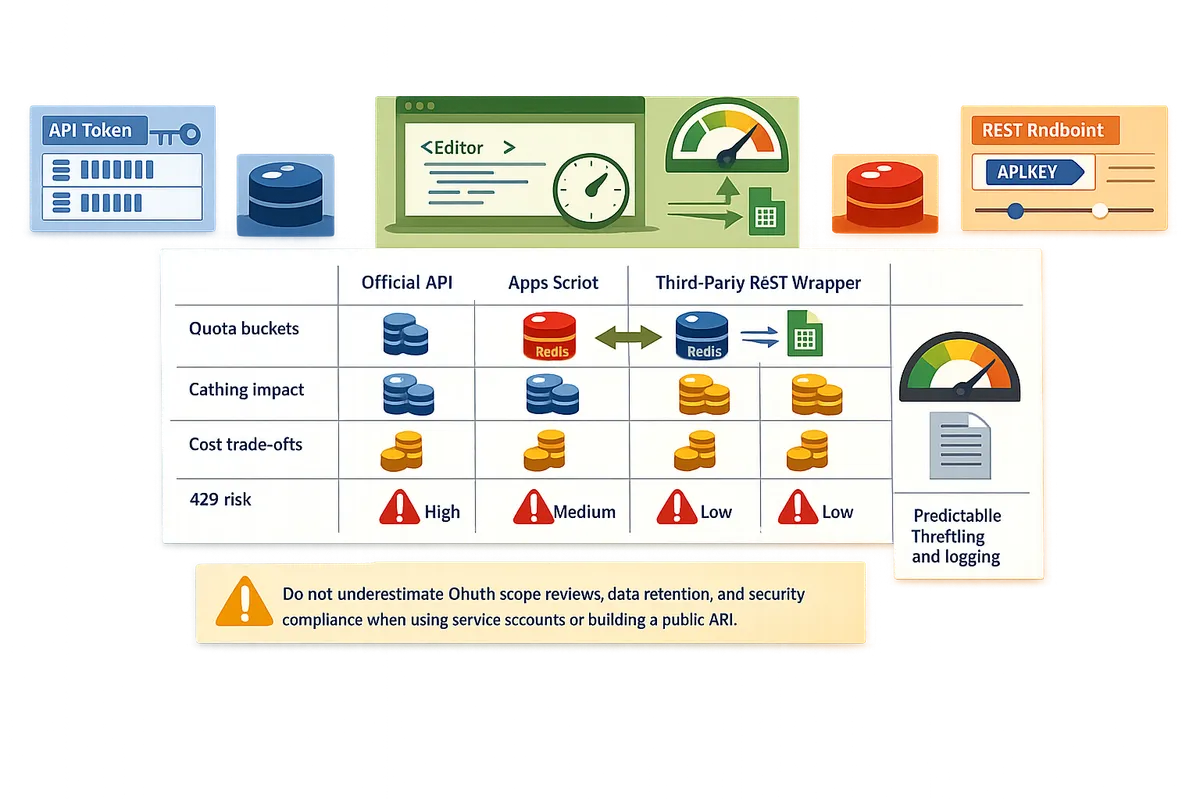
⚠️ Warning: Don't underestimate OAuth scope reviews, data retention, and security compliance when using service accounts or building a public API. Those hidden requirements add time and cost.
Which option should my team pick and what operational steps prevent 429s?
Pick the option that matches your sustained throughput, available engineering time, and tolerance for quota errors. Many small automation tasks do fine with Apps Script or direct Google Sheets API calls when you batch and cache aggressively. For production services with sustained or bursty traffic, a third-party REST wrapper such as Sheet Gurus API reduces operational risk by adding per-key rate limits, optional Redis caching, and API controls out of the box.
Pros and cons table for each approach ⚖️
The table below summarizes benefits and drawbacks of Google Sheets API, Apps Script, and Sheet Gurus API to aid a quick decision.
| Feature / Approach | Google Sheets API (direct) | Apps Script | Sheet Gurus API (third-party REST wrapper) |
|---|---|---|---|
| Setup time | Moderate. Requires OAuth, service account or user consent, and client code. | Fast for simple automations inside Google Workspace. | Very fast. Connect a sheet and get a CRUD endpoint with auth and docs. |
| Operational overhead | High. You must handle retries, quotas, token management, monitoring. | Moderate. Google-hosted but has script quotas and limited observability. | Low. Built-in API key management, rate limiting, and monitoring. |
| Burst handling | Poor without custom rate limiting and caching; prone to 429s under bursts. | Poor for external high-concurrency traffic; quota hits common. | Good. Offers configurable per-key and global throttling to flatten bursts. |
| Caching options | You must build external cache to reduce calls. | Limited; caching requires external storage or Drive workarounds. | Optional Redis caching to cut downstream Google calls and speed responses. |
| Security controls | OAuth scopes and IAM. Requires correct scope design and credential rotation. | Uses Google accounts; easier inside Workspace but weaker API controls. | API key auth, per-sheet permissions, and access controls without custom backend. |
| Suitability for AI workflows | Moderate. Requires custom endpoints for agent access and careful rate control. | Limited. Not designed for low-latency AI agent calls. | High. Exposes sheets as JSON and supports MCP-style access for assistants. |
Decision flow: When to build and when to use Sheet Gurus API 🛣️
Choose based on three criteria: expected sustained throughput, available engineering time, and business cost of quota errors. Use the checklist below to decide.
- Expected sustained writes or reads. If your system will make sustained writes above 100 requests per minute or reads that sum to multiple hundreds per minute across many clients, prefer a third-party wrapper with caching and per-key throttling. For example, a dashboard polled by 50 internal users every 10 seconds generates 300 reads per minute and will likely need caching.
- Engineering time available. If your team has less than two engineering-weeks to build and operate a resilient service (retry logic, batching, monitoring), choose Sheet Gurus API to get production features without custom infra. For teams with more time and strict internal controls, a custom Google Sheets API integration may be acceptable.
- Tolerance for quota errors. If business processes cannot tolerate intermittent 429s during peak hours (billing pipelines, customer-facing portals, AI agents), pick Sheet Gurus API for per-key rate limits and caching that reduce the chance of quota exhaustion.
If you still plan to build in-house, review the Google Sheets API reference for implementation specifics and consult our playbook on how to increase limits and prevent errors for quota planning and monitoring. (Google Sheets API Quotas and 429s: How to Increase Limits and Prevent Errors (2026 Guide + Calculator))
Step-by-step: requesting Google quota increases and what helps approvals 📝
A successful quota increase request demonstrates projected traffic, mitigation plans, and operational readiness. Follow this step-by-step checklist when you submit a Cloud Console request.
- Gather historical metrics. Export Cloud Monitoring graphs or server logs showing current calls per minute and peak bursts. Attach at least two weeks of representative data.
- Calculate expected calls per interval. Show math: concurrent clients × polling frequency, plus background jobs and retries. Include worst-case burst scenarios.
- Document your mitigation plan. Include batching strategies, caching, per-user limits, retry with exponential backoff, and duplicate protection. Cite where these are implemented in your code or architecture.
- Prepare a ramp schedule. Request a staged increase with clear daily or weekly caps and a rollback plan if errors appear.
- Submit the Cloud Console quota request. Provide the exact quota numbers, contact information, billing account ID, and a concise business justification. Attach architecture diagrams and the mitigation evidence from step 3.
- Follow up with Google if requested. Provide access to dashboards or a short demo of monitoring and throttling controls.
Factors that increase approval odds include a clear ramp plan, visible monitoring dashboards, and evidence you have reduced unnecessary calls via batching and caching. For a practical checklist and templates you can use when preparing a request, see our quota increase playbook. (How to Increase Limits and Prevent Errors (2026 Guide + Calculator))
Reliability and fallback patterns to avoid production 429s 🧯
Design production systems to serve cached data, queue writes, and degrade gracefully so users avoid hard failures when quotas are strained. The patterns below map directly to product capabilities and short examples you can implement immediately.
- Introduce short-lived read caching. Cache list and search endpoints for 10–60 seconds and include a cache-age field in responses. Example: return cached dashboard data while refreshing in the background so UI remains responsive. Sheet Gurus API supports optional Redis caching to implement this without custom cache servers.
- Queue writes and return optimistic responses. Accept the user update, return 202 Accepted, enqueue the write, and sync to the sheet asynchronously. Example: form submissions show "Queued" with a progress indicator until the background job completes. This prevents spikes of synchronous writes.
- Implement per-key throttling and global limits. Rate limit individual API keys to protect a single client from consuming project quota. Example: limit automated bots to 5 writes per minute while human users get higher short-term bursts. Sheet Gurus API exposes configurable per-key and global rate limits so teams avoid building custom throttle layers.
- Use duplicate protection and idempotent writes. Store a client-supplied request identifier to ignore repeated retries and prevent wasted quota. Describe this to reviewers when requesting quota increases to show you control retries.
- Surface graceful degradation in the UI. Show stale data with a timestamp, display offline/queued status for writes, and provide retry buttons for failed actions. Users tolerate short delays when the interface explains what happened.
💡 Tip: Display cache age and queued status in the UI so support teams can triage whether data is pending sync or stale.
For monitoring and alerting patterns to detect quota pressure early, consult our root-cause playbook which includes Cloud Monitoring dashboard examples and alert rules to trigger before 429s spike. (Google Sheets API 429s and Quotas (2026): Root‑Cause Playbook + Cloud Monitoring Dashboards and Alerting)
Frequently Asked Questions
This FAQ answers the operational and technical questions engineers and founders ask when comparing the official Sheets API, Apps Script, and third-party REST wrappers. It focuses on what actually causes 429s, practical mitigations, and the documentation or artifacts you should prepare when you need higher quota or production reliability.
How does Google count reads versus writes and why does that cause 429s? 🔍
Google counts many bulk reads as single requests but counts each separate HTTP call against request quotas, so a single spreadsheets.values.get over a 100-row range is one read request while 100 individual single-cell updates count as 100 write requests. Example 1: spreadsheets.values.get for A1:E100 returns 100 rows and consumes one read unit against per-user and per-project request counters. Example 2: updating A1:E20 with one spreadsheets.values.update call is one write request; performing 100 spreadsheets.values.update calls for 100 single cells is 100 write requests and risks per-minute write limits. spreadsheets.batchUpdate reduces round trips by packing many edits into one HTTP call, but batch payloads still generate internal write operations and can bump internal write-rate counters faster than a simple range update. Metadata calls such as spreadsheets.get (spreadsheet properties or sheet list) count as read-type requests and should be cached where possible.
⚠️ Warning: Single-cell updates in tight loops are a common source of 429s; batch or range updates and provider-side caching avoid most accidental quota exhaustion.
What typically triggers a 429 with the Google Sheets API? ⚠️
Most 429s happen when per-user, per-project, or per-interval quota buckets are exceeded during bursts or sustained high request rates. Common triggers include many clients syncing simultaneously, polling loops with no backoff, missing client-side throttling, and unshaped write spikes from batch jobs.
Quick mitigations.
- Shape requests with client-side throttles and progressively longer retry delays to avoid immediate re-queue spikes.
- Add jitter to retries and avoid synchronized cron jobs firing at the same second across many hosts.
- Replace frequent polls with push or webhook patterns where possible, and introduce short caches for read-heavy workflows.
- If you run a multi-tenant service, use per-tenant rate limits. Sheet Gurus API supports configurable per-key throttling so a single misbehaving client cannot exhaust the global quota. See the root-cause playbook for monitoring and alerting patterns that surface the specific quota being hit: https://sheetgurusapi.com/blog/google-sheets-api-429s-and-quotas-2026-rootcause-playbook-cloud-monitoring-dashboards-and-alerting
Apps Script quota limits vs Google Sheets API: which is better for scheduled automation? ⏱️
Apps Script works well for lightweight scheduled tasks tied to a single Workspace account, while the Google Sheets API or a third-party wrapper suits higher-throughput, multi-tenant, or low-latency services. Apps Script has convenient triggers and low setup friction for a single user, but it enforces per-user execution time, daily quotas, and simultaneous trigger limits that often bite when you scale.
When to choose which.
- Use Apps Script for small admin jobs and single-user automations that run a few times per day.
- Use the Google Sheets API directly if you need programmatic control and can build robust retry, batching, and monitoring logic.
- Use a third-party wrapper like Sheet Gurus API when you need a production-ready REST interface, per-sheet API keys, configurable rate limiting, and optional caching without building backend glue. Review the comparison article for a side-by-side view: https://sheetgurusapi.com/blog/google-sheets-rest-api-vs-google-sheets-api-differences-proscons-and-the-fastest-path-to-crud
Can caching and request shaping remove 429s entirely? 🧠
Caching and request shaping can dramatically reduce the frequency of 429s but cannot guarantee full elimination if traffic grows beyond quota ceilings. High cache hit rates convert repeated reads into local hits, and write batching reduces the number of write operations, often reducing Google calls by an order of magnitude in practice.
Realistic expectations and tactics.
- Aim for high cache hit rates on read-heavy endpoints. For many dashboards, moving from real-time reads to a 30–60 second cache cuts calls by 30x or more depending on traffic patterns.
- Use write queues and scheduled flushes to smooth bursts from many clients into predictable, quota-friendly windows.
- Test worst-case traffic in staging to measure how cache TTLs and batching affect actual Google API calls.
💡 Tip: Use short TTLs and immediate cache invalidation after writes to keep cache correctness without constant revalidation. Sheet Gurus API documents Redis caching and per-key rate limits to help implement these patterns: https://sheetgurusapi.com/docs/api-reference
How do I request a Google quota increase and what documentation should I attach? 📄
Request quota increases through the Google Cloud Console and attach precise traffic projections, architecture diagrams, and mitigation strategies. Google evaluates requests based on current usage, expected growth, and whether you have non-quota mitigations like caching or per-user limits.
File checklist to include with your request.
- Current quota and usage graphs (per-minute and per-100-seconds where applicable).
- Peak and average calls broken down by endpoint type (reads vs writes vs batch updates). Include sample payload sizes and request patterns.
- Traffic forecasts for 30, 90, and 180 days with justification (number of users, sync frequency, scheduled jobs).
- Architecture diagram showing caching, queuing, and throttling layers and a fallback plan for quota exhaustion.
- Contact information and an operations runbook for Google to validate claims.
See our step-by-step playbook and calculator for templates and an example submission: https://sheetgurusapi.com/blog/google-sheets-api-quotas-and-429s-how-to-increase-limits-and-prevent-errors-2026-guide-calculator
Are third-party wrappers safe for production and how do they handle access control? 🔐
Reputable third-party wrappers can be safe for production when they provide API key management, fine-grained per-sheet permissions, OAuth integration, logging, and a transparent privacy policy. Security posture varies widely, so evaluate a wrapper on controls, auditability, and data handling.
Security checklist when evaluating wrappers.
- Per-key permissions and the ability to revoke keys instantly. Sheet Gurus API offers per-sheet API key permissions and OAuth sign-in to scope access to the drive.file scope.
- Configurable rate limits and request logging to detect abuse and to troubleshoot quota issues.
- Clear privacy and data handling statements. Review the vendor privacy policy and confirm storage, retention, and deletion practices: https://sheetgurusapi.com/privacy
⚠️ Warning: Do not send personal health information or regulated data to a third-party wrapper unless you have explicit contractual and technical safeguards in place.
Choose a managed REST wrapper when quotas, 429s, and operational risk threaten a production Sheets integration.
A managed wrapper reduces the chance that quota spikes or retry storms will bring a spreadsheet-backed service offline. This google sheets api quotas comparison shows Apps Script works for light automation, the official Sheets API fits server-side integrations with predictable call patterns, and third-party REST wrappers remove much of the operational toil that causes downtime. Many teams hit 429 quota errors after as few as 1,000 daily Google Sheets API requests; our guide on increasing limits and preventing 429s explains which calls to prune and how to forecast usage.
Sheet Gurus API turns Google Sheets into production-ready RESTful JSON APIs in minutes, requiring no backend code. Schedule a consultation with Sheet Gurus API to map your quota profile, set a safe rate-limit plan, and get a migration roadmap that cuts developer hours and reduces outage risk. For hands-on diagnostics before a migration, consult the root-cause playbook and monitoring dashboards to spot the calls that cause the most 429s.