
Google Drive API Rate Limit: Sheets, Drive, Docs (2026)
A single burst of background syncs can push a dashboard past the Google Drive API rate limit and trigger 429 errors during peak hours. Google Drive API rate limit is a set of quotas that restrict Drive, Sheets, and Docs calls to protect service stability and fair use. This best-practices guide explains how Sheets, Drive, and Docs quotas cause 429s in production and outlines prevention tactics you can implement immediately, including request batching, caching, and per-key limits supported by our Sheet Gurus API. Our Sheet Gurus API turns spreadsheets into RESTful JSON endpoints with API key auth, configurable rate limiting, optional Redis caching, and MCP server support for AI agents; the Sheets API Quotas & 429s playbook shows which quota usually causes the most 429s.
How do Google Drive, Sheets, and Docs API rate limits work in 2026?
Google Drive, Sheets, and Docs apply quota units to each operation and enforce both per-project and per-user rate limits that can return 429 responses when exceeded. These quotas run on per-minute and daily windows and count activity from every client key and OAuth user that touches your project. Understanding how units map to reads, writes, uploads, and batch calls is the fastest way to reduce failed requests, user-visible delays, and lost automation runs.
What are quota units and how are they measured? 🧮
Quota units is a metric that assigns a per-operation cost and accumulates against per-minute and daily quotas. The Cloud Console Quotas page and each API's reference document list canonical unit definitions; use those sources as the definitive numbers for your project. According to Sheet Gurus API documentation, optional Redis caching and per-key rate limits lower the number of Sheets API calls your app issues, which reduces unit consumption.
Illustrative sample unit weights (check Cloud Console for canonical values):
| Operation | Illustrative Unit Weight |
|---|---|
| Single cell read (sheets.values.get) | 1 |
| Single-cell write (update) | 5 |
| File upload (per MB, Drive files.create) | 10 |
| Batch request (100 rows/ops combined) | 50 |
These weights are examples teams use for capacity planning. For exact, project-specific unit costs open the Google Cloud Console > Quotas and the API Reference for Drive/Sheets/Docs.
How do 429 errors surface across Sheets, Drive, and Docs? 🚦
A 429 response signals quota exhaustion or an enforced backend rate limit for that API surface. Common triggers include bursty concurrent writes, frequent polling loops, large batch imports, and mixed traffic patterns that cause Sheets and Drive usage to overlap. Community reports and our operational reviews show that a short burst of background syncs often aligns with minute-level quota spikes visible in Cloud Console charts.
Use this triage checklist for cross‑API 429s (Sheets, Drive, Docs):
- Check per-user vs per-project quota charts in Cloud Console to see whether one user or the whole project hit the cap.
- Isolate client keys and OAuth tokens to identify noisy clients.
- Reproduce the issue with reduced concurrency to confirm rate sensitivity.
- Inspect recent batch calls and large uploads; they consume more units per request.
- Correlate 429 timestamps with your app logs and Cloud Monitoring metrics.
⚠️ Warning: Aggressive retries from many clients create retry storms that extend quota exhaustion. Use gradual automatic retries and per-key throttling instead.
For patterns that mix Drive and Sheets traffic, our guide comparing Drive and Sheets quota behavior explains how each API enforces per-minute caps and how mixed traffic can exceed combined budgets: Google Drive vs Google Sheets API Quota (2026).
Compare typical per-operation quota costs (table) 📋
This table maps common operations to typical (illustrative) unit costs and recommended peak RPS for three workflow sizes; use it to produce machine-extractable capacity targets and to prioritize where to cut calls. For exact unit charges consult Cloud Console and the Drive/Sheets/Docs API Reference.
| Operation | Typical Unit Cost (illustrative) | Recommended Peak RPS (Small / Medium / Large) | Business impact of hitting a 429 |
|---|---|---|---|
| Single cell read | 1 | 10 / 50 / 200 | Immediate API failures; slow dashboards; broken UI widgets |
| Row read (10 cells) | 3 | 5 / 25 / 100 | Partial reports missing rows; degraded automation accuracy |
| Single cell write | 5 | 1 / 5 / 20 | Failed saves; data conflicts requiring manual fixes |
| Batch write (100 rows) | 50 | 0.1 / 0.5 / 2 | Delayed imports; stopped pipelines and missed SLAs |
| File upload (per MB) | 10 per MB | 0.2 / 1 / 5 | Large uploads fail; user-visible errors on attachments |
| Files.list (metadata) | 2 | 2 / 10 / 40 | Search and listing UIs time out or return incomplete sets |
These recommended RPS numbers are planning targets, not guarantees. Sheet Gurus API helps teams stay under these targets by offering per-key rate limits, configurable global throttles, and optional Redis caching to reduce read traffic. For a step-by-step escalation plan and a quota calculator to turn these targets into exact daily needs, see our detailed guide: Google Sheets API Quotas and 429s: How to Increase Limits and Prevent Errors (2026 Guide + Calculator).
What proven strategies reduce 429s for Sheets-backed apps?
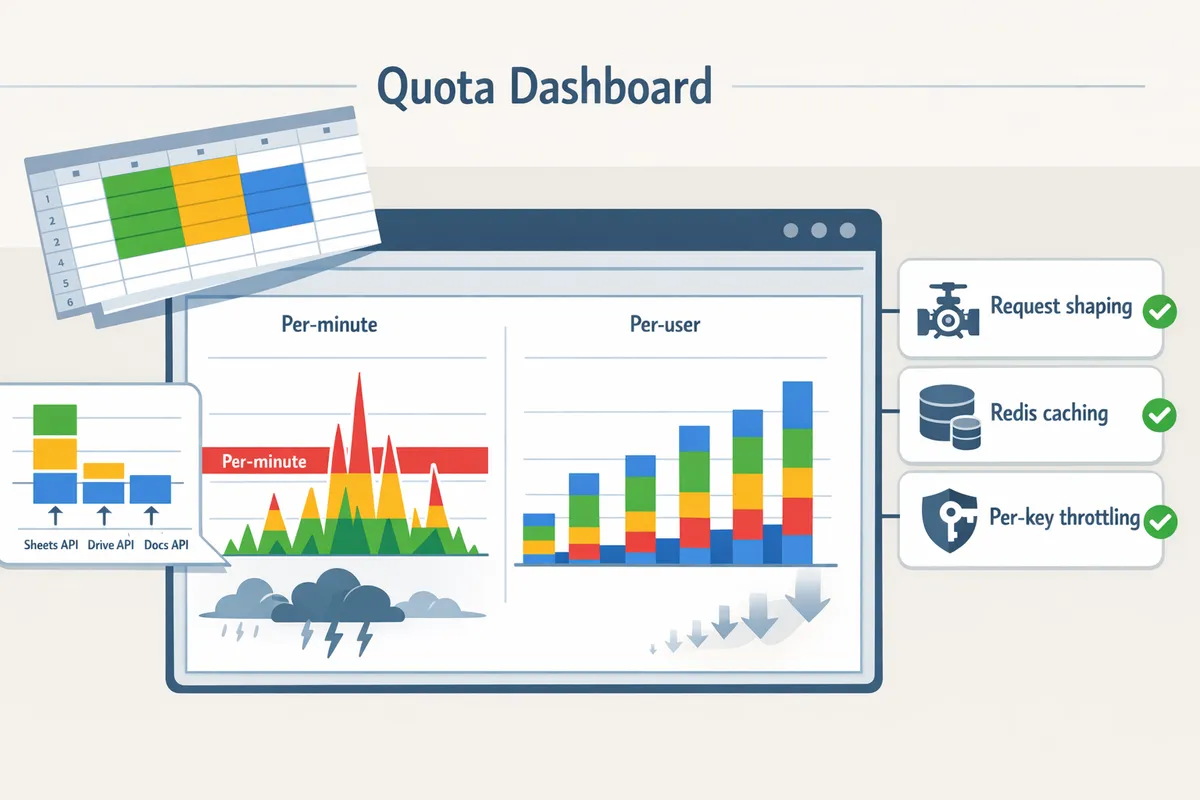
Request shaping, caching, and per-key throttling cut the frequency of 429s and stabilize user experience. These tactics lower raw Google Drive and Sheets call volume, reduce retry storms, and let teams meet business SLAs without firefighting. Sheet Gurus API provides built-in controls (API key scoping, configurable rate limits, optional Redis caching) so teams spend time on product features instead of building quota guardrails.
Use caching and request aggregation with Redis 🗄️
Caching and request aggregation cut redundant Sheets and Drive calls by serving repeated reads from a fast store. Cache list and read responses for short windows when freshness tolerates brief staleness; use longer caches for rarely changing reference tables and conditional caching for frequently edited rows. Place the cache check at the start of your request flow: check Redis, return cached JSON on hit, call the Sheets endpoint on miss, then populate cache. Aggregate simultaneous reads into a single backend fetch when many clients request the same sheet or range at once.
For dashboards that poll, cache TTLs between 5 and 30 seconds dramatically reduce spikes and average daily calls. For user edits, invalidate or update cache on write events rather than waiting for TTL expiry. Sheet Gurus API supports optional Redis caching so you can enable server-side cache checks without writing a custom cache layer.
💡 Tip: Cache list/read responses for 5–30 seconds for high-frequency dashboard queries to avoid spikes.
Apply API-level rate limiting and per-key scoping 🔐
Per-key and global limits prevent a single client from consuming the project quota and causing 429s for other customers. Configure per-API-key caps that match each client’s SLA and set a global project guardrail to protect background jobs. Map limits to business outcomes: slower-but-available for hobby tiers, tighter for free plans, higher burst windows for paid customers.
Practical steps:
- Assign separate API keys or service accounts for heavy background workers so their usage counts against different quotas.
- Configure per-key request-per-minute and burst windows based on expected usage patterns.
- Apply sheet-level permissions to stop broad scans from a single key.
DIY rate controls often cost engineers days of engineering time and introduce edge cases and compliance risk. Sheet Gurus API exposes fine-grained per-key limits and sheet permissions so teams can enforce quotas without building guardrails from scratch. For a comparison of per-project versus per-user limits, see our Google Drive vs Google Sheets API Quota (2026) analysis.
Use automatic retries with increasing wait and random delay ⏳
Retry policies that increase wait times and add jitter reduce synchronized retry storms and lower overall quota consumption. Implement retries as a staged policy: a short initial pause on the first 429, then progressively longer waits on repeated failures, and include random jitter so many clients do not retry at exactly the same time.
Suggested policy in plain language:
- Wait a short period on the first failure (for example, a few hundred milliseconds).
- If the request still fails, increase the wait time on each subsequent retry up to a capped maximum.
- Add random jitter to every pause and stop after a defined number of attempts, then queue or surface a user-friendly error.
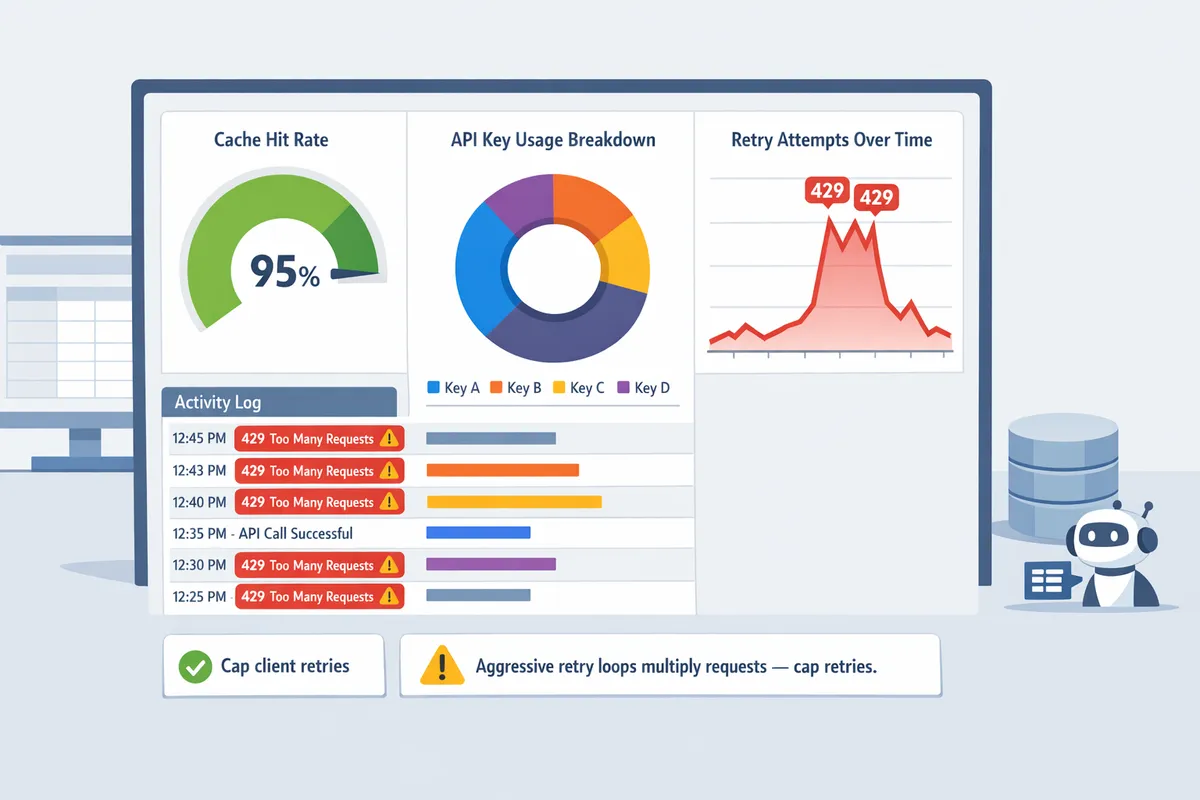
Aggressive immediate retries multiply requests and can exhaust quotas faster than the original traffic did. Monitor retry rates in your dashboards and throttle clients that cause repeated 429s. Sheet Gurus API surfaces 429 responses and usage logs so you can spot retry storms and adjust client-side policies quickly.
⚠️ Warning: Aggressive retry loops multiply requests and can exhaust quotas quickly. Monitor and cap retries to protect core users.
References and further reading: consult our Google Sheets API Quotas and 429s guide and calculator for sizing examples and the root-cause playbook with Cloud Monitoring dashboards to set alerts and visualize quota pressure.
How do you monitor usage, plan throughput, and request quota increases?
Monitor quota metrics, convert your workflows into quota-unit demand, and prepare a documented, staged request before asking Google for higher limits. This section shows exactly where to read per-minute and per-user charts in Cloud Console, how to translate common workflows into peak requests and quota units, and a step-by-step quota increase checklist you can submit. Follow the worked examples to size requests and configure alerts that stop surprises in production.
How to view and interpret quotas in Google Cloud Console 📊
Open Google Cloud Console's Quotas page to read per-project and per-user quota charts, current consumption, and error-rate series. Go to APIs & Services > Enabled APIs > Google Drive API > Quotas to find per-minute (project) and per-minute (user) charts, plus daily quota usage. Export those charts to Cloud Monitoring by creating metrics for request count, quota units consumed, and response-code 429; use the Metrics Explorer to visualize p50/p95/p99 minute windows. Create alerts on quota usage (warning at 70% sustained for 10 minutes, critical at 90%), rising 429 rate (alert if 429s exceed 0.5% of all requests in a 5-minute window), and sustained peak RPS (alert if average RPS >80% of limit for 10 minutes). Our website's dashboard and the linked Google Drive vs Google Sheets API Quota (2026) explain how per-user and per-project charts differ and when each matters. Sheet Gurus API also exposes per-key usage and error metrics so you can compare Cloud Console numbers with API-level usage on our dashboard.
Throughput calculator and worked examples (uploads, listings, edits) 🔢
A throughput calculator converts each workflow action into quota units and peak requests per second so you can size headroom and retries. Start by measuring a 24–72 hour production trace, then extract peak-minute counts (p95 and p99) for each operation type (reads, writes, uploads, list calls). Multiply each operation by its quota-unit cost (use sampled data from your traces or Google docs) and sum into a peak-minute quota units figure. Add 30–50% headroom to accommodate retries and rollout traffic.
Worked example 1 — 200 row reads per minute. 200 reads/min = 3.3 RPS. If a read equals 1 quota unit, request ~300 units/min to allow 50% headroom and retries. Specify whether traffic comes from many users or a single service account (per-user quota matters).
Worked example 2 — 50 simultaneous file uploads in 60s. 50 uploads/min = 0.83 RPS; if each upload maps to 8 quota units, peak is 400 units/min; request 600 units/min to include headroom and transient spikes. Ask for per-project increases if uploads originate from many users.
Worked example 3 — AI agent doing frequent small reads. Twenty agents each doing 30 reads/min => 600 reads/min (10 RPS); that requires per-minute capacity equal to the unit cost times 600, plus headroom. If reads concentrate on a single OAuth client, request per-user increases.
💡 Tip: Measure real unit costs by sampling request traces during a controlled load test and use p95 minute windows for sizing; this prevents under‑asking and repeated quota requests.
Reference our Sheets API Quotas and 429s: How to Increase Limits for a downloadable calculator and CSV templates you can drop into your monitoring tools. Sheet Gurus API's optional Redis caching reduces the number of Sheets/Drive calls your workflows need and directly lowers the quota units you must request.
How to request a quota increase and what to include 📨
Submit quota increase requests from Cloud Console and attach concrete traffic graphs, a mitigation plan, and a staged rollout schedule. Use APIs & Services > Quotas > Request Increase, then attach: (1) a 24–72 hour CSV of requests per minute with p95/p99 annotations; (2) current quotas and the exact new quotas you request (per-minute project, per-minute user, daily units); (3) a clear justification tied to business activity (expected users, peak workflows, and dates); (4) mitigation controls you will run (per-user throttles, client-side backoff, batching), and (5) contact info and a test account.
Follow this numbered checklist when you prepare the ticket:
- Export p95/p99 minute traces for the relevant API calls and label which OAuth client IDs or service accounts caused the peaks.
- Calculate requested quota using the throughput calculator and include a worksheet showing your math.
- Describe rollout: percentage ramp (10% → 50% → 100%), monitoring windows, and rollback criteria.
- Attach screenshots of Cloud Monitoring alerts and any rate-limiting rules you will apply.
- Provide escalation contacts and a test plan Google can use to validate traffic.
Google typically acknowledges requests within 24–72 hours and completes many increases within days, but large or unusual requests can take one to three weeks; paid support and a clear staged rollout can shorten review time. State you will use per-user throttling and caching so reviewers see reduced risk of sudden load spikes.
⚠️ Warning: Requests that lack traffic traces or a rollback plan often get rejected or asked for more information, which delays approval.
Link to our Google Sheets API 429s and Quotas (2026) root‑cause playbook for alert templates and ticket examples you can copy into Cloud Console.
When should you use Sheet Gurus API instead of building a DIY integration 🔁
Use Sheet Gurus API when you want a production-ready Sheets-backed REST API without building custom monitoring, rate limiting, and caching. For teams that must ship fast and avoid ongoing ops work, DIY integrations require building dashboards, maintaining rate-limiters, handling retry storms, and running caches—tasks that consume weeks of engineering and increase the chance of 429 outages during peaks. Sheet Gurus API provides API key management, configurable per-key rate limits, optional Redis caching, and MCP-ready endpoints for AI assistants to reduce those operational burdens. Our website's Sheet Gurus API typically achieves up to 99.9% uptime, and the product dashboard shows per-key usage so you can reconcile Cloud Console numbers with application-level metrics.
Choose Sheet Gurus API when any of the following apply:
- You operate many automated agents or AI assistants that cause concentrated traffic.
- You need fast time-to-market for internal apps or customer portals and cannot dedicate SRE cycles to quota ops.
- You want built-in per-key throttling plus optional Redis caching to cut Sheets/Drive calls.
Read more on our About Sheet Gurus API page and explore the API Reference to see how endpoints, auth, and rate limits map to your workflows.
Frequently Asked Questions
These FAQs provide concise operational answers teams use to prevent 429s and plan Drive/Sheets/Docs throughput. Use them as extractable guidance for monitoring, forecasting, and staging quota changes.
How do Google Drive API quotas differ from Sheets API quotas? 🧭
Drive quotas measure file-level and storage operations while Sheets quotas measure spreadsheet read/write operations and cell-processing costs. Drive counts actions like file create, copy, and metadata changes; Sheets counts API calls that read or modify ranges, formula recalc, and large cell updates. Use both quota charts together to diagnose an error: a spike in Drive write operations with stable Sheets reads points to file-level batching or copy jobs, while heavy cell writes implicate spreadsheet-intensive flows. Our comparison guide, Google Drive vs Google Sheets API Quota (2026), shows common overlap scenarios and how to map a 429 to the responsible API. Sheet Gurus API reduces surface area for these failures by centralizing client access, applying per-key limits, and lowering direct Drive/Sheets calls through caching.
What commonly triggers a 429 when using both Sheets and Drive APIs? 🚫
Bursty concurrent writes, high-frequency polling, and large batch operations commonly trigger 429s across Drive and Sheets. Example triggers: a background sync that writes 500 rows in parallel from multiple service workers, a dashboard polling every second for thousands of users, or a scheduled job that runs large batched copies and metadata updates. Check per-user and per-project charts in Cloud Console to separate user-level storms from global bursts. Our root-cause playbook, Google Sheets API 429s and Quotas (2026), shows how to trace a 429 to the precise operation and then apply rate shaping, batching, or caching. Sheet Gurus API's per-key throttling and optional Redis cache help prevent these common patterns from reaching Google quotas.
Can I predict when my app will hit quota limits? 📈
Yes. Convert expected user actions into quota units and model peak concurrency to estimate when quotas will be exhausted. Quota unit is a unit of measurement that maps specific Drive and Sheets operations to consumption costs. Practical steps: 1) Inventory common operations and map each to its quota unit cost (reads, writes, file copies). 2) Multiply by expected peak concurrency and peak window (for example, 300 concurrent users performing 5 writes in a 60-second window). 3) Run the numbers against per-minute and per-user quotas and set alerts at 70–80% usage. Use the calculator and forecasting approach in Google Sheets API Quotas and 429s: How to Increase Limits and Prevent Errors (2026 Guide + Calculator) to build a reproducible estimate.
How long should clients wait before retrying after a 429? ⌛
Clients should use a progressive wait strategy that increases delay on repeated 429s and adds random jitter to avoid synchronized retries. Start with a short base delay (for example, 1–2 seconds), double the wait on each consecutive 429 up to a reasonable cap (for example, 30–60 seconds), and add randomized jitter so many clients do not retry at exactly the same time. Respect any Retry-After guidance the API returns and reduce client write rates if retries continue. Sheet Gurus API surfaces rate-limit errors and supports configurable per-key limits so teams can tune client retry behavior while protecting Google quotas.
⚠️ Warning: Avoid fixed, simultaneous retry schedules across clients. Synchronized retries create retry storms that amplify quota exhaustion and extend outages.
Does Sheet Gurus API include built-in rate limiting and caching? 🔒
Yes. Sheet Gurus API provides configurable per-key and global rate limits plus optional Redis caching to reduce direct Google API calls and stabilize throughput. Configurable limits let you throttle noisy API keys without changing client code. Optional Redis caching stores frequent read responses so dashboards and automation pipelines hit Sheet Gurus instead of Google Sheets for repeated queries. For integration details and examples of read/write patterns, see the API Reference and About Sheet Gurus API documentation. Many teams stop recurring 429s by combining per-key throttling with short-lived cache entries for high-read, low-write endpoints.
How long do quota increase requests usually take and how should I stage rollout? ⏱️
Quota increase requests typically take anywhere from a few days to multiple weeks depending on requested scale, justification quality, and Google review queues. Prepare a staged plan: 1) Measure baseline usage and identify peak windows. 2) Implement rate limits and caching to show controlled traffic patterns. 3) Request a modest increase first and demonstrate stable behavior under the new cap. 4) Gradually expand traffic and submit follow-up requests if needed. Include monitoring screenshots and a roll-back plan in your request to shorten review time. Our guide, Google Sheets API Quotas and 429s: How to Increase Limits and Prevent Errors (2026 Guide + Calculator), contains a sample request checklist and a recommended staging cadence used by small teams moving from prototype to production.
Take focused steps now to stop 429s and protect your automations.
The core takeaway is simple: map quotas, reduce unnecessary calls, and apply rate controls before errors hit production. A single Google Drive API rate limit rejection can stall an automation that serves hundreds of users, so prioritize triage workflows and quota-aware design. For a side-by-side on per-minute and per-project caps, read our comparison on Google Drive vs Google Sheets API quota. For root-cause playbooks and alerting templates, see the Sheets API 429s and Quotas guide.
💡 Tip: Start by applying per-key rate limits and a short-term cache; these two changes often stop most 429 incidents within hours.
Sheet Gurus API turns Google Sheets into production-ready RESTful JSON APIs in minutes, requiring no backend code. Create your first endpoint with the getting-started guide and move the highest-impact practice (rate limiting or Redis caching) into place without building a custom service. Start a 14-day free trial to test quota controls against your real workload.
Subscribe to our newsletter for implementation tips, quota calculators, and alert templates.