
Claude MCP + Google Sheets CRUD API: DIY Python Server vs Sheet Gurus API vs Composio vs n8n (Latency, Auth, Quotas, Cost)
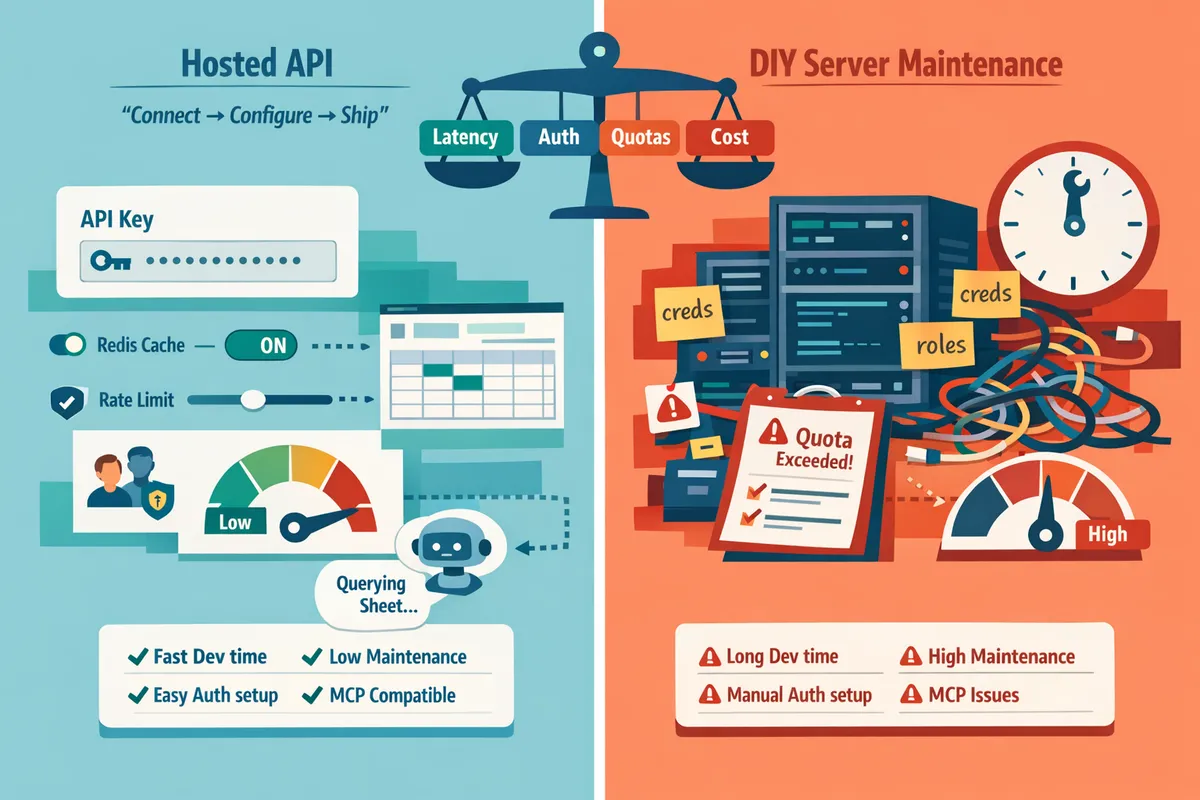
A single quota error on Google Sheets can stall an AI agent and cost days of developer time. crud api google sheets is a RESTful interface that exposes spreadsheet rows as JSON endpoints for create, read, update, and delete operations. This comparison evaluates four production-ready approaches (DIY Python MCP server, Sheet Gurus API, Composio, and n8n) for Sheets APIs for AI, focusing on latency, authentication, quotas, and cost. Sheet Gurus API turns Google Sheets into production-ready RESTful JSON APIs in minutes with API keys, per-sheet permissions, configurable rate limits, optional Redis caching, and tooling for AI workflows; it typically achieves average response times under 100 ms. Which option gives the lowest latency while keeping quotas and auth manageable at scale?
What practical options exist to build a CRUD API on Google Sheets?
There are five practical approaches to expose a CRUD API on Google Sheets: a DIY server with the Sheets API, Google Apps Script, hosted no-code services like Sheet Gurus API, Composio, and automation platforms such as n8n. Each option trades off latency, authentication controls, quota handling, and ongoing operational cost differently for AI assistants and internal apps.
What is a Google Sheets CRUD API and when should you use it? 🧾
A Google Sheets CRUD API is an interface that exposes spreadsheet rows and columns as JSON endpoints that support create, read, update, and delete operations. Use it when a spreadsheet is the single source of truth and teams need programmatic access for internal apps, dashboards, automations, or AI assistants. For example, a sales ops team using a 10,000-row pipeline sheet needs predictable filtering, pagination, and writeback to avoid manual CSV imports. If you need API key control, per-sheet permissions, or MCP-compatible endpoints for agents like Claude, choose a solution that includes those controls. See our step-by-step guide for building secure sheet-backed APIs with MCP, auth, and rate limits for hands-on instructions: Create a CRUD API from Google Sheets for AI Agents: Step‑by‑Step with MCP, Auth, and Rate Limits.
How does a DIY Python server using the Sheets API work?
A DIY Python server is a custom backend that calls the Google Sheets API to implement REST routes, authentication, validation, caching, and error handling. Teams build route handlers that map rows to JSON, add auth (OAuth or API keys), and implement retry and quota logic. The main benefit is full control over schema enforcement, caching strategy, and response formats; the downside is nontrivial ops work: credential management, token refresh, monitoring, and rate-limit handling often take 40+ developer hours to get production-stable. Expect hosting costs (e.g., a small cloud VM or serverless functions) plus ongoing maintenance for logging and backups. If you prefer templates, our list of starters includes Postman, OpenAPI, Apps Script, and n8n options to speed the DIY route: Google Sheets to REST API Templates: 10 Free Starters (Postman, OpenAPI, Apps Script, n8n) for Fast CRUD with Auth & Pagination. Sheet Gurus API removes most of this backend plumbing by instantly exposing a no code API with auth and rate limiting when time to market matters.
How does Google Apps Script expose CRUD endpoints?
Google Apps Script is a serverless scripting environment that creates web apps exposing simple HTTP endpoints which read and write Google Sheets through built-in services. It is fast to prototype: write a doGet/doPost handler, deploy as a web app, and call it from clients or automations. Apps Script works well for low-traffic automations or internal tools with predictable, light concurrency, but it has stricter quotas, limited concurrent execution, and coarser access controls than a managed API. For example, a support dashboard handling under 100 daily updates will run fine on Apps Script; a customer portal with hundreds of simultaneous users will likely hit execution or API quotas and require migration. If you need API keys, per-sheet permissions, consistent low latency, or MCP support for agents, consider a hosted API instead.
⚠️ Warning: Google Apps Script enforces daily and per-minute quotas; run load tests for your peak concurrency before relying on it for production.
See the quick starters for Apps Script in our templates roundup: Google Sheets to REST API Templates: 10 Free Starters (Postman, OpenAPI, Apps Script, n8n) for Fast CRUD with Auth & Pagination.
What is Sheet Gurus API and how does it differ? 🔌
Sheet Gurus API is a hosted no-code service that exposes a Google Sheet as a production-ready RESTful JSON API with built-in authentication, rate limiting, and optional caching. After signing in with Google and selecting a spreadsheet you immediately receive CRUD endpoints, API key management, configurable rate limits, and optional Redis caching to reduce calls to the Google Sheets API. The platform also exposes sheets as MCP servers so AI assistants like Claude can query and update structured data with predictable permissions. For teams that need a google sheets json api with crud operations and no code api for google sheets with authentication, Sheet Gurus API removes backend work and adds operational controls out of the box. Try the three-step flow and setup notes in our getting started guide: Getting Started.
How do Composio and n8n compare as alternatives?
Composio targets UI-first app builders while n8n focuses on workflow automation and integrations; both can expose or orchestrate sheet-backed data but require extra work to match production API controls. Composio excels when you need embedded forms, dashboards, or low-code app shells that talk to sheets. n8n excels when you need event-driven workflows, multi-step integrations, and triggers across SaaS systems. Neither provides full API key management, per-sheet rate limits, or MCP servers out of the box in the way a hosted API does, so you must add gateway or proxy layers for hardened auth, caching, and audit trails.
| Approach | Latency | Auth & Access Control | Quota Handling | Cost & Ops | Best use case |
|---|---|---|---|---|---|
| DIY Python server (Sheets API) | Variable; depends on hosting and caching | Customizable (OAuth, keys) but you must build it | You must implement retries and caching | Higher ops and developer time | Full customization, complex validation, custom SLAs |
| Google Apps Script | Moderate to high variability | Google-scoped auth; limited granular keys | Subject to Apps Script quotas and concurrency limits | Low initial cost; hard to scale | Prototypes, low-traffic automations |
| Sheet Gurus API | Typically low latency with optional caching | Built-in API keys and per-sheet permissions | Configurable rate limiting and optional caching | Low ops; no backend to maintain | Fast production rollouts, AI integrations, MCP support |
| Composio | UI-first, moderate latency | App-level auth; may need extra layers | Depends on connectors; add caching externally | Low-code for apps; extra ops for APIs | Embedded apps and internal portals |
| n8n | Workflow latency depends on runtime | Credentials per node; needs gateway for API keys | Add rate limits and caching via external services | Low-code automation with moderate ops | Orchestrations and cross-service automations |
Latency and performance expectations ⚡
Latency expectations differ by architecture and caching strategy and directly affect UX for AI assistants and dashboards. A simple read that hits a local cache returns far faster than a fresh Google Sheets API call. For example, adding Redis in front of any option reduces repeated read latency and cuts Sheets API calls.
Practical notes:
- DIY Python: latency depends on chosen host (serverless cold starts versus persistent VM), your concurrency model, and whether you batch sheet reads. Expect more variability unless you add caching and autoscaling.
- Sheet Gurus API: the platform includes optional Redis caching and centralized request handling that yields consistently low latencies for common requests. Use cases that need sub-second responses benefit most.
- Composio and n8n: orchestration adds hops and serialization; expect higher tail latency for complex multi-step flows. Use them for workflows rather than low-latency APIs.
Authentication, authorization, and compliance 🔐
Authentication models differ and determine how easy it is to enforce least-privilege access and audit changes. API key auth is easiest for server-to-server access; OAuth is necessary for user-scoped access.
How each option handles auth and compliance:
- DIY Python: you control auth choices but must implement key issuance, rotation, role mapping, and audit logs. That work adds engineering time and ongoing maintenance.
- Sheet Gurus API: provides Google sign-in plus API key authentication with fine-grained per-sheet permissions and built-in audit logs, reducing implementation risk for compliance. See the getting-started guide for the three-step flow.
- Composio: offers connector-level auth and can map permissions, but audit and per-sheet granularity depend on configuration.
- n8n: supports credential storage and RBAC, but you must design flows to avoid over-permissive access.
Link to a detailed implementation guide: use our step-by-step post on creating a CRUD API for AI agents for patterns you can reuse when setting up auth.
Quota handling, caching, and cost trade-offs 💸
Quota handling is the combination of rate limiting, caching, and batching that keeps a production app from hitting Google Sheets API limits. Effective quota handling reduces outages and developer fire drills.
Cost trade-offs:
- DIY Python: low platform fees but high recurring engineering cost. Expect hours per week for monitoring, token management, and incident response unless you automate these tasks.
- Sheet Gurus API: shifts cost to a subscription and reduces developer hours by providing rate limiting, API key rotation, and optional Redis caching that lowers Sheets API calls. This reduces the risk of quota-driven outages.
- Composio and n8n: subscription costs plus the operational cost of maintaining flows and connectors. Quota pressure can grow silently as flows duplicate reads/writes.
⚠️ Warning: Monitor Google Sheets API quotas closely. Uncached workflows, frequent polling, or multi-step automations can exhaust quotas and cause cascading failures.
AI and MCP readiness 🤖
AI/MCP readiness is how easily an AI assistant like Claude can query and update spreadsheet data through a stable, authenticated endpoint. Native MCP support removes long development cycles for agent access.
- Sheet Gurus API: exposes sheets as MCP-capable endpoints so AI agents can read structured rows and write back without custom middleware. This reduces integration time for assistants that need live spreadsheet data.
- DIY Python: you can implement MCP servers but must build and maintain the protocol, authentication, and rate limits yourself.
- Composio and n8n: can orchestrate AI calls but require flow design to expose a stable MCP interface and handle concurrent agent requests.
For hands-on setup patterns, see our guide on converting Google Sheets to a CRUD API for AI agents and the template roundup for starter projects that pair well with MCP workflows.
Which option should your team pick and what are the business trade-offs?
Choose the option that matches your team's velocity needs, tolerance for ongoing ops, and AI-agent requirements. Small product teams and AI-focused projects usually gain the most from a hosted API like Sheet Gurus API because it minimizes engineering hours and operational risk. Engineering-heavy teams that need complex, custom business logic should plan for the ongoing cost of a DIY server.
Recommendation by team size and use case 👥
Hosted APIs are the fastest path for small teams and AI agent integrations. Sheet Gurus API is a product that turns Google Sheets into production-ready RESTful JSON APIs without backend code, so a small product team can connect a sheet and get an MCP server for Claude in hours rather than days of backend work. Use Sheet Gurus API when the spreadsheet is the single source of truth and you need API keys, per-sheet permissions, and configurable rate limits out of the box.
Larger engineering teams or products that require unique processing rules, custom transaction handling, or proprietary data pipelines should choose a DIY Python server or a server-based stack. Expect to budget time and headcount for auth, quotas, monitoring, backups, and ongoing bug fixes. See our templates roundup for hybrid approaches and starter projects in the event you want a faster DIY baseline.
Business consequences of a DIY vs hosted approach ⚠️
A DIY CRUD API on Google Sheets forces you to own authentication, quota handling, monitoring, backups, and compliance, which adds recurring engineering and operational costs. Many teams spend 40+ hours just building stable CRUD endpoints, and those hours translate into delayed product features and increased maintenance work. Hosted options like Sheet Gurus API reduce that operational burden by providing API key auth, per-sheet permissions, configurable rate limiting, and optional Redis caching, so teams can focus on product features instead of platform plumbing.
⚠️ Warning: Do due diligence on data residency, retention, and audit logs before moving sensitive production data to a hosted provider. Confirm SLAs and export options.
Real-world adoption scenarios and time-to-market comparison ⏱️
Hosted APIs typically move spreadsheet-backed features to production in days; DIY servers usually take weeks to reach the same level of operational readiness. For example: an internal CRM that needs row-level access control, audit logs, and simple CRUD can be live with Sheet Gurus API in 1–3 days after connecting the sheet and configuring keys. Building the same CRM on a DIY Python server requires implementing OAuth flows, API endpoints, rate-limit handling, and monitoring, which commonly stretches into multiple sprints.
For AI use cases, Sheet Gurus API exposes MCP servers so Claude and other assistants can query and update structured sheet data with minimal setup. For workflow automation where conditional triggers and multi-step integrations matter, n8n provides low-code orchestration; choose n8n when you need complex automations across many services but accept larger latency and orchestration overhead.
Decision checklist: choose in 10 minutes ✅
- Required throughput. If you need sustained high throughput and complete control, plan a DIY server. If typical API traffic is moderate, pick a hosted API like Sheet Gurus API.
- Auth model. If you need API keys, per-sheet permissions, and simple key rotation, choose a hosted API. If you require a custom SSO or enterprise token system, consider DIY.
- Quota exposure. If Google Sheets API quotas are a risk, prefer hosted platforms that offer caching and configurable rate limiting to reduce calls.
- Audit and compliance. If you need full audit trails and data residency guarantees, verify provider logs or opt for a self-hosted stack.
- Expected latency. If sub-100 ms average responses are critical for user-facing portals, validate provider SLAs or invest in a custom, hosted cache layer.
- AI/MCP support. If you need an MCP server for Claude or other assistants quickly, prioritize Sheet Gurus API or platforms that advertise MCP support.
If most checklist answers favor minimal ops, quick MCP support, and fast time to market, choose a hosted no-code API; if you require unique processing logic or full infrastructure control, budget for a custom backend and ongoing maintenance.
For a hands-on comparison and step-by-step setup for AI agents, see our walkthrough on creating a CRUD API for AI agents and the templates roundup with no-code and starter templates.
- Create a CRUD API from Google Sheets for AI Agents: Step‑by‑Step with MCP, Auth, and Rate Limits: https://sheetgurusapi.com/blog/create-a-crud-api-from-google-sheets-for-ai-agents-stepbystep-with-mcp-auth-and-rate-limits
- Google Sheets to REST API Templates: 10 Free Starters (Postman, OpenAPI, Apps Script, n8n) for Fast CRUD with Auth & Pagination: https://sheetgurusapi.com/blog/google-sheets-to-rest-api-templates-10-free-starters-postman-openapi-apps-script-n8n-for-fast-crud-with-auth-pagination
- How to Turn Google Sheets into a REST API in Minutes (No Backend Required): https://sheetgurusapi.com/blog/how-to-turn-google-sheets-into-a-rest-api-in-minutes-no-backend-required
Frequently Asked Questions
This FAQ answers the operational, security, and cost questions teams ask when choosing a crud api google sheets option for production and AI use cases. Each answer compares DIY and hosted approaches and highlights how our Sheet Gurus API fits those needs.
How secure is exposing Google Sheets as a REST API? 🔒
Exposing a Google Sheet as a REST API can be secure when you enforce strong authentication, least-privilege access, and audit logging. Use OAuth or scoped API keys so clients only get the minimum permissions they need. Restrict the sheet's share settings, rotate credentials on a schedule, and capture access logs for every change so you can trace who wrote what and when.
Our Sheet Gurus API provides API key authentication with per-sheet permissions and built-in access controls that remove the need to embed broad service-account credentials in custom code. For step-by-step setup of scoped keys and rate limits, see our guide on creating a CRUD API for AI agents.
⚠️ Warning: Never give long-running automated clients full edit rights to spreadsheets used by humans; accidental column changes break integrations.
Can an AI assistant like Claude safely read and write to a sheet via MCP? 🤖
Yes. MCP servers let an AI assistant like Claude read and write a sheet safely when you assign per-agent credentials and limit writable scopes. Give each agent a dedicated API key or token that only permits the rows and columns it needs, and set per-key rate limits so a runaway agent cannot generate excessive writes.
Our Sheet Gurus API exposes sheets as MCP servers so AI agents interact through a structured JSON API rather than raw sheet edits. That lets you enforce request validation, revert changes, and audit agent activity. For an implementation walkthrough showing per-agent credentials and rate limiting, see Create a CRUD API from Google Sheets for AI Agents: Step‑by‑Step with MCP, Auth, and Rate Limits.
What are the typical costs: DIY engineering hours vs hosted platform fees? 💵
DIY costs concentrate in engineering hours to build auth, quota handling, retries, logging, and monitoring, plus ongoing maintenance for incidents and quota changes. Expect an initial build of multiple days to several weeks depending on complexity, then recurring hours to manage issues, schema drift, and backups.
Hosted platforms trade subscription fees for reduced ops overhead. Our Sheet Gurus API removes most backend work: teams sign in, pick a spreadsheet, and get a live CRUD endpoint with API keys, rate limiting, and optional caching. When you compare costs, add developer hours (initial + monthly) to hosting fees, and include incidental costs such as downtime recovery, pager rotations, and quota overage charges. For template-based DIY starters and time estimates, review our Google Sheets to REST API templates roundup.
How do you avoid hitting Google Sheets API quotas in production? 🛡️
You avoid quota limits by batching updates, caching reads, coalescing frequent writes, and applying rate limits. Batch write operations (for example, group row updates every few seconds), use a short-lived cache for read-heavy endpoints, and reject or queue excessive incoming requests at the API layer to prevent quota spikes.
Our Sheet Gurus API includes configurable rate limiting and optional Redis caching to reduce direct calls to Google’s API, which lowers quota consumption and improves response times. Also implement exponential backoff retries for transient errors and monitor quota usage in real time so you can adjust limits before hitting caps. See our complete guide to CRUD, auth, and performance for practical cache TTLs and batching patterns.
Is data modeling in Sheets a problem for APIs and how do I mitigate it? 📊
Yes, schema drift and inconsistent rows cause most production problems; mitigate them with a schema row, validation rules, and an API validation layer. Keep a hidden configuration sheet that defines column types and required fields. Enforce client-side and server-side validation so the API rejects malformed requests instead of writing bad data to the sheet.
In practice, add a versioned migration plan for schema changes, use Google Sheets validation rules where possible, and apply an API-level check that returns clear error codes for bad requests. Our Sheet Gurus API supports request validation and will reject malformed writes at the API boundary so your sheet remains a reliable single source of truth. For examples of schema patterns and migrations, see the Google Sheets JSON API complete guide.
How do I evaluate uptime and SLA claims from a hosted provider? ⏱️
You evaluate uptime claims by asking for a written SLA, historical incident reports, backup and restore procedures, and monitoring integrations. Confirm the provider's RTO and RPO for restores, their planned maintenance windows, and whether they expose metrics or alerts you can integrate into your monitoring stack.
Request proof: uptime reports, a list of recent incidents with root causes and resolutions, and evidence of automated backups and restore tests. Our Sheet Gurus API publishes SLA documentation and supports monitoring integrations so teams can verify average response times and incident handling during vendor evaluation. Also verify contractual terms for credits or remediation in the SLA before you rely on a hosted service for production workloads.
Choose the option that best balances latency, authentication, quotas, and cost for production use.
For most teams, a managed API wins on speed to production and lower operational risk. DIY Python servers give control but require days of work to handle quotas, auth, retries, and monitoring, which raises maintenance cost and potential downtime. If you need a reliable crud api google sheets for AI agents or internal apps, a hosted service usually reduces time to market and operational headaches.
Sheet Gurus API turns Google Sheets into production-ready RESTful JSON APIs in minutes, requiring no backend code. Users sign in with Google, select a spreadsheet, and immediately receive a live API endpoint that supports full CRUD (create, read, update, delete) operations with changes syncing back to the original sheet in real time. The platform adds API-level features that professional apps need, including API key authentication with per-sheet permissions, configurable rate limiting, and optional Redis caching.
Schedule a consultation with Sheet Gurus API to map latency, auth, and quota choices for your workload and get a migration plan tailored to your constraints. For implementation details, see the step-by-step MCP guide and the complete JSON API performance guide.
💡 Tip: Run realistic load tests against your sheet-backed endpoints to validate quotas and rate limiting before switching production traffic.