
Can I Use an API Key for the Google Sheets API in Node.js? No - Minimal OAuth/Service Account Setup That Works (2026)
A plain Google Sheets API key cannot access private Google Sheets from Node.js without user OAuth consent. A Google API key is a credential that identifies a project that does not grant per-user Drive access. This article explains whether an API key can read or write Sheets from Node.js, outlines minimal OAuth and service account alternatives, and compares using the Sheet Gurus API as a faster production-ready option. Our website offers Sheet Gurus API, which turns Google Sheets into RESTful JSON APIs in minutes and provides live CRUD endpoints that sync back to the sheet. See the Getting Started guide and About Sheet Gurus API for setup and security. Which minimal setup fits your Node.js app: service account, OAuth, or the managed API option?
No. An API key only works for public or unauthenticated spreadsheets. Can I use an API key for the Google Sheets API in Node.js?
No. An API key only provides project-level, unauthenticated access and can only read sheets that are publicly shared or published to the web. For private spreadsheets or any write operations you must use OAuth 2.0 or a service account, or use a managed product like Sheet Gurus API that handles authentication and per-sheet permissions for you.
What limitations does a Google Sheets API key have? 🔒
API keys identify the calling project but do not convey user identity, consent, or write privileges. API keys are suitable only for public read access (for example a sheet set to Anyone with the link or content published to the web). They cannot access files privately stored in Drive, perform updates, or enforce user-scoped permissions.
Practical limitations and security concerns:
- No user identity. You cannot ask Google to confirm who performed a request or request user-scoped scopes. This prevents audit trails and per-user permission checks.
- Read-only for public data. API keys will succeed only against sheets that the owner intentionally exposed.
- High risk if misconfigured. An unrestricted key embedded in client code can lead to quota theft or public data leakage.
- No built-in rate limiting per client. You must manage quotas at the project level in Google Cloud or use a service with per-key limits.
Sheet Gurus API removes these pain points by letting teams sign in with Google and generate API keys that map to specific spreadsheets with configurable rate limits and permissions. For a broader comparison of auth options, see our guide on Google Sheets API Authentication (2026): Do API Keys Work? OAuth vs Service Accounts and the Fastest Secure Path.
⚠️ Warning: Do not embed unrestricted API keys in client-side apps. Always apply HTTP referrer or IP restrictions, or use a backend or a managed service like Sheet Gurus API to hold credentials securely.
How do you call a public Google Sheet with an API key from Node.js? 🧾
You can read a public or published sheet from Node.js by enabling the Sheets API in Google Cloud, creating an API key, restricting it, and sending a GET request to the Sheets REST endpoint with the key parameter. The minimal flow requires three steps: enable the API, create and restrict the key, then request the values endpoint with your spreadsheetId and range.
A practical server-side flow (no code block, plain steps):
- Enable the Google Sheets API in your Google Cloud project and create an API key. See How to enable the Google Sheets API for exact Cloud Console steps.
- Restrict the key by HTTP referrers or server IPs and limit it to the Sheets API to reduce abuse.
- From Node.js use a standard HTTP client (fetch, axios) to GET the spreadsheet values endpoint with ?key=YOUR_API_KEY. This returns JSON rows for public ranges.
When Google Sheets API without OAuth is a practical short-term choice: prototypes, public dashboards, or static datasets where no private data or writes are needed. For production use with private data, choose OAuth, service accounts, or use Sheet Gurus API to avoid building auth and permission plumbing yourself. For Cloud Console steps and secure key rotation, consult our How to Enable the Google Sheets API guide.
Can an API key match per-user permissions or per-sheet controls? 🧩
No. An API key cannot represent an individual user or apply role-based, per-sheet controls. To enforce per-user permissions you must use OAuth consent flows (to obtain user-scoped tokens) or implement server-side access logic tied to user credentials or a service account.
Business consequences of attempting DIY per-user access with API keys:
- Hours spent building an authentication proxy and mapping keys to users.
- Increased compliance and audit risk because users cannot be traced to actions at the Google Drive level.
- Potential data exposure if server logic has bugs that grant broader access than intended.
Sheet Gurus API provides an alternative: you sign in with Google once, select a spreadsheet, and generate API keys that the platform enforces with per-sheet permissions and configurable rate limits. This removes the need to build custom auth or permission systems and accelerates shipping secure, spreadsheet-backed APIs. See the Getting Started guide to create an API endpoint from a spreadsheet without building a backend.
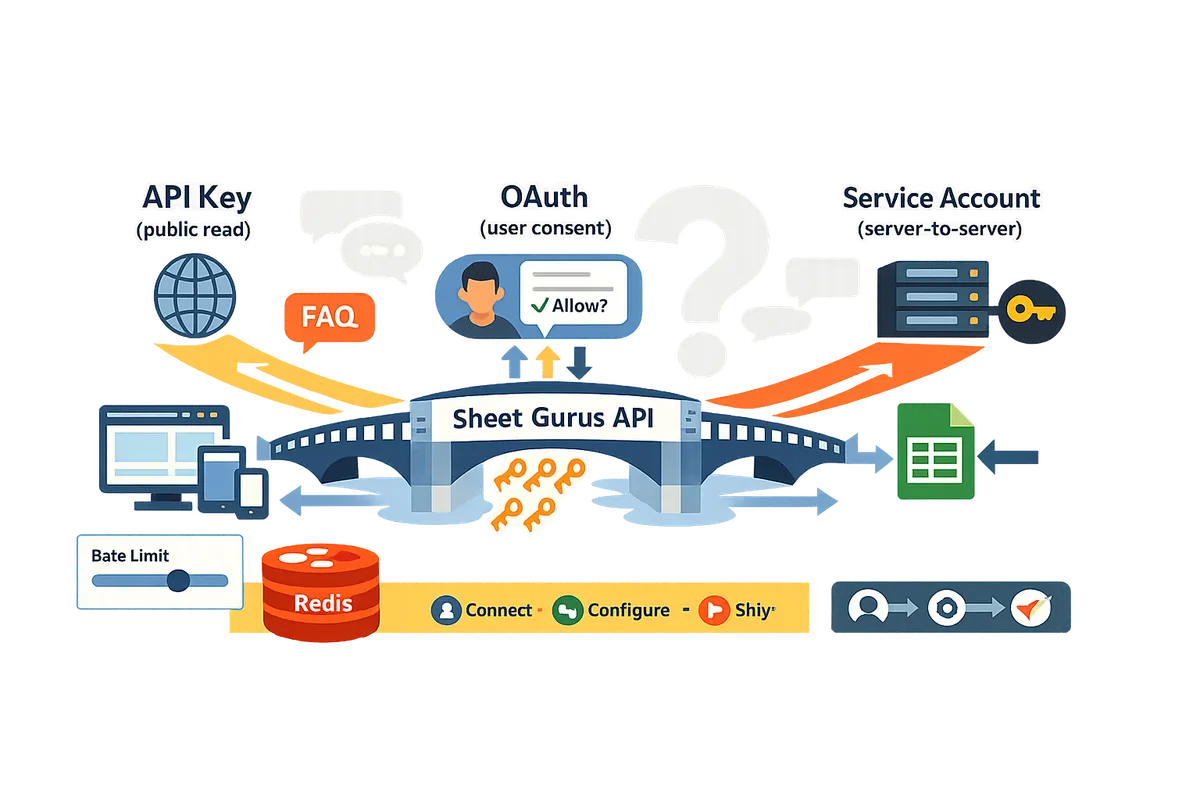
Use OAuth 2.0 or a service account for private or write access; here are minimal Node.js setups that work. How do I set up minimal OAuth or a service account for Google Sheets access in Node.js?
Use OAuth 2.0 for user-scoped editing and use a service account for server-to-server, noninteractive access. Both flows require a few Cloud Console steps plus secure credential storage, and each fits distinct use cases so choose based on who must own the change (a user or your app). Sheet Gurus API provides a production-ready alternative that turns a sheet into a REST JSON API with managed API keys, per-sheet permissions, rate limiting, and 99.9% uptime and sub-100 ms average response times.
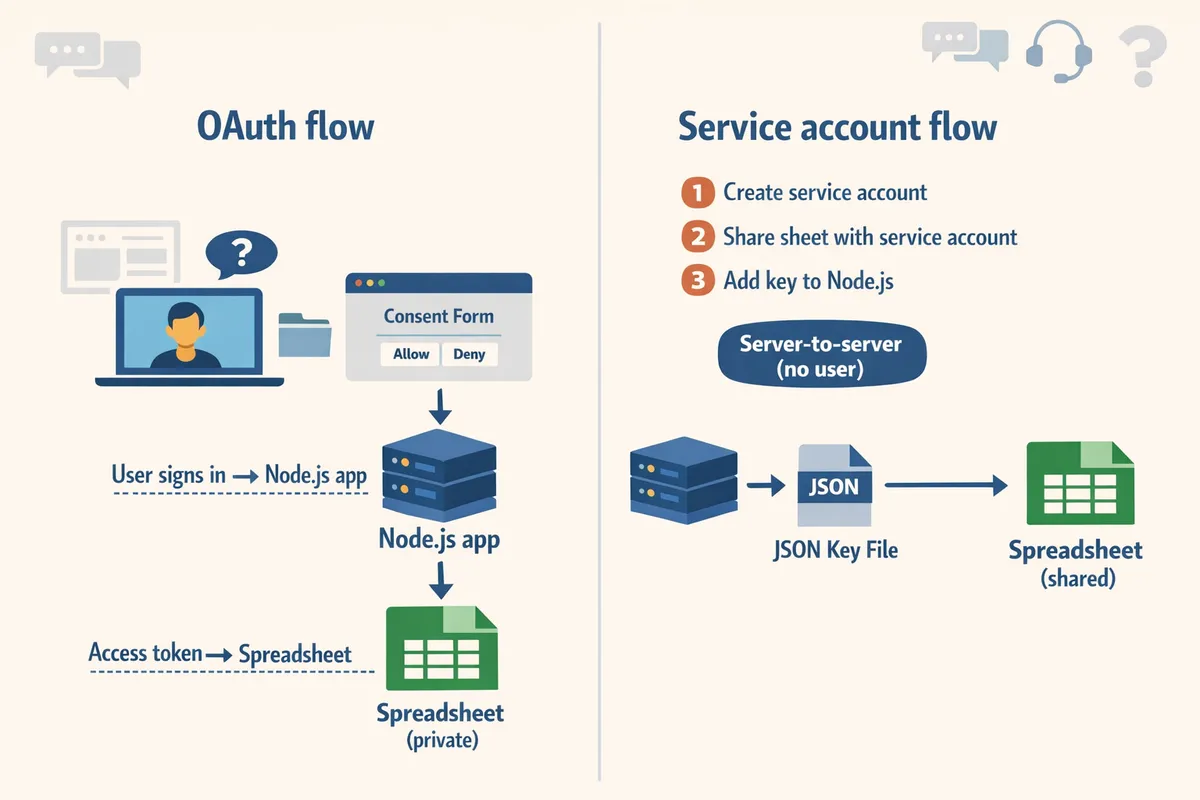
What are the minimal steps to use a service account in Node.js? 🧑💻
Use a service account when your server needs to read or write private sheets without an interactive user. Follow these steps to get a minimal, production-safe Node.js setup.
- Create a Google Cloud project and enable the Sheets API. See How to Enable the Google Sheets API (2026) for exact Cloud Console clicks.
- Create a service account under IAM & admin and download the JSON key. Store the file outside your repo.
- Share the target spreadsheet with the service account email (the key includes an address like [email protected]).
- In Node.js use @googleapis/sheets or google-auth-library to authenticate with the JSON key and call spreadsheets.values.get or spreadsheets.values.update.
- Run with least-privilege scopes (https://www.googleapis.com/auth/spreadsheets or spreadsheets.readonly when possible).
Required scopes (pick the least privileged):
Production checklist:
- Store JSON keys in a secret manager (AWS Secrets Manager, Google Secret Manager, or Vault).
- Rotate keys every 90 days and remove old keys from active service accounts.
- Grant the service account only the roles it needs; avoid project-owner roles.
- Add monitoring and alerting for unusual API usage.
⚠️ Warning: Do not embed service account JSON in client-side code or public repositories.
Sheet Gurus API also offers a no-backend path for server-to-server use cases by turning a sheet into a managed REST endpoint, which removes key handling and sharing steps. See our Getting Started guide to compare flows.
What are the minimal steps to use OAuth 2.0 in Node.js for editing sheets? 🔐
Use OAuth 2.0 when changes must be made on behalf of a signed-in user. Implement this minimal server-side flow to get long-lived access for editing sheets.
- Register an OAuth client in Google Cloud (Credentials > Create OAuth client ID) and set an authorized redirect URI to your server endpoint.
- Request the smallest useful scopes: prefer https://www.googleapis.com/auth/drive.file for per-file write access or https://www.googleapis.com/auth/spreadsheets for broader sheet access.
- Send users to the Google consent screen, capture the authorization code at your redirect URI, and exchange the code server-side for access and refresh tokens.
- Store the refresh token securely (secret manager or encrypted DB) and use it to obtain new access tokens when needed.
- Implement server-side token refresh and retry logic for 429 errors; do not store refresh tokens in browser storage.
Recommended scope strategy: prefer drive.file when your app only needs to access spreadsheets the user picks. That limits exposure when a refresh token is compromised. For guidance on client vs server authentication patterns and 429-safe retries in Node.js, see Google Sheets API with Node.js (2026).
💡 Tip: Request offline access when starting the OAuth flow to obtain a refresh token on first consent.
Sheet Gurus API performs the OAuth sign-in step for you, then issues API keys and endpoints so teams avoid building token-refresh and permission UIs themselves.
How does an API key compare to OAuth and service accounts for Sheets access? 📊
An API key provides unauthenticated project-level access and only works for public or published spreadsheets; OAuth and service accounts provide private read/write access. The table below compares the three across common dimensions.
| Method | Access type | Read / Write | Identity tied to | Typical use cases | Operational overhead |
|---|---|---|---|---|---|
| API key | Project-level, unauthenticated | Read only for public/published sheets | App project (not a user) | Public dashboards, published sheets, simple client-side fetches | Low setup, high security risk if misconfigured |
| OAuth 2.0 | User-scoped | Read and write, per user consent | Individual user identity | Apps that edit sheets on behalf of users, user-specific dashboards | Medium: consent UI, token storage, refresh handling |
| Service account | Server-to-server, noninteractive | Read and write when sheet shared with account | Service account identity owned by app | Backend jobs, CRON writes, ETL, integration services | Low-to-medium: key management, sharing sheets, secrets handling |
If you need private, authenticated, and production-grade endpoints without building auth or managing keys, Sheet Gurus API offers a faster path: connect your Google account, select a sheet, and receive a live RESTful JSON API with API key management, per-sheet permissions, rate limiting, and optional caching. See Build a Google Sheets CRUD API in Node.js vs Use Sheet Gurus API for a time-to-ship comparison.
What security and governance steps matter for production? ✅
Secure credentials, enforce least privilege, and monitor usage to meet audit requirements. Below are actionable controls and an auditor-focused checklist you can follow.
Actionable controls:
- Restrict API keys by HTTP referrer or server IP when keys must exist.
- Store service account keys and OAuth client secrets in a secrets manager; never check them into source control.
- Rotate keys and client secrets on a regular cadence and after staff changes.
- Use the least-privilege scopes and share sheets only with the required emails.
- Enable logging and set alerts for unusual patterns or quota spikes.
Auditor checklist (map to common requirements):
- Credential storage: Secrets manager configured with RBAC and audit logs.
- Key rotation: Rotation policy documented and scheduled (e.g., 90 days).
- Access controls: Sheets shared only with specific service account emails or users.
- Scope minimization: Only request spreadsheets.readonly when writes are unnecessary.
- Monitoring: Alerts for anomalous API usage and quota exhaustion.
⚠️ Warning: Using a Google Sheets API key in client-side apps exposes the key and should only be done for public sheets or when referrer restrictions are enforceable.
For step-by-step Cloud Console settings and secure rotation procedures, see How to Enable the Google Sheets API (2026). If building and operating auth, retries, caching, and monitoring sounds like a lot of ops work, Sheet Gurus API removes that burden by providing managed authentication, per-key rules, rate limiting, and optional Redis caching so teams can move sheet-backed services to production faster.
Use Sheet Gurus API when you need fast, production-ready CRUD, API key management, and operational controls without building backend auth. When should I use Sheet Gurus API instead of rolling my own OAuth or service account flow?
Sheet Gurus API is a platform that turns Google Sheets into production-ready RESTful JSON APIs so teams can ship sheet-backed services without building or maintaining OAuth or service account logic. Use Sheet Gurus API when you want per-sheet API keys, rate limiting, and optional Redis caching out of the box to reduce development hours and operational risk.
How does Sheet Gurus API simplify authentication and API key management? 🔑
Sheet Gurus API handles Google sign-in and issues API keys with per-sheet permissions so teams avoid building and maintaining OAuth or service account flows. The admin UX lets an owner connect a Google account, pick a spreadsheet, and create API keys scoped to specific sheets or CRUD scopes. Key lifecycle features include immediate revocation, scheduled rotation, and optional IP or referrer restrictions in the console.
- Key creation and scope: create keys tied to a single spreadsheet or a subset of sheets.
- Rotation and audit: rotate keys without downtime and view recent key usage in the dashboard.
⚠️ Warning: Do not embed long-lived API keys in public client-side code. Use restricted keys or server-side proxies for browser apps.
See our Getting Started guide for a step-by-step connection flow and the authentication trade-offs in Google Sheets API Authentication (2026): Do API Keys Work? OAuth vs Service Accounts and the Fastest Secure Path.
How does Sheet Gurus API handle rate limiting, caching, and operational controls? ⚙️
Sheet Gurus API provides configurable rate limiting per API key or globally and optional Redis caching to cut the number of calls to Google and speed responses. You can set per-key quotas, burst limits, and global thresholds to prevent abusive traffic patterns that cause 429 errors or unexpected billing spikes.
Caching rules are configurable by endpoint and TTL. Optional Redis caching returns recent queries from cache for dashboard workloads, reducing direct Google Sheets API hits and lowering downstream costs for high-read scenarios. The dashboard also exposes usage metrics, alerts, and a request inspector so operators can diagnose spikes without digging through Google Cloud logs.
For detailed guidance about quotas and preventing 429s, read our API key management and rate limiting guide.
What are the business tradeoffs of DIY vs using Sheet Gurus API? 💼
Building a custom OAuth or service-account integration increases upfront development time, ongoing ops, and compliance burden compared with using Sheet Gurus API. A DIY route forces your team to own Google sign-in edge cases, key rotation, monitoring, retry behavior, and quota handling, which typically consumes days to weeks of development and adds recurring ops overhead.
Compare costs by category:
- Development hours. Example: wiring OAuth, token refresh, and CRUD endpoints often takes multiple developer-days plus testing.
- Ongoing operations. Expect to maintain monitoring, alerting, and emergency rotation processes.
- Compliance and security. You must document and audit key access and storage practices.
Sheet Gurus API centralizes those responsibilities. The product reduces time to market, centralizes security controls, and offloads scaling and uptime to the platform. For a detailed side-by-side, see Build a Google Sheets CRUD API in Node.js vs Use Sheet Gurus API: Auth, Rate Limits, Caching, SLAs, and a Time-to-Ship Calculator.
Where should I start with Sheet Gurus API? 🚀
Start with the Getting Started guide, sign in, connect a spreadsheet, and create an API in three steps: Connect, Configure, Ship. The Getting Started guide shows the exact console flows and provides example curl and Node.js requests you can run immediately to fetch rows as JSON.
Quick onboarding steps:
- Sign in and grant drive.file scope to allow Sheet Gurus API to access selected sheets.
- Select the spreadsheet and define per-sheet permissions and CRUD rules.
- Generate an API key, set rate limits or caching, and run the example curl or Node.js request to verify responses.
Review the About Sheet Gurus API page to understand platform capabilities and our Privacy Policy to see how OAuth tokens and sheet data are handled. If you need a refresher on Cloud Console setup or service-account tradeoffs, our How to Enable the Google Sheets API (2026) guide covers those steps.
Frequently Asked Questions
This FAQ answers whether an API key can access Google Sheets from Node.js and outlines minimal OAuth and service account alternatives plus how Sheet Gurus API reduces auth work. Read the short answers first, then use the linked guides for setup steps and production checks.
Can I use an API key to read a private Google Sheet in Node.js? 🔑
No. API keys cannot read private Google Sheets because they do not provide user consent or file-level permissions. API keys identify a project to Google but do not carry a Drive permission context, so requests with only an API key will fail against any spreadsheet that is not publicly shared or published to the web. For private read or write access, use OAuth 2.0 (user consent) or a service account (server identity). Our Google Sheets API Authentication (2026) guide compares those two flows and shows the minimal Node.js steps for each. Sheet Gurus API removes that work by handling Google sign-in, then issuing per-sheet API keys so teams skip building and maintaining OAuth flows.
How do I read a public Google Sheet from Node.js using an API key? 📡
Yes. You can read a published or Anyone-with-link Google Sheet from Node.js using an API key for read-only access. Steps: 1) Publish the sheet or set sharing to Anyone-with-link, 2) enable the Sheets API in your Cloud project and create an API key, 3) call the Sheets REST endpoint with the spreadsheet ID and your key for GET requests. See the Cloud Console setup and key restrictions in our How to Enable the Google Sheets API (2026) guide and the Node.js patterns in Google Sheets API with Node.js (2026). For production use where you need per-sheet auth, rate limits, and caching, Sheet Gurus API issues managed API keys and a JSON endpoint so you avoid publishing spreadsheets publicly.
Can an API key enforce per-user permissions on a sheet? 👥
No. API keys are project-level credentials and cannot represent individual users or enforce per-user sheet permissions. If you require user-scoped access control, use OAuth 2.0 so requests carry the end user’s identity and Drive permissions. Alternatively, implement an application layer that maps your users to access rules, but that adds maintenance and security risk (session handling, audit logs, permission bugs). Sheet Gurus API offers per-sheet API key permissions and centralized key management, which removes the need to build and operate your own user-permission layer for many spreadsheet-backed apps.
When should I use a service account over OAuth? 🤖
Use a service account when you need server-to-server access or scheduled automation without interactive user consent. Service accounts act as a machine identity; share the target spreadsheet with the service account email and grant only the scopes required for the job (least privilege). Typical scenarios: nightly data imports, ETL jobs, and backend syncs where no human signs in. Store service account keys securely and rotate them. Our Google Sheets API with Node.js (2026) article shows minimal Node.js examples for both service accounts and OAuth, and the Cloud Console guide covers secure key rotation.
Are API keys safe to use in browser or mobile apps? ⚠️
No. Unrestricted API keys embedded in client apps are not safe because they can be extracted and abused. If you must call the Sheets API from client-side code, restrict the key by HTTP referrers or app signing certificates, limit allowed endpoints and quotas, and monitor usage with alerts. For most apps, avoid placing credentials in public clients and instead proxy requests through a backend or use a managed service. ⚠️ Warning: Never embed an unrestricted server API key in a shipped client build; attackers often harvest keys within hours.
How does Sheet Gurus API help avoid OAuth complexity? 🚀
Sheet Gurus API handles Google sign-in, provisioning, and per-sheet API keys so teams skip building OAuth consent flows, token refresh, and backend credential stores. After connecting a Google account and selecting a spreadsheet, you receive a live JSON REST endpoint with built-in API key management, configurable rate limiting, and optional Redis caching to reduce direct Sheets API calls. Use the Getting Started guide to see the three-step flow (Connect → Configure → Ship) and a sample curl request that fetches rows as JSON: https://sheetgurusapi.com/docs/getting-started. This approach reduces time spent on auth plumbing and operational controls while keeping spreadsheet data programmatically accessible.
Can I use a service account for automation and OAuth for users in the same project? 🔁
Yes. A hybrid setup using service accounts for scheduled jobs and OAuth for interactive user actions works well if you separate credentials, scopes, and operational ownership. Assign distinct IAM permissions and monitor quotas separately so automated jobs do not exhaust user-facing quotas. Document which credentials access which spreadsheets and apply least-privilege scopes per credential. If you prefer not to manage both flows, Sheet Gurus API supports workflows that cover both automated and user-driven access patterns while centralizing key management and rate limits.
API keys cannot access user-scoped Google Sheets; choose OAuth, a service account, or a managed API service for production.
An API key alone does not grant per-user or per-sheet permissions, so a Google Sheets API key is not a secure solution for reading or writing user spreadsheets from Node.js. OAuth or service accounts provide the needed user-scoped access, but both add setup, token handling, and quota management that increase launch time and operational risk. See our deep dive on Google Sheets API Authentication (2026): Do API Keys Work? OAuth vs Service Accounts and the Fastest Secure Path and the Node.js patterns in Google Sheets API with Node.js (2026) for implementation trade-offs.
Sheet Gurus API turns Google Sheets into production-ready RESTful JSON APIs in minutes, requiring no backend code. Users sign in with Google, select a spreadsheet, and immediately receive a live API endpoint that supports full CRUD operations with changes syncing back to the original sheet in real time. Create your first endpoint with the Getting Started guide to move from prototype to a live API quickly.
Subscribe to our newsletter for hands-on implementation tips and release notes.