No-Code Google Sheets REST API: From Prototype to Production (Auth, Rate Limits, Caching, AI Agents)
A no-code Google Sheets REST API exposes spreadsheet data as RESTful JSON endpoints and requires production controls for authentication, rate limiting, caching, and sync. How does a no code Google Sheets REST API work and what core controls must it provide?
A no code rest api for google sheets exposes rows, ranges, and sheet metadata as HTTP JSON endpoints and must include auth, quota controls, caching, and sync guarantees to run in production. Organizations using a google sheets rest api without coding expect predictable latency, secure access, and data consistency; those properties require operational controls beyond simple Apps Script hacks. Sheet Gurus API provides those controls out of the box so teams can move prototypes to production without building and maintaining custom middleware.
📌 What exactly is a no code Google Sheets REST API?
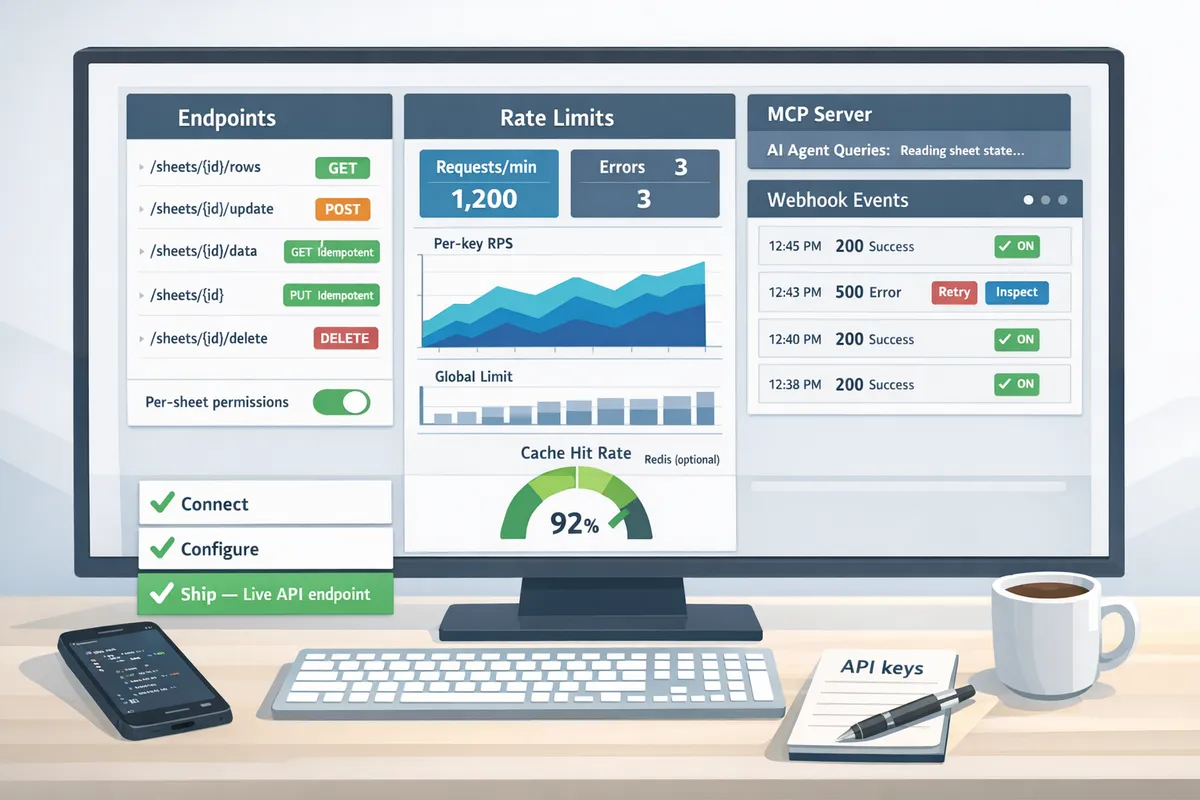
A no code rest api for google sheets is a service that exposes Google Sheets as RESTful JSON endpoints without backend code. Typical CRUD endpoints look like GET /sheets/{sheetId}/rows to read rows, POST /sheets/{sheetId}/rows to append, PATCH /sheets/{sheetId}/rows/{rowId} to update, and DELETE /sheets/{sheetId}/rows/{rowId} to remove. Common use cases include internal apps that write timesheets, dashboards that power charts from live rows, automation workflows that push leads into a sheet, small customer portals that surface sheet-backed records, and AI assistants that query structured sheet data. For teams wanting a production path, Sheet Gurus API gives immediate endpoints and maps sheet operations to standard JSON semantics, removing the need to run your own server.
Use case example: a support dashboard reading 3 columns across 10,000 rows can use GET with pagination instead of embedding CSV downloads. See our getting started docs for endpoint examples and setup steps.
🔐 How should authentication and access control be implemented?
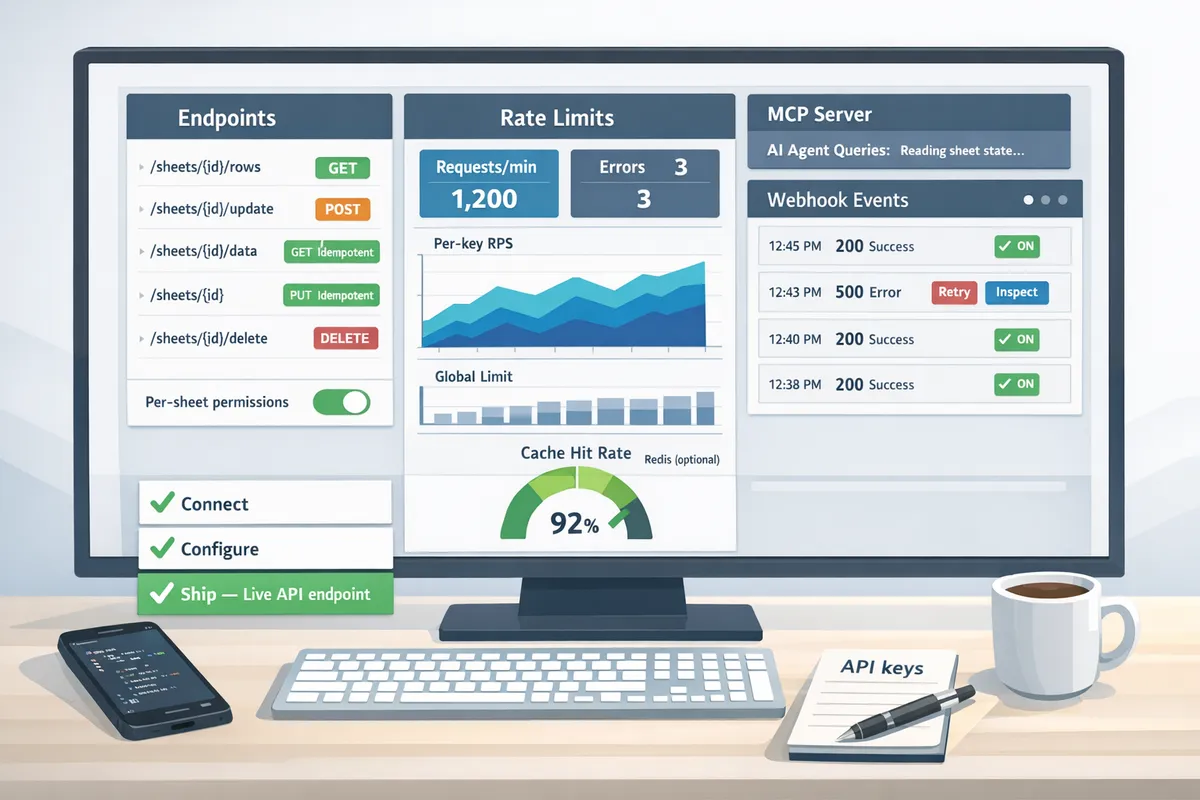
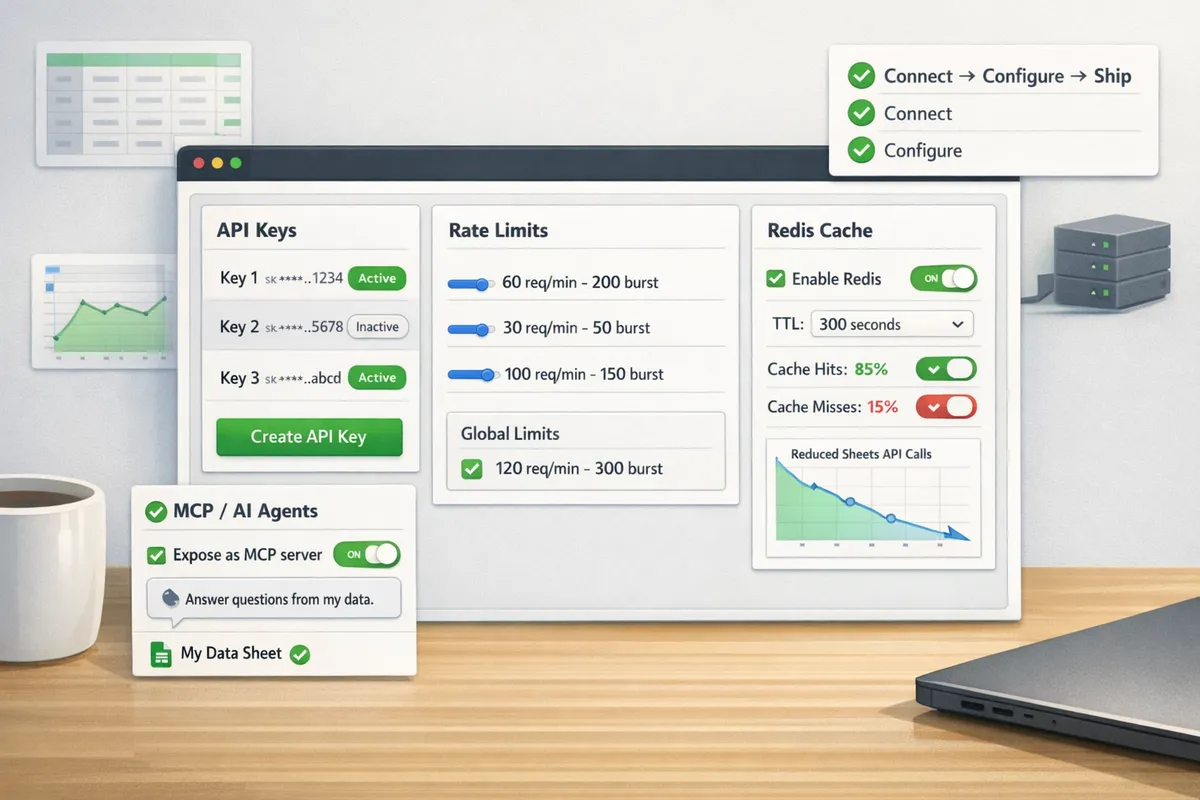
Authentication must combine OAuth onboarding for spreadsheet owners and API key management for service or app access with per-sheet permissions and audit logging. Admins should sign in via OAuth to grant the provider access to chosen spreadsheets, while service clients receive API keys or short-lived tokens scoped to specific sheets and CRUD operations. Production controls include per-sheet permission models (read-only, read-write, admin), key rotation, key expiry, and immutable audit logs for every API request. DIY builds require secure credential vaults, token refresh logic, and audit trails; those add weeks of engineering and ongoing ops work. Sheet Gurus API handles OAuth onboarding, stores scopes securely, exposes API key creation and rotation, and writes request logs you can review in the dashboard.
💡 Tip: Rotate service keys regularly and require scoped keys per integration to reduce blast radius when a key is leaked.
See our API reference and getting-started guide for step-by-step credential flows and recommended permission models.
⛔ How do rate limits and quotas work for sheet-backed APIs?
Rate limits must be enforced per API key and globally while mapping to Google Sheets API quotas and supporting burst handling with backoff and queuing. A production provider applies per-key QPS and per-minute quotas, enforces short burst windows, and implements retry with exponential backoff to protect both the sheet-backed service and the upstream Google Sheets API. Important mapping details: reads and writes consume different Google API operations, batch writes increase quota consumption, and uncontrolled clients can exhaust quotas quickly. If you build this yourself you must implement quota tracking, realtime counters, rate-limit headers, global throttles, and monitoring alerts. Sheet Gurus API enforces configurable per-key limits, global safeguards, and automatic queuing and retry logic so individual clients cannot take the whole spreadsheet offline.
Operational example: enforce a small per-key burst and queue excess writes to preserve Google quota and avoid 429 responses for downstream consumers. Review pricing and quota tiers if you expect high concurrency.
⚡ How should caching and data freshness be balanced?
Caching should reduce Google API calls for high-read workloads while enforcing short TTLs, write-driven invalidation, and read-through strategies to preserve freshness. Use cache-aside or read-through caches (Redis or in-memory) for frequently requested queries and set TTLs based on use case: sub-10-second TTLs for near-real-time dashboards, longer TTLs for archival reports. Invalidation strategies must include immediate purging on API writes, webhook-driven updates from the provider, or optimistic timestamps in responses so clients can detect staleness. For example, a dashboard polled by 200 clients per minute benefits from a short TTL plus aggressive invalidation on writes to cut Sheets API calls. DIY caching forces you to handle cache coherence, eviction policies, and cache stampede protection; Sheet Gurus API offers optional Redis caching and built-in invalidation hooks to simplify this.
🔁 How do you guarantee sync and avoid race conditions with sheet-backed APIs?
Sync and consistency require optimistic locking, idempotent writes, token refresh, retry logic with backoff, and webhook-driven cache invalidation to avoid race conditions and stale reads. Common hazards include concurrent writes to the same row, delayed Google API responses, and token expiry during long transactions. Operational patterns that work: add a version or timestamp column for optimistic locking, use idempotency keys for POST/PATCH to prevent duplicate writes, serialize conflicting writes via a write queue, and implement short retry windows with exponential backoff. DIY implementations must also manage OAuth token refresh, credential revocation, monitoring for quota throttles, and race conditions across multiple app instances.
Short illustrative DIY snippet (illustrative, not production-ready):
// Acquire token, attempt write, retry with idempotency
async function writeWithIdempotency() {
  const token = await refreshOAuthToken();
  const res = await fetch(sheetApiUrl, {
    method: 'POST',
    headers: {
      Authorization: `Bearer ${token}`,
      'Idempotency-Key': key
    },
    body: payload
  });
  if (res.status === 429) await sleep(backoff);
  // handle success or escalate
}
Sheet Gurus API removes much of this burden by handling token lifecycle, offering idempotent endpoints, and exposing webhooks for change events so your app can react to edits without polling. For AI assistants that query sheets as MCP servers, see our MCP server docs to learn how Agent queries stay consistent with sheet state.
For full setup instructions and API details, visit our getting-started guide and API reference.
Choose a platform that provides API keys, per-sheet permissions, configurable rate limiting, optional caching, and observability so you avoid DIY complexity. How to choose and configure a no code rest api for google sheets for production?
Choosing the right platform prevents hours of repeat engineering and reduces production risk. Focus on expected traffic, security requirements, and whether AI agents will query the sheet data. The right choice shortens time to ship and reduces ongoing maintenance for auth, quotas, caching, and monitoring.
When should you use Apps Script, a generic no-code connector, or Sheet Gurus API? 🧭
Use Apps Script for single-user prototypes, generic connectors for low-to-moderate demos, and Sheet Gurus API for production apps that need fine-grained auth, rate limiting, optional caching, and AI agent support. For example, an internal spreadsheet used by 3 people during a pilot is a fit for Apps Script. A marketing demo with a few hundred daily requests can use a generic connector. A customer portal, automation engine, or AI assistant querying sheets at scale should use Sheet Gurus API because it provides API‑key management, per-sheet permissions, and configurable rate limits out of the box.
Decision tree (step-by-step):
- Prototype needs: if only 1–5 users and low risk, choose Apps Script. It ships fastest.
- Expected traffic: >1k requests/day or bursty traffic favors a provider with rate limiting and caching.
- Security/compliance: require API keys, per-sheet ACLs, or audit logs? Choose Sheet Gurus API.
- AI integration: if agents need structured query access (MCP servers), use Sheet Gurus API; generic connectors rarely support agent-friendly protocols.
If you build your own, expect to implement credential rotation, token refresh, quota tracking, retry logic with exponential backoff, cache invalidation, and monitoring. Those operational components add weeks of work and ongoing maintenance.
// Minimal sketch: token refresh + retries (illustrative only)
async function fetchWithRetry(url, key) {
  for (let i = 0; i < 3; i++) {
    const res = await fetch(url, { headers: { 'x-api-key': key } });
    if (res.ok) return res.json();
    await new Promise(r => setTimeout(r, 100 * Math.pow(2, i)));
  }
  throw new Error('max retries');
}
Building robust retries, token refresh, quota tracking, and backoff logic is nontrivial; Sheet Gurus API handles those concerns so teams can focus on client behavior and tests.
Governance, migration, and rollback playbooks 🛡️
Prepare access reviews, key rotation policies, schema migration steps, and incident runbooks before cutting over to production. Create a schema change process: create a shadow sheet, map new columns programmatically, run compatibility checks against sample clients, and deploy the new endpoint in staging. For cutover, use traffic splitting or key-based routing to shift incremental traffic. Rollback by switching keys to the prior endpoint or restoring the sheet from a timestamped CSV backup.
Operational controls to document:
- Regular access reviews and least-privilege API key issuance.
- Key rotation schedule and automated revocation procedures.
- Schema migration checklist with automated validation scripts.
- Incident playbook: identify, isolate (revoke key), restore (CSV backup), and notify.
- Retention and audit log policy for compliance reviews.
Link to the getting-started guide and API reference for implementation details and examples: getting started with Sheet Gurus API, API reference. Consider pricing implications during load testing: see pricing before running sustained high-volume tests.
Frequently Asked Questions
These FAQs answer deployment, security, and integration questions teams ask when moving a no code rest api for google sheets from prototype to production. They focus on operational controls you must verify: authentication, rate limits, caching, monitoring, and AI agent access.
What is the fastest way to get a live CRUD API from a Google Sheet? ⚡
The fastest path is to sign in with Google, select a spreadsheet, enable scoped API keys, optionally enable Redis caching, and use the generated CRUD endpoints. Sheet Gurus API follows a three-step Connect → Configure → Ship flow that creates read, write, update, and delete JSON endpoints in minutes. Steps to replicate that fast path for a production trial:
- Sign in with Google and grant admin onboarding permissions to the provider. This avoids manual OAuth client creation.
- Select the spreadsheet and map header rows to JSON field names.
- Enable API keys and set per-key permissions. Link: read the getting started guide at getting started with Sheet Gurus API for end-to-end setup.
- Optionally enable Redis caching before heavy read traffic to reduce Google API calls.
Example. A prototype dashboard can query the generated read endpoint directly while you lock down per-key permissions for production apps.
How does authentication work with no-code Sheets APIs? 🔐
Authentication combines admin OAuth onboarding to connect the sheet and issued scoped API keys for services and agents. During onboarding an admin uses Google OAuth to grant the provider access to specific spreadsheets; the provider stores short-lived Google credentials and issues long-lived or scoped API keys that you distribute to clients and agents. Key management best practices to adopt:
- Create one key per client or agent and assign least-privilege per-sheet permissions.
- Rotate keys on a schedule and revoke immediately for compromised clients; automation reduces operational toil.
- Verify audit logs for key creation and usage to detect abnormal activity.
For reference on API credentials and endpoints, see the API reference at https://sheetgurusapi.com/docs/api-reference. Building this yourself requires credential rotation, token refresh logic, and secure storage for OAuth tokens.
Can I add rate limits and caching to protect Google quotas and speed up responses? ⏱️
Yes. You can apply per-key or global rate limits and add Redis caching to cut Google API calls and accelerate responses. Sheet Gurus API exposes configurable rate limits (per-key and global) and optional Redis caching so read-heavy workloads avoid hitting Google quotas. Cache strategy guidance:
- For dashboards with map-style reads use TTLs between 60 and 300 seconds to balance freshness and quota savings.
- For freshness-sensitive endpoints use short TTLs (0 to 5 seconds) and rely on cache invalidation on write operations.
- Always invalidate cache on writes or use write-through cache patterns to prevent stale reads.
Operational details you would otherwise build: cache invalidation hooks, distributed cache configuration, quota monitoring, and exponential backoff for retries on quota errors.
Is a no-code Sheets API suitable for production workloads? ✅
A no-code Sheets API is production-ready if it enforces authentication and ACLs, supports configurable rate limits and caching, provides monitoring and alerts, and implements retries with backoff. Validate the following during a trial to confirm production suitability:
- Authentication and ACLs. Verify per-sheet and per-field restrictions and audit trails.
- Rate limiting. Confirm per-key and global quotas and behavior when limits are hit.
- Caching. Test TTLs, invalidation on writes, and Redis connectivity under load.
- Monitoring and observability. Check logs, metrics, and alerting for error spikes and latency.
- Retry logic. Ensure the platform implements retries with exponential backoff for transient Google API errors.
- SLAs and uptime. Compare provider terms and support options; check pricing tiers for production limits at pricing.
DIY teams must plan for credential rotation, token refresh, quota handling, retry logic, race conditions on concurrent writes, cache invalidation, and monitoring—each adds weeks of engineering and ongoing ops overhead.
How do I connect AI assistants like Claude to a sheet-backed API? 🤖
Expose the sheet as an MCP server endpoint and give the assistant a scoped, read-only key that restricts allowed fields and methods. With Sheet Gurus API you register the sheet as an MCP server, create a scoped key for the agent, and configure the response schema so the agent receives structured JSON rather than raw sheet dumps. Practical steps:
- Register the endpoint and enable MCP mode in the provider console. See implementation details at https://sheetgurusapi.com/docs/mcp-server.
- Create a scoped key limited to specific ranges and columns and set strict rate limits for the agent.
- Restrict returned fields and enforce pagination or size limits so the agent cannot request the entire spreadsheet.
- Test with synthetic prompts and monitor outputs to ensure the agent returns safe, deterministic responses.
Example. If an agent needs customer balances, expose only customer_id and balance fields and paginate results to 50 rows per request.
What security best practices should I follow with a sheet-backed API? 🔒
Follow least-privilege access, automated key rotation, request logging, and strict endpoint exposure controls. Practical checklist:
- Enforce per-sheet and per-field permissions so apps and agents see only the columns they need.
- Rotate API keys regularly and automate rotation through a secrets manager.
- Disable public or unauthenticated endpoints; require keys for all access.
- Keep an audit trail of admin actions, key creation, and key usage; configure alerts for unusual traffic patterns.
- Use TLS for all calls and validate certificate chains.
💡 Tip: Automate key rotation and set alerts for key usage spikes to detect credential misuse early.
For API behavior, endpoints, and security knobs, review the API reference and security docs at https://sheetgurusapi.com/docs/api-reference and https://sheetgurusapi.com/docs.
Move a sheet-backed API into production with a practical provider.
Move a no code google sheets rest api from prototype to production by choosing a platform that removes credential handling, rate limiting, caching, and integration work from your team. DIY solutions require token refresh logic, quota handling, retry policies, race-condition fixes, cache invalidation, and production monitoring—all of which add weeks of work and ongoing ops burden.
💡 Tip: Start by securing access and adding rate limits first. Those two controls prevent the most common production incidents and let you iterate on performance safely.
Sheet Gurus API turns Google Sheets into production-ready RESTful JSON APIs in minutes, requiring no backend code. Create your first endpoint with the getting-started guide and test CRUD flows against a live endpoint. For AI agent workflows, consult the MCP server documentation to expose structured sheet data to assistants. For pricing and trial details, review the pricing page.
Begin the 14-day free trial by following the getting-started steps at getting started with Sheet Gurus API and explore how No-Code Sheet-to-API Solutions cut time to market while keeping operational risk low.