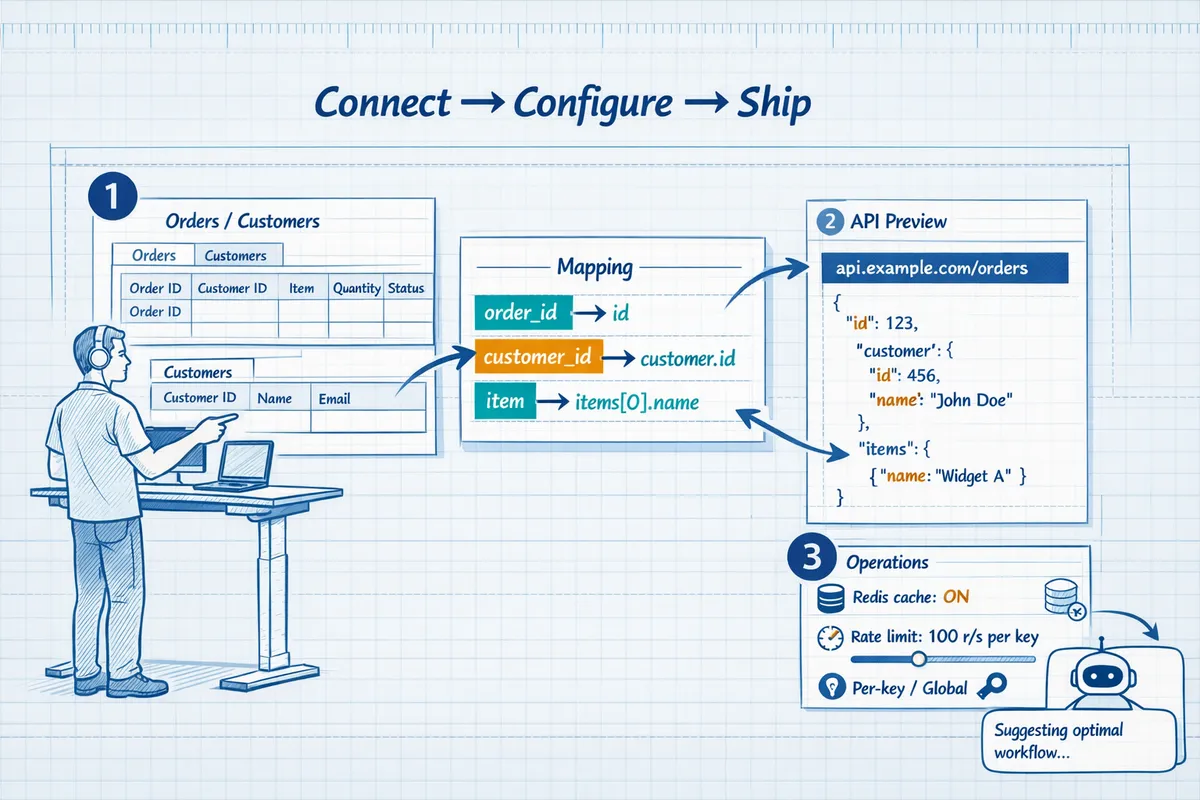
How to Turn Google Sheets into a REST API in Minutes (No Backend Required)
A single schema change in a shared Google Sheet can break five production integrations and trigger hours of emergency fixes. This guide shows how to turn Google Sheets into a REST API so engineers, no-code builders, and founders can expose spreadsheets as REST JSON APIs and choose between DIY or our hosted Sheet Gurus API. The DIY path requires handling credential management, token refresh, quota limits, retry logic, race conditions, cache invalidation, and monitoring.
Our Sheet Gurus API provides Google sign-in, instant CRUD endpoints that sync to the sheet, API key auth with per-sheet permissions, configurable rate limiting, optional Redis caching, and MCP servers for AI assistants. Which approach gets you a secure API faster with less ops overhead and alignment with General API Concepts?
Phase 1 — Choose the right approach and prepare your spreadsheet
Decide whether to use a no-code Google Sheets REST API product or build a DIY endpoint before you touch your data model or share credentials. That choice determines how much operational work you must accept: credential management, token refresh, quota handling, retry logic, race conditions, cache invalidation, and monitoring. This section lists the prerequisites, modeling decisions, and security trade-offs you must make to safely expose sheet data.
Evaluate use case and production requirements 🔎
- Define the integration type and SLAs. Example categories:
- Internal dashboard: low concurrency, sub-minute freshness, internal auth only.
- Public webhook consumer: high burst tolerance, strict rate limiting, public API keys.
- AI assistant (MCP): structured query patterns, consistent schema, incremental updates.
- Translate requirements into measurable targets. Record expected requests per minute (RPM), acceptable staleness (seconds or minutes), and error budget (percent of requests allowed to fail).
- Compare options. A DIY Apps Script or Google Sheets API route requires you to build OAuth flows, token rotation, backoff retries, monitoring dashboards, and quota alerts. Sheet Gurus API maps to these needs by issuing live endpoints, API key management, per-sheet permissions, and optional caching for AI workflows. See the MCP server docs for AI-specific patterns and the getting-started guide for the quick path to a hosted endpoint: https://sheetgurusapi.com/docs/getting-started.
Expected outcome: a one-page runbook that lists RPM, freshness, auth method, and a recommended path (DIY or Sheet Gurus API).
Model spreadsheet data as resources 🗂️
- Choose a resource-per-sheet model. Treat each row as a single resource and add an immutable unique ID column (UUID or an integer primary key). Example: orders sheet uses order_id; customers live in a separate customers sheet linked by customer_id.
- Normalize related tables across sheets. Keep one-to-many relations in separate sheets rather than stuffing arrays into cells. That avoids heavy parsing on read and simplifies partial updates.
- Design API-friendly fields now:
- pagination keys: limit, offset, cursor
- filtering columns: status, updated_at, created_at
- versioning column: etag or updated_at for optimistic concurrency
- Avoid volatile formulas in ID or key columns. If you must compute derived values, materialize them to static columns before exposing the sheet.
Practical note: with Sheet Gurus API, sheets map to REST resources automatically and you can configure which column acts as the resource id in the dashboard. Read the API reference to see how query parameters map to sheet filters: https://sheetgurusapi.com/docs/api-reference.
Permissions, scopes, and access patterns 🔐
Pick an access model that minimizes secret handling while meeting security needs.
- API keys are simplest for server-to-server access with per-key rate limits.
- OAuth (user consent) works when actions must run as the sheet owner or a specific user and you need fine-grained Google scopes.
- Use a hybrid model for public reads and restricted writes: public API key (read-only) plus OAuth for write operations.
DIY costs to plan for: secure key storage, rotation schedules, building an admin UI for key issuance, implementing token refresh with refresh tokens, scope scoping, and audit logs. You must also implement per-endpoint authorization checks and revoke compromised keys.
⚠️ Warning: Never expose a sheet containing PII with a public, unauthenticated endpoint. Audit column contents before granting read access.
Sheet Gurus API centralizes API key lifecycle and lets you set per-sheet permissions in the dashboard so you avoid building key rotation, issuance, and revocation flows yourself. See the docs for key management and privacy controls: https://sheetgurusapi.com/docs.
Performance and quota constraints ⚙️
Estimate capacity with a simple calculation: average requests per user × peak concurrent users × requests per page. Example: 200 concurrent users × 2 calls per page = 400 RPS peaks that the backend must sustain during bursts.
Account for Google platform limits. The Google Sheets API and Apps Script enforce per-user and per-project quotas and will return 429/5xx under sustained bursts. That forces you to implement:
- exponential backoff and retry with jitter
- idempotency for mutating calls (single client tokens)
- optimistic concurrency using an etag/updated_at column
- cache invalidation rules if you use Redis or CDN
When to add caching or denormalization:
- read-heavy public endpoints with thousands of hits per minute. Use a Redis cache with short TTL and stale-while-revalidate.
- joins across multiple sheets that cause many round trips. Denormalize frequently-read attributes into the primary sheet.
Short DIY snippet illustrating retry + token usage (illustrative only):
# pseudocode: add token refresh and simple retry
for _ in range(5):
    resp = requests.get(url, headers={'Authorization': f'Bearer {token}'})
    if resp.status_code == 401:
        token = refresh_token(refresh_token)
        continue
    if resp.status_code in (429, 500):
        time.sleep(backoff)
        continue
    break
Operational payoff of hosted option: Sheet Gurus API provides configurable rate limiting and optional Redis caching so you do not have to build per-key quotas, cache layers, or quota monitoring from scratch. Review pricing and feature tiers to match expected traffic: https://sheetgurusapi.com/pricing.
Phase 2 — Convert a Google Sheet to a REST API (no-code) in minutes
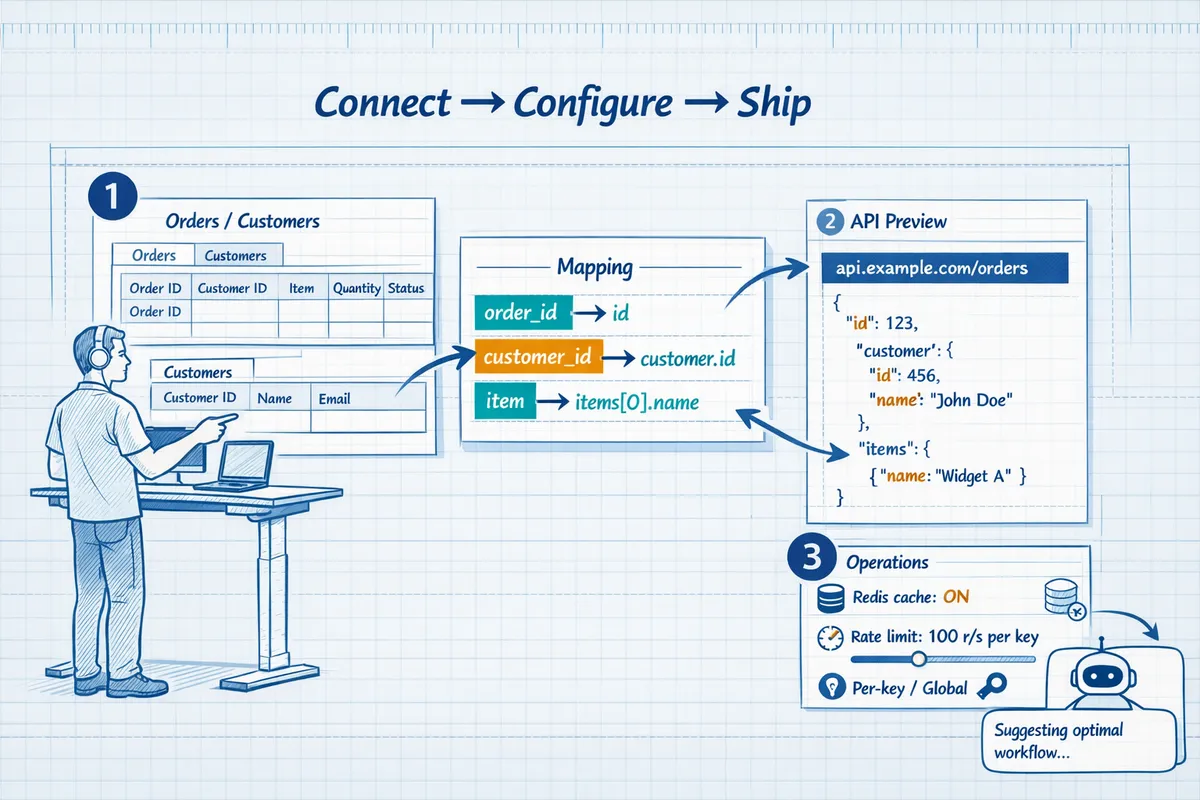
Follow a three-step flow on Sheet Gurus API to expose a production-ready JSON endpoint without writing backend code. Each step below gives exact actions, expected outcomes, and what to verify before routing traffic. At the end you get a short Apps Script alternative plus the operational costs you will incur if you DIY.
1. Connect: sign in and select a spreadsheet 🔗
- Sign in with Google on Sheet Gurus API and grant the minimal scopes the product requests: spreadsheets.readonly or spreadsheets for write access, and drive.file only if you need file-level operations. Our website displays the exact scopes during consent so you can audit least-privilege access before granting it.
- Pick the spreadsheet from the account or a shared drive. Expected outcome: the sheet appears in the Sheet Gurus dashboard under “Connected Spreadsheets” and the platform shows preview rows and column headers.
- Verify the sheet owner and sharing settings. If the sheet is in a shared drive, confirm Sheet Gurus has write permission if you plan to run CRUD operations.
Our website documents the sign-in flow and a checklist in the getting-started guide.
💡 Tip: Use a dedicated service account or per-key permissions to limit blast radius when a key is compromised. Our website recommends key rotation schedules and audit logging.
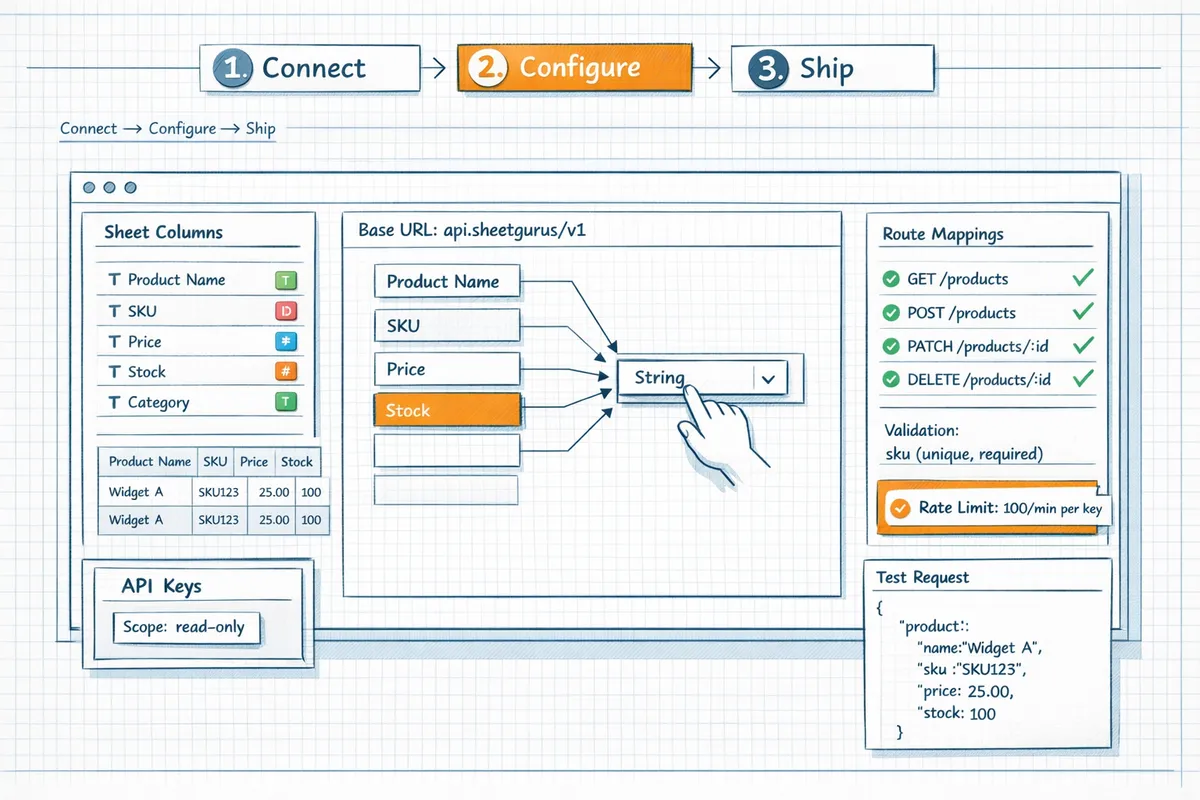
2. Configure: map resources, routes, and rules ⚙️
- Define resource names and routes. Example: map the sheet named Customers to /api/customers and choose the primary key column (id or rowId). Use plural resource names for consistency.
- Set field types for each column (string, integer, date, boolean). Incorrect types cause validation errors; set required fields for POST/PUT routes to prevent partial writes.
- Configure pagination and filtering. Recommended defaults for production: page_size 50 to 200, cursor-based pagination (next_cursor) to avoid offset penalties on large sheets.
- Set per-key permissions and rate limits. Start with conservative limits for public keys (for example, 10 requests per minute) and higher limits for internal keys. Enable optional Redis caching to cache read responses for short TTLs and cut Google Sheets API calls.
- Define idempotency behavior for POST/PUT. Choose to dedupe on a provided idempotency_key or on a unique column to prevent duplicate rows under retries.
Expected outcome: a complete route mapping, validation rules, and rate-limit policy visible in the dashboard. See the Sheet Gurus API docs for API schema options and route patterns.
3. Ship: receive endpoint, test, and deploy 🚀
- Click Ship to provision a live JSON endpoint. Sheet Gurus API returns a base URL and examples for each CRUD route in the dashboard.
- Create API keys with scoped permissions (read-only vs read-write) and copy one to a secure secret store for your app.
- Run smoke tests. Example curl read test:
curl -X GET \
 -H 'Authorization: ApiKey YOUR_KEY' \
 https://api.sheetgurusapi.com/api/customers?page_size=10
- Run a write test with an idempotency key and validate the row appears in the original sheet via the Google Sheets UI. Confirm rate limit headers and cache TTL headers if caching is enabled.
- Deploy the endpoint into your app or automation. Store keys in environment variables and rotate them regularly.
Our website includes a Postman collection and a step-by-step smoke-test checklist in the API reference and getting-started guides.
4. DIY alternative: quick Apps Script endpoint and why it costs more 🛠️
Here is a minimal Apps Script example to return rows as JSON (do not treat this as production-ready):
function doGet(e) {
 var ss = SpreadsheetApp.openById('SPREADSHEET_ID');
 var rows = ss.getSheetByName('Sheet1').getDataRange.getValues;
 return ContentService.createTextOutput(JSON.stringify({rows: rows})).setMimeType(ContentService.MimeType.JSON);
}
Running a DIY endpoint requires you to build and maintain many pieces the product already provides. You must manage OAuth credentials and refresh tokens or set up a service account. You must monitor and handle quota limits, implement retry logic with exponential backoff, add idempotency keys to avoid duplicate writes, and design concurrency controls to avoid race conditions when multiple clients update the same sheet. You also need logging, alerting, and an SLO if you require reliability beyond Apps Script quotas. If you add caching to reduce API calls, you will host and secure that cache and handle cache invalidation.
Operational costs add up as engineering time, quota workarounds, and ongoing maintenance. Sheet Gurus API removes most of those operational tasks by providing API key management, rate limiting, optional Redis caching, and a managed endpoint so teams can focus on product logic rather than infrastructure. See our pricing page for cost comparisons and the API reference for behavior details.
For implementation details and the full checklist, consult the Sheet Gurus API getting-started and API reference.
Sheet Gurus API getting-started
Sheet Gurus API docs and API reference
Phase 3 — Harden, test, and operate your sheet-backed API
A working endpoint is not a production service until it enforces correct access, predictable performance, and observability. This phase lists concrete steps to make a sheet-backed API safe, cost‑predictable, and operable. We contrast what you must build for a DIY convert Google Sheets to REST API approach with what Sheet Gurus API provides out of the box.
Access control and authentication 🔑
Choose an auth model and enforce scopes. Decide whether to use API keys, OAuth clients, or short‑lived tokens. Expected outcome: every request carries a token that maps to a single sheet and a permission set (read, write, admin). What can go wrong: unscoped keys expose entire spreadsheets.
Implement key issuance, storage, rotation, and revocation (DIY checklist). Store secrets in a KMS, hash key material in your database, expose an admin endpoint to revoke keys, and set automatic rotation policies. Expected outcome: compromised keys can be revoked without deploying code. What can go wrong: stale cached keys allow revoked clients to continue accessing data.
Audit and per-sheet ACLs. Record who created each key, which sheet it accesses, and every permission change. Expected outcome: audit trails that support forensics and access reviews. What can go wrong: missing logs make it impossible to trace misuse.
⚠️ Warning: Do not make spreadsheets public to avoid data leakage. Always enforce authentication and per-sheet access controls before sharing endpoints.
Sheet Gurus API removes the burden of building key management and audit logs by providing a management UI, per-sheet permissions, and token expiration controls. See the getting started guide for setup details: https://sheetgurusapi.com/docs/getting-started.
Caching, rate limiting, and performance 📈
Set cache TTLs based on use case. For dashboards and fast-refresh UIs use 30–60 second TTLs. For static reference data use 5–15 minute TTLs. Expected outcome: fewer Google Sheets API calls and faster responses. What can go wrong: long TTLs return stale values for active write workloads.
Use Redis for read-heavy loads and implement cache invalidation on writes. Pattern: write-through or cache-bust via pub/sub to evict affected rows. Expected outcome: high cache hit ratio and consistent reads after writes. What can go wrong: missing invalidation causes stale data; aggressive eviction increases calls and cost.
Implement distributed rate limiting and quota awareness (DIY tasks). Build per-key counters, sliding windows or token buckets, and global fallback rules when Google Sheets API quota approaches limits. Expected outcome: predictable throttling under bursts. What can go wrong: naive counters lead to race conditions across instances.
Sheet Gurus API offers configurable per-key and global rate limits plus optional Redis caching to reduce direct calls to Google Sheets. Review the API reference for cache and throttle options: https://sheetgurusapi.com/docs/api-reference.
Error handling, retries, and idempotency 🧭
Make write endpoints idempotent by requiring a client-supplied request-id header. First sentence answer: Require a unique request ID for each client write to enable safe retries. Expected outcome: duplicate submissions de-duplicate server side. What can go wrong: missing dedupe storage lets retries create duplicate rows.
Use optimistic locking with a version column for row updates. Pattern: client reads version, updates with expected version, server rejects mismatched versions with 409 and the current state. Expected outcome: predictable conflict detection and simple merge strategies. What can go wrong: clients that ignore 409s overwrite data.
Implement retry policies with exponential backoff and jitter. Limit attempts (for example 3–5 tries) and return clear retry-after headers on rate-limit errors. Expected outcome: reduced retry storms and fewer quota spikes. What can go wrong: unbounded retries cause cascading failures and increased costs.
Example (illustrative, not copy-paste ready):
// check idempotency key store
if (await seen(request.headers['x-request-id'])) return previousResponse;
try { writeRow(payload); storeResponse(requestId, result); }
catch (ConflictError) { return 409 with currentRow; }
DIY requires building the idempotency store, retry backoff, and optimistic locking logic. Sheet Gurus API exposes idempotency and conflict controls so teams avoid that operational code. See the API reference for idempotency options: https://sheetgurusapi.com/docs/api-reference.
Observability, alerts, and cost monitoring 🔍
Instrument request-level tracing and correlate to Google Sheets API calls. Required fields: request-id, key-id, sheet-id, and per-call latency. Expected outcome: every failed request can be traced to a specific Sheets API call. What can go wrong: missing correlation makes postmortems slow and costly.
Monitor these essential metrics: requests per key, 4xx/5xx error rate, P95/P99 latency, cache hit ratio, Google Sheets API call count, and estimated monthly cost. Set alerts for error rate spikes (>1% sustained) and quota usage (>80%). Expected outcome: early detection of regressions and runaway costs. What can go wrong: absent thresholds let outages escalate before detection.
Build a cost dashboard that ties function invocations, Sheets API calls, and Redis ops into a single view. Expected outcome: actionable insights to tune TTLs, rate limits, and retry settings. What can go wrong: siloed metrics hide cross-service cost drivers.
DIY teams must wire tracing, dashboards, and alerting to cloud monitoring tools and maintain those pipelines. Sheet Gurus API surfaces request metrics, audit logs, and usage-based alerts so teams avoid custom instrumentation. For guidance on AI integrations and MCP servers, consult the MCP server docs: https://sheetgurusapi.com/docs/mcp-server.
Useful links: the API reference shows operational controls and endpoints, and the pricing page explains usage tiers: https://sheetgurusapi.com/docs/api-reference and https://sheetgurusapi.com/pricing.
Frequently Asked Questions
Consolidated answers below focus on security, operational limits, costs, and real implementation choices when you turn Google Sheets into REST API. Each answer gives concrete trade-offs and links to resources so you can pick a DIY route or a no-code Google Sheets REST API option fast.
Can I turn Google Sheets into a REST API without writing code? 🤔
Yes — no-code platforms let you convert Google Sheets to a REST API in minutes without building a backend. Sheet Gurus API issues a live JSON endpoint after you sign in, select a spreadsheet, and configure routes, supporting full CRUD with per-sheet permissions and API key controls. The trade-off is control: no-code solutions handle authentication, rate limiting, and caching for you but limit deep custom middleware and bespoke business logic. If you expect custom validation, complex joins, or specialized auth flows, plan those needs before choosing a no-code option. See the getting started guide on our docs for the quick setup flow: https://sheetgurusapi.com/docs/getting-started.
How secure is a Sheets-backed API compared with a custom backend? 🔒
A Sheets-backed API can be as secure as a custom backend when you replace public sharing with scoped API access and key-based controls. With Sheet Gurus API you get API key management, per-sheet permissions, optional rate limiting, and audit logging that reduce exposure versus a misconfigured public sheet. A DIY service requires you to secure service account keys, implement OAuth scopes correctly, rotate credentials, store secrets safely (for example in Vault), implement TLS and logging, and integrate Cloud IAM or equivalent for audits. Mistakes in any of those areas increase attack surface. For details on our security controls and privacy commitments, see our privacy and docs pages: https://sheetgurusapi.com/privacy and https://sheetgurusapi.com/docs.
⚠️ Warning: Never embed service account private keys or long-lived credentials in client-side code or public repositories.
What limits and quotas should I expect when using Google Sheets as a datastore? 📊
Expect Google-enforced quotas and Apps Script runtime caps that make Sheets suitable for light to moderate traffic rather than high-throughput systems. Google’s APIs impose per-project and per-user request quotas and Apps Script enforces daily execution and CPU time limits, plus spreadsheet-specific constraints like cell and formula recalculation costs. In practice, sustained traffic above a few hundred requests per minute or very large sheets (tens of thousands of rows) will require caching, denormalization, or a different datastore. Use Redis or an edge cache to reduce calls and avoid throttling. Sheet Gurus API offers optional Redis caching and configurable rate limiting so teams can move from prototype to production without reengineering quota handling. See our API reference for details: https://sheetgurusapi.com/docs/api-reference.
How do I handle concurrent writes and race conditions? 🛠️
You must design for concurrency because Google Sheets does not provide transactional, row-level locking out of the box. Use idempotency keys for POSTs, an optimistic locking pattern (version/timestamp column), and clear retry logic with exponential backoff to resolve conflicts. An append-only write pattern avoids many overwrite races: add immutable rows with unique IDs and process them downstream. DIY implementations must add token refresh, retry/backoff, idempotency, and conflict detection to avoid lost updates.
Example optimistic update (illustrative, not production-ready):
# Check-and-update pattern
row = get_row(sheet, id)
if row['version'] == client_version:
 row['data'] = new_data
 row['version'] += 1
 update_row(sheet, row)
else:
 raise ConflictError
💡 Tip: Prefer append-only logging for high-concurrency flows. It reduces need for locking and simplifies audit trails.
Can I expose multiple sheets or spreadsheets as separate API resources? 🗂️
Yes — map each spreadsheet or sheet to a distinct REST resource and enforce permissions per resource. Use clear routing patterns such as /api/spreadsheets/{spreadsheetId}/sheets/{sheetName}/rows or friendly resource names like /customers and /orders mapped to specific sheets. Maintain a resource registry that documents schema, index columns, and permission scopes. Cross-sheet joins are expensive; either perform joins in the client or create denormalized views (materialized sheets) that Sheet Gurus API can cache. Sheet Gurus API supports mapping multiple sheets and configuring per-sheet access controls so you can expose multiple endpoints without wiring separate backend services. For multi-sheet patterns and MCP server usage for AI agents, see https://sheetgurusapi.com/docs/mcp-server.
Should I build a custom REST service or use Sheet Gurus API? ⚖️
Choose a custom REST service only if your SLA, compliance, or performance requirements force full control; otherwise use Sheet Gurus API to remove a lot of operational burden. Evaluate with this checklist:
- SLA and uptime needs. Do you require specific SLAs or on-prem hosting?
- Traffic profile. Will you sustain thousands of RPS or require sub-10 ms latency?
- Security and compliance. Need for custom auditing, encryption controls, or isolated networks?
- Engineering budget. Do you have time to build credential rotation, token refresh, quota tracking, retry logic, and monitoring?
- Time to market. How quickly must the API be live?
DIY complexity is real: credential rotation, token refresh, quota handling, retry/backoff, idempotency, cache invalidation, race-condition resolution, deployment/versioning, and ongoing monitoring. Sheet Gurus API eliminates most of that operational work by providing key management, rate limiting, optional Redis caching, and production-grade infrastructure so teams can focus on product features. For pricing and trial options, see https://sheetgurusapi.com/pricing and start with the getting-started walkthrough: https://sheetgurusapi.com/docs/getting-started.
Ship your sheet to production
You now have a repeatable process to expose a spreadsheet as a JSON REST endpoint and the confidence to choose between a DIY stack and a hosted service. After following the steps, you can turn Google Sheets into REST API endpoints that support programmatic CRUD and keep your sheet as the single source of truth. Building this yourself requires handling credential management, token refresh, quota handling, retry logic, race conditions, cache invalidation, and monitoring — each adds development and ops work that grows with usage.
Sheet Gurus API turns Google Sheets into production-ready RESTful JSON APIs in minutes, requiring no backend code. For a practical next step, follow our getting-started guide to create your first live endpoint and begin a 14-day free trial with no credit card at our getting-started docs. Learn more about architecture choices and General API Concepts in our API reference and on the Sheet Gurus API homepage to match the approach to your app's reliability and scale needs.