Google Sheets RESTful JSON API with CRUD: Free Postman & OpenAPI
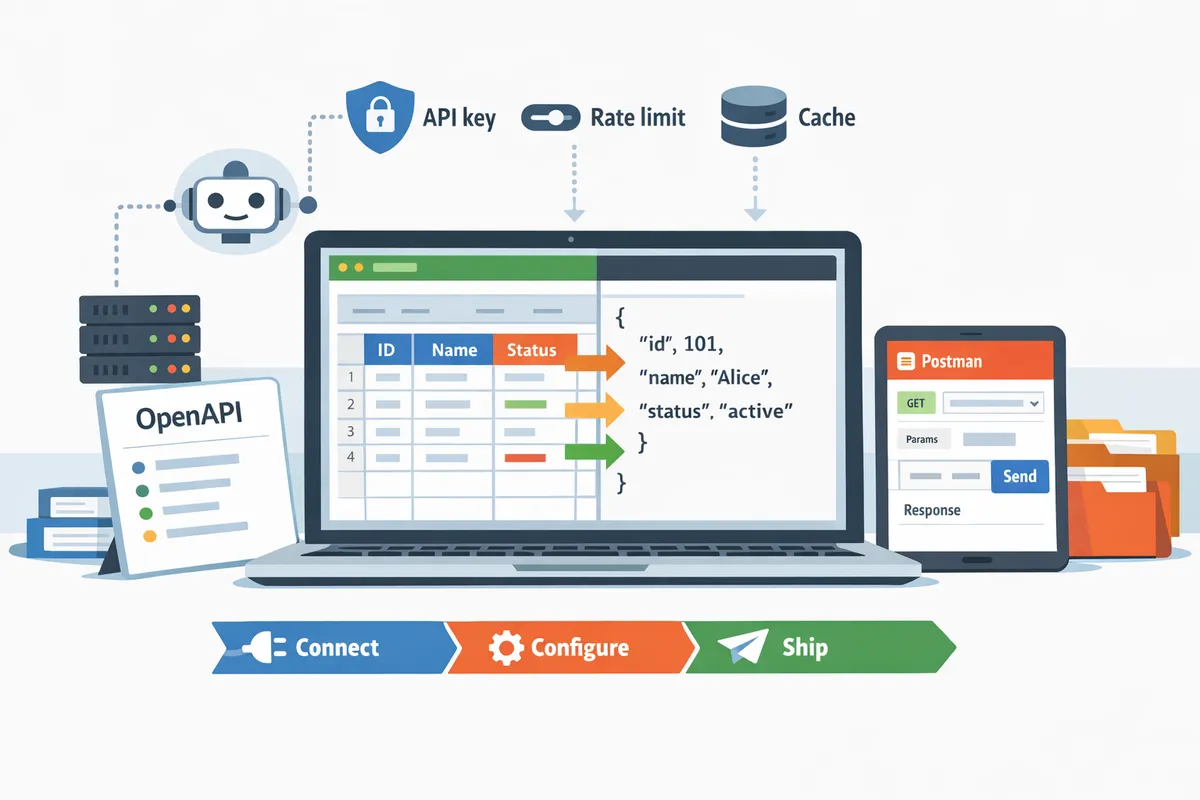
Teams typically spend 2 to 4 weeks building and securing spreadsheet-backed APIs, costing developer hours and delaying launches. Google Sheets RESTful JSON API is a RESTful JSON interface that exposes spreadsheet rows as CRUD resources for applications. This template-downloads article provides OpenAPI and Postman templates plus a practical guide to expose Google Sheets as a production-ready RESTful JSON API with full CRUD using our Sheet Gurus API. Our Sheet Gurus API turns Google Sheets into production-ready APIs in minutes without backend code: sign in with Google, pick a spreadsheet, and get a live endpoint. It adds API key authentication, per-sheet permissions, rate limiting, optional Redis caching, and MCP server support for AI agents. Which Postman requests and OpenAPI paths should you drop into CI first?
This section explains what the template includes and which use cases the Google Sheets RESTful JSON API template serves.
The download bundle includes an OpenAPI YAML that maps CRUD paths to sheet ranges, a Postman collection with environment variables, a README with mapping examples, and a sample sheet format with headers and example rows. These artifacts let teams deploy a Google Sheets RESTful JSON API with CRUD operations quickly using Sheet Gurus API, cutting days of backend work and reducing configuration mistakes.
What's included in the download 🧾
The package contains four files that make a plug-and-play API deployment possible. OpenAPI YAML is a machine-readable API contract that maps CRUD paths to specific sheet ranges and column schemas; the supplied openapi.yaml includes paths for list, read-by-id, create, update, and delete mapped to named sheets and ranges. Postman collection is a set of runnable requests that includes an environment file with variables (API_KEY, BASE_URL, SHEET_ID, PRIMARY_KEY); import this to test GET/POST/PATCH/DELETE flows against a staging Sheet Gurus API endpoint.
The README.md explains mapping rules and sample request/response shapes with two examples: mapping a product catalog (id, sku, name, qty, price) and a contacts sheet (id, name, email, role). The sample sheet (sample-inventory.csv and a ready-to-copy Google Sheet) contains header rows and three example rows so you can validate round-trip writes quickly. After import, Sheet Gurus API uses the OpenAPI mapping to route requests to the selected spreadsheet without writing server code.
Who should use this template ⚙️
This template fits internal tools, dashboards, small customer portals, automation pipelines, and AI agents that need a production-ready Google Sheets RESTful JSON API with CRUD. Example 1: a 200-row inventory dashboard with roughly 100 requests/day for sorting, filtering, and updates; expect simple rate limiting and optional caching to keep Google Sheets quota usage low. Example 2: an automation pipeline that creates and updates records at about 500 requests/day; this requires reliable write permissions, per-key permissions, and predictable retries to avoid duplicate rows. Example 3: an AI assistant endpoint that performs bursty reads during inference windows (dozens to thousands of reads in short bursts); use caching and rate limiting to avoid quota exhaustion and to keep latency acceptable.
These scenarios show why a turnkey API avoids wasted developer hours and compliance mistakes: building custom OAuth flows, key rotation, and request throttling adds maintenance and risk. For more operational guidance and use cases, see our guide on Google Sheets to API: 15 Production-Ready Use Cases for Internal Tools, Portals, and AI Agents and the step-by-step approach in How to Turn Google Sheets into a REST API in Minutes (No Backend Required).
Side-by-side comparison of four approaches 📊
This table compares the Official Sheets API, Google Apps Script endpoints, no-code wrappers, and Sheet Gurus API across setup time, auth, CRUD support, rate limiting, caching, scalability, and typical cost.
| Approach | Setup time | Auth methods | CRUD support | Rate limiting | Caching available | Scalability | Typical cost |
|---|---|---|---|---|---|---|---|
| Official Sheets API | Medium to long; requires backend and credential management | OAuth 2.0, service accounts | Full but requires custom endpoints | Manual handling; must implement quotas and retries | Not built-in; you must add a cache layer | High if you build ops (monitoring, retries) | Dev time + hosting costs; medium to high |
| Google Apps Script endpoints | Short to medium; quick to prototype | Google OAuth or web app access | Supports CRUD but limited by script quotas and execution time | Limited; Apps Script has daily quotas and execution limits | Not native; can use caching with extra setup | Moderate for low traffic; fragile under bursts | Low hosting cost; higher maintenance for production |
| No-code wrappers (SheetDB, etc.) | Very fast to prototype | API key or OAuth depending on vendor | Often supports basic CRUD; varied feature parity | Vendor-dependent; often basic throttling | Some offer caching; usually limited | Good for prototype, may hit limits under scale | Low monthly fees; may require upgrade for traffic |
| Sheet Gurus API | Minutes to deploy; no backend code required | Google sign-in plus API key with per-sheet permissions | Full CRUD with mapped OpenAPI paths and real-time sync | Configurable per-key or global rate limiting | Optional Redis caching to reduce Google calls | Built for production with operational controls | Predictable subscription pricing; lower dev cost and ops overhead |
The Sheet Gurus API row shows where operational work shifts off your team: authentication, per-key permissions, configurable throttling, optional caching, and uptime monitoring are included so you avoid building and maintaining those systems yourself. For a detailed operational primer on auth and performance trade-offs, see Google Sheets JSON API: The Complete Guide to CRUD, Auth, and Performance.
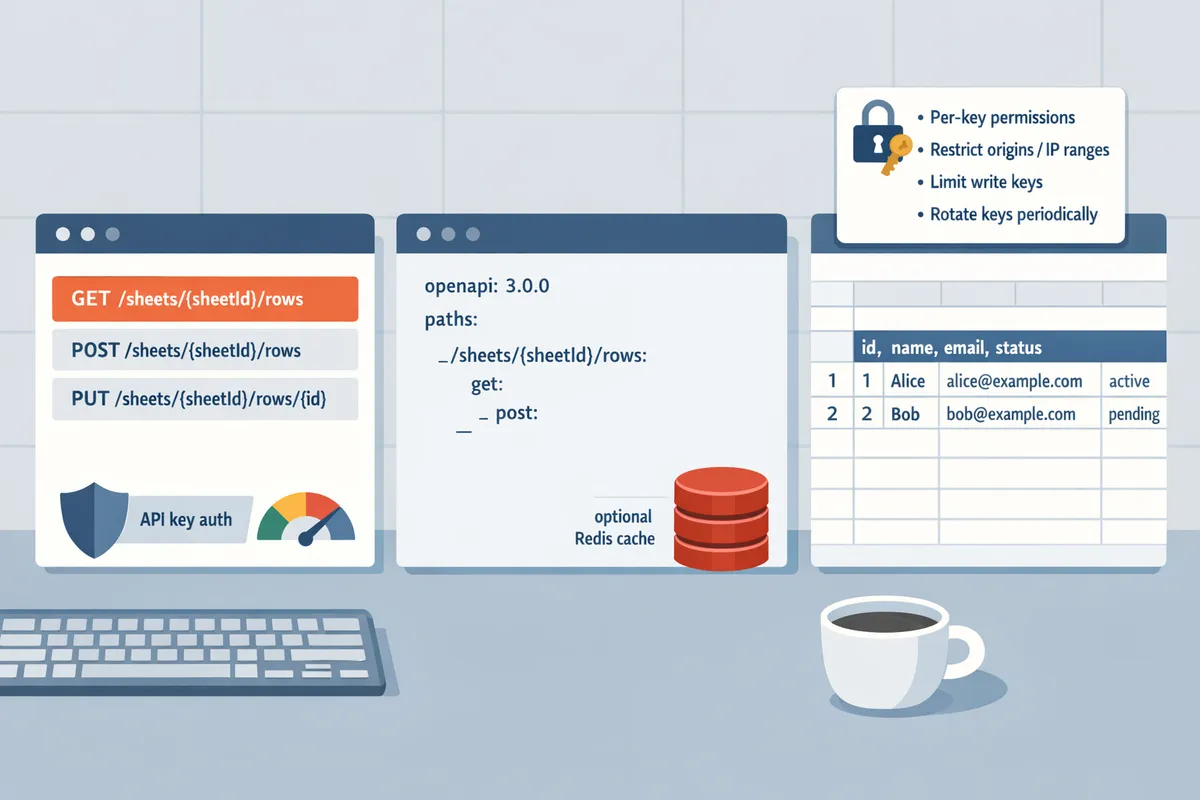
⚠️ Warning: Never publish spreadsheet URLs or API keys without restrictions; always use per-key permissions, restrict origins or IP ranges where possible, limit write access to necessary keys only, and rotate keys periodically. Missing these controls causes accidental public writes, quota abuse, and compliance exposure.
This section gives step-by-step instructions to connect a Google account, configure CRUD routes, and deploy the OpenAPI/Postman templates effectively.
Follow these steps to move from a spreadsheet to a live, testable RESTful JSON API with full CRUD using Sheet Gurus API. The quick-start below maps each CRUD verb to a sheet action, shows how to import the OpenAPI into Postman, and explains how to validate requests against a live endpoint.
Quick-start sequence: Connect → Configure → Ship 🔁
Sign in with Google, map sheet ranges to CRUD paths, then publish the endpoint to get a live API.
- Sign in: Open Sheet Gurus API, choose Sign in with Google, and grant Sheets read/write scopes for the spreadsheet you want to expose.
- Map ranges: In the dashboard map sheet tabs and cell ranges to routes (for example, GET /sheets/{id}/rows -> Sheet1!A1:E). Assign per-route permissions: read-only for dashboards, write for internal tools.
- Publish: Click Publish to generate the live endpoint and OpenAPI YAML. Endpoints are available immediately; expect DNS propagation under two minutes for most accounts. Verification commands to try right away: use GET /sheets/{sheet_id}/rows to fetch rows, POST /sheets/{sheet_id}/rows to append a row, PATCH /sheets/{sheet_id}/rows/{row_id} to update, and DELETE /sheets/{sheet_id}/rows/{row_id} to remove. If you want a shorter walkthrough that starts from zero, see our guide on how to turn a sheet into a REST API for a minute-by-minute onboarding: https://sheetgurusapi.com/blog/how-to-turn-google-sheets-into-a-rest-api-in-minutes-no-backend-required.
Set API key authentication and per-sheet rate limits to control access and traffic 🔐
Create API keys in Sheet Gurus API and restrict them to specific sheets or routes to prevent broad data exposure.
- Create key: In the API Keys panel, create a key and attach it to a single sheet or a small set of routes.
- Restrict scope: Use route-level allow lists so a key that should only append rows cannot read entire sheets or export ranges.
- Rate limits: Configure per-key or global limits in the dashboard (requests per minute and burst size). For SMB workloads, start with 100–1000 requests/day and tune upward as traffic stabilizes.
Consequences of weak controls include unintended data exposure, runaway third-party costs from heavy reads, and service degradation from uncontrolled write storms. According to Sheet Gurus API, you can assign fine-grained permissions per key to reduce those risks.
💡 Tip: Rotate API keys and limit write permissions to reduce blast radius. Rotate keys on a 30–90 day cadence for public-facing keys and grant write access only where necessary. Also enable logging and alerts for elevated write activity.
Use the Postman collection and OpenAPI validator to test CRUD, error cases, and schema conformance 🧪
Import the OpenAPI YAML into Postman to generate a ready-to-run collection and environment for automated smoke tests.
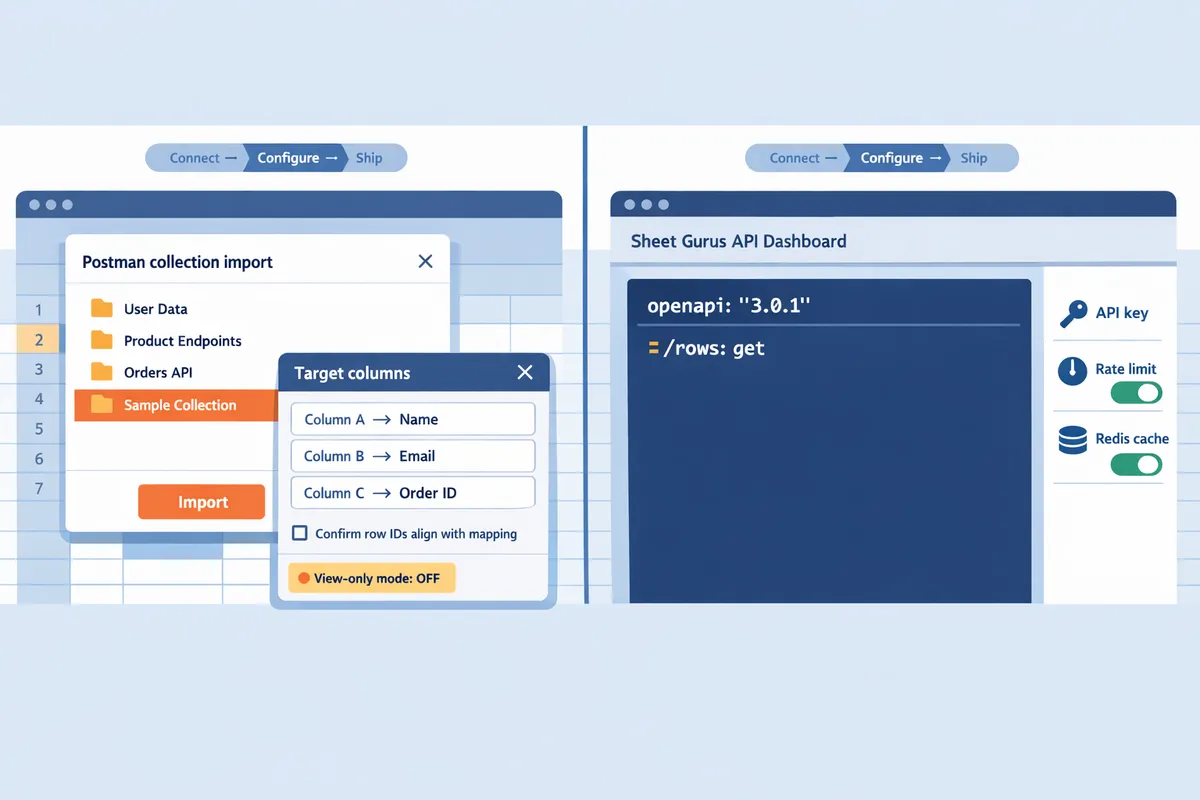
- Import OpenAPI: In Postman choose Import -> File and select the OpenAPI YAML from the download bundle. Postman will create requests for each CRUD route and example bodies.
- Set environment variables: Define base_url (your published endpoint), api_key, and sheet_id in the Postman environment. Replace placeholders with the values from Sheet Gurus API.
- Run smoke tests: Execute these checks for each CRUD path: verify 200/201 for successful reads/writes, 400 for malformed payloads, 401 for missing/invalid keys, and 429 for rate limit hits. Confirm each successful write appears in the Google Sheet within seconds. Validation checklist:
- Status codes match expectation for normal and error cases.
- Returned JSON matches the OpenAPI schema (fields, types, required properties).
- Writes sync back to the original sheet in real time. If you prefer a more detailed walkthrough of mapping CRUD and auth patterns, consult our Complete Guide to CRUD, Auth, and Performance: https://sheetgurusapi.com/blog/google-sheets-json-api-the-complete-guide-to-crud-auth-and-performance.
Troubleshooting checklist for common errors
Authentication and permissions errors typically cause most failures; verify OAuth scopes, API key scopes, and sheet sharing settings first.
- 401 Unauthorized: Confirm api_key is set and not expired. Recreate and test a new key if needed.
- 403 Forbidden: Ensure the Google account that signed in still has access to the spreadsheet and that the sheet is not owned by a suspended domain.
- 400 Bad Request / Schema mismatch: Compare the response body to the OpenAPI schema in Postman and adjust the payload or mapping rules.
- 429 Rate Limit: Inspect key-level and global rate settings in Sheet Gurus API and increase limits or enable caching for heavy read use cases.
- Writes not appearing: Check that the mapped range covers the target columns, confirm row IDs align with your mapping, and verify the sheet is not in view-only mode. For operational reference, use our API Reference to match endpoints and parameters: https://sheetgurusapi.com/docs/api-reference.
This section shows practical customizations, JSON schema patterns, and examples for common data models and performance tuning.
Modeling spreadsheet rows and tuning API behavior prevents data quality issues, reduces latency, and keeps Google API quotas under control. The examples below show concrete schema patterns for contacts, inventory, and bookings, practical caching and rate-limit settings, an AI agent workflow using MCP servers, and a short migration checklist you can run before switching production traffic.
Map headers and types to JSON schema to prevent parsing errors and mismatched types 🗂️
Map spreadsheet headers to explicit JSON schema types so downstream apps receive predictable fields and type errors surface early. Sheet Gurus API lets you declare a column type (string, integer, number, boolean, date, enum) and rejects or normalizes rows that do not match the declared type. Use exact header names (case-sensitive) in the mapping to avoid accidental column shifts when collaborators edit the sheet.
| Use case | Example spreadsheet header | JSON type | Validation rule | Example-value style |
|---|---|---|---|---|
| Contacts | phone, email, created_at, opted_in | string, string, date, boolean | phone must match "+1##########"; email must contain "@"; date ISO-8601 | "+12223334444", "[email protected]", "2026-03-02", true |
| Inventory | sku, name, qty, price, last_counted | string, string, integer, number, date | qty >= 0; price >= 0.00; missing last_counted -> null | "SKU-1001", "Widget", 42, 9.99, null |
| Bookings | booking_id, customer_id, start_ts, end_ts, status | string, string, date-time, date-time, enum | end_ts > start_ts; status in (confirmed, canceled, pending) | "BKG-300", "CUST-12", "2026-04-01T09:00:00Z", "2026-04-01T10:00:00Z", "confirmed" |
Practical rules to avoid common failures:
- Normalize dates to ISO 8601 (YYYY-MM-DD or full timestamp with timezone). Downstream agents read timestamps reliably when timezone is explicit. Example: 2026-04-01T09:00:00Z.
- Treat empty numeric cells as null, not empty string. That prevents transport libraries from coercing an empty string into 0.
- Use enums for controlled vocab (status, type) to prevent spelling drift when multiple editors update the sheet.
- Validate phone numbers and emails at the ingestion edge; for example, require +countrycode format for phones so third-party integrations do not parse ambiguous local formats.
For more on authentication and request patterns that work with typed schemas, see our guide on Google Sheets JSON API: The Complete Guide to CRUD, Auth, and Performance.
Enable optional Redis caching and tune rate limits to cut Google Sheets API calls and speed responses ⚡
Enable Redis caching on read-heavy or high-duplicate-query endpoints to reduce Google Sheets API calls and improve response times. Sheet Gurus API offers optional Redis caching per route and configurable TTL so you can balance freshness and cost without building cache infrastructure.
When to enable caching:
- Read-heavy endpoints such as product catalogs, pricing lists, or dashboard queries.
- Frequent identical queries (same query params) across many users.
- Endpoints that tolerate short staleness (inventory counts that update every few minutes).
Suggested TTL ranges by workload:
- Real-time critical checks (availability during checkout): 15–60 seconds.
- Product catalogs or lists that change periodically: 5–30 minutes.
- Daily reports or exports: 1 hour or more.
Rate-limit recommendations:
- Small teams (100–1,000 requests/day): use a conservative per-key limit like 1 request/sec with a daily quota to avoid bursts that hit Google API quotas.
- Growing workloads (1,000+ requests/day): raise per-key burst allowance (for example, up to 5–10 requests/sec) and rely on cache hit rates to keep Google calls low.
Business cost of not caching: increased latency for users, faster consumption of Google API quotas that can trigger quota errors, and higher operational pressure during traffic spikes. Use monitoring to track cache hit rate and Google API calls per minute and tune TTL until you reach an acceptable trade-off between freshness and cost.
💡 Tip: Start with a short TTL (30–60s) for critical endpoints, then increase to 5–15 minutes after you confirm the cache hit rate and user tolerance for staleness.
Refer to How to Turn Google Sheets into a REST API in Minutes (No Backend Required) for a playbook on choosing TTLs and rate limits when moving from a prototype to production.
Expose sheets as MCP servers for AI assistants and show an example agent workflow 🤖
Use Sheet Gurus API's MCP server capability so AI assistants can query, interpret, and update sheet-backed data using the OpenAPI spec as structured context. The OpenAPI definition gives the assistant precise parameter names, types, and acceptable values so prompts can be deterministic and safe.
Example agent flow for checking product availability and creating a restock task:
- Assistant receives: “Is SKU-1001 available for same-day shipping?”
- Assistant calls the products endpoint (GET /products?sku=SKU-1001) using the OpenAPI schema to request numeric qty and ship_by_date fields.
- Assistant evaluates response: if qty > 5 and ship_by_date <= today, reply "Available" and create a short internal note.
- If qty <= 5, assistant POSTs a restock row to /tasks with {sku, qty_needed, reason} and updates product.status to "reorder_requested" via a PATCH.
Why this matters: the OpenAPI spec removes guesswork about field names and types, so the assistant does not invent column names or write malformed rows. Sheet Gurus API handles authentication and the writeback flow so you avoid building a custom API layer and the associated security and retry logic.
For more scenarios where agents interact with sheet data, see Google Sheets to API: 15 Production-Ready Use Cases for Internal Tools, Portals, and AI Agents and the API Reference for endpoint payload expectations.
Migration checklist and rollback plan
Follow a short, testable checklist and a clear rollback plan to move a sheet-backed API into production safely. Sheet Gurus API supports staging endpoints and per-key permissions so you can run canary traffic before full cutover.
- Snapshot the spreadsheet (make a dated copy) and export a CSV backup.
- Create least-privilege API keys in Sheet Gurus API with per-sheet permissions for the staging environment.
- Configure schema mappings and enable optional Redis caching on read endpoints.
- Run parallel traffic for 48 hours: route a percentage of production calls to the Sheet Gurus staging endpoint while keeping the original integration active.
- Monitor key metrics: 4xx/5xx error rate, average latency, Google API call volume, and cache hit rate.
- If errors appear, switch traffic back to the original integration, revoke the staging keys, and restore the spreadsheet from the snapshot if row-level corruption occurred.
Rollback steps (quick):
- Repoint client integrations or load balancer to the previous endpoint.
- Revoke or rotate keys used for the failed deployment.
- Restore spreadsheet from the snapshot CSV and run a data integrity check against sample IDs.
⚠️ Warning: Take a full snapshot before any schema change. A single removed column can cause multiple downstream integrations to fail; restoring a copy is faster than manual repairs.
For a detailed migration playbook and notes on operational risk, see Google Sheet REST API: What It Is, How It Works, Limits, and the Fastest Way to Get One.
Next steps and downloadable templates.
Download the OpenAPI and Postman templates, connect a sheet, and get a production-ready API in minutes. The assets in this article give you ready-made OpenAPI and Postman templates for Google Sheets API so you can validate endpoints, test auth, and onboard integrations fast.
Sheet Gurus API turns Google Sheets into production-ready RESTful JSON APIs in minutes, requiring no backend code. Users sign in with Google, select a spreadsheet, and immediately receive a live API endpoint that supports full CRUD (create, read, update, delete) operations with changes syncing back to the original sheet in real time. The platform adds API key authentication with fine-grained per-sheet permissions, configurable rate limiting, optional Redis caching to cut Google Sheets API calls and accelerate responses, and enterprise infrastructure with 99.9% uptime.
💡 Tip: Export your sheet schema before publishing an endpoint to avoid breaking live integrations.
Download the Postman and OpenAPI templates for Sheet Gurus API and follow the quick walkthrough in "How to Turn Google Sheets into a REST API in Minutes (No Backend Required)" to publish your endpoint. For more background and examples, see the complete CRUD guide, the API reference, the glossary on REST endpoints, and 15 production-ready use cases linked above.