Google Sheets JSON API: The Complete Guide to CRUD, Auth, and Performance
Building a production-ready JSON API for a Google Sheet often takes days of backend work and adds operational risk. This beginners-guide shows developers, data analysts, and no-code builders how to expose a google sheets json api that supports CRUD operations, authentication patterns, rate limiting, caching, and real-world examples tied to General API Concepts. Our website explains how Sheet Gurus API turns Google Sheets into production-ready RESTful JSON APIs in minutes without backend code, letting teams sign in, pick a spreadsheet, and get a live endpoint. The platform typically achieves up to 99.9% uptime while offering API key permissions and optional Redis caching. If that feels overwhelming, the guide starts from zero and builds practical steps to ship. You may be surprised which configuration choices matter.
Fundamentals and key concepts
This section clarifies the technical paths for exposing a google sheets json api and the planning trade-offs you must address: auth, data modeling, quotas, and error handling. Treat these building blocks as decisions that determine latency, concurrency, and operational risk for any sheet-backed JSON endpoint.
Google Sheets as a JSON data source 📡
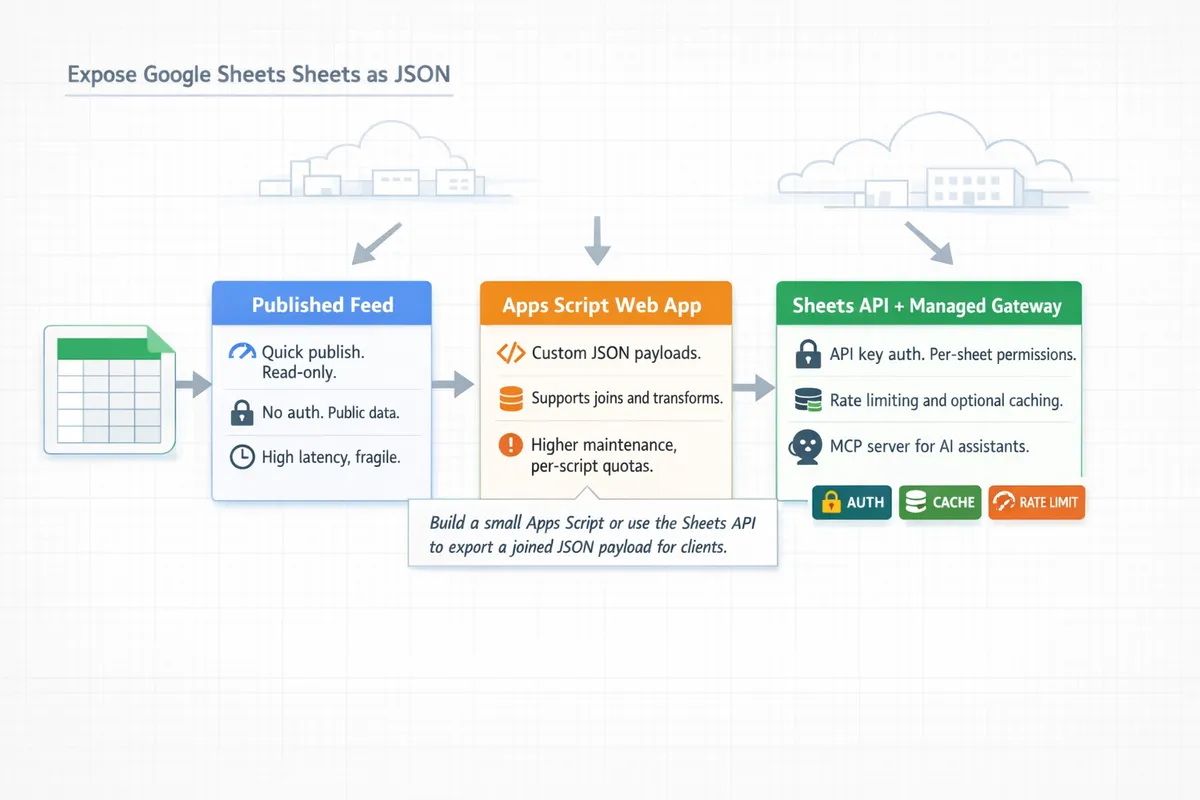
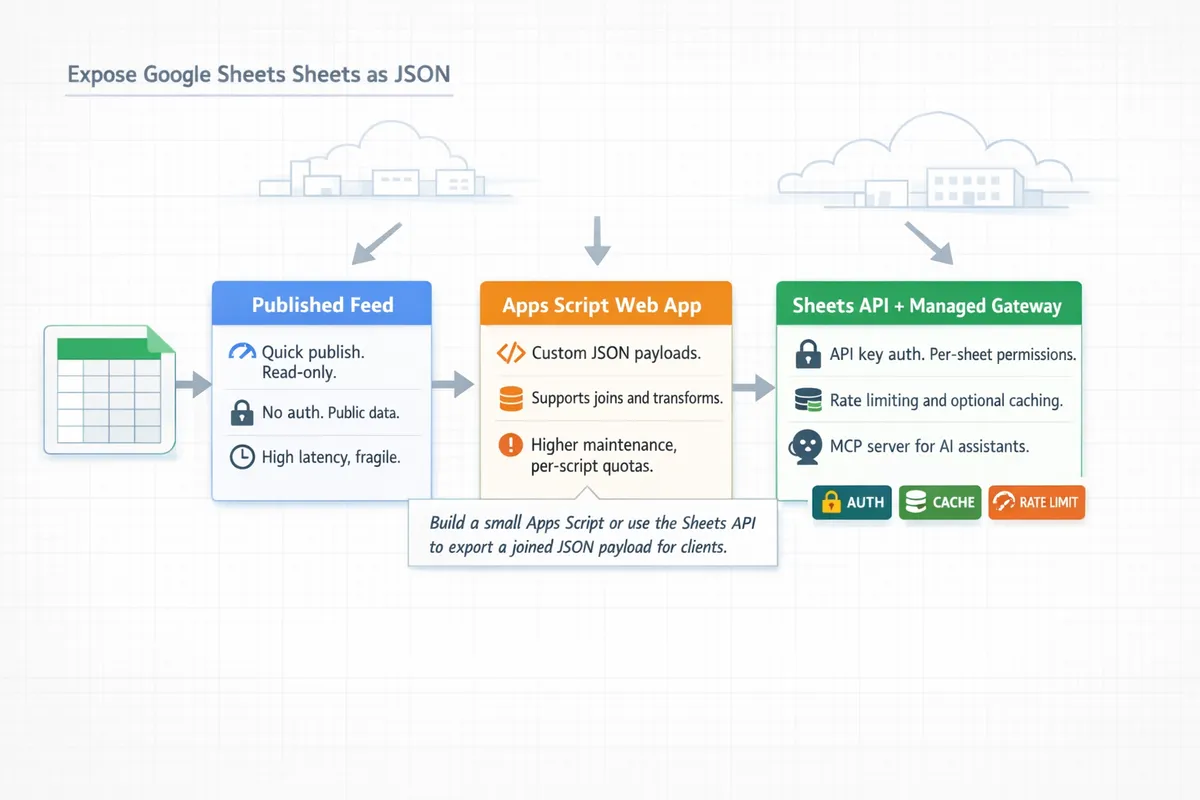
There are three common approaches teams use to expose a google sheets json endpoint, and each suits different production needs. First, publishing a sheet (File > Publish to the web) gives a public CSV or HTML feed that clients can fetch and parse. That approach has the lowest operational overhead and benefits from CDN caching, but it provides no per-user access control and is ill-suited to high-concurrency write workflows.
Second, Apps Script Web Apps can return JSON from script doGet/doPost handlers. Apps Script offers quick server-side logic, URL-based endpoints, and simple deployment without extra infrastructure. Expect cold-starts, script-execution limits, and quota constraints; Apps Script is best for moderate traffic or where inline transformation logic sits next to the sheet.
Third, the official Sheets API provides granular read/write operations, batch updates, and OAuth2-based access control. Use the Sheets API when you need concurrency, partial updates, or transactional write patterns; plan a server component or a managed gateway to handle tokens, retries, and rate limiting.
For teams that want an out-of-the-box, production-ready REST endpoint without building a backend, our website documents the Sheet Gurus API that issues secure JSON endpoints from a connected spreadsheet and adds API-key permissions, rate limiting, and optional caching. See our getting-started guide for the three-step flow and API reference for endpoint examples (https://sheetgurusapi.com/docs/getting-started).
Authentication and access control
OAuth2 with the Sheets API provides delegated, per-user access and is the standard choice for server-to-server or user-scoped integrations. You must implement access token storage, automated refresh flows for expired tokens, and scoped consent for Drive and Sheets scopes. Apps Script uses script-level permissions and can publish a web app either executing as the script owner or as the end user; pick the execution model based on whether the app should respect individual Google Drive sharing rules.
Managed services and API gateways typically use API keys or signed tokens for client access while holding OAuth tokens server-side to call Google. That pattern separates client authentication from Google credentials, enforces per-sheet permissions, and simplifies token rotation. Store long-lived credentials in a secure secret store and restrict API keys by origin, IP, or role.
💡 Tip: Use short-lived access tokens and a secure refresh-token workflow. Keep refresh tokens in an encrypted secret store and rotate keys when a credential is compromised.
Refer to our API reference for examples of API-key configuration and permission scopes (https://sheetgurusapi.com/docs/api-reference).
Quotas, rate limits, and common failure modes
Google APIs enforce per-project and per-user quotas that affect both read-heavy and write-heavy workflows; plan for per-minute and daily limits rather than assuming unlimited calls. Common error responses you will encounter include 429 Too Many Requests for quota bursts, 403 variants such as rateLimitExceeded, 401 for invalid or expired credentials, and 5xx transient server errors that indicate retries may succeed.
Implement exponential backoff with jitter: detect 429/5xx, wait an exponentially increasing interval with randomized jitter, and cap retries to avoid cascading load. Use a retry policy that distinguishes client errors (4xx other than 429) from transient server errors; do not retry on permanent 4xx failures.
At the API gateway layer, apply rate limiting (token-bucket or fixed-window) per API key and per-IP to absorb traffic spikes before Google sees them. Add caching for read-heavy endpoints; caching reduces Google API calls, lowers cost, and smooths quota usage. Our website supports configurable rate limiting and optional Redis caching for endpoints created via Sheet Gurus API, which reduces direct Google calls and centralizes quota protection. See caching and MCP server docs (https://sheetgurusapi.com/docs/mcp-server).
⚠️ Warning: Excessive retry loops without jitter will amplify quota problems and can trigger sustained throttling from Google.
Designing a sheet schema for JSON
Design the sheet layout as a normalized, queryable model rather than arbitrary rows if you expect real API usage. Use one tab per primary entity and a consistent unique-id column (for example, id or order_id) to anchor joins. Represent one-to-many relationships with child tabs that include a foreign-key column (parent_id) instead of packing arrays into single cells; that pattern keeps rows filterable and supports partial updates via the Sheets API or a managed endpoint.
Header conventions help automated conversion. Use dot notation for nested scalar fields (customer.name, customer.email) and avoid ambiguous header names. For arrays, store line items in a child sheet (order_items) with order_id plus ordinal to preserve order. Keep JSON blobs in a cell only when the application needs free-form data that will not be queried server-side; blobs simplify writes but prevent column-level filters and slow range-based reads.
Migration and export steps: 1) Map entities to tabs and assign unique IDs. 2) Create child tabs for arrays and store foreign keys. 3) Add header normalization and a schema row documenting types. 4) Build a small Apps Script or use the Sheets API to export a joined JSON payload for clients. For AI integrations, our MCP server docs show patterns for exposing normalized sheets to assistants (https://sheetgurusapi.com/docs/mcp-server).
Core architectures and application patterns
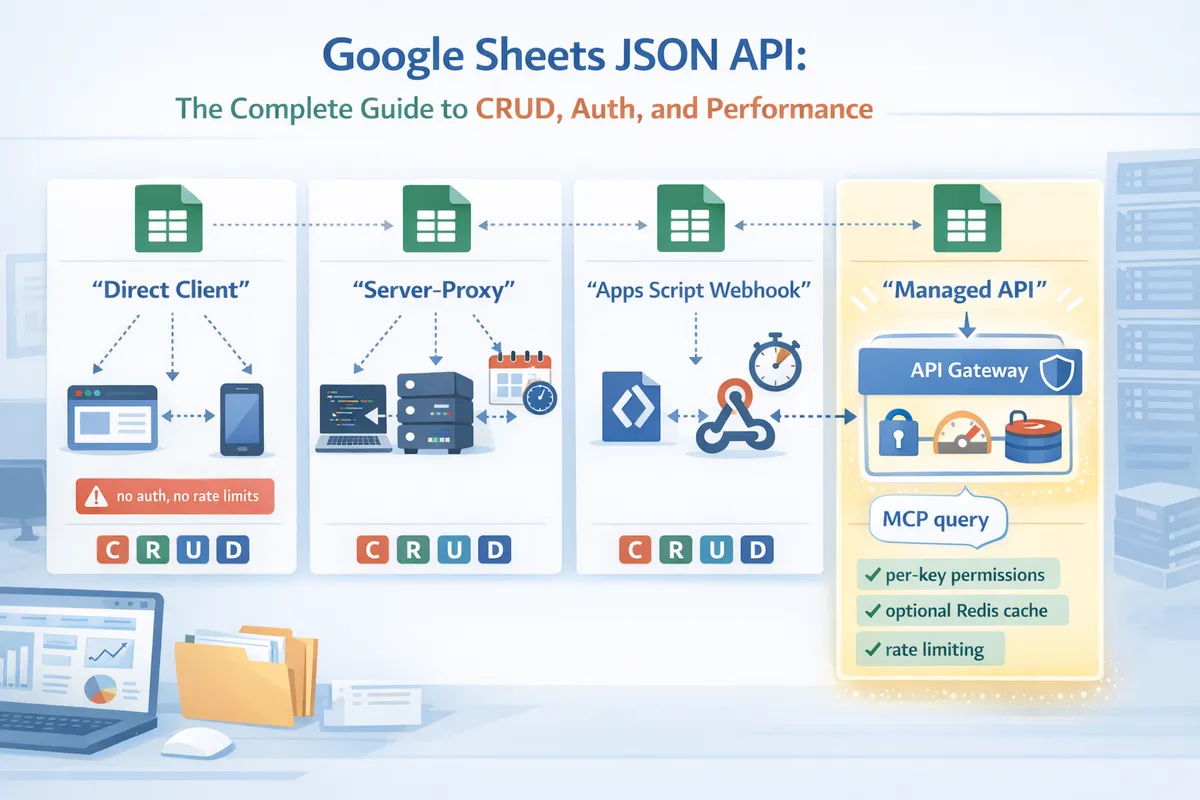
Choosing how your app talks to a sheet determines security, latency, and operational burden. This section maps four common architectures and gives clear decision criteria so you can pick the pattern that fits an internal dashboard, a public API, or a production service.
Direct client access vs. proxied API 🔐
Direct client access to a published sheet endpoint is simplest because the browser calls a public URL and receives JSON without backend code. That pattern works for internal demos or small-team tools where data sensitivity is low and you can accept public-read exposure; a published Google Sheets JSON endpoint or a simple Apps Script GET can serve reads directly. Do not expose credentials or service-account keys to client code. Public-facing apps must avoid storing API keys in the browser since attackers can copy them and abuse your quota or data.
A server-proxied API places authentication and rate limiting behind a backend you control and solves CORS and credential leakage. The proxy can add per-user access control, cache responses to reduce Sheets API calls, and consolidate retries and exponential backoff. Choose a proxy when you need write protection, per-user permissions, or to enforce quotas for external clients. For immediate production readiness with per-key permissions and built-in rate limiting, evaluate our Sheet Gurus API or see the API reference for implementation patterns: https://sheetgurusapi.com/docs/api-reference.
⚠️ Warning: Never embed long-lived credentials in client-side bundles; use short-lived tokens or a backend proxy.
Apps Script Web Apps vs. Sheets API vs. managed endpoints ⚙️
Apps Script web apps fit small automation tasks and prototypes where a single user or a few editors run scripts on a schedule or via simple webhooks. Apps Script has an easy deploy path and triggers, but it enforces execution time limits, per-user daily quotas, and limited concurrent executions, so it degrades under moderate concurrent traffic. Use Apps Script for nightly imports, on-edit triggers, or small internal webhooks that do not require sub-second latency.
The Sheets API gives fine-grained control: batch reads/writes, value and format updates, and append operations with explicit ranges. The API scales better for concurrent clients when paired with a service account, request batching, and exponential backoff. Plan for OAuth token refresh, per-project quotas, and billing if you exceed free-tier request volumes; implement retries and backoff in the client to handle 429s and 5xx errors.
Managed endpoints add production-grade operational controls—API key management, per-key rate limiting, configurable caching, and SLA-backed infrastructure—so teams avoid building and operating the proxy layer. Our Sheet Gurus API provides API-key auth, per-sheet permissioning, optional Redis caching, and request throttling that reduce the operational code you must write; check the getting-started guide for configuration options: https://sheetgurusapi.com/docs/getting-started.
Data sync and concurrency strategies 🔁
Optimistic updates work when conflicts are rare: clients write a change with a version token and the server accepts the change if the token matches the current row version. To implement this with sheets, add a version or updated_at column and require writers to check the value before applying a change. If the version mismatches, return a 409 and provide the latest row so the client can merge or retry.
Row locks and write batching reduce write conflicts under heavy load. Use an append-only operation log sheet for queued mutations and have a single worker process that consumes the log and applies ordered writes to the canonical sheet. That approach serializes conflicting operations and simplifies rollbacks. For read-heavy scenarios, maintain a cached copy (Redis or in-memory) and use webhooks or change-detection to invalidate cache entries.
Example: sync a backend cache with periodic full reads and webhook-driven deltas.
- Full snapshot: run a full read of the sheet once per hour and refresh the cache.
- Delta stream: use an onEdit Apps Script webhook or managed webhook to post deltas to your backend in real time.
- Apply changes: backend validates and applies deltas to cache, then to sheet via batched writes every 5–30 seconds.
- Conflict handling: if batched write fails due to version mismatch, re-fetch the affected rows and replay unresolved deltas.
💡 Tip: Keep an append-only audit sheet for every write; it simplifies debugging and conflict resolution.
google sheets json api example: typical stacks 💻
React SPA calling an authenticated JSON endpoint.
- Flow: client authenticates to your backend, backend issues a short-lived session token, client fetches /api/sheets/{id}/rows with Authorization header. Backend proxies the request to the sheet endpoint or a managed API, enforces per-user permissions, and caches GET responses for 30–120 seconds to reduce Sheets calls. On writes, the client POSTs changes to the backend which validates input, applies optimistic version checks, and returns the updated row.
Python backend consuming sheet-backed data.
- Flow: a scheduled Python worker uses a service account to read the sheet via the Sheets API or a managed endpoint, stores normalized rows in a relational cache, and exposes internal REST endpoints for downstream services. Use batchGet and spreadsheets.values.batchUpdate to reduce HTTP overhead, and implement exponential backoff for quota errors.
Serverless function wrapping a sheet-based API.
- Flow: serverless functions (AWS Lambda, Cloud Run) validate incoming requests, consult a short-lived cache, and call the sheet JSON endpoint for cache misses. The function performs small business logic (validation, enrichment) and writes back via batched operations; keep function execution under provider limits by delegating heavy work to background workers.
For AI integrations or structured query access, see our MCP server docs for patterns on exposing sheets to assistants: https://sheetgurusapi.com/docs/mcp-server. For API mechanics and sample endpoints, consult the API docs: https://sheetgurusapi.com/docs/api-reference.
Getting started: a practical, step-by-step beginner workflow
This section gives a reproducible path to publish a Google Sheets JSON endpoint you can call from a local app. Follow the numbered setup flow, then run the minimal working example to verify end-to-end behavior before adding auth, caching, or rate limits.
Step-by-step: Connect → Configure → Ship 🚀
Sign in and grant spreadsheet access. Sign in to Sheet Gurus API with the Google account that owns the spreadsheet and grant read/write permission to the specific sheet you will expose. Use a least-privilege account if the sheet contains sensitive data.
Select sheets and define read/write mappings. Open the spreadsheet selector, pick the single sheet or range, and confirm the header row maps to field names (example: id, email, status). Mark which column acts as the primary key (row ID) so updates and deletes target a stable identifier.
Choose auth mode and set permissions. Pick one of: public (no auth, for read-only lists), API key (recommended for server-to-server calls), or OAuth 2.0 (user-scoped access). Configure per-sheet permissions (read, create, update, delete) per API key or OAuth client.
Configure rate limits and caching. Set per-key and global rate limits to avoid hitting Sheets API quotas. Enable optional Redis caching for list requests that are safe to serve stale (configure TTL in seconds and cache invalidation on writes).
Publish endpoint and test. Publish the endpoint; copy the live URL and run smoke tests for GET, POST, PATCH, DELETE. Validate headers, response codes, and timing under simulated concurrency.
Validation checks before going live:
- Ensure header row contains unique primary key column.
- Confirm write permissions only on endpoints that truly need them.
- Test quota behavior under burst traffic (simulate 100 concurrent GETs).
- Verify cache TTL and invalidation on write operations.
Refer to our getting started documentation for screenshots and step screenshots: https://sheetgurusapi.com/docs/getting-started
Hands-on: create your first google sheets json endpoint 🛠️
This minimal example exposes a single sheet as a GET JSON list with simple query filtering. Sheet layout (first row headers): id,name,email,status. The API maps query parameters to columns (for example status=active filters rows where status equals active).
Request pattern (example):
GET https://api.sheetgurusapi.com/spreadsheets/{spreadsheetId}/sheets/{sheetName}/rows?status=active&limit=50
Expected JSON shape (array of objects):
{
 "rows": [
  { "id": "r1", "name": "Alice", "email": "[email protected]", "status": "active" },
  { "id": "r2", "name": "Bob", "email": "[email protected]", "status": "active" }
 ],
 "meta": { "count": 2, "limit": 50 }
}
Curl call outline to test locally :
curl -H 'Authorization: Bearer YOUR_API_KEY' https://api.sheetgurusapi.com/spreadsheets/SPREADSHEET_ID/sheets/Sheet1/rows?status=active&limit=10
Testing notes:
- Confirm filters are case-sensitive or case-insensitive depending on mapping rules in the console. Adjust mapping if you need normalization.
- Verify meta.count matches returned rows and that limit truncation works.
- Use the Sheet Gurus API docs for query parameter details: https://sheetgurusapi.com/docs/api-reference
google sheets json api example: client snippets for read/write ⚙️
Read (GET with query). Use query parameters mapped to column names to fetch rows. Example endpoint pattern: GET /spreadsheets/{id}/sheets/{name}/rows?status=active&limit=25. Expect 200 OK with JSON array and meta. If no rows match, respond 200 with an empty array, not 404.
Create (POST row). POST to /rows with JSON body { "name":"Jane","email":"[email protected]","status":"pending" }. On success return 201 Created and the created row object (including assigned id).
Update (PATCH by row ID). PATCH /rows/{id} with partial object { "status":"active" }. Respond 200 OK with updated row. If the id is missing return 404 Not Found.
Delete (DELETE by row ID). DELETE /rows/{id}. Return 204 No Content on success. If deletion is blocked by permissions return 403 Forbidden.
Headers and status code reminders:
- Use Cache-Control on list responses (eg, Cache-Control: max-age=30) to let clients cache safely.
- Provide ETag on row GETs and support If-None-Match for 304 Not Modified responses.
- Return 400 Bad Request for malformed JSON, 401 Unauthorized for missing or invalid keys, and 429 Too Many Requests when rate limits trigger.
See the API reference for exact parameter names and examples: https://sheetgurusapi.com/docs/api-reference
Common setup pitfalls and how to avoid them 🚧
Wrong sheet range. Problem: selecting a range that misses the header row leads to incorrect field mapping. Remediation: always select the full header row and sample 10 rows when you map fields. If you need nested JSON, model it as JSON strings in a cell and parse them client-side or use Sheet Gurus schema mapping.
Missing headers. Problem: non-unique or blank headers produce ambiguous fields. Remediation: enforce unique snake_case headers (id, created_at, customer_email) and use the platform's header validation tool before publishing.
Insufficient permissions. Problem: using a broad OAuth token tied to a personal account exposes unrelated sheets. Remediation: create a service account or a dedicated Google user and restrict the sheet sharing to only that account.
Exceeding quota. Problem: heavy polling or many write bursts hit Google Sheets API quotas. Remediation: enable Redis caching for read-heavy endpoints, set sensible TTLs, and set per-key rate limits. If writes require immediate consistency, keep write endpoints rate-limited and queue bulk updates.
⚠️ Warning: Do not publish endpoints that return personal data without applying API key restrictions and rate limits. Public endpoints can expose PII quickly if not protected.
For production patterns that connect AI assistants to sheets, see our MCP server docs: https://sheetgurusapi.com/docs/mcp-server
Next steps and advanced resources
This guide leaves you able to expose spreadsheets as maintainable, production-ready JSON endpoints that handle CRUD, authentication, rate limits, caching, and real-world edge cases. The practical patterns and code snippets here prepare developers, data analysts, and no-code builders to move spreadsheets from prototypes into services that apps and agents can call. The google sheets json api approach in this guide focuses on predictable behavior, operational controls, and observable performance.
Sheet Gurus API turns Google Sheets into production-ready RESTful JSON APIs in minutes, requiring no backend code. Users sign in with Google, select a spreadsheet, and immediately receive a live API endpoint that supports full CRUD operations with changes syncing back to the original sheet in real time; the platform also adds API key authentication, configurable rate limiting, optional Redis caching, and tooling for AI workflows via MCP servers.
For practical next steps, follow our getting started guide to create your first endpoint and consult the API reference for General API Concepts and best practices; learn about AI integrations in the MCP server docs. Subscribe to our newsletter for implementation tips, release notes, and example walkthroughs.