
Google Sheets for AI Agents (2026)
A single mis-synced row can trigger 1–3 hours of triage when using Google Sheets for AI agents. Google Sheets for AI agents is a pattern that exposes spreadsheet data as production-ready RESTful JSON endpoints so assistants can read and update a single source of truth. Our Sheet Gurus API converts Google Sheets into live CRUD APIs in minutes, adding API key authentication, per-sheet permissions, configurable rate limits, and optional Redis caching to cut Google API calls (see the MCP Server docs). It also exposes sheets as MCP servers so assistants like Claude can query structured context directly; learn more about the Sheet Gurus API. Which three operational controls prevent most agent failures?
What core principles ensure safe, scalable Google Sheets integrations for AI agents?
Strict access control, sensible rate limits, pragmatic caching, and firm governance form the core principles that keep AI agents safe and scalable when they access spreadsheets. These controls prevent data exposure, runaway costs, and stale agent context while enabling predictable production behavior. Apply policy and technical controls together before you expose any sheet to an assistant or automation.
How should access control, scopes, and tokens be configured? 🔒
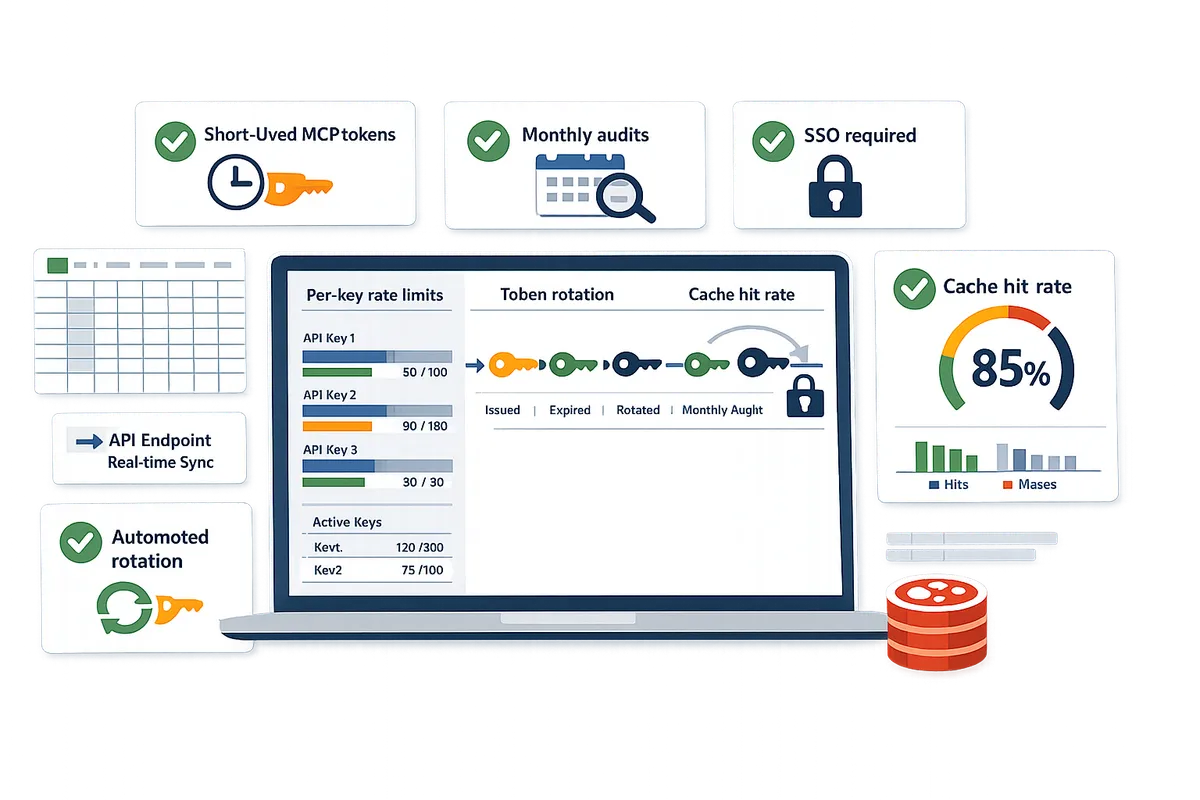
Scoped tokens and per-sheet API keys enforce least privilege and reduce blast radius when AI agents access spreadsheets. A scoped token is a short-lived credential that grants access only to specified sheets, tabs, or CRUD operations. Configure tokens so each agent only gets the operations it needs (read-only for lookups, read-write only where updates are required). Use per-sheet API keys for UI-level integrations and scoped MCP tokens for assistants that need structured context. Rotate tokens automatically and audit every issuance; for example, require daily rotation for production assistants that perform writes and weekly rotation for low-risk read-only agents. Store keys in a secrets manager and never embed them inside a spreadsheet. Our Sheet Gurus API's MCP Server lets you create scoped tokens and manage per-sheet permissions; see MCP Server configuration examples for step-by-step guidance and the Google Sheet MCP Server: 2026 Beginner's Guide for setup patterns.
💡 Tip: Configure token rotation and tie rotation events to audit logs so token issuance always leaves a searchable trail.
How do rate limits and quotas prevent abuse? ⏱️
Rate limits and quotas stop runaway agent queries from degrading sheets, spiking costs, or causing quota errors. Rate limiting is a control that caps requests per API key or globally to keep latency and billing predictable. Implement both per-key limits to contain a single misbehaving agent and global quotas to protect shared spreadsheets. Use soft limits (warning thresholds) plus hard limits (request rejection) and require agents to use automatic retries with progressive delay when they receive throttle responses. As a starting benchmark, set per-agent read limits low (for example, 30–60 requests per minute) and increase after profiling real traffic. Our Sheet Gurus API supports configurable per-key and global quota rules so you can test conservative limits and relax them once usage patterns are stable. For implementation details and rate-limit tuning, see our Create a CRUD API from Google Sheets for AI Agents: Step‑by‑Step with MCP, Auth, and Rate Limits.
When should you add caching and performance controls? ⚡
Add caching for read-heavy agent workflows where slightly stale data is acceptable to reduce Google Sheets API calls and improve response times. Caching is an optional layer that stores API responses for a configurable TTL to avoid repeated reads of unchanged rows. Use Redis caching for high-read scenarios such as user profile lookups or autocomplete suggestions; set short TTLs (30–60 seconds) for frequently changing context and longer TTLs (5–15 minutes) for reference data. Avoid caching transactional or ledger rows unless you invalidate cache on every write. Implement cache-bypass paths for verification queries and include explicit cache invalidation on agent writes. Our Sheet Gurus API supports optional Redis caching so teams can cut Google API calls while keeping control over TTL and invalidation.
⚠️ Warning: Caching can cause agents to act on stale information. Use short TTLs or bypass caching for decisions that must reflect the latest spreadsheet state.
What governance and data ownership rules matter? 📁
Clear ownership, retention policies, and regular access reviews reduce compliance and operational risk for spreadsheet-backed AI workflows. Governance is a set of rules and responsibilities that determine who owns data, how long it is kept, and who may access it. At minimum, assign a data owner per sheet, document retention periods for rows and backups, require quarterly access reviews, and maintain an incident plan to revoke keys quickly. Enforce column-level exposure rules so PII is redacted or minimized before an agent can see it. Our Sheet Gurus API provides audit logs, API key management, and MCP token lifecycle controls to support these governance tasks; review the Sheet Gurus API terms of service for account and data ownership guidance. For decision guidance by team size, solo operators can use per-sheet keys with weekly reviews, small businesses should add short-lived MCP tokens and monthly audits, and enterprises should require SSO, automated rotation, and continuous logging. See our Sheets APIs for AI Agents (2026) decision framework for mapping controls to organizational needs.
Which strategies work best for connecting AI agents to Google Sheets in production?
Use an MCP server with scoped tokens, strict schemas, guarded write flows, and operational controls to move agents from prototype to reliable production workflows. Sheet Gurus API is a platform that turns Google Sheets into production-ready RESTful JSON APIs and exposes sheets as MCP servers so agents can query and update structured data without a custom backend. The patterns below focus on predictable agent outputs, least-privilege access, and engineering controls that reduce incidents and manual triage.
How does the MCP server enable safe agent access? 🤖
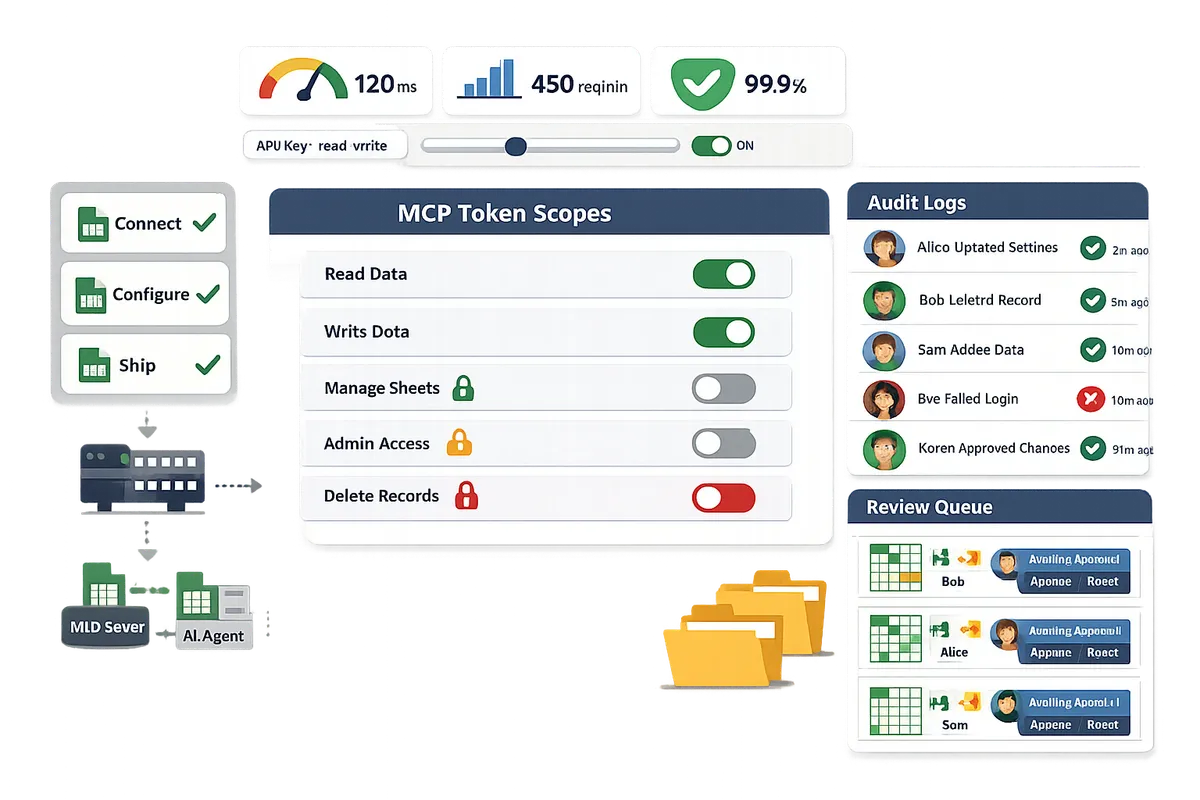
Run an MCP server that exposes sheet rows and tabs as structured JSON context with token-enforced scopes and auditability. Model Context Protocol (MCP) is a protocol that exposes spreadsheet data as structured endpoints agents can query and update while the server enforces scopes, pagination, and consistent schemas. Using Sheet Gurus API's MCP Server you can issue scoped tokens such as read-only for a 'customers' tab or write-limited to a single 'notes' column; this prevents broad keys from editing unrelated data. For example, give a conversational assistant a token scoped to recent invoices and deny access to payroll tabs to reduce risk. See the MCP Server guide for step-by-step enablement and scoped token examples and our beginner's guide for common configuration choices.
What prompt and schema patterns reduce agent errors? 🧭
Enforce explicit JSON schemas and fixed prompt templates so agents return predictable, machine-parseable responses. A JSON schema is a contract that defines field names, types, required flags, and allowed values; pairing that with a strict prompt template reduces parsing failures and downstream exceptions. Example: require {'customer_id': integer, 'follow_up': 'yes|no', 'note': string(max:500)} and instruct the agent to respond only with that JSON object. Validation rules then reject any response that fails schema checks and log the error for triage. Sheet Gurus API works with those schemas by surfacing structured rows; teams that add field-level validation cut manual corrections and malformed writes during the first 48 hours of rollout.
How do you secure write operations and prevent accidental edits? 🛡️
Require explicit write permissions, gated approval flows, and per-token write scopes to prevent accidental or malicious edits. Scoped write tokens limit which tabs, columns, or rows an agent may change; pair that with a review queue (a separate 'pending_changes' tab or an approval API call) for high-risk updates such as pricing or customer balances. For example, route any agent-initiated price change into a pending_changes sheet and require a human approval action before applying it to the live tab. Sheet Gurus API supports per-sheet permissions that make guarded write patterns practical without custom middleware.
💡 Tip: For high-impact changes, require a human approval record plus an auditable comment that references the originating token and agent prompt.
What operational controls should engineering teams require? 🔧
Require API key lifecycle management, audit logs, configurable rate limits, and usage metrics before rolling agents into production. API keys and MCP tokens must support rotation and revocation; audit logs should capture token ID, agent prompt hash, row IDs affected, and before/after values to support fast incident response. Set rate limits per key to protect Google API quotas and enable optional caching for read-heavy agents to reduce cost. Retain logs for a period that matches your compliance needs (90 days is a common starting point for SMBs; extend for regulated industries). See About Sheet Gurus API for built-in operational features and consult our Create a CRUD API guide for practical setup patterns that combine auth, rate limiting, and MCP.
How do you implement, measure, and scale AI agent workflows with Google Sheets?
Implement production-ready AI agent workflows with Google Sheets by following a repeatable Connect → Configure → Ship flow while measuring latency, throughput, and costs to scale. Sheet Gurus API typically achieves up to 99.9% uptime, which helps remove infrastructure uncertainty when you move from prototype to production.
How to run the three-step Connect → Configure → Ship flow? 🚀
Connect → Configure → Ship is a reproducible deployment path: sign in and grant scoped access, map schemas and permissions, then publish a live API endpoint. Use Sheet Gurus API to reduce manual backend work: sign in with Google, pick the spreadsheet, enable MCP tokens for assistant access, and generate API keys with per-sheet scopes.
Follow this step-by-step checklist for a safe rollout:
- Connect. Sign in with Google and select the spreadsheet. Confirm the minimal OAuth scopes required and enable MCP server tokens for agent access. See our Google Sheet MCP Server: 2026 Beginner's Guide for details.
- Configure. Map tabs to endpoints, define field types (date, number, enum), set per-sheet API key permissions, and configure rate limits and optional Redis caching. Run a schema validation pass against representative rows.
- Ship. Create a staging API key, run a smoke test that exercises reads and guarded writes, enable logging and alerts, then promote keys to production after approval.
Rollout checklist (pre-shipping):
- Validate 10–50 real queries from your AI agent with production-like prompts.
- Run permission audit and revoke any editor-scoped tokens.
- Configure rate limits per key and add an alert for sustained 5% error rates.
- Enable optional Redis caching if p95 latency exceeds your target during tests.
💡 Tip: Use scoped MCP tokens for agent sessions so a compromised assistant cannot edit unrelated sheets.
Link resources: Follow the Create a CRUD API from Google Sheets for AI Agents: Step‑by‑Step with MCP, Auth, and Rate Limits for a full walkthrough of auth and permissions.
How to benchmark latency, throughput, and failure modes? 📊
Measure end-to-end response time, Google Sheets API call volume, and error rates under representative agent load to find bottlenecks. Collect p50, p95, and p99 latencies, Google API calls per agent action, and error type breakdowns during a controlled ramp test.
Suggested short testing plan:
- Define realistic scenarios (e.g., single-agent lookup, batch reconciliation, and multi-agent concurrent reads/writes).
- Run three ramps: low (10 RPS), medium (50 RPS), and high (sustained peak expected). Record p50/p95/p99, Google API calls/minute, and HTTP 4xx/5xx counts.
- Inspect failure modes: quota errors, rate-limit rejections, stale reads, and conflicting writes.
When to add Redis caching or increase rate limits:
- Add Redis caching when p95 latency is driven by repetitive read patterns and caching cuts Google API calls by 30% or more.
- Increase rate limits when error rates exceed 2–5% under realistic sustained load, and caching cannot reduce call volume.
Operational metrics to track monthly:
- Total API calls to Sheet Gurus API and Google Sheets API.
- Average and 95th percentile response time.
- Error rate by endpoint and by API key.
⚠️ Warning: Don’t assume synthetic single-thread tests predict multi-assistant traffic; concurrent writes often surface schema and conflict issues.
Use the Google Sheets MCP Server Quickstarts for Claude, Cursor to validate assistant-specific behaviors and token scoping during tests.
How do native Google Sheets features compare to external agent platforms and Sheet Gurus API? 📋
Native Google Sheets features, DIY integrations, and Sheet Gurus API each trade off security, ops overhead, latency, and development time. The table below shows the typical differences so you can pick the path that matches your risk tolerance and time-to-market needs.
| Approach | Security & Access Control | Operational Overhead | Typical Latency | Development Time | Key capabilities |
|---|---|---|---|---|---|
| Native Google Sheets (Apps Script, built-in automation) | Limited to spreadsheet sharing and script scopes; auditing is manual | Low infra ops but high manual governance and brittle at scale | Variable; depends on Apps Script quotas and triggers | Short for prototypes, long to hardened production | Good for quick automations, poor for programmatic agent access |
| DIY integrations & third-party add-ons (Zapier, n8n, custom REST) | Depends on implementation; credential management often manual | High. You maintain tokens, retries, and quota handling | Moderate to high if routing through custom services | Weeks to months, includes maintenance burden | Flexible but requires ongoing ops and security checks |
| Sheet Gurus API (MCP server, per-sheet permissions, rate limiting, Redis) | API key and scoped MCP tokens, per-sheet permissions and audit logs | Low. Managed rate limits, optional Redis caching, and production monitoring | Typically low; suitable for multi-assistant use cases | Minutes to days to publish a CRUD endpoint with auth | Exposes sheets as RESTful JSON with MCP support for AI agents |
If you need a decision framework by use case and business size, see our Sheets APIs for AI Agents (2026): MCP vs Zapier/n8n vs Composio vs REST API decision framework and setup paths for recommended paths.
How should you estimate ROI and ongoing operational costs? 💰
Estimate ROI by modeling developer hours saved, predicted API call volume, and monthly ops overhead, then compare those costs to building and maintaining a custom REST backend. Use three inputs: initial implementation hours, recurring maintenance hours, and expected API usage.
Step-by-step ROI model:
- Inputs. List initial developer hours to build a custom API, hourly rate, monthly maintenance hours, and projected API calls per month.
- Cost the DIY path. Multiply developer hours by rate, add monthly ops cost (on-call, infra, error triage). Include an annual maintenance uplift (20–30%).
- Cost the managed path. Sum Sheet Gurus API subscription plus predicted usage fees and any optional Redis or enterprise add-ons. Add minimal ops overhead for key rotation and monitoring.
Example scenario (illustrative): a small product team expects 50k agent-driven calls/month. Building a custom REST API might take 160 developer hours plus 10 hours/month maintenance. Using a managed API can cut initial build time to a few hours and reduce ongoing ops to 1–3 hours/month. Quantify your hourly rates to convert time savings into dollars.
Decision triggers to prefer a managed API like Sheet Gurus API:
- You need production controls (per-sheet permissions, rate limiting) without hiring SREs.
- Faster time-to-production is critical for experiments that impact revenue or support load.
- The ongoing maintenance cost of a custom API exceeds subscription plus lower ops time.
Link resource: our Google Sheets to API: 15 Production-Ready Use Cases for Internal Tools, Portals, and AI Agents lists common scenarios and helps model when a managed approach pays back.
Frequently Asked Questions
This FAQ answers the operational, security, and configuration questions teams ask when running AI agents against Google Sheets. Each answer points to practical options you can apply immediately and links to implementation details in our documentation.
How do I connect Claude or other AI agents to Google Sheets using MCP? 🤖
Enable the MCP server on the spreadsheet, create a scoped MCP token for the agent, and present that token when the assistant queries the MCP endpoint. Follow a short, repeatable flow: 1) enable MCP on the sheet inside Sheet Gurus API, 2) create a scoped token that restricts the agent to specific tabs and allowed operations, and 3) supply that token to the assistant (Claude, Cursor, etc.) when configuring its data source. For step-by-step token examples and supported agent workflows see our MCP Server guide and the quickstarts for Claude and Cursor. If you prefer a full CRUD API pattern instead of MCP, our Create a CRUD API from Google Sheets guide walks the same authentication and rate-limit patterns but with REST endpoints.
Are MCP tokens and scopes secure enough for production? 🔒
Scoped MCP tokens provide strong production controls when you use short lifetimes, least-privilege scopes, and regular rotation. Scoped tokens limit an agent to only the tabs and operations you permit, which reduces blast radius if a token leaks. Follow these controls: use short-lived tokens, assign per-tab read/write scopes only where required, rotate tokens on a schedule, and record token creation and revocation in audit logs. See the MCP Server docs for token examples and the Terms of Service for account and key management rules. ⚠️ Warning: Do not grant write scope to sheets that contain regulated personal data unless you have explicit compliance approvals and audit processes in place.
Can AI agents both read and write spreadsheet data safely? ✍️
Yes, agents can read and write safely when you grant explicit per-sheet and per-operation permissions and gate high-impact writes with validation or review. Practical patterns include staging writes to a review tab, automated validation rules that reject out-of-range updates, and a human-approval workflow for changes that affect billing or customer balances. Sheet Gurus API supports per-sheet permissions and API key management so you can restrict an agent to only the necessary tables. For a hands-on example of safe write flows and audit logging, see the Google Sheet MCP Server: 2026 Beginner's Guide and the Create a CRUD API walkthrough.
What rate limits should I set for agent access? ⏱️
Start with conservative per-key rate limits and raise them based on observed error rates, latency, and Google API quota usage. A practical setup: 1) apply low per-key quotas to prevent accidental loops, 2) enable a global quota so one misbehaving key cannot exhaust your Google API allotment, and 3) monitor errors and back off before increasing limits. Use Redis caching to reduce repeated reads and lower your effective request rate. Sheet Gurus API supports both per-key and global rate limits so you can test with tight limits and relax them as usage stabilizes. See the Quickstarts for a simple tweak that reduces rate-limit errors when agents make bursty queries.
How do I monitor agent activity and audit changes? 📈
Monitor API access logs, Google Sheets change history, and application-level audit records to trace what an agent read, wrote, or attempted. Instrument these signals: collect per-key request counts, write volumes per tab, error rates, and unusual latency spikes. Export logs to your SIEM or alerting system and set thresholds for sudden increases in write rate or repeated error codes. Sheet Gurus API exposes API access logs and records sync activity so you can correlate agent calls with spreadsheet change history. For examples of metrics to track and alert thresholds, consult the Create a CRUD API guide and the MCP Server documentation.
Do I need to build a backend if I use Sheet Gurus API? ⚙️
No, you can avoid building a custom backend because Sheet Gurus API exposes a production-ready RESTful JSON API and an MCP server that handle auth, rate limiting, and optional caching. Use the three-step Connect → Configure → Ship flow to publish a live endpoint without writing server code. You may still need a light backend if you require advanced orchestration, multi-service transactions, or long-running jobs, but many AI-assistant workflows run directly against the MCP endpoint. See About Sheet Gurus API and the Create a CRUD API post for common patterns and when a minimal backend adds value.
Move sheet-backed AI agents into production with guardrails and minimal ops.
The core takeaway is that Google Sheets can serve as a reliable data layer for AI agents when you apply security, performance, and operational controls. Using consistent schemas, scoped access, and rate limits prevents wrong answers and costly incident response. See the Google Sheet MCP Server: 2026 Beginner's Guide for a hands-on setup if you need step-by-step evaluation and configuration.
Sheet Gurus API turns Google Sheets into production-ready RESTful JSON APIs in minutes, requiring no backend code. Users sign in with Google, select a spreadsheet, and immediately receive a live API endpoint that supports full CRUD (create, read, update, delete) operations with changes syncing back to the original sheet in real time. The platform adds API-level features that professional apps need—API key authentication with fine-grained per-sheet permissions, configurable rate limiting (per key or global), optional Redis caching to cut Google Sheets API calls and accelerate responses, and enterprise infrastructure with 99.9% uptime and average response times under 100 ms.
💡 Tip: Start with one critical sheet, enable MCP tokens, and validate agent queries before scaling.
Create your first endpoint with the MCP Server guide and start a 14-day free trial to test Google Sheets for AI Agents in production. Subscribe to our newsletter for implementation tips and updates.