
Google Sheets API with Node.js (2026): Client vs Server Auth, Read/Write Rows, Pagination, and 429‑Safe Patterns
A runaway google sheets api loop can consume thousands of quota units and trigger 429 errors that stall production jobs. Google Sheets API is an HTTP interface that lets Node.js apps read and write spreadsheet data programmatically. This how-to guide shows production-ready ways to access and operate Google Sheets data from Node.js: choose client versus server auth, implement read/write flows (including a spreadsheets.values.update Node example), handle pagination, and apply 429-safe retry patterns. Our Sheet Gurus API converts spreadsheets into RESTful JSON APIs in minutes and adds API key auth, configurable rate limiting, optional Redis caching, and MCP support; see our getting-started guide and API reference for concrete examples. You will find a compact Node.js spreadsheets.values.update pattern and a 429-handling recipe you can test against both auth models.
Quotas, auth choices, and data layout determine reliability. What do you need to prepare before coding with the Google Sheets API?
Decide on an auth model, map expected quota use, design a sheet schema to minimize calls, and plan secure credential handling before writing a single line of Node.js. These choices directly affect uptime, user experience, and how often your code must handle 429 responses or rebuild broken integrations.
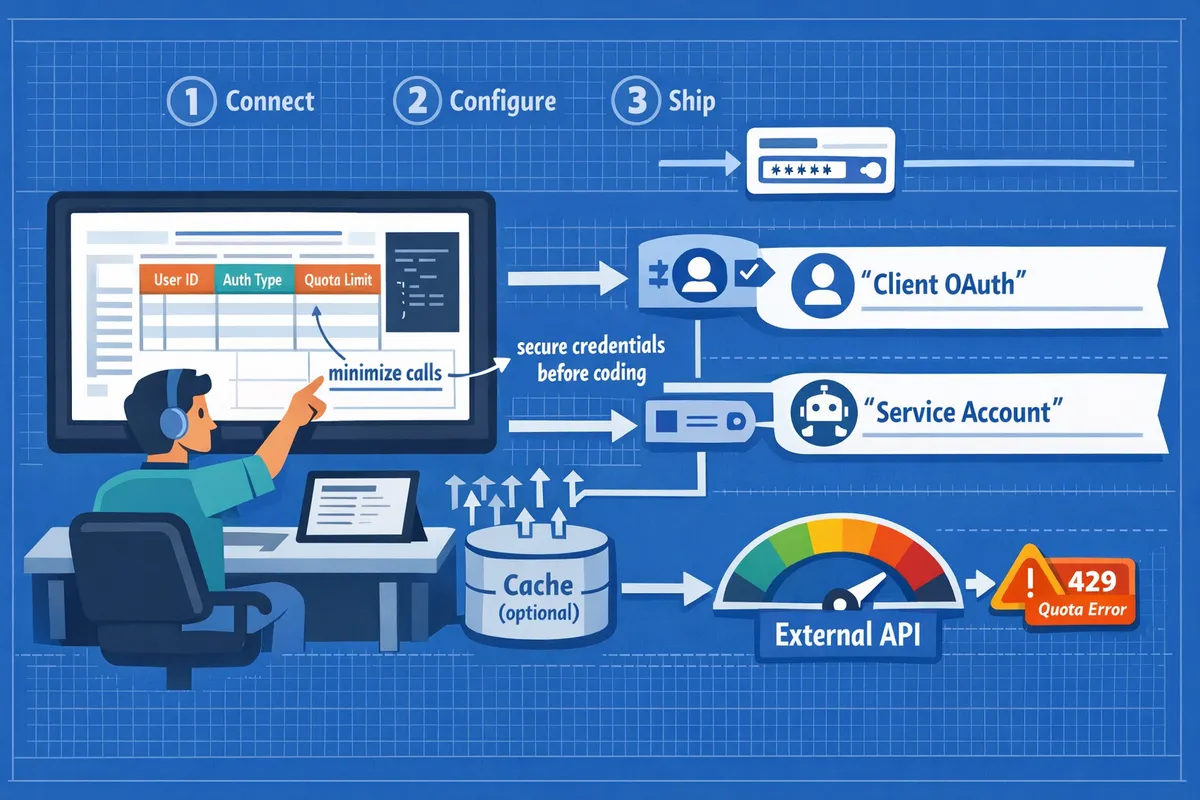
Client OAuth vs Service Account 🔑
Client OAuth is an auth flow that requires user consent. Client OAuth is best when an interactive user must grant your app access, for example single-user dashboards or apps that act on behalf of sign-in users. A service account is a server-side identity that performs actions without interactive consent. Use a service account for backend jobs, scheduled syncs, or multi-tenant servers that own their own spreadsheet access. Token lifetimes matter: access tokens are short-lived and need refresh; refresh tokens keep user sessions long but break if the user revokes consent. For small teams, managing user consent flows and revoked tokens creates operational risk and support overhead. Sheet Gurus API handles OAuth onboarding and issues API keys scoped to sheets so teams avoid building and supporting consent flows and refresh logic. See our getting-started guide for step-by-step OAuth onboarding and the API Reference for credential examples.
How quotas and rate limits change design choices 📊
Sheets API quotas include per-project, per-user, and per-spreadsheet limits that shape request patterns. Common quota types to plan for are requests-per-minute for your Google Cloud project, per-user per-minute limits that affect interactive apps, and per-spreadsheet constraints that appear under heavy concurrent writes. Hitting quotas leads to failed syncs, stalled automations, and unhappy users. Quick mitigations include batching reads with spreadsheets.values.batchGet, grouping writes into spreadsheets.values.batchUpdate, adding caching, and retrying failed requests with increasing delays. Architect writes as queued or rate-limited operations to avoid bursts that trigger 429 errors. Our API Reference lists quota-aware endpoints and request-cost patterns you should audit before launching. Sheet Gurus API offers configurable per-key rate limits and optional Redis caching to reduce direct Sheets API calls and help prevent quota exhaustion.
💡 Tip: Use batchGet to fetch multiple ranges in one call and use batchUpdate to apply many cell changes in a single request.
Data layout: model the sheet to reduce calls 🗂️
A sheet's row-and-column design directly controls how many API calls your app must make. Use a single header row, an immutable ID column, and group related fields so reads and writes target contiguous ranges. Avoid sparse, extremely wide sheets where each update touches isolated columns; a single column update across N rows should be handled via one range update, not N separate updates. Example: an orders sheet with 1,000 rows that needs a status change for 100 orders can use one batchUpdate to write the status column for that subset instead of 100 requests. Prefer denormalized columns for frequently read data and normalized linked sheets for rarely updated relational data. Sheet Gurus API maps rows to JSON and supports server-side filtering and pagination so clients can fetch only the fields they need, cutting round-trips. For layout templates and starter patterns, review our templates and no-code migration posts.
Credential handling and operational risk 🔒
Secure credential storage and rotation are operational tasks that small teams often underestimate. Store keys in a dedicated secret manager or vault, use least-privilege OAuth scopes, avoid committing keys to source control, and rotate credentials on a schedule tied to your risk tolerance. Building key rotation, audit logging, and automated revocation adds days to weeks of work and ongoing maintenance for SMBs. Sheet Gurus API reduces that burden by handling OAuth onboarding, issuing API keys with per-sheet permissions, and providing dashboard controls for key rotation and usage logs. Do not leave service account JSON files in shared drives or public repos; implement access controls and monitoring around any secret material.
⚠️ Warning: Never commit service account keys or API keys to a public repository. Treat them like passwords and restrict access to only the processes that need them.
For hands-on setup, follow our getting-started guide to create a working API in minutes and consult the API Reference for quota-aware endpoints and request formats. For broader decision help and migration patterns, read our guide on building a google sheets json api and the post listing production-ready use cases.
A focused, numbered Node.js implementation shows how to connect, read, and write rows safely. What are the step-by-step actions to implement Google Sheets API access from Node.js?
Follow these five numbered steps to authenticate, fetch, and update sheet rows from Node.js while avoiding common quota and 429 pitfalls. This sequence contrasts a DIY REST approach with a faster managed option using Sheet Gurus API, and links to our getting-started and API reference for exact request/response shapes. Sheet Gurus API also offers production controls such as API key auth, configurable rate limiting, and optional Redis caching to reduce upstream calls and operational overhead.
Step 1 — Create the right credentials and enable the API 🛠️
Create OAuth client IDs for browser/mobile apps or service accounts for server processes, and enable the Google Sheets API in the Cloud Console. Choose scopes precisely: use https://www.googleapis.com/auth/spreadsheets.readonly for read-only workloads and https://www.googleapis.com/auth/spreadsheets for read-write. Broad scopes increase blast radius if credentials leak. Expected outcome: a JSON key or OAuth client secret and a project with the Sheets API enabled. Use our getting-started guide for the minimal console steps and the recommended scope list. Sheet Gurus API removes this step for most teams by handling OAuth onboarding and granting scoped access when you connect a spreadsheet.
Step 2 — Obtain tokens and initialize a Node.js client ⚙️
Exchange OAuth authorization codes for access and refresh tokens for user-based flows, or use a service account key for server-to-server auth, and initialize your HTTP client with those credentials. Store refresh tokens and service keys in a secrets manager (HashiCorp Vault, AWS Secrets Manager, or environment-secured variables); never check keys into source control. Implement silent refresh: request a new access token before expiry and retry the original request after a single refresh. Common pitfalls: using overly broad scopes, embedding long-lived service keys in repositories, and not handling clock skew during token refresh. See the API reference for token-related header expectations. Sheet Gurus API offers API keys and a managed token lifecycle so you avoid most credential ops.
⚠️ Warning: Do not commit service account JSON or OAuth client secrets to your repo. Treat refresh tokens like production credentials and rotate regularly.
Step 3 — Read rows efficiently and convert them to JSON 📥
Use spreadsheets.values.batchGet for multiple ranges, map a header row to JSON keys, and avoid repeated single-cell reads to minimize quota consumption. Implementation details: request contiguous ranges (Sheet1!A1:F1000) or multiple named ranges in one batchGet. Use the first row as the canonical header and map subsequent rows to objects, casting dates with valueRenderOption and handling empty cells explicitly. For very large sheets, read in windowed ranges (e.g., A1:F1000 then A1001:F2000) or use filter columns to fetch only active rows. Pagination note: Google Sheets does not offer cursor-based pagination; you must implement range-based paging or filtering on a marker column. For built-in JSON pagination and query filters, consider the endpoints in our API Reference or use Sheet Gurus API for immediate paged JSON responses. For examples of mapping headers to keys and practical pagination patterns, see our guide on building a Google Sheets JSON API.
Step 4 — Update rows safely with spreadsheets.values.update ✍️
Use spreadsheets.values.update to write a specific range or spreadsheets.values.append to add rows, set valueInputOption to RAW or USER_ENTERED as appropriate, and verify the response's updatedRange and updatedCells. Idempotency patterns: include a unique id column or an idempotency token column so retries do not create duplicates. Typical update flow: read the row to confirm a match, compute a values array aligned to the header order, call spreadsheets.values.update on the exact A1 range for that row, then validate updatedCells in the response before acknowledging success upstream. Atomicity tip: a single spreadsheets.values.update call affects one range; group related cell changes into one batchUpdate when you need atomic multi-range updates. Consult our API Reference for the exact request body and example responses.
Step 5 — Batch writes, retry safely, and avoid 429 traps 🧩
Group multiple writes into spreadsheets.values.batchUpdate to reduce per-request quota and lower failure surfaces, and apply exponential backoff on 429 responses with capped retries. When to batch: combine updates that target different ranges or multiple rows in a single request to cut request counts. On partial failures, examine the batch response to identify failed replies and retry only those with backoff. Avoid tight retry loops; implement increasing sleep intervals and a maximum retry budget per operation. Operational pattern: queue writes server-side, flush them in controlled batch windows, and add optimistic locking with a version or timestamp column to prevent lost updates. Sheet Gurus API provides configurable rate limiting and optional Redis caching to reduce calls and help prevent 429s in production.
Comparison — REST API vs Apps Script vs Workflow tools vs Sheet Gurus API 📋
REST API, Apps Script, workflow tools, and Sheet Gurus API address different needs and trade off setup time, maintenance cost, auth models, rate-limit controls, and caching.
| Approach | Setup time | Maintenance cost | Auth model | Rate-limit controls | Caching options | Ideal use case |
|---|---|---|---|---|---|---|
| DIY REST API (Google Sheets API) | Medium to high | High (token lifecycle, retries) | OAuth or service account | Manual quotas and client-side backoff | DIY caching (Redis or in-memory) | Teams that need full control and custom logic |
| Apps Script | Low | Low to medium (script maintenance) | OAuth via script owner | Script quotas, limited control | Script cache, limited TTL | Light automation and small internal tools |
| Workflow tools (n8n, Zapier) | Low | Medium (connector changes) | OAuth via connector | Connector limits, platform throttling | Platform cache options | Event-driven integrations and business automation |
| Sheet Gurus API | Very low | Low (managed) | OAuth onboarding + API keys | Configurable per-key and global limits | Optional Redis caching | Production REST endpoints fast, with API key controls |
Choose Sheet Gurus API when you need a production-ready REST endpoint quickly, want API key controls and rate limiting without building backend services, and prefer optional Redis caching and built-in pagination over custom implementations. For setup instructions and endpoint examples, see our getting-started guide and the API Reference.
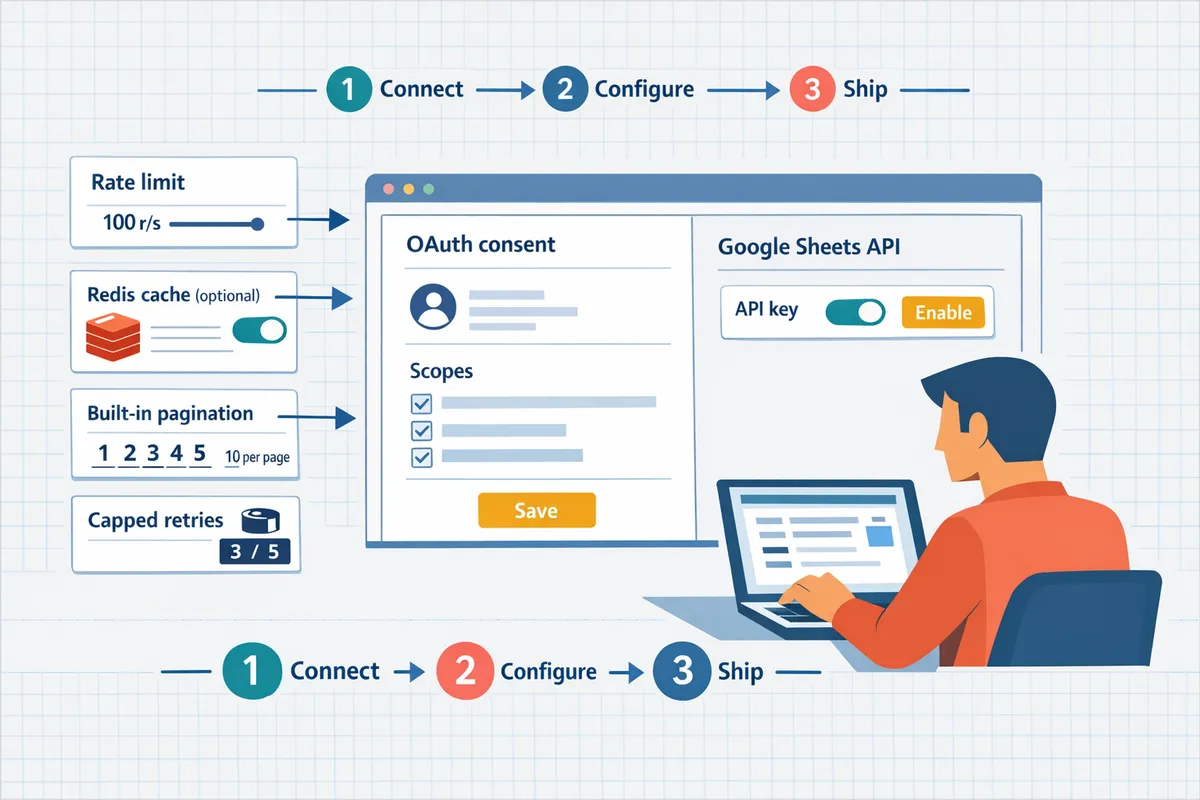
Retries, pagination, and caching decide production reliability. How do you run Google Sheets-backed services at scale while avoiding 429 errors?
Run production sheet-backed services by combining deterministic pagination, capped retries with randomized backoff, short-term caching, and targeted monitoring so clients do not trigger quota throttles. These controls keep memory predictable, cut Google Sheets API calls, and surface problems before users see outages. For teams that do not want to build and operate these layers, Sheet Gurus API provides configurable rate limits and optional Redis caching to handle much of the operational work.
Pagination is a deterministic sequence that prevents large payloads from timing out. How should you page and stream large sheets? 📑
Slice-and-fetch is a pagination pattern that requests small row ranges and uses a cursor column to resume reliably. Slice-and-fetch is a pagination pattern that requests small row ranges and uses a cursor column to resume reliably. Example implementation steps:
- Choose a stable page size that keeps memory bounded. Start with 250–1,000 rows depending on column width and JSON size. Expect network latency to grow with larger pages.
- Add a cursor column (for example, __cursor_id or __row_version) that contains an increasing marker or timestamp. This lets requests resume from the last processed value without scanning the whole sheet.
- Request ranges using A1 or index ranges (for example, rows 1:250). Process and persist each page before fetching the next to avoid reloading large datasets into memory.
- Backfill missing pages by detecting gaps in the cursor column and fetching those ranges on demand.
Business trade-off: predictable memory use and fewer partial failures at the cost of more round trips. Sheet Gurus API supports paginated read endpoints and cursor-like markers in responses; see the API reference for pagination examples and recommended page sizes.
Safe retry patterns use capped retries with exponential backoff plus randomized jitter and escalation after a fixed failure count. What are safe retry patterns for 429 and 5xx responses? ⏱️
Use a runbook that treats 429 and 5xx as transient but limited events and counts retries for observability. Follow these step-by-step rules for retries:
- Detect 429 or 5xx. Treat client 4xx other than 429 as immediate failures to surface data issues.
- Retry with exponential backoff and randomized jitter. Example: base delay 500 ms, double on each retry, add random jitter to avoid thundering herd, cap at 8 attempts or 60 seconds total retry window.
- Escalate after N failures. If attempts exceed the cap, mark the request failed and create an incident ticket or queue the operation for manual review.
- Instrument every retry. Emit metrics for retry count, retries per API key, and average retry latency. Alert when retry rate exceeds a normal baseline.
- Prefer idempotent designs for write retries. For non-idempotent actions, place writes behind a queue that de-duplicates by idempotency key.
💡 Tip: Add small random jitter to each retry delay to avoid synchronized client retries causing repeated collisions.
Sheet Gurus API applies configurable rate limiting and automatic queuing so your clients see fewer 429s and your app can avoid building custom retry infrastructure.
Add Redis or in-process caching when read volume to the same ranges is high and freshness can tolerate short TTLs. When should you add Redis or in-process caches? 🧠
Use caching for high-read, low-write use cases where reduced latency and quota savings matter more than strict real-time freshness. Practical guidance:
- Use short TTLs for near-real-time dashboards: 5–15 seconds. Use slightly longer TTLs (30–60 seconds) for dashboards polled by many clients.
- In-process cache fits single-instance services and reduces latency but loses coherence across instances. Redis reduces quota pressure across a fleet and preserves a shared cache.
- Invalidation strategies: purge cache on successful writes, use provider webhooks for change notifications, or embed optimistic timestamps in responses so clients can detect staleness.
Consistency trade-off: caching trades immediate freshness for lower request volume and faster responses. For teams who prefer not to run Redis or implement invalidation, Sheet Gurus API offers optional Redis caching with built-in invalidation hooks to reduce calls to Google Sheets without custom infra.
⚠️ Warning: Long TTLs with frequent writes cause stale reads and hidden business logic bugs. Keep write-driven invalidation in place for any cache that serves user-facing data.
You should monitor request rate, 429 rate, latency p95/p99, cache hit ratio, and token refresh failures. What metrics and alerts should you set up? 📈
Instrument and alert on a small set of high-signal metrics so you detect quota pressure and client regressions quickly. Recommended metrics and alert rules:
- Request rate per API key and global. Alert when a key exceeds its expected baseline or configured per-key limit.
- 429 rate and 5xx rate. Alert if 429s or 5xxs exceed 1% of requests over 5 minutes, or if absolute counts rise sharply.
- Latency p95 and p99. Alert if p95 latency increases by 2x versus baseline.
- Cache hit ratio. Alert when hit ratio drops below 60% for a read-heavy endpoint.
- Retry count and token refresh failures. Alert if retries per minute exceed normal behavior or if token refresh fails for a service account.
Simple remediation checklist for on-call:
- Identify offending API key and throttle or rotate it.
- Check dashboard for burst patterns and recent deploys that increased fan-out.
- Enable or increase cache TTL for hot endpoints.
- Engage Sheet Gurus support or review the quota panel in Google Cloud if upstream limits are the cause.
Instrumenting these metrics is straightforward with standard telemetry tools and helps avoid long, costly outages.
Quick checks that fix the most frequent issues. What troubleshooting steps fix the most common problems? 🛟
Most incidents resolve with a short checklist that validates configuration, quota, and caching logic. Follow these steps in order:
- Confirm spreadsheet ID, sheet name, and range syntax. A mis-typed range or sheet name is a common silent failure.
- Verify OAuth scopes or API key permissions. Ensure the key has read/write access to the selected spreadsheet.
- Inspect Google Cloud and Sheet Gurus API quota dashboards for spikes or exhausted quotas. Look for correlated increases in request rate.
- Review rate-limit headers and retry counts. If clients keep hitting 429s, add caching or reduce page sizes.
- Validate cache behavior. Ensure writes trigger cache invalidation or that TTLs are appropriate for the use case.
- If replication or sync issues persist, backfill missing pages using cursor markers and check for concurrent writers to the same rows.
Building robust retry, caching, and key management usually costs engineering weeks and ongoing ops overhead. For teams that need a faster path, Sheet Gurus API provides per-key rate limits, API key management, and optional Redis caching so you can move from prototype to production without rebuilding these operational controls. For implementation templates and starter patterns, see our guide on converting sheets to REST APIs and the API reference for pagination and caching examples.
Related reading: See our Google Sheets JSON API: The Complete Guide to CRUD, Auth, and Performance for deeper background on API patterns, How to Turn Google Sheets into a REST API in Minutes (No Backend Required) for the no-code path, and the API Reference for concrete pagination and caching endpoints.
Frequently Asked Questions
This FAQ answers practical follow-ups about google sheets api usage from Node.js and when a hosted Sheets-as-API product like our Sheet Gurus API makes sense. Sheet Gurus API typically achieves up to 99.9% uptime. Use the short answers below to decide auth, batching, retry, pagination, and security choices for production workloads.
Service accounts vs client OAuth — which should I use? 🔐
Choose client OAuth when your app must act on behalf of individual users with interactive consent; choose a service account when the app runs backend-only automation or single-owner integrations. Client OAuth requires user sign-in and per-user consent, which fits multi-user apps or apps that read private user spreadsheets. Service accounts are simpler for scheduled jobs, server-side webhooks, or CRM syncs because they avoid interactive refresh flows and centralize permission control, though you must secure the account key and rotate it. For small teams that want to avoid building consent flows, our Sheet Gurus API handles OAuth onboarding and exposes scoped API keys so you do not manage tokens yourself. See our getting-started guide for the recommended flow.
How can I minimize quota usage when updating many rows? 📦
Minimize Google API quota by batching operations, writing only changed cells, and combining column writes into fewer calls. Practically, diff the local dataset to produce a minimal set of updates, group those updates into batchUpdate requests sized to fit Google quotas and payload limits, and avoid per-row round trips. Test with a realistic chunk size (for example, 100 to 500 row edits per batch) to find the sweet spot between payload size and latency. Our Sheet Gurus API also exposes batch endpoints and server-side batching in the API Reference, so teams can reduce Google calls without building custom batching logic.
What backoff strategy should I use for 429 responses? ⏱️
Use capped exponential backoff with randomized jitter and an escalation path after a small retry budget is exhausted. Start with a base delay (for example, 500 milliseconds), double on each retry, add random jitter to avoid thundering herd, cap the delay (for example, 20 to 30 seconds), and stop after a fixed number of retries (commonly 5 to 7). Track retry counts per request and emit alerts when retries exceed the threshold so you can investigate quota exhaustion or abuse. If you prefer not to implement this yourself, our Sheet Gurus API provides configurable rate limits and automatic queuing to smooth bursts and reduce client-side retry complexity.
Do I need Google's Node.js client library or is raw HTTP fine? 📚
Use Google's Node.js client library when you want built-in auth handling, token refresh, and convenience helpers; use raw HTTP if you need minimal dependencies or full request control. The client library reduces boilerplate for OAuth flows, handles refresh tokens, and exposes typed methods that speed development. Raw HTTP gives full control over headers, retry behavior, and request batching but forces you to implement token lifecycle, retry logic, and error handling. For SMBs or teams that want to avoid both paths, our Sheet Gurus API provides instant REST endpoints and API key management so you do not write or maintain server code. For a walkthrough of pros and cons and starter templates, read our guide on building a google sheets json api.
How do I page results from a large sheet without missing rows? 📑
Page reliably by using a monotonic cursor column (for example, an indexed ID or timestamp) or fixed-range windows and validate continuity with row counts or checksums per page. Cursor-based paging returns rows newer than the last seen cursor value, so concurrent inserts do not shift pages; range-based paging reads explicit A1 ranges (for example, rows 1–500) but risks missing or duplicating rows if sheet editors reorder rows. Add a server-side count or checksum to each response so clients can detect gaps and request adjacent ranges when inconsistency appears. Our Sheet Gurus API supports cursor pagination and includes examples in the API Reference that avoid common fragmentation issues when multiple writers update the same sheet.
How should small teams protect spreadsheet data exposed via APIs? 🛡️
Protect spreadsheet data with least-privilege credentials, per-sheet permissions, scoped API keys, and regular rotation combined with logging and IP or origin restrictions. Create keys scoped to specific sheets and operations (read-only for dashboards), rotate keys on a schedule, store secrets in a vault or secrets manager, and enable request logging and alerts for unusual volume. Enforce HTTPS and limit key creation to admins. Our Sheet Gurus API provides per-sheet permissions, API key management, configurable rate limits, and audit logs so teams can reduce operational risk without building a key-rotation and permission system from scratch.
💡 Tip: Rotate API keys regularly, scope keys to individual sheets, and require separate keys for read-only and read-write integrations to reduce blast radius.
Related reading: see our guide on turning Google Sheets into a REST API in minutes for when a no-backend path fits, or the deep guide to Google Sheets JSON API: The Complete Guide to CRUD, Auth, and Performance for developer-focused patterns and templates.
Move your Node.js Sheets integration to a production-ready API endpoint.
You now have practical patterns to choose the right auth model, read and write rows safely, paginate large datasets, and handle 429 rate limits without disrupting users. Applying these patterns prevents quota exhaustion, reduces emergency fixes, and keeps integrations predictable under load.
Sheet Gurus API turns Google Sheets into production-ready RESTful JSON APIs in minutes, requiring no backend code. If you want a reliable google sheets api for Node.js reads, writes, pagination, and 429-safe retries, create your first endpoint with the getting-started guide.
Test the flows from this article against a live sheet: validate writes with a spreadsheets.values.update node example and confirm pagination and retry behavior. For deeper reading on auth, CRUD, and operational trade-offs, see our Google Sheets JSON API guide and the production-ready use cases for Sheets to REST API.
Subscribe to our newsletter for implementation tips and updates.