
Google Sheets API Templates Hub (2026): OpenAPI + Postman, Insomnia, Bruno, Hoppscotch, n8n, Apps Script — Complete Starter Kit + Free Downloads
Rebuilding API request collections and OAuth flows can cost a full developer day. Google Sheets API templates are reusable request collections that let you connect spreadsheets to REST clients and automation platforms without writing a backend. This beginner's guide shows where to find and use templates for Postman, Insomnia, Bruno, Hoppscotch, n8n, and Apps Script, plus step-by-step setup with Sheet Gurus API. Sheet Gurus API turns Google Sheets into production-ready RESTful JSON APIs in minutes with no backend; our getting started guide shows signing in, connecting a spreadsheet, and generating a live CRUD endpoint. Grab starter files from our Google Sheets API Templates Hub and follow the Connect → Configure → Ship flow to test a live endpoint.
What are Google Sheets API templates and which template formats exist?
Google Sheets API templates are prebuilt mappings that connect spreadsheet structures (sheets, header rows, named ranges) to API endpoints, request/response schemas, and tool-specific configuration files. These templates let teams import a ready-made contract into tools like Postman, Insomnia, n8n, or Apps Script so they can test, generate clients, or run automations without rebuilding mappings by hand. If you need a starter, search for google sheets api templates download that match your tool and validate the mapping against a sample sheet before importing.
OpenAPI, Postman, Insomnia, Bruno, and Hoppscotch explained 🔁
OpenAPI is a machine-readable specification that describes endpoints, schemas, and authentication; Postman and Insomnia supply runnable collections with environment variables and test scripts; Bruno and Hoppscotch export lightweight collections for quick manual checks. OpenAPI works best when you need client code generation or CI validation because it encodes paths, query parameters, and response schemas in a standard format. Postman and Insomnia excel for interactive testing and automated monitors; include environment variables for API keys and base URLs and attach test scripts to assert pagination, auth, and field types. Bruno and Hoppscotch create smaller, human-friendly collections that are faster to edit for ad-hoc QA or scripted checks.
Sheet Gurus API pairs well with these formats: use an OpenAPI spec or a Postman collection to validate the endpoints Sheet Gurus publishes from your spreadsheet. For downloadable starters, see the free Postman and OpenAPI templates in our Google Sheets RESTful JSON API with CRUD article to compare imports and test setups.
Template use cases: API testing, dashboards, and automation ✨
Templates generally target three outcomes: API testing, dashboard generation, or automation workflows. For API testing, download a Postman or Insomnia collection, add your Sheet Gurus API key, and run smoke tests that verify auth, read endpoints, and pagination in 30–90 minutes. For dashboards, prefer OpenAPI-driven workflows: generate a client from an OpenAPI file and wire it into a charting tool or React dashboard; that reduces front-end mapping errors and typically cuts integration time from days to hours. For automation, pick n8n flow templates or Apps Script starter projects that include triggers, transforms, and error handling so business teams can schedule syncs or push row updates without developer-heavy glue.
If you are deciding which starter to use, our comparison post Google Sheets API Templates (2026): Postman vs OpenAPI vs n8n vs Apps Script helps weigh reliability and iteration speed for each outcome. For quick wins without building a backend, Sheet Gurus API provides a live REST endpoint so teams can focus on product logic instead of infrastructure.
How templates map to Google Sheets structures 🗂️
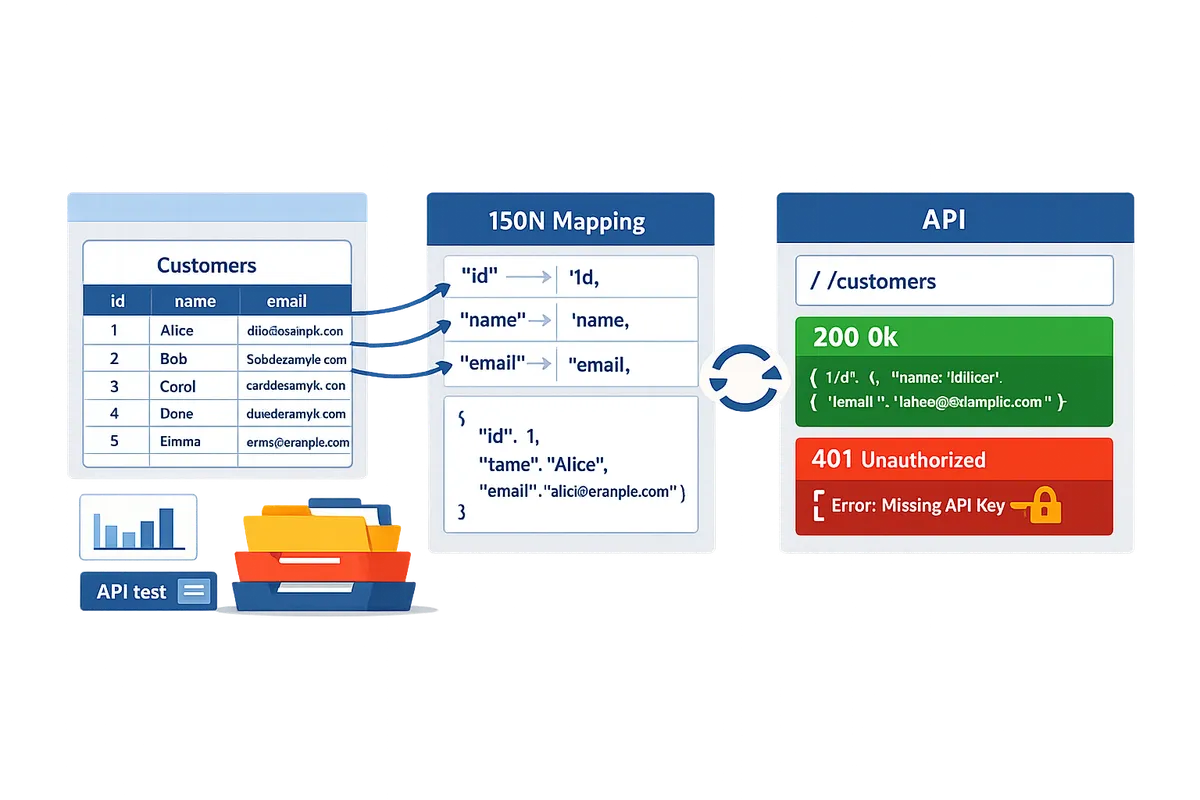
Templates map sheet names to resources, header rows to JSON keys, and named ranges to endpoint parameters. A concrete example: a sheet named Customers maps to /customers; a header row with email, name, joined_date becomes {"email":"...","name":"...","joined_date":"..."} in JSON; a named range CustomerID becomes a path or filter parameter like /customers/{CustomerID} or ?id=CustomerID. Common pitfalls include missing or extra header rows, mixed data types in a column (dates mixed with text), merged cells, and named ranges that point to multiple noncontiguous ranges. Validate a template against a copied sample sheet before you import it to avoid downtime and wasted debugging hours.
- Confirm the header row index and ensure every column has a single header.
- Check data type consistency per column (dates, numbers, emails).
- Verify named ranges exist and point to the expected single column or cell.
- Run a single GET with the template in Postman, Hoppscotch, or Sheet Gurus API to verify field names and pagination.
- Validate auth: swap in your API key or OAuth token and test 401 and 200 responses.
💡 Tip: Make a copy of the spreadsheet before testing templates and keep a one-sheet sample with 5–10 representative rows. That makes schema validation fast and reduces the risk of accidental edits to production data.
Which template sources and formats should I choose for dashboards, API testing, and automation?
Choose templates by matching the business outcome you need—API testing, dashboard reporting, or automation—to the source's support level, licensing, and update cadence. Good choices reduce setup time and maintenance risk; poor choices create hidden operational work and debugging time. Sheet Gurus API integrates with OpenAPI and Postman starters for fast production APIs, and it can take over authentication, rate limiting, and monitoring if a template lacks those controls.
Source comparison table (official samples vs galleries vs third-party) 📊
Use official samples for canonical API examples, curated galleries for dashboard-ready layouts, open-source repositories for flexible starters, and paid marketplaces for supported production templates.
| Source type | Support level | Licensing | Update frequency | Pricing | Data source integrations | Expected setup time | Best for |
|---|---|---|---|---|---|---|---|
| Official developer samples (OpenAPI, Google samples) | Low-to-medium vendor support; ideal as canonical references | Usually permissive (Apache, BSD) but check repo | Infrequent but stable | Free | Google Sheets, Google APIs | 30–90 minutes for API testing examples | Learning API shapes; CI validation |
| Curated galleries (Dataslayer-style dashboards, product galleries) | Community support; curated for UX | Varies; often permissive with attribution | Weekly to monthly for popular galleries | Mostly free; some premium templates | Common data connectors (Sheets, BigQuery, Ads) | 1–3 hours to match headers and visual fields | Production dashboards and reporting |
| Open-source repositories (GitHub starters, Postman collections) | Community-driven; can be forked | Open-source licenses (MIT, GPL) — review terms | Variable; depends on maintainer activity | Free | Any connector contributors add | 1–4 hours depending on cleanup | Custom workflows and audits |
| Paid marketplaces (commercial templates, supported plugins) | Vendor or marketplace support and SLAs | Commercial license; read TOS | Regular updates or paid support | Paid; ranges from one-time to subscription | Often includes premium connectors | 2–8 hours with vendor onboarding | Mission-critical dashboards and production automation |
Interpret the table by matching risk tolerance to outcome. If you need a production-ready JSON API quickly, choose an OpenAPI or Postman starter that pairs with the Sheet Gurus API for API key auth and operational controls. For dashboard projects, pick a gallery template that already maps headers to chart fields. See our list of free starters in Google Sheets to REST API Templates: 10 Free Starters for practical downloads and examples.
Decision tree: pick a template by outcome (testing, dashboards, ingestion) 🧭
Pick Postman/OpenAPI for testing, a gallery dashboard for reporting, and n8n or Apps Script for automation.
- I need to validate endpoints and example payloads fast. Use a Postman collection or OpenAPI spec. Expected setup: 30–60 minutes to import, map auth, and run tests. Pair the spec with Sheet Gurus API to convert a sheet to a live CRUD endpoint without building a backend. See our Google Sheets RESTful JSON API with CRUD: Free Postman & OpenAPI for ready downloads.
- I need visual reports or executive dashboards. Use a curated gallery template or a dashboard starter that matches your spreadsheet schema. Expected setup: 1–3 hours to align headers, clean data, and connect charts. If the dashboard calls APIs, export an OpenAPI or use Sheet Gurus API for stable endpoints.
- I need scheduled transformations or multi-step automations. Use n8n templates (no-code workflows) or Apps Script for sheet-native automation. Expected setup: 1–2 hours for an n8n flow; 1–3 hours for a polished Apps Script template. For production automations that require auth controls and throttling, integrate the workflow with Sheet Gurus API so the automation talks to a managed API endpoint rather than raw Sheets credentials.
- I need strict SLAs or vendor support. Choose a paid marketplace template or a supported repo and plan for vendor onboarding (2–8 hours). For mission-critical flows, combine the template with Sheet Gurus API for API-level access control and rate limiting.
If you want a guided comparison between these starters, our head-to-head article Google Sheets API Templates (2026): Postman vs OpenAPI vs n8n vs Apps Script — Which Starter Should You Use? outlines trade-offs and common pitfalls.
Free vs paid templates and licensing checklist 💳
Always confirm commercial use rights, update policy, and maintainer support before deploying a template in production.
- Check the license file. Confirm the template allows commercial use and whether attribution is required (MIT vs GPL have different constraints).
- Verify maintainer activity. Look for recent commits, open issue response time, and a published changelog. Low activity means you absorb future fixes.
- Confirm update policy and critical-bug handling. Know who will patch connector breaks and how quickly.
- Inspect dependencies and connectors. Ensure the template does not rely on deprecated connectors or private APIs.
- Validate data security and secrets handling. Templates that store credentials in plaintext are unacceptable for production.
- Plan a rollback and monitoring strategy. Keep a tested copy of the original spreadsheet and a recovery plan if an update breaks the template.
💡 Tip: Prefer templates that include an OpenAPI spec or a maintained Postman collection because they integrate with monitoring and CI; Sheet Gurus API accepts OpenAPI and Postman artifacts to speed production rollout.
How do I set up free Google Sheets API templates and connect them to Sheet Gurus API?
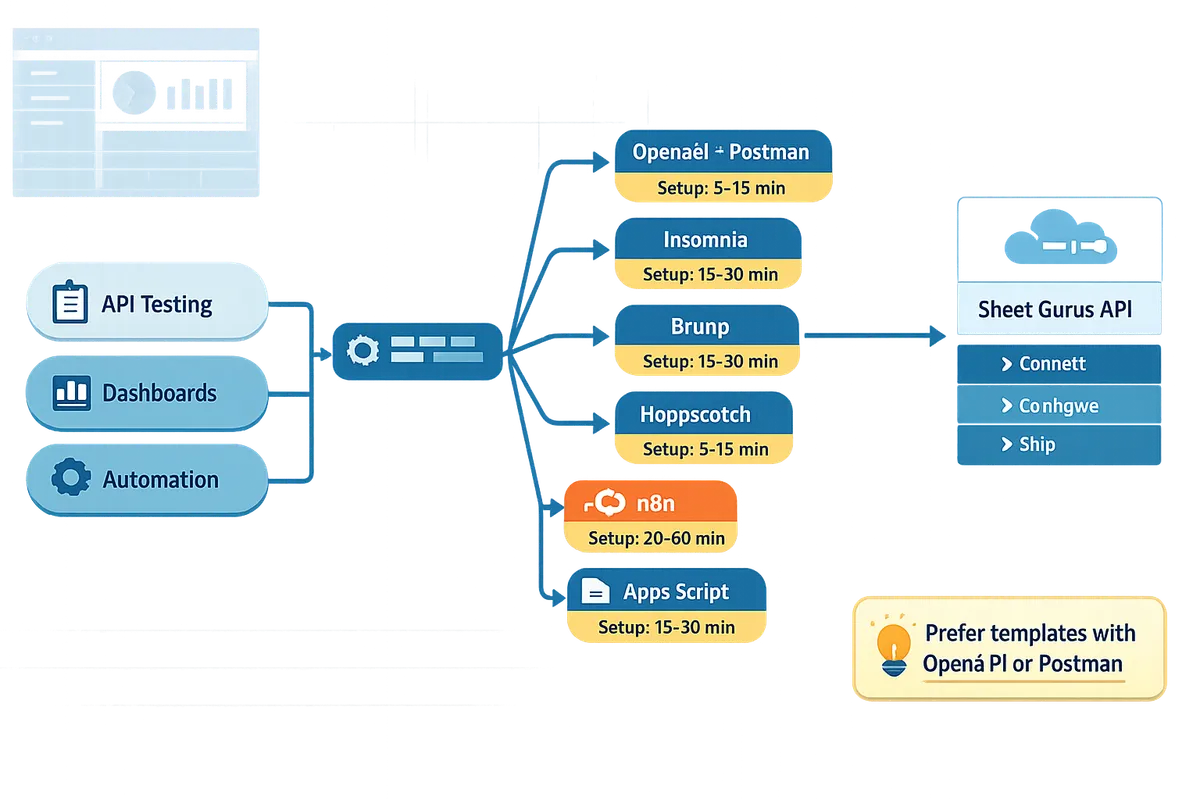
You can set up free Google Sheets API templates and connect them to Sheet Gurus API in three repeatable steps: import the template, configure authentication and base URL, and run smoke tests. This short flow gets you from download to verified CRUD calls without writing a backend. Follow the tool-specific steps below for Postman, Insomnia, Bruno, Hoppscotch, n8n, and Apps Script.
Quick-start: download and run a Postman/Insomnia collection in 10–30 minutes ⏱️
Importing a Postman or Insomnia collection, setting the Sheet Gurus API base URL, and adding an API key lets you run end-to-end CRUD requests in under 30 minutes. Follow these steps exactly to avoid common mapping errors.
- Download the collection or OpenAPI file from the template gallery or from our starter roundup: Google Sheets to REST API Templates: 10 Free Starters.
- Import into Postman. For Insomnia use File > Import and select the collection or OpenAPI spec. Postman imports environment variables automatically when provided.
- Set the base URL environment variable to your Sheet Gurus API endpoint. See Getting Started for the exact pattern and examples. Our website's Getting Started guide shows how to locate the live endpoint for a connected spreadsheet.
- Add your API key. API key is an alphanumeric token that authenticates API requests. Create or copy a key from the Sheet Gurus API dashboard and store it in an environment variable named SG_API_KEY.
- Map the key to the header the template expects (typical names: x-api-key or Authorization). Check the collection's auth tab and update the header accordingly.
- Run the smoke tests included in the collection: GET rows, POST a sample row, PATCH an existing row. Confirm the JSON response reflects changes in the sheet.
Support note. If the collection includes OpenAPI examples, import that spec into Postman to populate request bodies and schema validation automatically. For more on which starter fits your needs, see our comparison post: Postman vs OpenAPI vs n8n vs Apps Script — Which Starter Should You Use?.
No-code and low-code flows: n8n, Bruno, Hoppscotch, and Apps Script 🛠️
Use n8n flows, Bruno or Hoppscotch requests, or an Apps Script project to automate spreadsheet-backed pipelines without building a backend. Each tool uses the same three configuration items: base URL, API key, and a mapping between JSON fields and sheet columns.
- n8n. Import the provided flow JSON into n8n, create a credential entry for Sheet Gurus API using SG_API_KEY, and point the HTTP request nodes at your BASE_URL. Use a webhook or cron trigger to run row inserts and map JSON fields to column headers. Test by inserting a sample row and confirm the sheet updates.
- Bruno and Hoppscotch. Import the OpenAPI or Postman collection. Set the environment variables for BASE_URL and SG_API_KEY. Use the built-in request runner to test GET and POST operations. Bruno and Hoppscotch are useful for quick interactive debugging when you want to iterate on field mappings.
- Apps Script. Import the starter project and set the script property SG_API_KEY to your key. Apps Script uses UrlFetch-style calls under the hood; the starter includes functions that call the Sheet Gurus API for read and write flows. Run the provided test function to ensure the script can read rows and append a test row.
Example outcome. Using an n8n flow to push form submissions to a Sheet Gurus endpoint typically saves hours compared with building a custom webhook service and handling auth, retries, and rate limits yourself. For template selection and no-code options, consult our free starter list: Google Sheets RESTful JSON API with CRUD: Free Postman & OpenAPI.
💡 Tip: Use a dedicated test spreadsheet and a sandbox API key for initial runs so production data and permissions remain separate.
Quick-start checklist and common pitfalls to avoid ✅
Follow this checklist to prevent the most frequent setup failures: confirm credentials, match header names and JSON schema, test rate limits, and run a read/write smoke test. Each item below maps to a short fix you can run in 5–15 minutes.
- Credentials and access.
- Confirm you created an API key in the Sheet Gurus dashboard. API key is required for authenticated calls. If the template uses OAuth flows, complete consent and grant the spreadsheet to the connected account.
- Base URL and environment variables.
- Verify BASE_URL points to your spreadsheet's live Sheet Gurus endpoint. Incorrect spreadsheetId or path will return 404s.
- Header names and auth mapping.
- Check whether the template expects x-api-key or Authorization. Map SG_API_KEY into the exact header the template uses.
- Schema and column mapping.
- Validate that your sheet's header row matches the JSON field names the template sends. A missing header causes silent failures or corrupted rows.
- Rate limits and caching.
- If you plan frequent reads, enable Sheet Gurus API rate-limit policy or optional Redis caching in the dashboard to reduce Google Sheets calls and improve response times.
- Smoke tests.
- Run a sequence: GET rows, POST a sample row, PATCH that row, then GET to confirm the change persisted to the spreadsheet.
Common pitfalls and fixes.
- Problem: POST returns 400 but the request looks valid. Fix: compare the request JSON keys to the sheet header row; case and spacing must match.
- Problem: Requests succeed but changes do not appear in the sheet. Fix: confirm the spreadsheet is the one connected to your Sheet Gurus endpoint, and re-run the connection in the Getting Started flow.
- Problem: Auth fails in CI. Fix: store SG_API_KEY in your CI secrets and set the collection environment variable at runtime.
For troubleshooting patterns and examples of mapping templates to production use cases, see our roundup and guide posts: Google Sheets to REST API Templates: 10 Free Starters and Google Sheets RESTful JSON API with CRUD: Free Postman & OpenAPI.
How do I operate, secure, and scale Google Sheets API templates for production and AI workflows?
Operate, secure, and scale Google Sheets API templates by adding authentication and per-sheet permissions, applying caching and rate limits, automating tests and monitoring, and exposing sheets via MCP for AI assistants. These controls turn a prototype into a production endpoint that teams can trust for internal tools, dashboards, and assistant workflows. The sections below map concrete steps and governance patterns you can apply with Sheet Gurus API and common template sources.
Security and governance: API keys, per-sheet permissions, and auditing 🔒
Use API keys with least-privilege per-sheet permissions and audit logs to control and trace access to spreadsheet-backed APIs. Assign short-lived or scoped keys for automation jobs and longer-lived read-only keys for dashboards. Our Sheet Gurus API supports key creation with per-sheet scopes so you can give a connector access only to the exact sheets and ranges it needs.
Map keys to roles (automation, analytics, human editor) and keep a single key per integration to make rotation and revocation simple. Store keys in a secrets manager (AWS Secrets Manager, Google Secret Manager) and rotate on a schedule tied to your risk profile. Enable audit logging in Sheet Gurus API and stream logs to your SIEM for alerts on unusual activity such as repeated 401s or high write volumes.
💡 Tip: Name API keys with the consuming system and owner (for example "n8n-sync:finance-team") to speed incident response and audits.
See our Google Sheets to REST API Templates: 10 Free Starters for examples of how templates supply auth-ready request collections and which starters pair best with per-sheet permission models. Link your process to our Getting Started guide for key generation and scope details.
Performance: when to add Redis caching and rate limiting ⚡
Add Redis caching when read frequency is high or consistent low-latency responses matter, and apply rate limiting to protect spreadsheets from burst traffic or abusive clients. Use caching for read-heavy endpoints that return relatively stable rows, and keep writes going directly to the sheet so data stays authoritative.
Use short TTLs (seconds to a few minutes) for dashboard queries and longer TTLs for reference lists that change rarely. Invalidate or purge the cache on successful writes. Our Sheet Gurus API offers optional Redis caching and configurable rate limiting per API key so you can isolate tenant quotas and avoid hitting Google Sheets API quotas.
Configure rate limits based on observed traffic patterns from Postman or your API logs. Start conservatively: throttle bursts, return clear 429 responses, and implement client-side retry with increasing wait times. Partition caches by tenant or spreadsheet ID to avoid cross-tenant stale reads and reduce blast radius during cache eviction.
Testing, monitoring, and CI for template-driven APIs 🔁
Automate smoke tests, schema validation, and uptime checks in CI so breaking changes fail before deploy. Include tests that verify authentication, CRUD operations, pagination, and sample schema fields for every template you publish.
Use Postman monitors or CI jobs that call your Sheet Gurus API endpoints as part of pull-request pipelines. Validate JSON schemas against expected fields, check pagination links, and confirm that rate-limited responses conform to your client contract. Run tests against a staging spreadsheet and separate staging API keys to avoid mutating production data.
⚠️ Warning: Do not run mutable tests against production sheets. Use a staging spreadsheet and replay recorded fixtures to validate breaking changes safely.
Wire uptime checks to an alerting channel (Slack, PagerDuty) and add a daily cron that fetches row counts and verifies schema consistency. Refer to the API Reference for example request/response shapes to add reliable assertions in CI.
Extending templates for AI workflows and MCP servers 🤖
Expose spreadsheets as MCP servers so AI assistants can query and update structured data with context and controlled access. Model Context Protocol (MCP) is a communication protocol that lets AI assistants request structured context and submit updates while preserving access controls and predictable semantics.
Our Sheet Gurus API includes MCP support so you can point an assistant at a sheet-backed MCP endpoint. To deploy: provision a staging sheet, enable MCP in the Sheet Gurus console, create a scoped API key (read-only or write-limited), and test typical assistant prompts with a small context window. Use per-sheet permissions and audit logs to restrict what the assistant can read or write.
For best results, present the assistant with pre-filtered, cached snapshots for its context window to avoid token bloat. Keep write actions explicit (for example, assistant suggests changes and a human approves before commit) when the sheet drives customer-facing workflows. Our usage examples in Google Sheets to API: 15 Production-Ready Use Cases show common patterns for ticket triage, inventory lookups, and CRM updates with MCP-enabled sheets.
Frequently Asked Questions
This FAQ answers the practical questions teams ask when selecting, downloading, and running Google Sheets API templates across Postman, Insomnia, Bruno, Hoppscotch, n8n, and Apps Script. Use these answers to pick a template source, validate safety, and get a working connection with Sheet Gurus API quickly.
Can I download ready-made templates for Google Sheets API? 📥
Yes — many open repositories and template galleries provide downloadable OpenAPI files, Postman collections, Insomnia workspaces, Bruno/Hoppscotch request sets, n8n flows, and Apps Script starter projects for Google Sheets API templates download. Check each template's license, last-updated date, and issue tracker before using it in production to avoid abandoned or incompatible files. Use our list of free starters in "Google Sheets to REST API Templates: 10 Free Starters (Postman, OpenAPI, Apps Script, n8n) for Fast CRUD with Auth & Pagination" to find vetted downloads and examples that include auth and pagination patterns. If you plan to run templates against Sheet Gurus API, confirm the collection expects a configurable base URL and API key so you can swap in your endpoint without editing requests one-by-one.
How do I import a Postman collection for Sheet Gurus API? ⚙️
Import the Postman collection file, create an environment with your Sheet Gurus API base URL, and set your API key in the environment header to run requests against your live endpoint. Follow these steps:
- File > Import and load the collection JSON or ZIP.
- Create an environment (name it e.g., SheetGurus) and add variables such as SG_BASE_URL and SG_API_KEY.
- Update collection authorization to use the SG_API_KEY environment variable and set any path variables to SG_BASE_URL.
- Run a small smoke test: GET the rows endpoint and confirm the response matches your spreadsheet.
Using an environment keeps secrets out of the collection and lets you reuse the same collection across staging and production. For a ready-made Postman/OpenAPI package, see "Google Sheets RESTful JSON API with CRUD: Free Postman & OpenAPI."
Are templates safe to use in production? 🔒
Templates can be safe for production when you verify licensing, harden authentication, enforce rate limits, and apply per-sheet permissions and audit logging. Vet the template for embedded secrets, outdated dependencies, or unsupported schema mappings that can expose data or break under load. Use Sheet Gurus API's API key authentication and per-sheet permissions to control access, enable configurable rate limiting to stop abusive traffic, and run templates first in a staging account to catch schema or permission mismatches.
⚠️ Warning: Never run a downloaded template that contains embedded API keys or OAuth client secrets. Replace any credentials with environment variables before testing.
How do I add caching to a template-based API? ⚡
Add a cache (Redis is common) in front of read-heavy endpoints and set TTLs that match your freshness requirements to reduce Google Sheets API calls and speed responses. Cache list and read endpoints first because they account for most requests; set short TTLs (30–120 seconds) for near-real-time dashboards and longer TTLs (5–15 minutes) for infrequently changing reference data. Tie cache invalidation to sheet updates where possible: trigger a cache purge after writes or use webhook notifications if your workflow supports them. Sheet Gurus API supports optional Redis caching so you can enable caching without building a custom proxy.
💡 Tip: Start with a 60-second TTL for list endpoints and monitor cache hit rate; increase TTL if hit rate is low and data freshness permits.
What formats are best for no-code automation like n8n or Apps Script? 🧰
n8n flow templates and Apps Script starter projects are best for no-code and low-code automation because they embed triggers, UI configuration, and connectors that run without a separate backend. Use n8n templates when you need multi-step integrations (webhooks, transformations, external APIs) with visual debugging. Use Apps Script starter projects when you want in-spreadsheet triggers, simple UIs, and direct access to Google Workspace auth without hosting. Postman and OpenAPI remain valuable for testing and CI, while Bruno and Hoppscotch are excellent for quick exploratory requests. For a deeper comparison to choose the right starter, read "Google Sheets API Templates (2026): Postman vs OpenAPI vs n8n vs Apps Script — Which Starter Should You Use?". If you want to remove backend maintenance entirely, expose spreadsheets with Sheet Gurus API and connect n8n or Apps Script to that stable endpoint.
Does Sheet Gurus API support OpenAPI and Postman collections? 🧭
Yes — Sheet Gurus API is compatible with OpenAPI-driven workflows and Postman collections for testing, documentation, and CI. Use the getting started guide and API reference to grab example requests and schema snippets, then export or import OpenAPI/collection files into Postman, Insomnia, Bruno, or Hoppscotch. When importing, update the base URL to your Sheet Gurus endpoint and store the API key in environment variables so automated tests and pipelines can run without changing request bodies. See "Google Sheets RESTful JSON API with CRUD: Free Postman & OpenAPI" for sample collections and path examples you can drop into CI.
Take a starter template and create a live API endpoint to test real data.
You now know where to find and test Google Sheets API templates and how to turn a spreadsheet into a practical API-backed workflow. Use one of our 10 free starters for Postman, OpenAPI, Apps Script and n8n to validate headers, sample rows, and pagination against real data before committing to a production flow. Trying a template first saves developer hours and reduces the risk of misaligned columns or missing headers that stop apps from working.
Sheet Gurus API turns Google Sheets into production-ready RESTful JSON APIs in minutes, requiring no backend code. Users sign in with Google, select a spreadsheet, and immediately receive a live API endpoint that supports full CRUD with changes syncing back to the original sheet in real time. Follow the getting-started guide to connect a sheet and create your first endpoint.
Subscribe to our newsletter for implementation tips, template updates, and example requests to copy into Postman or Hoppscotch.