
Google Sheets API Pricing and Quotas Guide
A sudden burst of 1,000 writes can trigger 429 errors and halt an internal app that depends on spreadsheets. Google Sheets API pricing and quotas is a reference that describes costs, per-method request limits, and quota behaviors you must plan for. This best-practices guide shows how to size capacity, avoid rate limits, and choose the right architecture for spreadsheet-backed services. Our Sheet Gurus API turns Google Sheets into production-ready RESTful JSON APIs in minutes, offering API key authentication, per-sheet permissions, configurable rate limiting, optional Redis caching, and Model Context Protocol support for AI assistants. Follow the examples and links to our Sheet Gurus API docs and the Sheets Auth & Rate Limits cluster to map cost and performance trade-offs you can test next.
What Are the Core Pricing and Quota Rules for Google Sheets API?
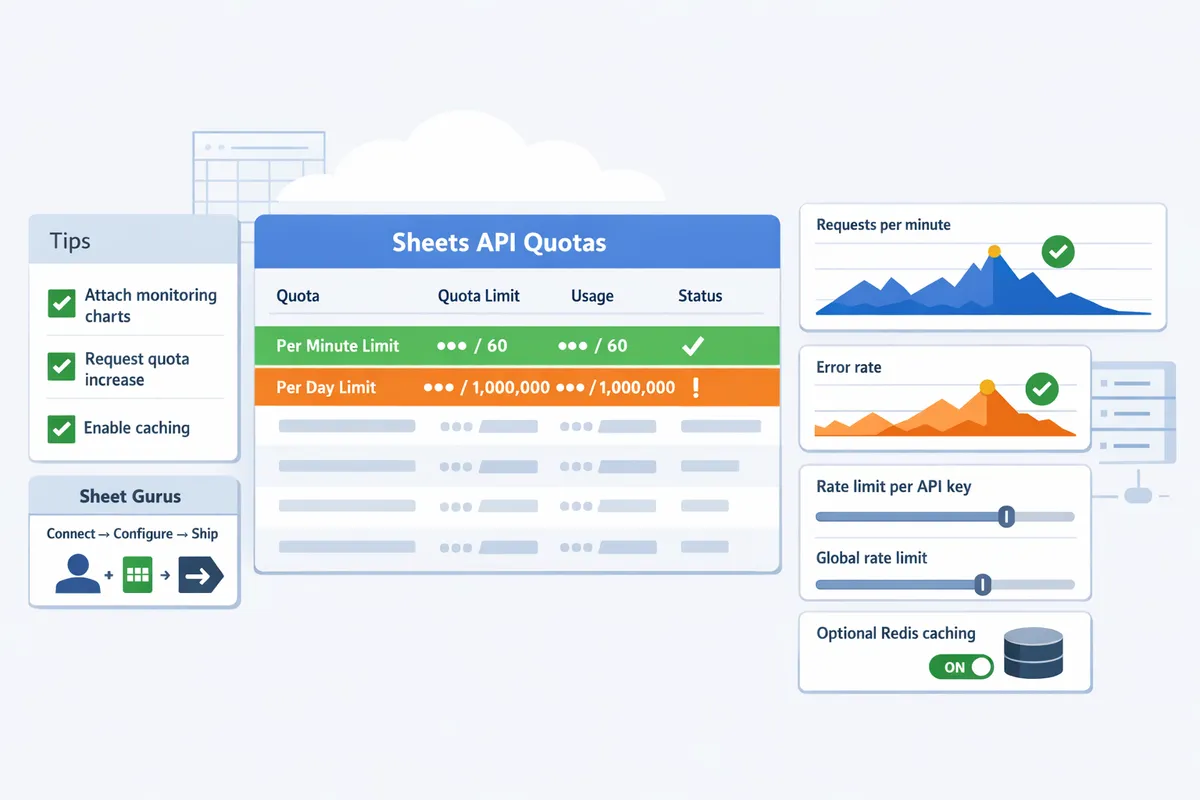
Google Sheets API pricing is free within enforced quota limits that restrict requests per project and per user. Google enforces separate per-minute and per-day counters, and you must check quotas in the Google Cloud Console to avoid 429 errors and service interruptions.
Per-minute and Per-day Quotas Explained 🕒
Per-minute quotas limit short bursts while per-day quotas cap sustained usage. Google typically refills per-minute counters continuously (for example, a sliding window measured in requests per 60 seconds) while daily counters reset every 24 hours. Reads and writes count differently: many read-heavy operations (batchGet, spreadsheets.values.get) consume read tokens, whereas writes (updates, appends, batchUpdate) count against write quotas. For example, a background job that launches 200 concurrent reads in a few seconds can exceed a per-minute read limit and trigger 429s even if the daily total remains low. See the official quota table in our Google Sheets API Documentation: Quickstart, Quotas, Examples, and a Faster JSON API Alternative for exact method mappings and the latest limits.
Per-user vs Per-project Limits and Why They Differ 👥
Per-user quotas apply to individual Google accounts; per-project quotas apply to the Cloud project that owns the API credentials. Per-user limits protect against abuse from a single account, while per-project limits cap total consumption across all users and service accounts. Practical rule: if many end users share one service account or one OAuth client, plan around per-project limits because a single spike can exhaust the project quota. Example: 50 users each making 5 reads per minute equals 250 reads per minute billed to the project; that pattern requires batching, caching, or splitting credentials to avoid hitting project-level caps. This distinction is the core of any plan that compares Google Sheets API daily limit per user vs per project.
Where to Verify Official Quotas and Request Increases 📈
You verify and request quota changes in Google Cloud Console under the Quotas page. Steps:
- Open the Cloud Console and filter by the Sheets API to view current per-method and per-period limits.
- Enable billing for the project if the quota increase form requires it.
- Prepare a justification that includes peak QPS, request patterns (bursts versus steady), and business impact if denied.
- Submit the quota increase request and attach monitoring screenshots. Typical review times range from a few business days to a couple of weeks; common denials happen when the request lacks traffic evidence or when the proposed pattern looks like unmitigated spikes. Our guide on Google Sheets API Quotas and 429s explains which calls to prune first and includes a quota calculator to estimate monthly demand. Also consult the API Reference for method-level guidance and our About page for how Sheet Gurus API can reduce direct Sheets API traffic with configurable rate limiting and optional caching.
💡 Tip: Attach Cloud Monitoring charts showing your peak requests per minute and error rates when you submit a quota increase. That shortens review cycles and reduces denial risk.
How Do You Plan Capacity for Google Sheets API in 2026?
Capacity planning for Google Sheets API in 2026 converts expected user actions into projected monthly requests and peak QPS, then maps those numbers to Google quota rules and contingency buffers. Capacity planning is a forecasting practice that helps you avoid 429s, costly retry storms, and surprise operational work. Sheet Gurus API changes the practical math by reducing direct Sheets API calls with configurable rate limits, optional Redis caching, and request consolidation.
Simple Monthly Usage Estimator and Worked Example 📊
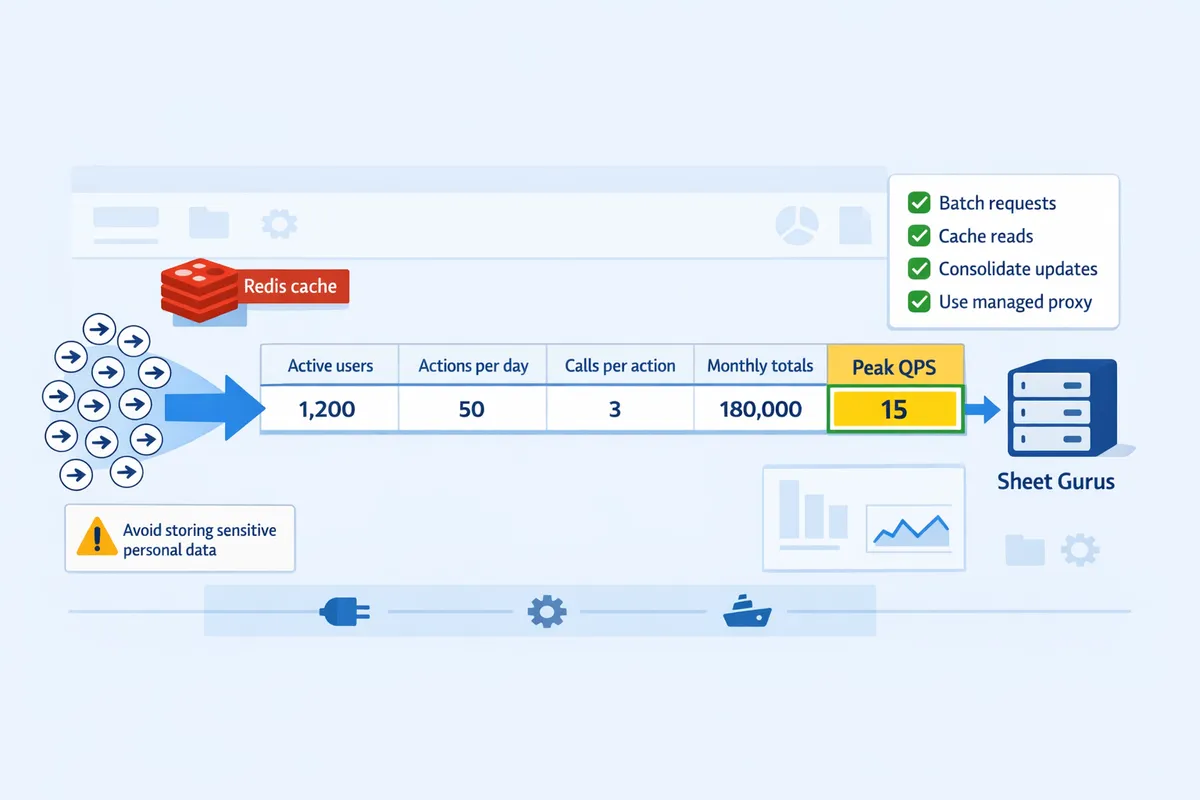
Use a one-row formula: monthly_requests = active_users × actions_per_user_per_day × calls_per_action × days_per_month. This formula separates reads, writes, and background syncs so you can map each to the appropriate Google quota.
How to build the one-row spreadsheet. Column headers: Active users | Actions/user/day | Calls/action (read, write) | Days/month | Monthly reads | Monthly writes | Peak QPS estimate. Example row (copy into your planner):
- Active users: 500
- Actions/user/day: 3
- Calls per action: 2 reads + 1 write
- Days/month: 22 (business days)
- Monthly reads = 500 × 3 × 2 × 22 = 66,000
- Monthly writes = 500 × 3 × 1 × 22 = 33,000
Estimating peak QPS. Convert a peak minute to QPS by assuming a burst factor. Example: if 20 percent of daily activity happens in a 1-minute window, peak QPS = (total actions that minute × calls_per_action) / 60. For the example above: 500 × 3 × 0.2 = 300 actions in that minute → 300 × 3 calls = 900 calls → peak QPS = 15. Use a higher burst factor for mobile app launches or scheduled reports.
Why separate reads and writes. Google counts reads and writes differently and writes often hit stricter per-minute limits. Track both metrics and plan throttles or batching for writes first.
See the quota calculator and procedural checklist in our guide on Google Sheets API Quotas and 429s for a downloadable estimator and sample spreadsheets.
When to Request Quota Increases and a Practical Timeline ⏳
Request quota increases when projected peak QPS or daily totals reach 70 to 80 percent of your current Google limits. Google support often responds to standard quota requests within 48–72 hours; complex enterprise requests can take one to two weeks.
Required justification items to include with the request:
- Google Cloud project ID and API key or OAuth client ID.
- Clear usage pattern: daily totals, peak-minute QPS, and graphs from Cloud Monitoring.
- Business justification: user counts, revenue impact, or critical workflow dependency.
- Test plan and rollback plan showing staged rollout and throttling thresholds.
Fallback plan if the request is delayed:
- Throttle nonessential traffic and batch writes.
- Shift background syncs to off-peak windows and increase caching TTLs.
- Use a third-party API layer like Sheet Gurus API to consolidate calls and apply per-key rate limits while you wait.
Suggested timeline with milestones:
- Estimate current and projected usage (day 0–3).
- Prepare graphs and justification (day 3–5).
- Submit quota request (day 5).
- Run staged traffic tests at 50%, 75%, then 100% of projected peak while monitoring (after approval or in parallel if safe).
- Enable throttles and rollback triggers in production monitoring.
For detailed step-by-step guidance and the downloadable calculator, see our 2026 quota increase playbook.
How Sheet Gurus API Reduces Google Sheets API Load and Risk ✅
Sheet Gurus API reduces direct Google Sheets API calls through configurable rate limiting, optional Redis caching, and request consolidation at the API layer. These controls let teams cut quota consumption, prevent sudden 429 storms, and shorten time-to-resolution compared with maintaining a DIY proxy.
Practical ways Sheet Gurus API helps:
- Per-key rate limiting prevents a single integration from exhausting project quotas.
- Optional Redis caching turns frequent reads into cache hits and reduces read requests to Google.
- Request consolidation groups multiple app-level reads/writes into fewer Google calls, so scheduled syncs and bursty UIs stop triggering quota spikes.
- Per-sheet permissions and API key management reduce accidental or overly broad access patterns that consume quota.
Example scenario. A reporting tool that polls a sheet every minute and made 10,000 direct Sheets API calls per day can reconfigure to poll the Sheet Gurus endpoint with a 30-second cache and request consolidation, resulting in only about 1,200 direct calls to Google per day in this example. That outcome reduces the chance of hitting per-minute limits and lowers operational overhead.
See the Sheet Gurus API About page for product context and the API Reference for implementation patterns that show caching, rate limiting, and request consolidation in action.
⚠️ Warning: Avoid storing sensitive personal health or financial data in spreadsheets exposed to APIs without explicit data governance. Review our privacy practices before enabling broad programmatic access.
What Are Proven Rate-Limit Mitigation Strategies and Alternatives?
Mitigation strategies reduce Google Sheets API calls by batching requests, caching reads, consolidating updates, and using a managed proxy such as Sheet Gurus API. These techniques lower the risk of 429s, improve UX latency, and make quota planning predictable. Choose the mix of tactics based on read/write patterns, business risk for stale data, and how quickly you need to ship.
Batching and Request Consolidation Techniques 🗂️
Batching is a request-optimization technique that groups multiple spreadsheet operations into a single API call. Batching reduces per-action calls by reading ranges rather than single cells, grouping multiple row updates into one bulk write, and scheduling non-urgent syncs for off-peak windows. For example, a dashboard that polls 500 cells every minute produces 500 x 60 x 24 = 720,000 reads per day; switching to a single range read cuts that to one call per minute and drops daily reads by orders of magnitude. Our Sheet Gurus API supports range reads and bulk writes so you can consolidate client requests into fewer upstream Google calls without writing backend glue.
Practical tactics:
- Read contiguous ranges (A1:C100) instead of individual cells when rendering tables.
- Buffer user edits and flush them as a single batch update every 30–120 seconds for non-critical fields.
- Move frequent, analytics-only polling to hourly or nightly batch jobs.
Business cost of not batching: unexpected 429s, slower app interactions, prolonged debugging time, and lost user sessions. See our guide comparing official docs and faster JSON alternatives for more on common quota traps.
Caching Patterns and When to Use Redis Cache ⚡
Caching is a storage-layer technique that returns recent spreadsheet reads without contacting the Google Sheets API. Use caching when data is read frequently but updates are infrequent or can tolerate short staleness. Redis works well for high-read, low-write tables such as product catalogs, lookup tables, or dashboard snapshots. TTL choices depend on business tolerance: 5–30 seconds for near-real-time UIs, 1–60 minutes for reference data, and several hours for archival views.
Invalidate or update cache on writes by either pushing a cache refresh on commit or using a short TTL and letting writes trigger synchronous cache updates. For example, set a 120-second TTL for inventory snapshots and update the cache immediately when stock levels change.
Our Sheet Gurus API offers optional Redis caching that sits between clients and Google, reducing quota consumption and shortening response times without custom infrastructure. That makes it practical to add a cache layer quickly rather than building and maintaining one in-house.
💡 Tip: For critical write paths that affect billing or orders, prefer immediate cache update on write rather than TTL-only eviction to avoid revenue-impacting stale reads.
Read our 429 playbook for patterns that combine caching with backoff and alerting.
Comparison Table: Sheets API vs Apps Script vs Sheet Gurus API 📋
The table below compares the three approaches across calls, operational effort, rate-limit controls, caching, SLA/latency expectations, and best-fit use cases.
| Approach | Estimated calls to Google Sheets API | Ops overhead | Rate-limiting controls | Caching options | SLA / latency expectations | Best-fit use cases |
|---|---|---|---|---|---|---|
| Google Sheets API (direct) | High when clients poll or write frequently; each cell/read counts | High. Requires backend, credential management, retry logic, and monitoring | Native Google quotas only; no per-client throttles without custom code | DIY caching required (Redis or CDN) | Variable; depends on your infra and quota errors | Integrations where you control backend and need direct Google features |
| Apps Script | Moderate for server-side automations; runs under per-user quotas and triggers | Moderate. Easier for simple automations but limited testability and deployments | Limited to Apps Script quotas; per-user and per-project limits can be restrictive | Basic in-memory caching available; persistent caching limited | Good for lightweight automations and scheduled jobs, not high-throughput APIs | Automated reports, small-scale workflows, admin tasks |
| Sheet Gurus API (managed) | Lower at the Google level because requests consolidate and optional Redis reduces calls | Low. No backend to build; configuration and API key management via our console | Configurable per-key and global rate limits plus retry policies managed by our platform | Optional Redis caching built in and managed by our platform | Production-grade availability and predictable latency managed by our service | Teams that need a production REST API over sheets fast, with operational controls |
Use this table to decide whether to build a custom proxy or deploy a managed service. For a step-by-step escalation path from prototype to production, consult our comparison of official API vs Apps Script vs third-party wrappers and our quickstart that shows how to get a REST JSON API endpoint live with minimal effort.
For implementation templates and quota calculators, see our playbook on increasing Google Sheets API quota and the root-cause guide for 429 troubleshooting.
Frequently Asked Questions
This FAQ answers the most common questions about Google Sheets API pricing, quotas, monitoring, and practical alternatives. Use these concise replies to decide whether to request quota increases, redesign callers to use fewer requests, or adopt a managed proxy such as Sheet Gurus API.
How does Google charge for Sheets API usage? 💵
Google does not charge per API request for the Sheets API; requests are free so long as you stay within Google-enforced quota limits. Related Google Cloud resources (for example, Cloud Functions, BigQuery, or outbound network egress) may incur charges, and enabling billing on a project is often required to request higher quotas. Check Google Cloud billing and the quickstart/quota pages for full billing rules, and consider using a managed proxy like Sheet Gurus API to add API-level rate limits and optional caching that reduce unexpected billing exposure.
⚠️ Warning: Enabling billing is commonly required before Google will approve quota increases for a project.
What is the Google Sheets API daily limit per user vs per project? 📐
Per-user limits cap the number of requests a single Google account can make, while per-project limits cap total traffic for the Cloud project; either limit can cause 429 errors when reached. Shared service accounts or many end users routed through one Cloud project typically hit the per-project ceiling first, so monitor both counters in the Google Cloud Console. See our explainer on quotas and 429s for common failure modes and which limit to check first: https://sheetgurusapi.com/blog/google-sheets-api-documentation-quickstart-quotas-examples-and-a-faster-json-api-alternative.
How can I quickly estimate my monthly Google Sheets API calls? 🧮
Estimate monthly calls by multiplying active users × actions per user per day × requests per action × days in the month. Example: 200 active users × 3 actions/day × 4 requests/action × 22 business days = 52,800 monthly requests. Run two scenarios: "normal" (average load) and "peak" (expected busy month) and add a buffer (suggest at least 25%) before deciding whether to request higher quotas or use caching. For a reusable tool and a guided calculator, see our quota calculator guide: https://sheetgurusapi.com/blog/google-sheets-api-quotas-and-429s-how-to-increase-limits-and-prevent-errors-2026-guide-calculator. Sheet Gurus API can reduce requests per action by batching, debouncing, and optional Redis caching.
How long does it take to get a Sheets API quota increase approved? ⏱️
Quota increase requests typically resolve within a few business days but can take longer for large or complex increases. Prepare a compact packet that includes projected request curves (normal vs peak), a short architecture diagram showing where calls originate, and a rollback plan that explains how you will reduce traffic if the increase causes issues. Following our procedural playbook shortens review time; see the step-by-step quota increase guide here: https://sheetgurusapi.com/blog/google-sheets-api-quotas-and-429s-how-to-increase-limits-and-prevent-errors-2026-guide-calculator. If your main blocker is operational complexity rather than quota size, consider using Sheet Gurus API to add per-key throttling and caching instead of requesting large quota increases.
Can I avoid rate limits without moving data out of Google Sheets? 🛡️
Yes; you can dramatically cut direct Sheets API calls by caching reads, batching writes, consolidating updates, and routing traffic through a managed proxy such as Sheet Gurus API. For frequent-read datasets, enable short-term caching (for example, Redis) to serve repeated queries without hitting Google. For write-heavy workflows, batch changes and apply debounce windows so the system issues a single consolidated update instead of many small writes. Our API Reference shows how to set up read/write patterns and optional Redis caching with Sheet Gurus API: https://sheetgurusapi.com/docs/api-reference.
Is Apps Script a cheaper alternative to the Sheets API for production? ⚖️
Apps Script can reduce the number of direct API calls for internal automations but carries its own quotas, execution limits, and maintenance needs that may make it unsuitable for production-facing services. Compare Apps Script quota rules and retry/failure modes against the operational controls you need—API key access, per-endpoint rate limiting, caching, and SLA-backed infrastructure. Our comparison guide walks through tradeoffs between the official API, Apps Script, and third-party REST wrappers: https://sheetgurusapi.com/blog/google-sheets-api-quotas-429s-2026-official-api-vs-apps-script-vs-thirdparty-rest-wrappers-limits-costs-and-scale-benchmarks. Teams that need predictable production behavior often move to Sheet Gurus API to offload maintenance and gain API-level controls.
What monitoring and alerts should I set for quota usage? 🔔
Monitor requests per second, error (4xx/5xx) rates, and quota utilization, and set alerts at 50, 75, and 90 percent of quota to catch trends before hard limits trigger. Capture these metrics:
- Requests per second (project and per-user)
- 429 and other error rates (5-minute and 1-hour windows)
- Quota consumption percentage (per-minute and daily views)
- Latency and request volume by endpoint or API key
Configure Cloud Console quota alerts plus application-level logging that includes API key or service-account dimensions. Run periodic synthetic peak tests to validate alerting thresholds and automatic throttles.
💡 Tip: Use synthetic peak tests and replay recorded traffic to validate that alerts fire and throttles kick in before real users experience failures.
Next steps to prevent quota outages
Reduce unnecessary calls, enable caching, and apply per-key rate limits to keep apps running under quota. Understanding Google Sheets API pricing and quotas helps you decide whether to prune calls, request higher limits, or adopt a managed wrapper. For a tactical playbook on avoiding 429s and forecasting demand, see our guide on increasing quotas and preventing 429s. If you are choosing between a DIY endpoint and a hosted option, read the comparison of Google Sheet REST API approaches for limits, costs, and scale.
Sheet Gurus API turns Google Sheets into production-ready RESTful JSON APIs in minutes, requiring no backend code. Users sign in with Google, select a spreadsheet, and immediately receive a live API endpoint that supports full CRUD (create, read, update, delete) operations with changes syncing back to the original sheet in real time. The platform adds API-level features that professional apps need—API key authentication with fine-grained per-sheet permissions, configurable rate limiting (per key or global), optional Redis caching to cut Google Sheets API calls and accelerate responses, and enterprise infrastructure with 99.9% uptime and average response times under 100 ms.
Start a 14-day free trial at Sheet Gurus API and create your first endpoint with the getting-started guide.
💡 Tip: Compare Google Sheets API daily limit per user vs per project when planning per-key throttling and caching.