
Google Sheets API Documentation: Quickstart, Quotas, Examples, and a Faster JSON API Alternative
A single undocumented quota limit in Google Sheets APIs can stop a sync pipeline and cost hours of debugging. google sheets api documentation is reference material that lists endpoints, quotas, quickstarts, and examples for programmatic access to spreadsheets. On our website, Sheet Gurus API turns Google Sheets into RESTful JSON APIs in minutes without backend code: sign in with Google, pick a spreadsheet, and receive a live CRUD endpoint that syncs back to the sheet, plus API key auth with per-sheet permissions, configurable rate limiting, optional Redis caching, and enterprise-grade infrastructure with up to 99.9% uptime. Which option, official docs with glue code or a ready JSON API with documentation, pricing, and trials, avoids quota surprises and lets you ship faster?
How do I follow a practical Google Sheets API quickstart and run common CRUD tasks?
You can complete a quickstart using OAuth 2.0 for user access or a service account for server-to-server calls. This section gives minimal, copy-pasteable examples (Python, Node.js, cURL), step-by-step credential setup, practical sheet schema mappings for create/read/update/delete workflows, and a no-code alternative with Sheet Gurus API. Each code sample states required scopes and a short note on token handling so you can test an end-to-end flow quickly.
Quickstart snippets: Python, JavaScript, and cURL 💻
Each snippet shows how to authenticate, call the Sheets API, and perform one CRUD action using OAuth or a service account. Use the scope https://www.googleapis.com/auth/spreadsheets for read/write access and https://www.googleapis.com/auth/spreadsheets.readonly for read-only flows.
Python (service account append example):
from google.oauth2 import service_account
from googleapiclient.discovery import build

SCOPES = ['https://www.googleapis.com/auth/spreadsheets']
creds = service_account.Credentials.from_service_account_file('service-key.json', scopes=SCOPES)
svc = build('sheets', 'v4', credentials=creds)
svc.spreadsheets.values.append
 spreadsheetId='SPREADSHEET_ID', range='Users!A:C',
 valueInputOption='RAW', body={'values': [['[email protected]','Alice','2026-03-18']]}).execute
Node.js (service account update example):
const {google} = require('googleapis');
const auth = new google.auth.GoogleAuth({keyFile: 'service-key.json', scopes: ['https://www.googleapis.com/auth/spreadsheets']});
const sheets = google.sheets({version: 'v4', auth});
await sheets.spreadsheets.values.update({spreadsheetId: 'SPREADSHEET_ID', range: 'Users!B2', valueInputOption: 'RAW', requestBody: {values: [['Updated name']]} });
cURL (read example using an access token obtained from OAuth flow):
# set ACCESS_TOKEN from an OAuth exchange or service account impersonation
curl -H "Authorization: Bearer $ACCESS_TOKEN" \
 "https://sheets.googleapis.com/v4/spreadsheets/SPREADSHEET_ID/values/Users!A1:E100"
Note on exchanging OAuth codes: POST your code to https://oauth2.googleapis.com/token with client_id, client_secret, redirect_uri and grant_type=authorization_code to receive access and refresh tokens.
Sheet Gurus API can remove the need for these auth flows in client code by handling OAuth onboarding, token storage, and exposing API key access for apps.
Create credentials and enable the API in Google Cloud Console 🔐
Enable the Sheets API, then create an OAuth client ID for user flows or a service account for server-to-server calls. Follow these numbered steps to avoid common mistakes and to prepare secure storage for keys.
- In Google Cloud Console enable Google Sheets API for your project.
- Choose Credentials > Create Credentials: pick "OAuth client ID" for web or installed apps, or "Service account" for backend services.
- For OAuth clients add authorized redirect URIs for your app and request the spreadsheet scope(s).
- For service accounts download the JSON key and set GOOGLE_APPLICATION_CREDENTIALS=/path/to/service-key.json on servers, or import into a secret manager.
- Test with the minimal code above and verify token refresh works for long-running workflows.
⚠️ Warning: Never commit service account JSON to source control or embed OAuth client secrets in browser-side code. Store keys in a secrets manager and restrict IAM roles to least privilege.
If you prefer a hosted path, our website explains how Sheet Gurus API handles OAuth onboarding and key management so your app receives a live JSON endpoint without writing backend token-refresh code. See our detailed walkthrough in Google Sheets JSON API: The Complete Guide to CRUD, Auth, and Performance for deeper credential patterns.
Common CRUD patterns mapped to sheet schemas 🧾
Use a header row for field names, a stable ID column for primary keys, and append-only timestamped rows for transactional data to avoid schema anti-patterns. The table below maps three common app models to recommended sheet structures and CRUD mappings.
| App model | Sheet structure | CRUD mapping and tips |
|---|---|---|
| User lists (profiles) | Header row with columns: id,email,name,role; one record per row | Use id as primary key. Read with GET ranges, update with PATCH to specific row ranges, and delete by marking a deleted flag instead of removing rows for auditability. |
| Transactional rows (events, orders) | Append-only rows: timestamp,id,amount,status; no formulas in data columns | Treat sheet as an append log. Use POST to append rows, and avoid shifting row positions. For updates, include an id and update matching rows with batchUpdate to avoid race conditions. |
| Lookup tables (codes, config) | Small table with stable keys and cached read TTL | Cache lookups client-side or via Redis. Use PATCH sparingly and invalidate caches on write events. |
💡 Tip: Add a version or updated_at timestamp column to each row and use optimistic locking in your client to detect concurrent edits.
DIY implementations must handle idempotency keys, token refresh, retry backoff, quota monitoring, and conflict resolution. Sheet Gurus API maps sheet rows to standard JSON CRUD endpoints and provides idempotent writes, configurable rate limits, and webhook change notifications so teams avoid building these operational controls from scratch.
No-code and low-code quickstarts for product teams ⚙️
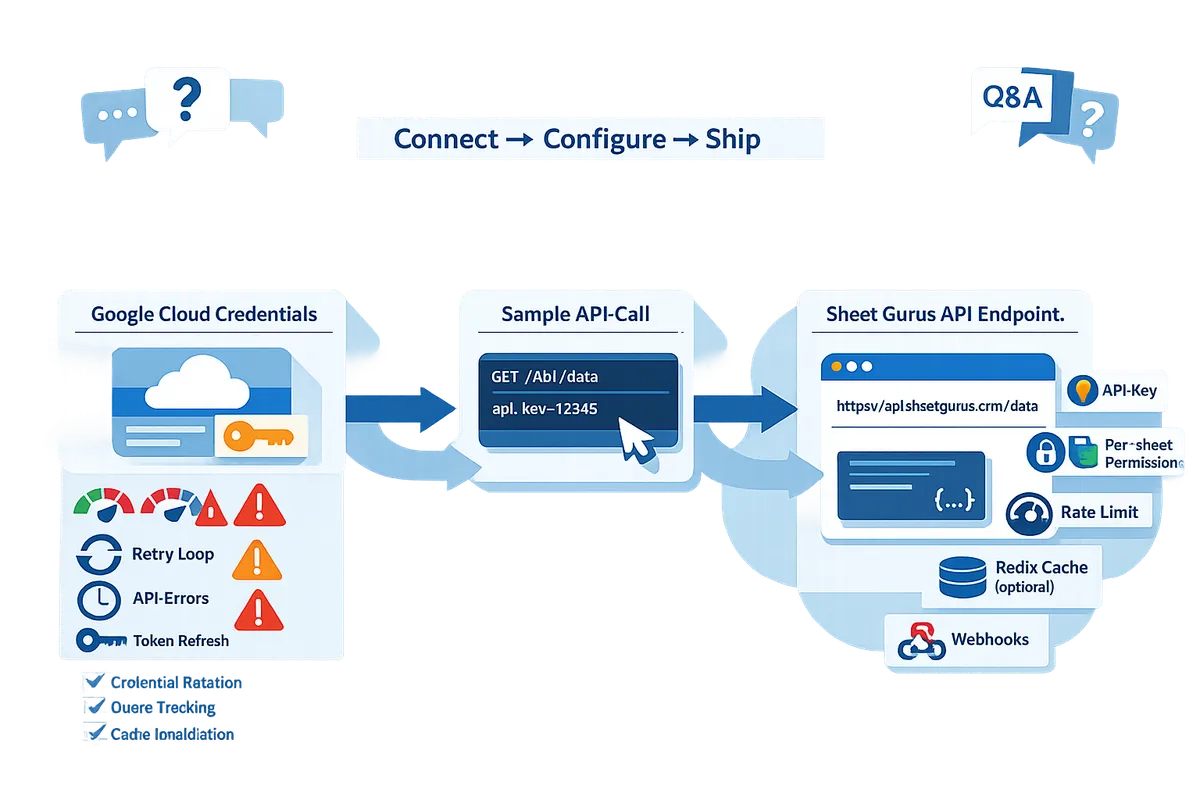
Non-developers can expose sheet data without writing backend code by using no-code tools or Sheet Gurus API to create a live JSON endpoint in minutes. The usual three-step flow is: Connect, Configure, Ship.
- Connect: Sign in with Google and grant access to the spreadsheet.
- Configure: Select sheets, map headers to fields, set per-endpoint permissions and rate limits.
- Ship: Receive a RESTful JSON endpoint that supports GET/POST/PATCH/DELETE and webhooks for change events.
Even with a no-code endpoint, teams must plan for auth, rate limits, pagination, and data freshness. Read our guide How to Turn Google Sheets into a REST API in Minutes (No Backend Required) for step-by-step non-developer examples and No-Code Google Sheets REST API: From Prototype to Production for production controls you must consider. Sheet Gurus API provides API key auth, per-sheet permissions, configurable rate limiting, optional Redis caching, and webhook support so product teams skip building credential rotation, quota tracking, and cache invalidation logic.
How do Google Sheets API quotas, errors, and security constraints affect production integrations?
Quota limits, error responses, and security constraints determine throughput, retry requirements, and the ongoing operational burden for any production Google Sheets integration. Exceeding quota or mishandling credentials leads to 429/403 failures or expired tokens that stop writes and require immediate remediation. Teams must instrument monitoring, retry policies, and secure credential rotation before going to production.
Quota types and where calls count ⚖️
Quota is a set of enforced limits that control request throughput and resource consumption for the Google Sheets API. Google applies multiple quota categories: per-project, per-user (per 100 seconds), per-minute and per-method limits, and some heavy operations count more against quotas than simple reads. For example, batchUpdate and spreadsheets.batchUpdate consume more quota than a single spreadsheets.values.get; copyPaste and large batch writes can spike consumption quickly. Use Cloud Console's APIs & Services -> Quotas and Cloud Monitoring to track the exact counters and set alerts when usage approaches thresholds.
- Typical quota categories to monitor:
- Requests per 100 seconds per user.
- Requests per 100 seconds per project (global QPS).
- Per-minute or daily write quotas for intensive operations.
- Monitoring tips:
- Export Sheets API metrics to Cloud Monitoring and create alerting policies.
- Track by method name so you can see when batchUpdate or batch writes drive consumption.
See our guide on building a sheet-backed JSON API for CRUD, auth, and performance for detailed examples and monitoring setups: Google Sheets JSON API: The Complete Guide to CRUD, Auth, and Performance.
Recommended retry, backoff, and idempotency patterns ⚙️
Use exponential backoff with jitter and idempotent design to handle 429 throttling and transient 5xx responses. Implement this sequence when you receive rate-limit or transient errors:
- Detect 429 or 5xx. Capture request ID, timestamp, and response headers.
- Apply exponential backoff with full jitter (base delay 100ms, double per attempt, cap at 30s).
- Retry only idempotent operations automatically (GET, safe PUTs).
- For non-idempotent writes, use idempotency keys and server-side deduplication before retrying.
- After N attempts (typically 5), escalate to a queued write or error callback to the calling service.
Idempotency keys are critical for writes that are not inherently safe to retry. Include an Idempotency-Key header and persist that key on the server (or Sheet Gurus API) to detect duplicate attempts. If you build this yourself you must also add persistent queues, dedupe stores, and visibility into retry failures; Sheet Gurus API provides built-in idempotent endpoints and queuing options so teams avoid building and maintaining these subsystems.
Common error codes and diagnostic steps ❗
HTTP 429 indicates quota exhaustion; 403 often indicates insufficient scopes or a revoked credential; 5xx signals transient backend errors. Triage quickly with this checklist:
- 429: Check per-user and per-project quota metrics in Cloud Console, then throttle clients and increase retries.
- 403: Verify OAuth scopes and whether the token was revoked or the spreadsheet's sharing changed.
- 401/invalid_grant: Inspect token expiry and refresh logic.
- 5xx: Correlate timestamped request IDs with Cloud Monitoring logs and retry with backoff.
Always log the request ID, exact RPC method, payload size, and timestamp. Those fields let you correlate client activity to Google Cloud logs. For more on operational errors and how to map sheet operations to API usage, read How to Turn Google Sheets into a REST API in Minutes (No Backend Required).
Credential management, token refresh, and security best practices 🔐
Secure credential storage and automated token refresh are operational necessities when calling the Sheets API directly. Follow these practices:
- Use short-lived OAuth access tokens and refresh tokens for user flows; prefer Workload Identity or IAM for server-to-server access when possible.
- Rotate service account keys regularly; avoid long-lived JSON keys in source repos.
- Apply least-privilege scopes (spreadsheets.readonly vs spreadsheets) and limit token scope to the minimal sheet set.
- Store secrets in environment-specific secret stores such as Google Secret Manager, AWS Secrets Manager, or a Kubernetes secrets backend.
💡 Tip: Never commit service account JSON to code. Use scoped service accounts plus secret managers and automated rotation to reduce blast radius.
Building and operating these controls yourself requires token refresh code paths, secure vaulting, role separation, and audit logging. Sheet Gurus API handles OAuth onboarding, key creation, and credential lifecycle so you do not need to implement rotation and per-environment secret wiring.
How Sheet Gurus API reduces operational complexity 🧩
Sheet Gurus API handles credential lifecycle, rate limiting, caching, and monitoring so teams avoid building and running those subsystems themselves. DIY integrations must implement credential rotation, token refresh, quota tracking, retry queues, race-condition detection, cache invalidation, and operational dashboards; each adds days or weeks of engineering and ongoing maintenance.
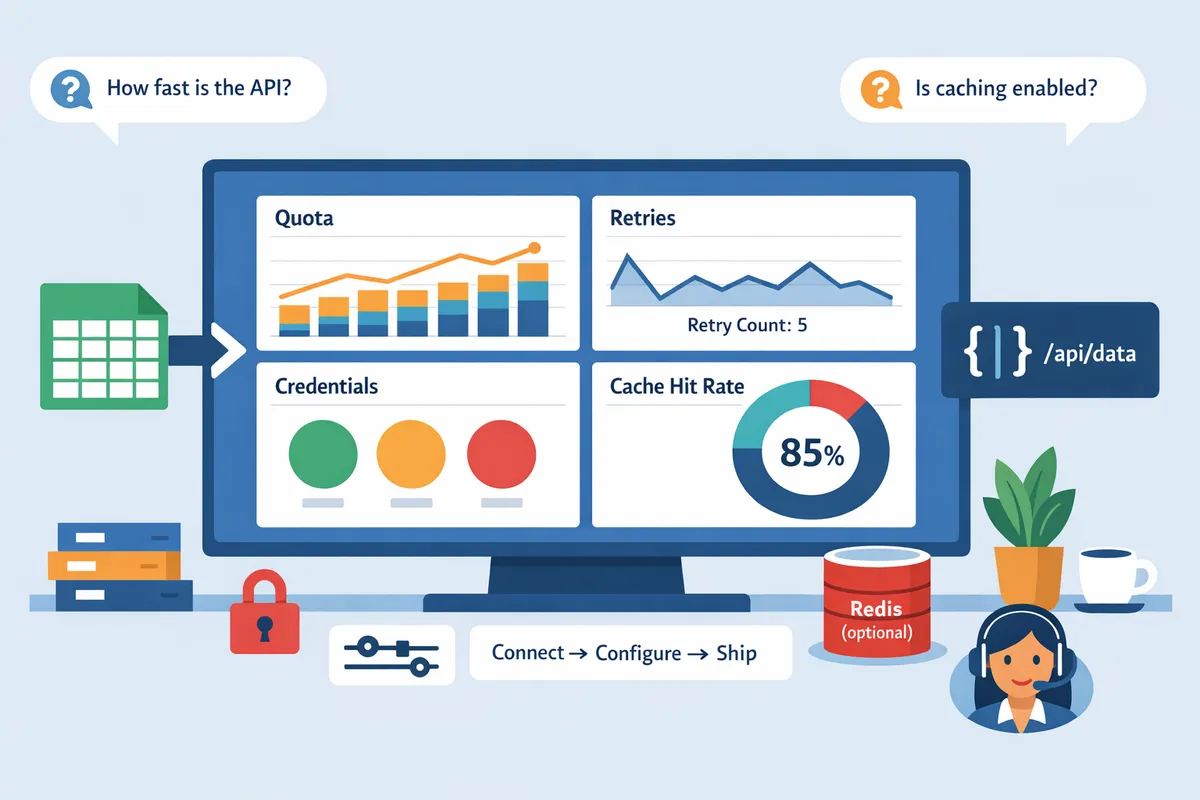
Sheet Gurus API offers API key auth with per-sheet permissions, configurable rate limiting, optional Redis caching to cut Google API calls, idempotent endpoints, and built-in monitoring and alerts. Those features map directly to the common failure modes above: rate-limit spikes are contained by per-key throttles, credential issues are surfaced by centralized OAuth flows, and cache hits reduce read pressure on heavy sheets. For migration patterns and no-code options, read our comparison between DIY and hosted paths in No-Code Google Sheets REST API: From Prototype to Production (Auth, Rate Limits, Caching, AI Agents) and our practical guide on getting a fast REST API from a sheet: Google Sheet REST API: What It Is, How It Works, Limits, and the Fastest Way to Get One.
Which approach should I choose: direct Google Sheets API, a no-code connector, or Sheet Gurus API?
Choose based on required SLA, development speed, and how much operational complexity your team can support: direct Google Sheets API for full control, no-code connectors for quick prototypes or simple automations, and Sheet Gurus API for production-ready JSON endpoints with built-in operational controls. Each option trades development time for operational responsibility. The rest of this section lays out a side-by-side comparison, a migration checklist to move prototypes to production, and guidance on trials and pricing.
Comparison table 🧾
This table compares build time, credential complexity, rate limiting control, caching option, monitoring and alerting, SLA, and best use cases for each approach.
| Approach | Build time | Credential complexity | Rate limiting control | Caching option | Monitoring & alerting | SLA | Best use cases |
|---|---|---|---|---|---|---|---|
| Direct Google Sheets API | Weeks for a robust integration. | High: OAuth flows, token refresh, secret storage. | Low-level control but you must implement quota tracking and backoff. | DIY: integrate Redis or in-memory caches. | DIY: add logging, metrics, and alerting yourself. | Operationally dependent on your infra. | High-control integrations, custom batching, complex data transformations. |
| No-code connectors (Zapier, Make, AppSheet) | Minutes to days for simple flows. | Low for simple user auth; limited service-account options. | Limited; per-platform quotas and unpredictable throttles. | Usually none or platform-limited caching. | Basic activity logs; limited alerting. | Varies by vendor; rarely SLA-grade for heavy traffic. | Prototypes, light automations, non-critical dashboards. |
| Sheet Gurus API | Minutes to configure a production endpoint. | Low: Google sign-in onboarding and API key management. | Configurable per key and global rate limiting out of the box. | Optional Redis caching and built-in invalidation. | Built-in request logs, metrics, and alert hooks. | Commercial SLA available through our plans. | Internal apps, dashboards, AI agents, and any sheet-backed service needing predictable latency and lower ops overhead. |
For a developer-focused walkthrough of building a JSON API from a sheet and the operational gaps DIY exposes, see our guide on the Google Sheets JSON API. If you want a no-backend walkthrough to compare step-by-step flows, see How to Turn Google Sheets into a REST API in Minutes.
Migration checklist for moving from prototype to production ✅
Use this checklist to harden a sheet-backed prototype before routing production traffic. Each item lists the DIY work required and how Sheet Gurus API reduces that burden.
- Enforce row-level IDs and schema validation. Add a stable ID column and server-side schema checks to avoid silent breakage when users edit the sheet. DIY requires background jobs to validate and repair rows; Sheet Gurus API maps rows to stable record IDs and can validate schemas on ingest.
- Implement retries and idempotency. Add idempotency keys for POST/PATCH and exponential backoff for 429/5xx responses. DIY needs request dedup stores and retry queues; Sheet Gurus API provides idempotent endpoints and retry-safe semantics.
- Add rate limiting and caching. Enforce per-client and global quotas, and cache hot read queries with TTLs and write-driven invalidation. DIY requires realtime counters and cache coherence logic; Sheet Gurus API exposes configurable per-key limits and optional Redis caching with invalidation hooks.
- Set up credential rotation and secure storage. Plan for service account key rotation, OAuth refresh token handling, and secrets vaults. DIY forces you to build token refresh and vault integration; Sheet Gurus API handles OAuth onboarding and API key rotation in the dashboard.
- Add monitoring, SLOs, and alerting. Instrument latency, error rates, and quota consumption, then wire alerts for quota exhaustion and rising error rates. DIY needs Prometheus, dashboards, and alert rules; Sheet Gurus API exports request logs and metrics you can forward to your observability stack.
- Run realistic load and quota tests. Simulate concurrent reads/writes to measure Google Sheets API quota consumption and dataset contention. DIY teams must model Google quotas and build retry logic; test results inform whether you need batching or provider-side queuing. Sheet Gurus API helps by isolating upstream quota usage and smoothing bursts.
- Plan schema change management and migrations. Gate schema edits with review, add column deprecation paths, and provide backward-compatible endpoints. DIY requires governance and migration scripts; Sheet Gurus API supports stable endpoint mappings while the underlying sheet evolves.
💡 Tip: Add an immutable ID column and require idempotency keys for writes to minimize duplicate records and make retries safe.
Pricing, trials, and next steps 💳
You can trial Sheet Gurus API for 14 days with no credit card required and evaluate whether monthly costs beat the engineering time to build and maintain a custom backend. Sign up, connect a Google account, select a spreadsheet, and exercise CRUD endpoints to validate latency, caching, and rate-limit behavior before committing.
When to prefer each option:
- Choose direct Google Sheets API when you need absolute control over request patterns, custom batching, or unusual auth flows and you have engineering capacity for credential rotation, token refresh, quota monitoring, retry logic, and cache invalidation.
- Choose no-code connectors for quick automations, notifications, or one-off integrations that tolerate vendor quota limits and lower observability.
- Choose Sheet Gurus API when you need a production-ready JSON API quickly and want built-in API key management, per-sheet permissions, configurable rate limits, optional Redis caching, and request logging without building middleware.
Start your trial and compare plans on our Sheet Gurus pricing page. If you want a deeper technical comparison of building a sheet-backed JSON API yourself, read our Complete Guide to CRUD, Auth, and Performance and the No-Code Google Sheets REST API primer to see the exact operational steps and failure modes teams usually miss.
Frequently Asked Questions
This FAQ answers common searches about quickstarts, quotas, service accounts, safe retries, and when to use Sheet Gurus API. Use these concise, actionable answers to jump to step-by-step examples on our website or start a trial.
Where can I find a step-by-step google sheets api quickstart guide? 📘
You can follow Google's official quickstart for minimal OAuth and service-account examples and our website's task-focused quickstart for CRUD patterns and a one-click Sheet Gurus API endpoint tutorial. Google's docs provide language-specific quickstarts for Python, Node.js, Java, and cURL that show how to enable the API, create credentials, and run a minimal request. Our task-focused guide demonstrates practical CRUD flows (GET rows, POST append, PATCH updates, DELETE row) with short Python and Node.js snippets and a three-step Sheet Gurus API onboarding that issues a live JSON endpoint after Google sign-in. See our guide on how to turn a sheet into a REST API for a hands-on walkthrough.
What are the google sheets api quota limits and how do I monitor them? ⏱️
Google Sheets API enforces per-project, per-user, and method-specific quotas that produce 429 throttling when exceeded. Check the Cloud Console for quota metrics and enable alerts, export metrics to Cloud Monitoring for historical trends, and implement request sampling to estimate consumption. Note that write-heavy methods such as spreadsheets.batchUpdate consume more quota than simple reads; batching can reduce round trips but raises per-request cost. Using Sheet Gurus API can reduce direct Sheets API calls by applying configurable rate limiting and optional Redis caching, which helps avoid hitting Google quotas in production.
⚠️ Warning: Excessive batch writes or unthrottled clients commonly trigger 429 responses and can stall downstream consumers; enforce per-client limits and monitor quota usage closely.
Can I use service accounts for user spreadsheets? 🔐
Service accounts can access a spreadsheet only if the sheet owner shares the file with the service account or the workspace has domain-wide delegation configured. Use service accounts for automated server-to-server jobs that operate on sheets you control. Use the OAuth user consent flow when your app must access an end user's private spreadsheet without requiring a share action. Building a DIY flow requires secure credential storage, token refresh, and rotation logic; Sheet Gurus API simplifies this by using OAuth onboarding so users sign in, grant access, and avoid handling long-lived service credentials.
How do I safely retry write operations to avoid duplicate data? 🔁
Make write operations idempotent or include unique operation IDs so retries never create duplicate rows. Practical patterns: upsert by row ID, conditional updates using an ETag or checksum column, and write-ahead logs that let you reconcile duplicates after retries. For DIY code you must implement exponential backoff, idempotency-key generation, and conflict detection; here is a short illustrative snippet showing an idempotency header pattern (illustrative, not production-ready):
// Acquire token, include idempotency key, retry on 429 with backoff
const res = await fetch(url, {
 method: 'POST',
 headers: { Authorization: `Bearer ${token}`, 'Idempotency-Key': opId },
 body: JSON.stringify(payload)
});
if (res.status === 429) await sleep(backoff);
💡 Tip: Include a stable unique key for each logical operation and persist recent keys so retries can be recognized across restarts.
Sheet Gurus API exposes idempotent endpoints and handles token lifecycle and write queuing so teams do not have to build complex retry orchestration themselves.
When should I move from direct API calls to a hosted JSON API like Sheet Gurus API? ⚡️
Move to a hosted JSON API when you need production controls—centralized API key management, configurable rate limiting, caching, and operational SLAs—rather than building and maintaining those systems yourself. A DIY migration to production forces you to solve credential rotation, token refresh, quota monitoring, retry logic with backoff, race conditions on concurrent writes, cache invalidation, and end-to-end monitoring. Sheet Gurus API removes those burdens by issuing live CRUD JSON endpoints after Google sign-in, offering per-sheet permissions, configurable throttles, optional Redis caching, and a simple Connect → Configure → Ship flow. Try our three-step onboarding with a 14-day free trial to evaluate how it reduces ops work.
Does using an external API affect data residency or security compliance? ⚖️
Using an external API changes your data flow and may introduce residency, retention, and audit requirements that your compliance reviewers must approve. Evaluate where data is stored, whether logs include PII, encryption in transit and at rest, DPA and contractual terms, and available audit logs and access controls. Our website documents security controls, access logs, and optional data residency configurations so teams can map those controls to regulatory requirements. If strict on-prem or regional residency is required, confirm the provider's options before migrating production data.
Start a production-ready Google Sheets API in minutes.
The clearest takeaway is that building a reliable, quota-safe Sheets API yourself requires more work than most teams expect—credential management, token refresh, quota handling, retry logic, cache invalidation, and monitoring all add weeks of effort. For an actionable contrast, read our guide on how to turn a sheet into a REST endpoint or the complete CRUD and auth reference to see which DIY pitfalls matter most.
Sheet Gurus API turns Google Sheets into production-ready RESTful JSON APIs in minutes, requiring no backend code. Users sign in with Google, select a spreadsheet, and immediately receive a live API endpoint that supports full CRUD operations with changes syncing back to the original sheet in real time. Try creating your first endpoint with the getting-started guide and evaluate how much ops work it removes compared with a homegrown approach.
💡 Tip: Use the getting-started guide to validate CRUD, permission scopes, and rate-limit settings before migrating production traffic.
Start a 14-day free trial with Sheet Gurus API to test a production path for your use case. Subscribe to our newsletter for implementation tips and Documentation, Pricing, & Trials updates.