
Google Sheet REST API: What It Is, How It Works, Limits, and the Fastest Way to Get One
A google sheet rest api is a RESTful JSON endpoint that exposes spreadsheet data with full CRUD operations, and a single misconfigured OAuth token can halt an app that depends on that data. This glossary entry explains what a google sheet rest api can and cannot do, outlines limits, and highlights DIY operational complexity—credential management, token refresh, quota handling, retry logic, cache invalidation, and monitoring—so you know what building and maintaining a custom endpoint truly requires. Our Sheet Gurus API turns Google Sheets into production-ready RESTful JSON APIs in minutes with no backend code: sign in with Google, select a sheet, and receive a live endpoint that syncs changes back to the original spreadsheet. It also adds API key management, per-sheet permissions, configurable rate limiting, optional Redis caching, and support for MCP servers for AI assistants, with up to 99.9% uptime and average response times under 100 ms—so which DIY failure mode will cost you the most time?
Definition and core mechanics
A google sheet rest api is a JSON HTTP endpoint that maps standard HTTP CRUD verbs to spreadsheet rows and cells, letting clients read, create, update, and delete records as JSON resources. This section gives the exact building blocks developers need: endpoint shapes, request and response payloads, authentication choices, and practical data modeling patterns so teams can compare DIY approaches with a hosted option like Sheet Gurus API.

Quick definition: what is google sheet rest api
A google sheet rest api exposes a Google Sheet as a RESTful JSON resource where GET, POST, PATCH, and DELETE correspond to reading collections or rows, creating rows, updating cells, and removing rows. Implementations either proxy the official Google Sheets REST API directly or run middleware that maps HTTP requests to Sheets operations and enforces auth, quotas, and caching. For a hands-on comparison between DIY wrappers and hosted services, see our guide How to Turn Google Sheets into a REST API in Minutes (No Backend Required).
Core components: endpoints, payloads, and data shape
Typical endpoints for a sheet-backed API look like:
- GET /items. Returns a paginated collection of row objects.
- GET /items/:id. Returns a single row by stable ID column.
- POST /items. Creates a row from JSON payload.
- PATCH /items/:id. Updates specific fields on a row.
- DELETE /items/:id. Removes or marks a row deleted.
JSON payloads should map column headers to typed fields. Example record: { "id": "r_123", "name": "Acme", "revenue": 12000, "active": true, "closed_at": "2025-01-15T00:00:00Z" }.
Design choices to make explicit: which column holds the stable ID, how to represent nulls, and whether writes append or patch cells in place. Sheet Gurus API supplies these endpoints automatically after you connect a spreadsheet and lets you declare the ID column and field types in the dashboard.
Auth options and security mechanics 🔐
OAuth 2.0 with user consent, service accounts, and API keys cover the common auth flows for sheet-backed APIs. OAuth 2.0 grants per-user access with explicit scopes; service accounts let server apps act without interactive consent; API keys provide simple client authentication but require additional access controls.
Operational tasks developers must build and run for OAuth or service accounts include secure credential storage, automated token refresh, enforcing least-privilege scopes, handling revocation, and rotating keys on compromise. You also need to monitor usage and revoke credentials quickly when abuse appears.
💡 Tip: Restrict OAuth scopes to the minimum spreadsheet access required and store credentials in a secrets manager with automated rotation.
Sheet Gurus API removes most of this operational burden by offering Google sign-in, per-sheet API key permissions, and key management in the console so teams do not need to implement token refresh, credential storage, or admin revoke endpoints themselves. For a deeper walkthrough of auth patterns and trade-offs, see Google Sheets JSON API: The Complete Guide to CRUD, Auth, and Performance.
Official Google Sheets REST API vs sheet-as-API wrappers ⚖️
Calling the official Google Sheets REST API means using Google client libraries, requesting scopes like spreadsheets.readonly or spreadsheets, and managing quotas and per-project limits. That path gives full control but requires you to handle credential rotation, token refresh, exponential backoff for rate limits, paging, retry logic, and concurrency issues when multiple writers update the same range.
Running your own wrapper adds middleware responsibilities: secure credential stores, quota monitoring, idempotent write logic, cache invalidation, race-condition handling for concurrent updates, and production-grade logging and alerts. Third-party wrappers or hosted platforms shift those responsibilities off your team. Sheet Gurus API provides configurable rate limiting, optional Redis caching to reduce Google calls, and a production-grade infrastructure so teams avoid building their own wrapper and the operational complexity that brings. See our step-by-step comparison in How to Turn Google Sheets into a REST API in Minutes (No Backend Required) for practical trade-offs.
Data modeling patterns for spreadsheets 🧾
Rows-as-records with header-driven schemas works for most use cases. Use one header row that defines field names and map columns to typed fields (string, integer, boolean, date, JSON). Handling optional fields means allowing empty cells and mapping them to null in JSON responses.
For nested data, common patterns include storing JSON in a single cell for small objects or modeling relationships across multiple sheets and referencing row IDs as foreign keys. Be explicit about type coercion rules: parse date strings to ISO 8601, cast numeric-looking cells to numbers, and treat empty strings as null where appropriate.
Schema drift is the largest operational risk. Plan migrations: create a new column, backfill via script, update API field mapping, and deprecate the old column after consumers migrate. Sheet Gurus API helps here by letting you configure field types and ID columns in the dashboard and by providing change controls so schema edits do not immediately break production clients. For patterns and example migrations, consult our No‑Code API for Google Sheets: The Definitive 2026 Guide to Tools, Security, and AI Workflows.
Examples, code paths, and common operational pitfalls
This section gives actionable starter paths and real operational warnings so you can decide between a quick hosted API and a full DIY build. Each subsection shows the minimal code flows you must implement, the hidden runtime work you will inherit, and how Sheet Gurus API removes that ongoing burden.
Quick end-to-end examples (curl, Node.js, Python) ⚙️
These short examples show the minimal steps any sheet-backed REST API needs: authenticate, read rows, write a row, and patch a cell. For DIY flows you must store credentials securely, handle refresh tokens, build retry logic, and parse Google error payloads.
curl -H "Authorization: Bearer $ACCESS_TOKEN" \
 "https://sheets.googleapis.com/v4/spreadsheets/$SPREADSHEET_ID/values/Sheet1!A1:C100"
Node.js (illustrative, simplified auth refresh logic):
// pseudocode: not production-ready
const token = await getAccessToken; // must handle refresh + rotation
await fetch(url, { headers: { Authorization: `Bearer ${token}` } });
Python (patch a single cell):
# use google-auth to manage refresh tokens securely, not plaintext keys
service.spreadsheets.values.update(spreadsheetId, 'Sheet1!B2', body).execute
Each snippet omits essential pieces: secure credential storage, token refresh handlers, exponential backoff, idempotency guards, and structured error parsing. If you want a longer step-by-step DIY starter, see our guide on How to Turn Google Sheets into a REST API in Minutes (No Backend Required) and the API Reference.
💡 Tip: Never embed refresh tokens or service account keys in client-side code. Keep credentials in a secrets store and rotate them regularly.
Handling quotas, rate limiting, and retries 🔁
The phrase google sheets rest api limits matters because quota exhaustion is the most common production outage cause. Google enforces per-project and per-user quotas and returns 429 when you exceed those rates. Plan for backoff, batching, and caching rather than reacting after errors.
Practical mitigations.
- Exponential backoff with full jitter for 429/5xx responses. Retry idempotent GETs and safe PUTs, avoid blind retries on non-idempotent POSTs.
- Request batching (where supported) to reduce call volume and network overhead.
- Conditional caching using ETag or last-modified to avoid unnecessary reads.
- Client-side rate limiter (token-bucket) to smooth bursts from many clients.
Monitoring and alert thresholds to track.
- Quota usage percentage (alert at 60–75% of daily quota).
- 429 error rate (alert if sustained >5 per minute).
- Token refresh failures (alert on any rate spike).
- Latency p95 and p99.
Sheet Gurus API provides configurable rate limiting and optional Redis caching to reduce calls to the Google API and cut the work required to implement these mitigations yourself.
Common error states and debugging checklist 🐞
403 invalid scope or access. Check the token scopes and ensure the OAuth client or service account has spreadsheet read/write scopes. Verify the spreadsheet's share settings include the service account or user.
401 expired or revoked token. Inspect token expiry in your secrets store and build a refresh path that retries after refresh. Log the full auth exchange with masked secrets for audits.
429 quotaExceeded. Identify which client or API key caused the surge, examine request patterns, and apply client throttling or batching.
500 and 503 transient errors. Retry with exponential backoff and record request IDs for replay.
409 conflict on writes. Implement optimistic concurrency: add a version column, use ETags where possible, or queue writes to serialize updates.
Troubleshooting checklist (use recorded request/response headers when replaying):
- Verify scopes and spreadsheet permissions.
- Check token expiry and refresh logs.
- Confirm request payload shapes (range, majorDimension).
- Replay failing requests with original headers and timestamps.
Our platform surfaces request traces and aggregate error metrics so teams avoid building custom tracing and log retention for these diagnostics. See the Google Sheets JSON API: The Complete Guide to CRUD, Auth, and Performance for deeper debugging examples.
⚠️ Warning: Replaying production credentials in a local environment risks accidental data leaks. Mask tokens and use least-privilege credentials for debug runs.
Why DIY becomes operationally expensive ⚠️
A working DIY endpoint quickly requires a long list of operational pieces you must build and maintain. Each adds dev time and ongoing ops burden.
- Credential management. You need a secrets vault, rotation policies, and access audits for OAuth client secrets or service account keys.
- Token refresh logic. Implement refresh token flows, handle refresh failures, and detect revoked tokens. Missing this causes sudden outages.
- Quota and rate handling. Build client-side throttlers, global counters, and dashboards to prevent 429 storms.
- Retry/backoff strategies. Differentiate idempotent vs non-idempotent operations and implement jitter to avoid synchronized retries.
- Race conditions on concurrent writes. Add optimistic locking or serialized write queues to avoid lost updates.
- Cache invalidation. Decide TTLs, conditional requests, and cache warming for predictable performance.
- Monitoring, alerting, and tracing. Ship dashboards for quota usage, auth failures, and request latency; maintain log retention policies.
Each bullet is a cross-cutting concern requiring code, tests, and runbooks. For a checklist and DIY decision guidance, consult our longer walkthrough How to Turn Google Sheets into a REST API in Minutes (No Backend Required).
How Sheet Gurus API reduces ops work ✅
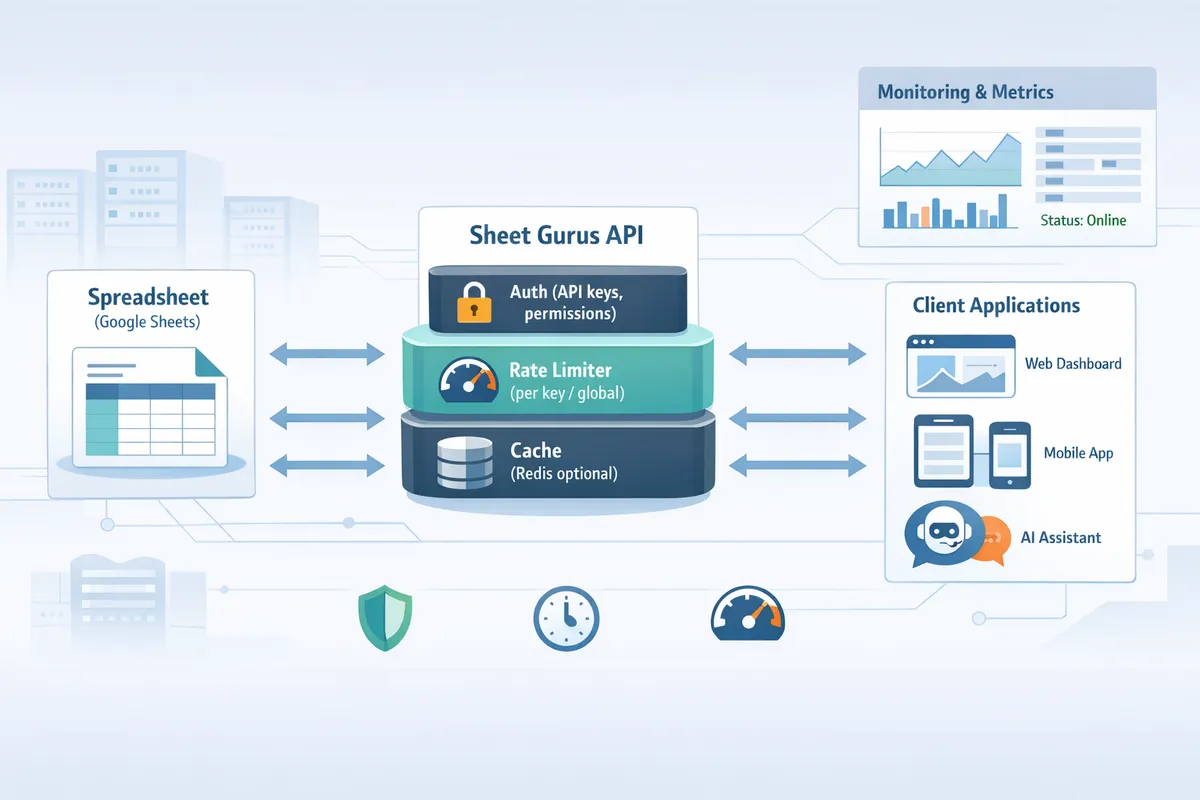
Sheet Gurus API replaces the middleware you would otherwise build and operate. Connect a Google account, select a spreadsheet, and the platform issues a live CRUD endpoint with built-in operational controls.
Concrete capabilities that remove DIY burden.
- API key management with per-sheet permissions, avoiding distributed OAuth handling.
- Configurable rate limiting at the key or global level to prevent quota surges.
- Optional Redis caching to reduce Google API calls and improve response times.
- Built-in monitoring and request tracing so you do not build dashboards and log retention yourself.
- Automatic retries and safe defaults for backoff behavior to limit custom retry implementations.
Example: a client can call a Sheet Gurus endpoint with an API key stored in an environment variable instead of implementing OAuth refresh logic.
curl -H "x-api-key: $SHEET_GURUS_KEY" \
 "https://api.sheetgurusapi.com/v1/spreadsheets/$ID/rows?sheet=Sheet1"
For teams weighing DIY vs hosted, read our practical comparison in No‑Code API for Google Sheets: The Definitive 2026 Guide to Tools, Security, and AI Workflows to see which approach fits specific constraints and compliance needs.
Related terms, tools, and deployment options
Choosing how to expose a spreadsheet as a REST API affects security, performance, and long-term ops. This section compares common toolchains, caching patterns, monitoring needs, and cost scenarios so you can pick a path that fits your team's tolerance for engineering work.
Apps Script, AppSheet, and no-code REST wrappers 🧩
Apps Script. Quick to prototype and free on many Google accounts, but a production rollout requires building token refresh, quota monitoring, retry logic with exponential backoff, and concurrency controls to avoid race conditions. Apps Script projects also often rely on OAuth scopes that teams must rotate and audit, which adds operational overhead.
AppSheet. Strong for internal apps that need UI and data validation without custom code. AppSheet does not expose a full-featured REST JSON API suitable for complex automation or granular per-key permissions in many deployments.
No-code REST wrappers. Offer instant JSON endpoints and minimal setup, but you still must manage API key storage, rate limits, and cache invalidation. Our comparison guide, How to Turn Google Sheets into a REST API in Minutes (No Backend Required), shows where a hosted product like Sheet Gurus API removes those operational tasks by providing API key auth, per-sheet permissions, and built-in rate limiting so teams avoid building credential rotation and quota handling themselves.
Caching and performance: Redis, CDNs, and MCP servers ⚡
Use Redis for low-latency, read-heavy workloads that query structured rows with filters, sorting, or aggregation. Redis reduces Google Sheets API calls by holding normalized JSON results and supports fine-grained invalidation when you write back to the sheet. Use a CDN for public, read-only endpoints with long TTLs; CDNs reduce edge latency but require strong cache-control headers and conservative TTLs for dynamic sheets.
Batching writes and adding a short write-buffer TTL prevents write storms and quota exhaustion. MCP servers sit between LLMs and sheets to provide a stable JSON schema, query planning, and cached context windows. Sheet Gurus API offers optional Redis caching and MCP server support so teams do not have to implement cache key design, invalidation hooks, or token refresh logic themselves.
See Google Sheets JSON API: The Complete Guide to CRUD, Auth, and Performance for caching patterns and examples.
Monitoring, logging, and SLA considerations 📈
Track these metrics as baseline requirements: request latency, error rate, quota usage, token failures, cache hit ratio, and downstream Google API error codes. Alert when latency exceeds 500 ms for 1-minute windows or when error rate remains above 1% for 5 minutes. Quota usage alerts should trigger at 70 to 80 percent of available quota to allow mitigation.
Logging should include request ID, sheet ID, API key or service account, client IP, Google API response codes, and the time-to-first-byte for each upstream call. Implement synthetic checks that perform typical read and write flows and verify cache invalidation paths.
💡 Tip: Capture spikes in 429 responses separately and map them to client keys. A sudden 429 cluster often indicates missing client-side throttling or a bad batching strategy.
Sheet Gurus API provides built-in monitoring, API key management, and configurable rate limits so teams avoid building tracing, alerting, and token-rotation systems from scratch. Refer to the API Reference for telemetry fields to capture in custom logs.
Cost and quota planning with example scenarios 💸
Scenario A: Internal dashboard with 10 users making 10 reads per minute and 5 writes per day. Without caching, that pattern generates ~144,000 reads per day and quickly consumes per-minute read quotas; implementing Redis caching for list endpoints often cuts reads by 70–90 percent and reduces quota pressure.
Scenario B: AI assistant querying recent rows at high frequency. Each assistant session can cause tens of requests per minute. Deploying an MCP server to batch and cache queries prevents repeated token refreshes and avoids quota spikes.
Operational costs for a DIY solution include engineering time to implement credential rotation, retry logic with backoff, quota monitoring, cache invalidation, and race-condition protection. If you expect sustained concurrent requests above a few requests per second, or need per-key rate limiting and audit logs, choose a managed option. Sheet Gurus API shifts these tasks off your team by providing API-level auth, rate limiting, optional Redis caching, and MCP support so you can focus on product logic rather than token lifecycle and quota engineering.
Related resources: No‑Code API for Google Sheets: The Definitive 2026 Guide to Tools, Security, and AI Workflows and How to Turn Google Sheets into a REST API in Minutes (No Backend Required).
Frequently Asked Questions
These FAQs give short, actionable answers for common operational and security questions about a google sheet rest api, quota handling, and how fast teams can get a production endpoint with Sheet Gurus API. Each answer states the direct response first, then adds concrete steps or examples you can use immediately.
How do I authenticate requests to a Google Sheet REST API? 🔐
Use OAuth 2.0 for user-consent flows and service accounts for server-to-server automation; API keys or managed keys fit read-only public scenarios or gateway-managed access. OAuth requires handling refresh tokens and secure storage of client secrets. For a DIY build you must implement token exchange, periodic refresh, and secure storage (secret manager or hardware module), plus scope minimization (read-only vs read-write). Example minimal refresh flow (illustrative, not production-ready):
// Pseudocode: exchange refresh token for access token
POST /oauth2/v4/token
{ client_id, client_secret, refresh_token, grant_type: 'refresh_token' }
Sheet Gurus API removes most of that operational burden by providing Google sign-in, API key issuance, and per-sheet permission controls so you do not build refresh logic or credential rotation yourself. For implementation details and auth patterns see our guide on authentication and CRUD in the Google Sheets JSON API.
💡 Tip: Store long-lived refresh tokens and API keys in a secrets manager (AWS Secrets Manager, Google Secret Manager). Rotate keys on a schedule and revoke compromised keys immediately.
What are the google sheets rest api limits and how can I avoid them? ⚖️
Quota types include per-project and per-user request limits, per-method quotas, and rate limits that trigger on parallel reads or bursts of writes; you must design around these limits. Common triggers are tight polling loops, concurrent bulk writes, and parallel jobs that perform many small updates. Mitigation techniques that work in practice:
- Batch writes into larger update calls instead of many single-cell updates.
- Use caching for high-read workloads to reduce Google Sheets API calls (Sheet Gurus API offers optional Redis caching).
- Implement exponential backoff and jitter on retries to avoid synchronized retries causing quota spikes.
- Shape request rates with client-side throttling or a gateway-level rate limiter.
Monitor quota usage with Cloud Console or external metrics and set alerts on consumption thresholds. Our comparison of DIY wrappers versus hosted gateways explains the operational costs of handling quotas yourself and when to use a managed API like Sheet Gurus API.
Can I expose a private spreadsheet as a public JSON API? 🔓
You can expose a private sheet as a JSON endpoint, but you should avoid making the sheet publicly readable; instead use a gateway with fine-grained keys and scopes. Public-read means anyone with the URL can view data and may violate privacy or compliance requirements. Safer patterns:
- Keep the sheet private and grant access to a service account or a managed gateway account.
- Issue short-lived API keys or signed tokens for client access and revoke them when needed.
- Use per-sheet permissions so keys only allow the minimum required operations.
⚠️ Warning: Do not embed service account credentials or static API keys in client-side code. That exposes write access and leads to immediate compromise.
Sheet Gurus API provides per-sheet API key management, configurable permissions, and auditability so you can expose a JSON API without publishing credentials or opening the sheet to the public. For step-by-step options and risk tradeoffs, see our quick how-to on turning sheets into REST APIs.
Is a service account better than OAuth for sheet APIs? 🤝
Use a service account when your server needs persistent, unattended access to a sheet owned by a team or application; use OAuth when the sheet belongs to an individual user and user consent is required. Service accounts simplify automated jobs, scheduled syncs, and server-side backends, but they require secure storage of the key file and handling key rotation. OAuth gives end-to-end consent and works for user-owned sheets, but requires handling refresh tokens and consent screens.
Practical considerations:
- Shared Drive and domain scenarios may require granting the service account explicit file permissions or using domain-wide delegation.
- DIY service-account setups must manage credential rotation, secure key storage, and impersonation logic.
Sheet Gurus API supports both sign-in flows and server-style access while abstracting credential rotation and impersonation details so teams avoid building that infrastructure.
How do I map spreadsheet rows to stable record IDs? #️⃣
Do not rely on row numbers; create a dedicated immutable ID column to serve as a stable primary key. Common strategies:
- Add an ID column populated with UUIDs or short unique tokens when a row is created.
- Use a composite key from immutable fields (for example: account_number + creation_date) when UUIDs are not feasible.
- Maintain a separate index sheet that maps logical IDs to current row numbers and update the index atomically.
Concurrency risks: concurrent inserts or deletes shift row indexes and lead to race conditions if you use row position as the key. Add a version or updated_at column to detect write conflicts and apply optimistic locking. Sheet Gurus API supports stable ID columns and conflict detection patterns so you avoid building row-tracking and reconciliation logic yourself.
How quickly can I get a production endpoint with Sheet Gurus API? 🚀
You can go from Google sign-in to a live CRUD JSON endpoint in minutes using a three-step flow: Connect → Configure → Ship. Steps explained:
- Connect. Sign in with Google and select the spreadsheet. Sheet Gurus API handles OAuth and permission grants.
- Configure. Map columns to fields, set read/write rules, enable optional Redis caching, and configure API key permissions and rate limits.
- Ship. Get a production-ready endpoint and API key, then integrate it into your app or automation. The platform provides built-in auth, per-sheet rate controls, optional caching to reduce Google API calls, and endpoint monitoring so you avoid building backend auth, quota handling, retry logic, and cache invalidation yourself.
For a quick walkthrough and decision checklist comparing DIY vs hosted, read our guide on turning Google Sheets into a REST API in minutes.
Final takeaway and next steps
A google sheet rest api gives apps programmatic access to spreadsheet data, but building and operating one requires handling credential management, token refresh, quota limits, retry logic, race conditions, cache invalidation, and monitoring—tasks that add days of work and ongoing ops risk. Sheet Gurus API turns Google Sheets into production-ready RESTful JSON APIs in minutes, requiring no backend code. Users sign in with Google, select a spreadsheet, and immediately receive a live API endpoint that supports CRUD and syncs changes back to the original sheet.
For a hands-on walkthrough, read How to Turn Google Sheets into a REST API in Minutes (No Backend Required). For deeper implementation patterns on auth, pagination, and performance, see our Google Sheets JSON API guide. Create your first endpoint with the getting-started guide and start a 14-day free trial of Sheet Gurus API to move a spreadsheet-backed service from prototype to production quickly. Subscribe to our newsletter for implementation tips, best practices, and updates.