Google Drive vs Google Sheets API Quota (2026)
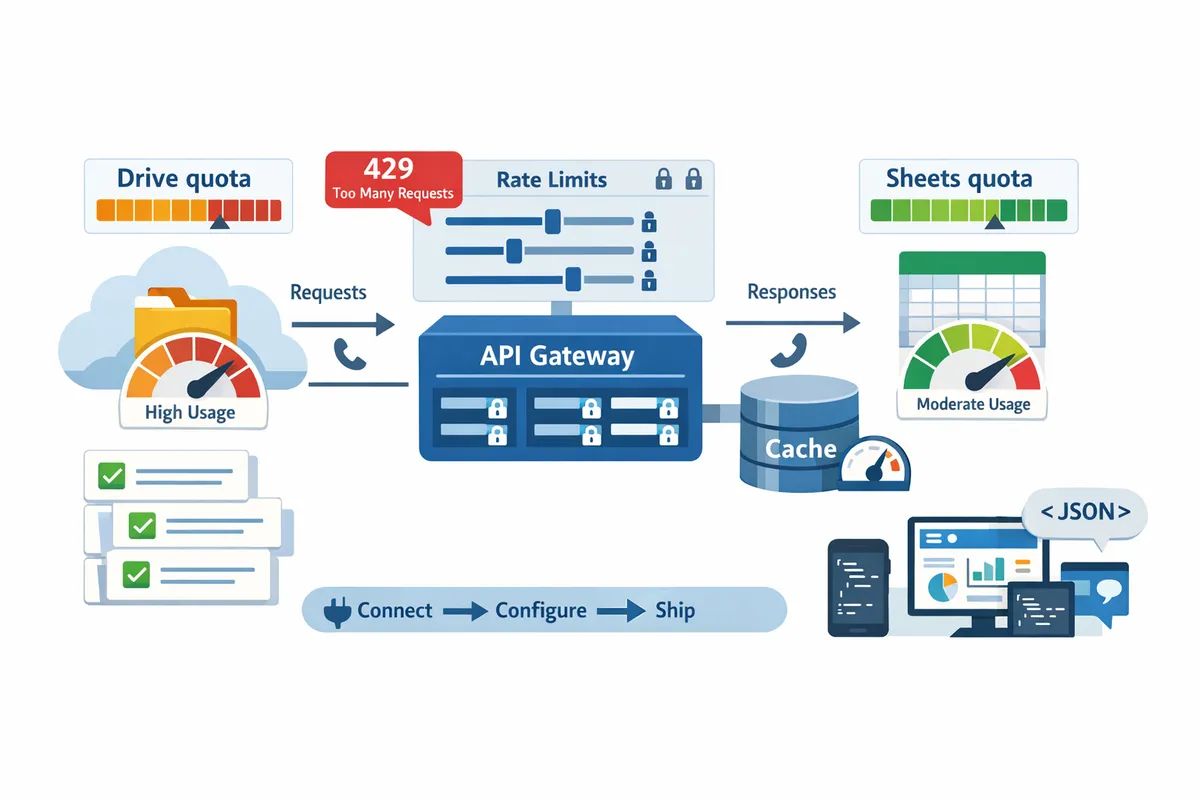
A single 429 quota error can stop an automation that serves 500 customers and force a small team into hours of manual fixes. Google Drive vs Google Sheets API quota is a top query for teams weighing per-minute limits, read versus write caps, and batch behavior. Google Drive vs Google Sheets API quota is a comparison topic that explains how each API enforces request limits, per-user and per-project caps, and rate rejections.
Our website's Sheet Gurus API turns Google Sheets into production-ready RESTful JSON APIs in minutes and adds API key auth, per-key rate limits, and optional Redis caching to cut Sheets API calls, typically achieving up to 99.9% uptime. This article compares quota rules, shows practical quota-reduction tactics for SMB workflows, and links to detailed Sheets API Auth & Quotas resources for monitoring. Which API imposes tighter write caps for multi-user flows, and which caching patterns save the most calls?
How Do Google Drive and Google Sheets API Quotas Differ?
Google Drive and Google Sheets use separate quota systems with different unit types, refill cadences, and common bottlenecks. Drive quotas focus on file-level operations such as exports, copies, and metadata reads, while Sheets quotas count RPC-style calls like reads, batchUpdate, and value reads, producing different per-minute and per-day hotspots. For practical mitigation tactics for Sheets-specific limits, see our Google Sheets API Quota: Limits & Best Practices (2026) guide.
Quick comparison table: Drive vs Sheets quotas 📊
Drive and Sheets count different operations, so treat them as separate budget lines when planning integrations.
| API | Quota unit | Typical sources of consumption | Per-minute vs per-day behavior | Refill cadence | Typical spike triggers |
|---|---|---|---|---|---|
| Google Drive API | File operations and per-request units (exports, creates, copies) | Exports to PDF/CSV, file creation, file copies, permissions edits | Often enforced as per-minute and per-user limits for heavy file operations; some calls also counted against daily project quotas | Per-minute limits refill continually; daily project quotas reset every 24 hours | Nightly batch exports, bulk copying of templates, mass permission updates |
| Google Sheets API | RPC-style calls (get, batchGet, batchUpdate, append, clear) counted per request or per-range | Range reads by dashboards, batchUpdate for many cell edits, append rows, valueGet requests | Heavy sensitivity to per-minute bursts; some quotas also track per-day usage for large automation jobs | Per-minute quotas refill quickly but fines for bursts can cause immediate 429s; daily quotas reset every 24 hours | High-frequency dashboard polling, AI-assisted multi-range reads, automation that writes many rows at once |
| Combined workflows | Cross-service operations count against both APIs | Exporting a sheet to CSV via Drive after multiple Sheets reads; copying spreadsheets then running scripts | Can hit per-minute throttles on one API while exhausting daily limits on the other | Each API follows its own cadence; combined flows compound risk | End-to-end exports where a job reads many ranges then triggers Drive export/copy |
Read the table as separate budgets: reduce the Drive budget by batching exports or using stored copies, and reduce the Sheets budget by batching range reads or using caching. For deeper Sheets mitigation techniques and a quota calculator, consult our Google Sheets API Quotas and 429s: How to Increase Limits and Prevent Errors (2026 Guide + Calculator).
Common quota pain points for SMB workflows 🚨
The biggest practical failures come from per-minute bursts during scheduled jobs, not from steady daily use. For example, a nightly sync that issues 200 range reads across 20 spreadsheets can produce a per-minute spike that triggers 429s and halts report generation. A bulk onboarding where automation copies 150 templates and writes 10 rows per copy will hit Drive copy limits and Sheets write quotas in the same job, doubling the operational risk. High-frequency dashboard polls that request small ranges every 5–15 seconds multiply calls quickly; 30 dashboards polling a sheet every 15 seconds equals thousands of reads per hour and creates instability.
Common SMB scenarios that cause problems:
- Scheduled CSV exports: each export may be a Drive export call; run many in parallel and you hit per-minute limits.
- Bulk sheet copies and template cloning: file copy operations multiply Drive consumption quickly and also trigger Sheets reads/writes post-copy.
- High-frequency dashboard polls: frequent get or batchGet calls drive Sheets per-minute quotas.
- Mass writes from automation: append and batchUpdate calls consume Sheets write quota and increase retry overhead.
- AI-assisted multi-range queries: agents that request many ranges per prompt multiply Sheets calls and create spikes.
💡 Tip: Stagger scheduled jobs across minutes and prefer batched reads or cached endpoints to flatten per-minute spikes and reduce retry cycles.
When manual work replaces failed automations, teams lose hours and sometimes revenue. For tactical playbooks to diagnose 429s and set alerts, see our Google Sheets API 429s and Quotas (2026) root-cause playbook and monitoring dashboards.
How Sheet Gurus API changes the consumption pattern ✅
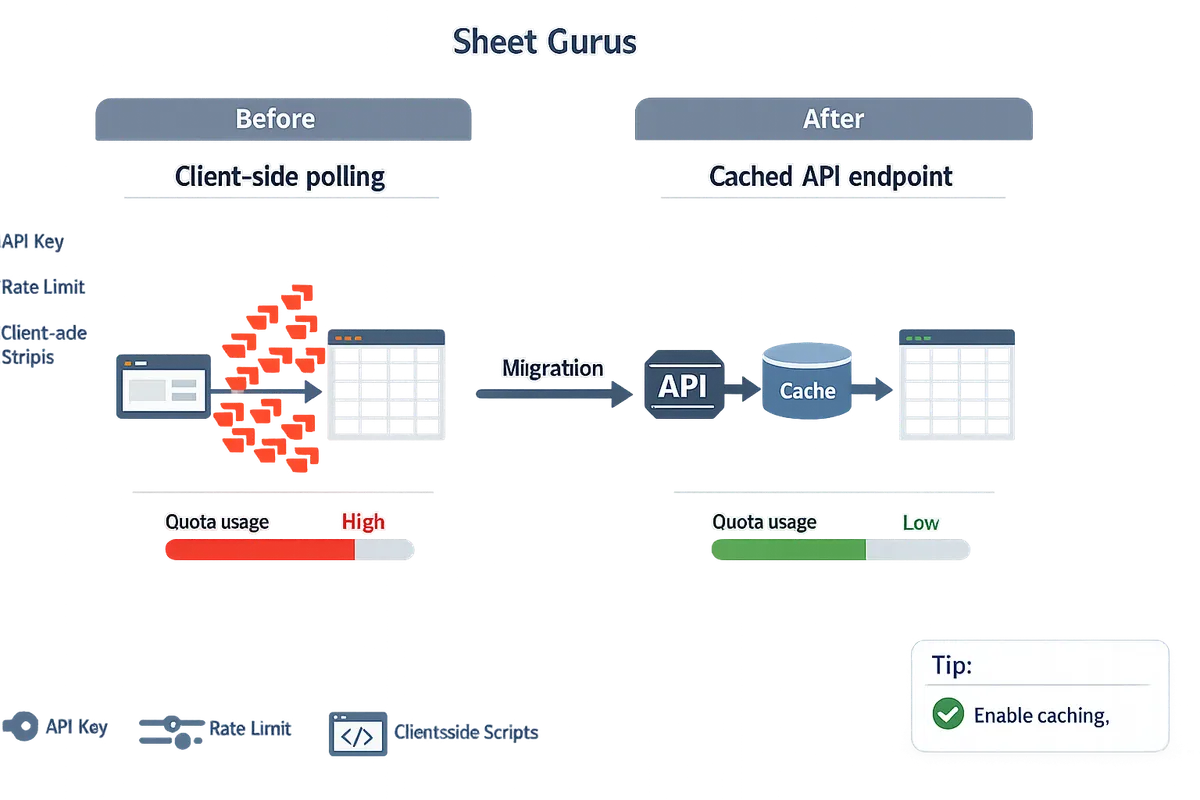
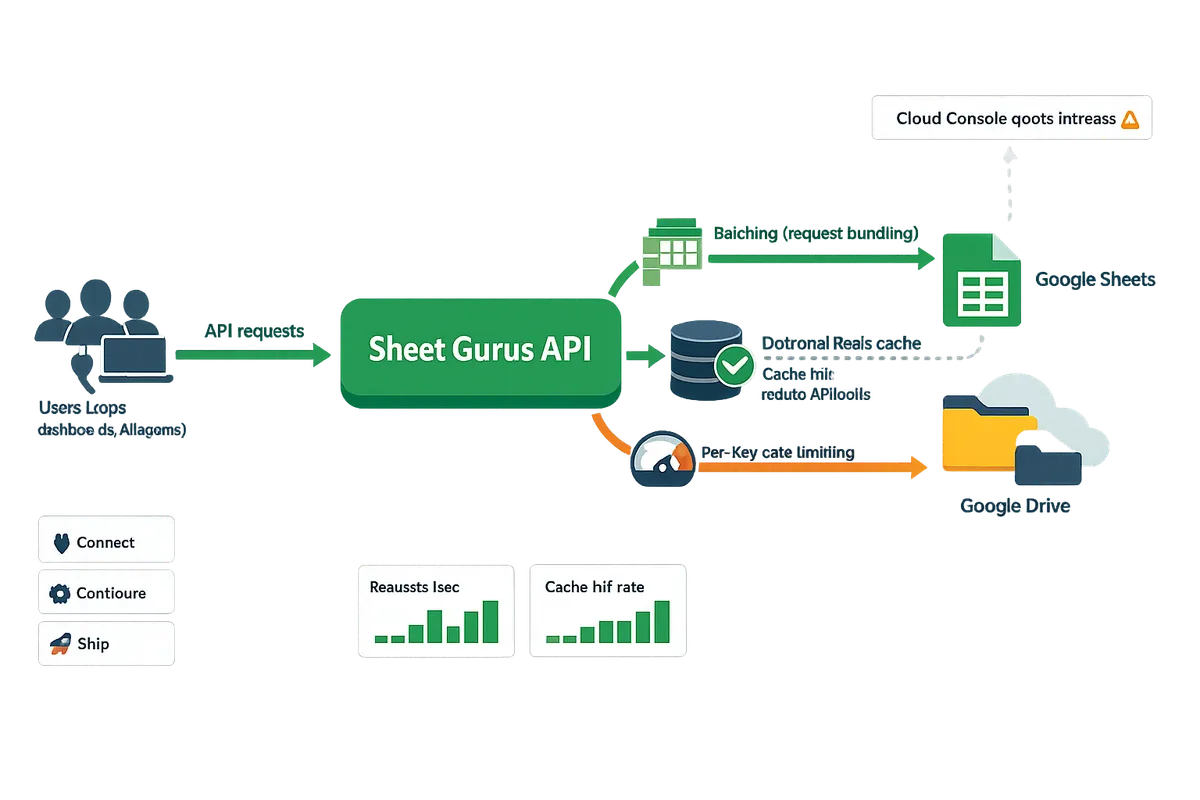
Sheet Gurus API centralizes spreadsheet access behind a single API layer, which reduces direct Google Drive and Sheets calls by using server-side batching, configurable rate limits, and optional caching. For example, a dashboard that previously polled Sheets every 10 seconds can call a single Sheet Gurus endpoint that serves cached JSON and refreshes the cache on a controlled cadence, turning hundreds of Sheets RPCs into one cached API call. Sheet Gurus API supports Redis caching to cut raw Sheets calls, per-key rate limiting to prevent rogue clients from exhausting quotas, and server-side batching that groups writes into fewer batchUpdate operations. See the Sheet Gurus API about page for feature details and our API reference to compare request shapes.
Practical outcomes for SMB teams:
- Fewer immediate 429s. Centralized throttling prevents spikes from individual integrations.
- Lower Drive consumption. Exports and file operations can be minimized when Sheet Gurus serves JSON instead of generating files on demand.
- Predictable capacity planning. Per-key limits and cache hit rates make quota forecasting easier than aggregating many client-side scripts.
If you want to test a migration path from client-side polling to a cached API endpoint, follow our getting started guide to connect a spreadsheet, configure permissions, and enable caching to observe the quota reduction in minutes.
What Practical Strategies Reduce Quota Pressure for Sheets and Drive?
Batching, caching, scheduling, and per-key rate controls are the fastest ways to cut Sheets and Drive API request counts and avoid quota errors. Product controls such as Sheet Gurus API's server-side batching, configurable rate limits, and optional Redis caching let teams apply these patterns without building middleware. Below are concrete patterns, examples, and decision guidance you can apply today.
Batching and request consolidation 📦
Group multiple logical reads or writes into single API calls to reduce per-minute request counts. For reads, use batchGet to request multiple ranges in one call; for writes, use batchUpdate to send several edits at once. Example: a dashboard that previously requested 20 cell ranges on every refresh will drop from 20 calls to 1 call by using batchGet, cutting minute-level quota pressure by 95 percent during bursts. Practical steps:
- Identify hot paths (UI refreshes, sync jobs, bulk imports).
- Replace looped single-row calls with a single batchGet or batchUpdate.
- Aggregate UI actions: queue user edits and commit every 2–5 seconds rather than on each keystroke.
Sheet Gurus API supports server-side batching so you can combine client CRUD requests into fewer Sheets API calls without building your own aggregator. If you do not batch, you risk frequent 429s that stop automation and force manual fixes.
Caching reads and TTL best practices ⏱️
Cache frequently requested ranges with appropriate TTLs to lower Sheets API read volume while keeping data fresh for intended use cases. Choose TTL by use case: interactive UIs often use 5–30 second caches, AI assistants and chat agents use 30–300 seconds, dashboards use 1–5 minutes, and scheduled reports use 15–60 minutes or longer. Example: a support agent UI that polls a customer row every 10 seconds can move to a 15 second cache and reduce reads by 60 percent while keeping response times acceptable.
Invalidation strategies:
- Invalidate on explicit sheet edits (push from change webhook or an application event).
- Use short TTLs for high-change ranges and longer TTLs for stable lookup tables.
- For complex multi-user edits, prefer event-driven invalidation to avoid stale writes.
Sheet Gurus API offers optional Redis caching and automatic invalidation hooks so teams avoid building cache infrastructure.
💡 Tip: For ranges that change infrequently but must be accurate when edited (price lists, quota tables), set a longer TTL (15–60 minutes) and trigger immediate invalidation on edit events.
Rate limits, per-key controls, and scheduling ⚙️
Enforce per-key throttles and stagger heavy jobs to prevent bursts that trigger quota errors. Assign each client or integration its own API key and apply a per-key request cap to contain noisy tenants. For background exports and Drive file operations, schedule jobs into fixed windows (for example, 5-minute staggered windows) and limit concurrent file writes to avoid hitting file-level Drive quotas.
Implementation pattern:
- Map requests to API keys tied to customers or services.
- Set per-key and global limits (for example, 10–30 requests per minute per key) and enforce at the gateway.
- Batch scheduled exports and stagger start times across minutes to smooth traffic.
Sheet Gurus API exposes configurable rate limiting per key so you can enforce these rules without custom middleware. Monitor errors and use exponential backoff with jitter for retries to reduce synchronized retry storms. See our guide on diagnosing 429s for monitoring templates and alerting patterns.
⚠️ Warning: Allowing unlimited bursts during nightly exports often causes quota exhaustion; enforce a staging window to avoid production outages.
When to optimize versus when to request more quota 💼
Optimize first; request additional quota only if optimizations cannot meet business SLAs or for unavoidable one-time large exports. Use a decision checklist to evaluate whether to optimize or ask for more quota:
- Measure current usage and peak windows (per-minute and per-day). Use logs and Cloud Monitoring dashboards.
- Estimate engineering effort to implement batching, caching, and per-key throttles (hours/days).
- Calculate business impact of outages (hours of manual work, lost revenue).
- If optimization cost is low relative to outage cost, implement patterns above. If you need sustained higher throughput or must export large historical datasets, prepare a quota request packet.
Steps to request more Drive or Sheets quota:
- Compile request logs showing peaks, average rates, and business justification.
- Show mitigation efforts already taken (batching, caching, limits).
- Submit the quota increase request through your Google Cloud Console and attach the packet.
If you prefer to avoid the quota increase process, Sheet Gurus API's rate limiting and caching options reduce the chances you will need higher Google quotas while giving predictable per-customer controls.
Related reading: explore our troubleshooting and forecasting playbook in "Google Sheets API 429s and Quotas (2026): Root‑Cause Playbook + Cloud Monitoring Dashboards and Alerting" and the practical limits in "Google Sheets API Quota: Limits & Best Practices (2026)."
How Should Teams Monitor Quotas, Set Alerts, and Request More Quota?
Teams should monitor quotas with real-time metrics, tiered alerts on sustained thresholds, and a prepared quota-request package before contacting Google. Effective monitoring detects creeping load before it causes 429 outages; a request packet that documents mitigation steps shortens approval time. The steps below show what metrics to track, exact alert thresholds to use, and how to assemble the artifacts Google expects for Drive export–heavy workflows.
Set up real-time quota monitoring and alerts 📈
Monitor per-minute and per-day usage plus 429 and export error rates for both Drive and Sheets in real time. Capture these metrics: per-minute requests, per-day requests, 429 error rate, latency spikes, number of concurrent keys, and Drive export counts. Use Google Cloud Monitoring for per-minute and per-day charts, Cloud Audit Logs for per-request detail, and the Sheet Gurus API usage dashboard for key-level throttling and cache hit rates.
Steps to implement alerts.
- Export Sheets and Drive metrics to a Cloud Monitoring workspace and retain 30 days of high-resolution data.
- Create alerting policies for sustained thresholds: trigger when usage exceeds 70% of a per-minute quota for 5 minutes, and when daily usage reaches 85% of projected daily quota.
- Add a separate alert for 429 rate > 0.5% over a 10-minute window.
- Send alerts to an on-call channel and a secondary escalation (email + ops webhook).
💡 Tip: Alert on sustained congestion rather than single spikes. A single spike often recovers; sustained 70% usage over 5 minutes signals systemic pressure.
Refer to our root-cause playbook for Cloud Monitoring dashboards and alerting patterns in the 429s guide.
How to prepare a quota increase request 📝
Prepare traffic graphs, a clear business justification, and evidence of mitigation steps before filing a quota increase request with Google. Google expects a usage timeline, examples of peak traffic, a projection of growth, and proof you tried batching, caching, or rate limiting.
Required artifacts to attach.
- Usage timeline with minute-level charts covering at least two high-load days. Export CSVs from Cloud Monitoring or audit logs.
- A written description of peak events (time, root action, user count, concurrent API keys).
- Mitigation log showing batching, caching, and per-key throttles applied and results.
- Business justification: number of customers affected, revenue impact per hour of outage, and projected growth over 90 days.
Operational pitch. Describe how you will use any additional quota: steady-state daily growth and peak-minute headroom. Mention temporary mitigations you can apply while waiting, such as Sheet Gurus API configurable rate limits, request throttling by API key, server-side batching, or optional Redis caching. Sheet Gurus API teams can review traffic patterns and recommend temporary throttles or a staggered export schedule to reduce per-minute pressure.
⚠️ Warning: Requests without evidence of optimization or without clear growth metrics usually get delayed or denied.
For a step-by-step filing checklist and templates, see our quota increase playbook and calculator.
Quota-aware deployment checklist and usage estimator 🧭
Map every user action to its API call cost and run a 24-hour peak simulation to estimate reads, writes, and exports before deployment. Use an estimator to convert user flows into expected API calls, then run a simulated spike at expected concurrency to validate alerts and rate limits.
Deployment checklist.
- Map actions to calls: list each UI action and its underlying Sheets or Drive API call (read, write, create, export).
- Measure peak concurrency: observe simultaneous users during peak hour in logs or run a load script for an hour.
- Run a 24-hour traffic simulation that includes peak bursts and nightly jobs. Record per-minute and daily totals.
- Add per-key rate limits and global caps in your API gateway or with Sheet Gurus API to limit damage from an errant client.
- Enable optional Redis caching and server-side batching to cut repeated reads and exports.
- Schedule heavy Drive exports as staggered batches (for example, break 500 file exports into 10 batches of 50 spread across 30 minutes) to avoid per-minute export limits.
Example: a nightly job that exports 300 reports will generate 300 Drive export calls. Staggering those into 6 batches of 50 over 60 minutes often reduces per-minute pressure enough to avoid quota errors while keeping delivery times acceptable.
Use our quota estimator and the increase guide to translate your workflows into reads, writes, and export counts and to create the artifact package required for a quota request. Also consult the Sheet Gurus API docs for implementing rate limits and optional Redis caching in your deployment.
Frequently Asked Questions
This FAQ provides short, actionable answers to the questions teams most often search about Google Drive and Google Sheets API quota. Use these responses to triage 429s, plan quota requests, and estimate daily call volumes without digging through multiple docs.
How do Sheets API quotas differ from Drive API quotas? 🔍
Sheets API quotas count read, write, and batchUpdate operations while Drive API quotas count file-level actions such as create, copy, export, and metadata reads. Sheets quotas matter for dashboards and frequent cell-level updates; Drive quotas matter for exports, file copies, and creating or uploading files. For exporters and automation, that means a single export often hits Drive (export/create) while repeated cell reads or batchUpdates hit Sheets. Use this distinction to decide where to apply batching and caching: batch reads and writes at the Sheets layer, and consolidate or schedule file exports that call Drive.
Refer to our detailed planner in "Google Sheets API Quota: Limits & Best Practices (2026)" for examples of which endpoints consume which quotas.
Can I use Sheet Gurus API to reduce quota usage? ✅
Yes. Sheet Gurus API reduces direct calls to Google Sheets and Drive by exposing a single REST endpoint that performs server-side batching, configurable rate limits, and optional Redis caching. That central endpoint lets you move logic (filtering, pagination, bulk updates) off client devices so a single request can replace many small calls to Google APIs. Configure per-key rate limits to prevent noisy users from causing minute-level bursts, and enable Redis caching for read-heavy endpoints to cut Sheets calls for dashboard and reporting patterns. See our API reference and getting-started guide to map your current calls to Sheet Gurus workflows.
What usually causes 429 errors with Sheets and Drive? ⚠️
429 errors most often come from minute-level bursts, unbatched bulk operations, or concurrent scheduled jobs that overlap and exceed per-minute quotas. Immediate mitigations include pausing or staggering jobs, adding exponential backoff on retries, and switching hot paths to batched requests. Long-term fixes include adding server-side batching via Sheet Gurus API, caching read-heavy endpoints, and applying per-key throttling so one client cannot exhaust project-level quotas. For a step-by-step troubleshooting playbook and Cloud Monitoring templates, see our root-cause guide on 429s and quotas.
💡 Tip: Pause simultaneous scheduled jobs and add jitter. Staggering a few seconds can turn a synchronized burst into safe traffic under per-minute limits.
How do I increase google drive api quota for sheets exports? 📈
File a quota increase request in Google Cloud and include traffic graphs, export frequency, and a proven mitigation plan before requesting higher limits. Prepare: (1) export the Cloud Monitoring or API usage graphs showing minute and daily peaks, (2) document current export cadence and business justification, and (3) list immediate mitigations you will run while Google reviews the request (batching, scheduled windows, caching). Expect Google to review usage patterns and ask for test plans or staging proofs. While the request is pending, contact Sheet Gurus API support for export-optimization suggestions and temporary orchestrations that reduce Drive calls.
- Gather graphs and sample logs.
- Draft a mitigation plan that proves you will reduce burstiness.
- Submit the quota request and continue optimizations.
See our how-to playbook "Google Sheets API Quotas and 429s: How to Increase Limits and Prevent Errors (2026 Guide + Calculator)" for a checklist and sample request language.
How can I estimate daily reads and writes for my workflow? 🧮
Estimate daily reads and writes by mapping every user action to the number of API calls it triggers, then multiply by peak users and action frequency. Start with a simple mapping, count the calls per action, and add scheduled and background jobs to the total. Example action mapping:
| Action | Typical API calls per action | Notes |
|---|---|---|
| Dashboard view | 3–10 Sheets reads | Depends on number of ranges and formulas returned |
| Save a row | 1 Sheets write | Use batchUpdate when saving multiple rows |
| Run scheduled export | 1 Drive export + 1 Drive create | Exports often hit Drive quotas |
Example calculation: if a dashboard view averages 5 reads and 200 peak users view it once per day, expected reads = 5 * 200 = 1,000. For a fuller estimator and templates, consult "Google Sheets API Quota: Limits & Best Practices (2026)" and our quotas calculator guide.
Does caching introduce data staleness risks? 🕓
Yes. Caching reduces API calls but can return stale data until TTLs expire or explicit invalidation runs. Choose TTLs by use case: short TTLs (5–30 seconds) for live dashboards, medium TTLs (1–15 minutes) for operational reports, and longer TTLs for static exports. Implement invalidation tied to write operations or webhooks so writes clear or refresh cached records immediately; Sheet Gurus API's optional Redis caching supports programmatic invalidation on updates. Test with representative traffic to find the TTL that balances API savings against acceptable staleness for your users.
⚠️ Warning: Avoid caching regulated personal health or financial data without an audit trail and clear invalidation rules.
Next steps for managing API quotas
Reduce request volume, add per-key rate limits, and monitor usage to prevent quota outages. Use batching, targeted filtering, and short-term caching to cut calls during heavy jobs. Comparing google drive vs google sheets api quota shows Drive calls often hit upload and metadata limits while Sheets calls face per-minute read/write caps, so map each workflow to the API that best fits its pattern. Review our Google Sheets API Quota: Limits & Best Practices (2026) guide to estimate production demand and identify which calls to prune first.
💡 Tip: Start with caching and per-key throttling; they usually yield the largest immediate reduction in Sheets API traffic.
Sheet Gurus API turns Google Sheets into production-ready RESTful JSON APIs in minutes, requiring no backend code. For a practical next step, download the quota calculator and playbook in our Google Sheets API Quotas and 429s: How to Increase Limits and Prevent Errors (2026 Guide + Calculator) to forecast risk and choose mitigations. After that, connect a high-impact sheet to Sheet Gurus API to apply rate limits and caching without building a custom backend.