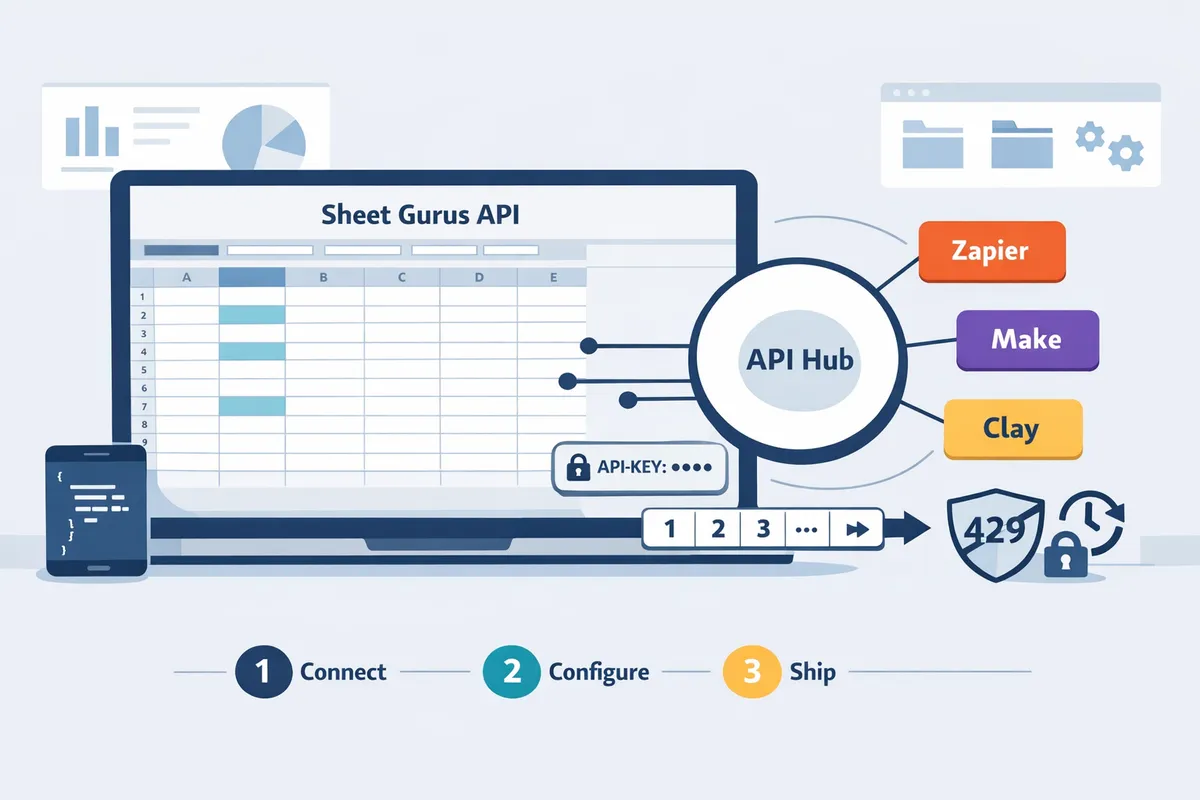
Connect a Google Sheets REST API to Zapier, Make, Relay.app, and Clay (2026): API‑Key Auth, Pagination, and 429‑Safe Retries
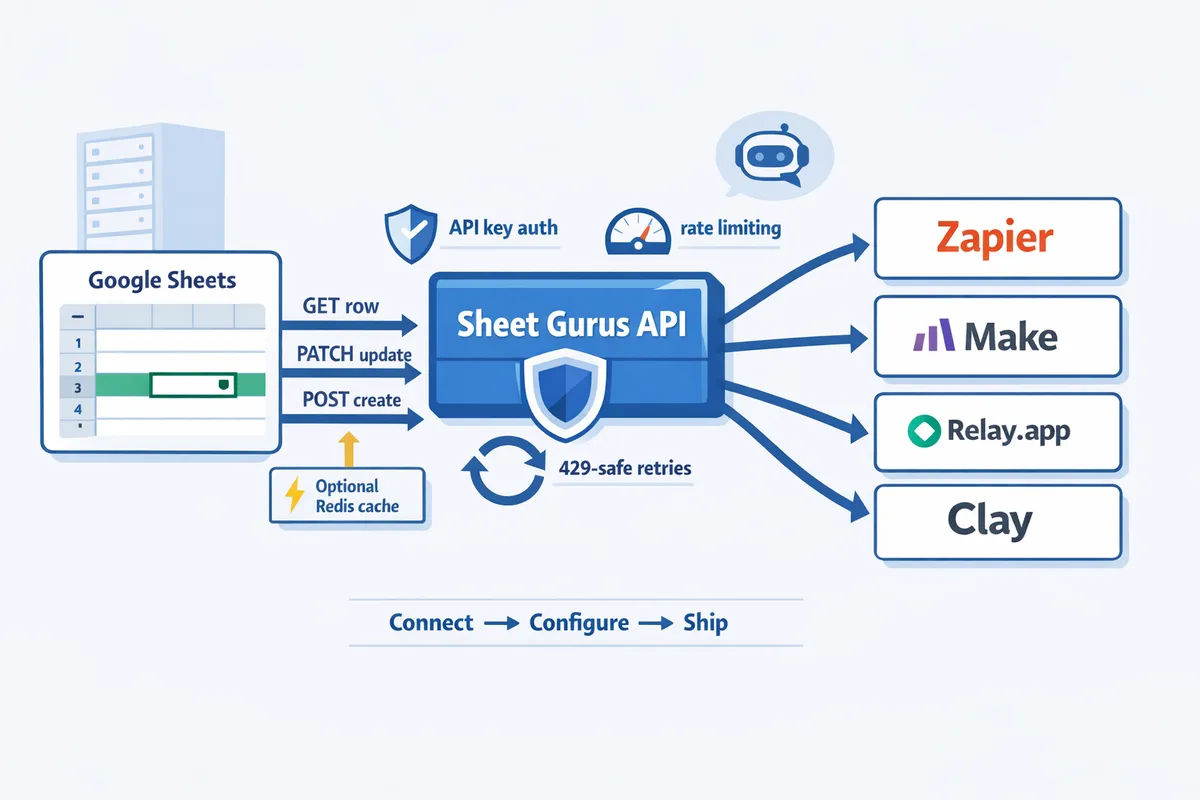
A single 429 error during a peak workflow can stop 20+ Zapier runs and break customer-facing automations. To connect google sheets rest api to zapier make, remember that a Sheets REST API is a RESTful JSON API that exposes spreadsheet rows as CRUD endpoints. Our Sheet Gurus API turns Google Sheets into production-ready RESTful JSON APIs in minutes without backend code; users sign in with Google, select a spreadsheet, and receive a live CRUD endpoint that syncs changes back to the sheet. The platform adds API key authentication, per-sheet permissions, configurable rate limiting, and optional Redis caching, and setup typically completes in under 10 minutes. See the Getting started guide or the Sheets REST API primer for Zapier and Make steps that prevent quota errors.
What do I need to connect a Google Sheets REST API to Zapier, Make, Relay.app, and Clay?
You need a Sheet Gurus API endpoint with an API key, a Google account that has editor access to the target spreadsheet, and an automation platform account (Zapier, Make, Relay.app, or Clay) that can call external REST endpoints. Our website's Sheet Gurus API exposes a chosen spreadsheet as a JSON REST API with per-sheet permissions and optional Redis caching, and it typically achieves average response times under 100 ms.
What is a Sheets REST API?
A Sheets REST API is an API that exposes Google Sheets rows as JSON endpoints supporting create, read, update, and delete operations. For example, our Sheet Gurus API maps each sheet row to a JSON object and provides query parameters for filtering and pagination so automation platforms can consume structured data directly. See our guide "How to Turn Google Sheets into a REST API in Minutes (No Backend Required)" for a step-by-step walkthrough and example schema considerations.
Which accounts and permissions do I need? 🔐
You need a Google account with edit access to the spreadsheet, a Sheet Gurus API project that can generate scoped API keys, and an automation platform account with permission to call external REST endpoints. Specifically, confirm these items:
- Google account with Edit permission on the target spreadsheet. This avoids write failures when the API syncs row updates back to the sheet.
- Sheet Gurus API project created on our website and an API key issued for that project. Generate a key scoped to the specific spreadsheet or sheet to limit blast radius.
- Automation platform account (Zapier, Make, Relay.app, or Clay) with the ability to make authenticated HTTP requests and set custom headers.
- Optional: IP allowlist or OAuth client restrictions if your security policy requires network or client constraints.
💡 Tip: Create one API key per integration (for example, one key for Zapier and another for Make) so you can throttle or revoke a single integration without disrupting others.
Which Sheet Gurus API features matter for production?
API-key authentication with per-key permissions, per-key rate limits, and optional Redis caching matter most for production reliability. Our Sheet Gurus API lets you restrict keys to specific spreadsheets, set rate limits per key to avoid 429 cascades, and enable Redis caching to reduce Google API calls and speed repeated reads. For guidance on avoiding rate-limit errors from upstream automation platforms, consult our rate-limit recipes in "Stop Google Sheets 429s in Zapier, Make, and n8n (2026): Rate‑Limit Recipes, Batching, and Importable Fix Kits." Use per-key limits to match your Zapier or Make usage patterns and reduce chances of hitting Google quotas.
Quick prerequisites checklist
Confirm the following before you start configuration in Zapier, Make, Relay.app, or Clay:
- Sheet Gurus API account created and a project connected to Google sign-in. (See our Getting Started guide for creating the API endpoint.)
- Target spreadsheet formatted with a header row and stable column names. APIs map columns by header; inconsistent headers break parsing.
- At least one test row present so you can validate read and update flows without affecting real data.
- API key generated with per-sheet scope and appropriate rate-limit settings. Record the key securely in your automation platform's secret store.
- Zapier/Make/Relay.app/Clay account configured to perform authenticated HTTP requests and to set request headers (Authorization: Bearer
). - A simple test plan: fetch a single row, update a field, and create a new row to confirm full CRUD behavior.
⚠️ Warning: Do not reuse a single unrestricted API key across multiple integrations. A surge from one integration can trigger 429s and block other automations.
Related guides you may want now: our Getting Started documentation and the post on authentication "Google Sheets API Authentication (2026): Do API Keys Work? OAuth vs Service Accounts and the Fastest Secure Path." For templates that you can import and run fast, see "Google Sheets to REST API Templates: 10 Free Starters (Postman, OpenAPI, Apps Script, n8n) for Fast CRUD with Auth & Pagination."
How do I set up API-key authentication, pagination, and the Zapier/Make connection?
Set up API-key auth in Sheet Gurus API, generate a per-sheet API key, then configure Zapier's Webhooks or Make.com's HTTP module to send that key in an Authorization header and to handle pagination and 429-safe retries. This section gives exact request examples, Zapier Webhooks settings, Make's pagination and retry advice, and importable Relay.app and Clay templates so you can test end-to-end quickly.
Step 1 — Connect your spreadsheet and generate an API key 🔌
Sign in to Sheet Gurus API, connect the Google account, select the target spreadsheet, and create an API key with the exact per-sheet permissions you need. Follow the steps in our Getting Started guide to authorize Google sign-in, expose the sheet, and generate a key. When creating the key, choose only the scopes required (read-only for reporting flows, read-write for syncs). Record the key value immediately; you will paste it into Zapier, Make, Relay.app, or Clay.
- Sign in to Sheet Gurus API and click Connect spreadsheet. See the quick walkthrough in Getting Started.
- Select the sheet tab(s) to expose and assign per-sheet permissions.
- Create an API key, name it for the integration (e.g., zapier-crm-sync), and copy the key.
- Optionally enable per-key rate limits and caching on the key if you expect high throughput.
Refer to How to Turn Google Sheets into a REST API in Minutes (No Backend Required) for a comparison of DIY approaches and why an API layer matters.
Step 2 — Configure API-key auth in Zapier (Webhooks) 🔑
Use Zapier's Webhooks by Zapier action (Custom Request) and set the Authorization header to ApiKey <your_key> for all requests to Sheet Gurus API. This header is what Sheet Gurus API uses to identify the calling automation and apply per-key permissions and rate limits.
- Trigger: choose your Google Sheets trigger or any Zap trigger.
- Action: choose Webhooks by Zapier → Custom Request.
- Method: GET to read, POST to create, PATCH/PUT to update as required.
- URL: paste the Sheet Gurus API endpoint (from your dashboard or API Reference).
- Headers: add
Authorization: ApiKey <your_key>andContent-Type: application/json. - Data: map column values to JSON fields for POST/PUT. Use raw JSON mode for complex bodies.
Example headers block for Zapier Custom Request:
{
 "Authorization": "ApiKey your_api_key_here",
 "Content-Type": "application/json"
}
Map Sheet column values to JSON keys by using Zapier field tokens in the Data box. Test the action and inspect the response in Zap history. See the API Reference for expected response shapes and error codes.
Step 3 — Configure Make.com HTTP module for pagination and retries 🔁
Set Make.com's HTTP module to use page and limit query parameters and enable retries with exponential backoff so the scenario iterates through pages until the API returns an empty result or a terminal status. Make's iterator and automatic retry settings let you paginate without custom code while handling transient 429 responses.
- Add HTTP module → Make a request. Set Method to GET for reads.
- URL:
https://api.sheetgurusapi.com/v1/sheets/{sheet_id}/rows?page={{page}}&limit={{limit}}. - Pagination: in the module, enable automatic pagination or use a router that increments
pageuntil the returned array length is less thanlimit. - Set limit to a balanced value (50–200) to reduce the number of calls while avoiding large payloads.
- Retries: open module settings and set automatic retries (e.g., 5 attempts) with an exponential backoff multiplier (start 2s, multiply by 2). Also add a specific handler for 429 to wait an extra interval before retrying.
⚠️ Warning: If your Make scenario polls a large sheet without batching, you will hit rate limits quickly. Use Sheet Gurus API's per-key rate limiting and optional Redis caching to reduce calls and prevent 429 storms. See Stop Google Sheets 429s in Zapier, Make, and n8n for batching patterns and throttling playbooks.
Step 4 — Import-ready Relay.app and Clay templates 📥
Use our Relay.app and Clay templates to avoid manual setup; the templates pre-fill endpoint paths, headers, and JSON mappings so you can run common flows (read, create, sync) in minutes. Each template includes a sample mapping, required headers, and a test payload to validate behavior before production runs.
What each template contains:
- Endpoint URL and path variables preconfigured for your sheet ID.
Authorization: ApiKey <your_key>header placeholder.- Example JSON mapping for create and update actions.
- A sample GET with pagination parameters and a POST create payload.
Import steps:
- Download the template from Google Sheets to REST API Templates and import into Relay.app or Clay.
- Replace the API key placeholder with your Sheet Gurus API key.
- Run the sample flow and confirm the row appears in the sheet and the API returns 200/201.
Mapping fields and sample requests 🧩
Map Google Sheet header names to JSON keys exactly and validate with a sample POST and a paginated GET before enabling a live automation. Misnamed headers are the most common cause of failed writes and silent data drift.
Sample paginated GET (curl):
curl -X GET "https://api.sheetgurusapi.com/v1/sheets/{sheet_id}/rows?page=1&limit=50" \
 -H "Authorization: ApiKey your_api_key_here"
Sample POST to create a row (curl):
curl -X POST "https://api.sheetgurusapi.com/v1/sheets/{sheet_id}/rows" \
 -H "Authorization: ApiKey your_api_key_here" \
 -H "Content-Type: application/json" \
 -d '{"Name": "Acme Co", "Email": "[email protected]", "Status": "new"}'
Validation checklist:
- Run the POST and confirm the API returns the created object with an
idfield. - Run the paginated GET for page=1, limit=50 and confirm the new row appears.
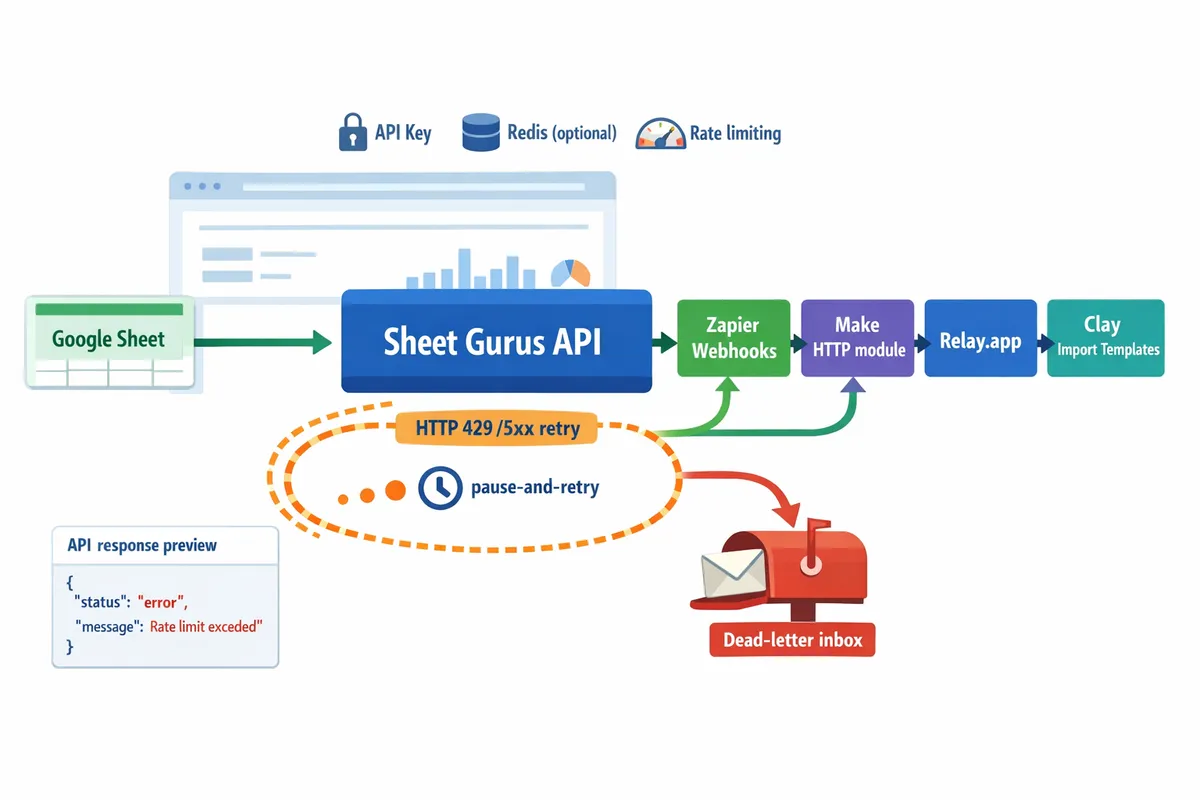
- Audit Zapier/Make run logs for 429 or 5xx codes and route retries to a dead-letter inbox if failures persist.
💡 Tip: Use exact header names from the sheet (case-sensitive) and preview the Sheet Gurus API response in the API Reference to confirm the JSON path you must map.
How do I test, monitor, and implement 429-safe retries and error handling?
Test with staged requests, verify response shapes against a known sample, and set your automations to pause-and-retry on HTTP 429 rather than failing immediately. This reduces cascading failures in Zapier, Make, Relay.app, and Clay and keeps downstream systems consistent. Use Sheet Gurus API's per-key rate limiting and optional Redis caching to reduce request volume and surface retry guidance in response headers.
How should I validate responses and schemas? ✅
Validate responses by running staged requests that return a small, known row set and comparing keys and types to your expected JSON schema. Start with 1–2 sample rows that represent edge cases (empty cells, date formats, numeric strings). Use the Sheet Gurus API endpoint described in the API Reference to fetch a deterministic response (for example, ?limit=2&page=1) and confirm these checks:
- Field presence. Confirm required keys exist and optional keys appear only when data is present.
- Type mapping. Verify dates arrive as ISO strings, numeric columns map to numbers, and blank cells become nulls or empty strings as your downstream app expects.
- Pagination tokens. Ensure next-page tokens or page numbers match the values in the response body or headers.
Steps to validate quickly:
- Run a GET for the known rows via the Sheet Gurus API and save the JSON output. See the API Reference for example responses.
- Compare keys and types against a minimal JSON schema in Postman or a spreadsheet column mapping.
- Push the same sample to the downstream app (CRM, analytics) and confirm no type conversion errors appear.
💡 Tip: Use the Getting Started guide to generate a per-sheet API key before testing so you can reproduce permission-related errors during validation.
How do I implement 429-safe retries in Zapier and Make? ⚠️
Implement 429-safe retries by detecting HTTP 429 responses and applying incremental delays or exponential backoff before re-sending the request. Immediate retries amplify rate limits; staggered retries respect service limits and reduce failed runs.
Zapier (Webhooks and built-in actions). Zapier does retry failed Zaps automatically in some cases, but you should implement predictable backoff for writes. Common pattern:
- Use Webhooks by Zapier to call the Sheet Gurus API and capture the full response and status code.
- Add a conditional step (Filter or Paths) that checks for status code 429.
- If 429, use Looping by Zapier or a sequence of Delay For actions with increasing intervals (for example: 5s, 20s, 60s). Limit attempts to 3–5 to avoid task exhaustion.
- On success, proceed with downstream steps. On final failure, log the run ID and surface an alert.
Make (make.com HTTP module). Make lets you add per-module error handling and retries directly in the scenario. Practical setup:
- Use the HTTP module to call Sheet Gurus API. Enable module-level error handling and set retries for HTTP 429 only.
- Configure a conditional router that inspects the status code. For 429 set a Repeat handler with delays like 2s, 8s, 32s and max 4 attempts.
- If retries exhaust, route to a notification module (Slack, email) with the scenario run ID and sample payload.
Common safety practices across platforms:
- Respect Retry-After headers when Sheet Gurus API returns them. If present, wait that duration before retrying.
- Use idempotency or duplicate protection in downstream systems; treat retries as possible duplicate attempts.
- Prefer increasing page sizes or batching (fetch 100 rows per call instead of 1) to reduce calls and 429 exposure.
⚠️ Warning: Never immediately reissue failed write requests without idempotency checks. Retries can create duplicate records in CRMs and billing systems.
What monitoring and alerts should I add? 📊
Monitor 4xx and 5xx error rates, retry counts, and average response latency in both your automation platform and the Sheet Gurus API dashboard. These metrics show when rate limits, slow responses, or misconfigurations cause user-visible failures.
Practical monitoring items to add now:
- Error rate alert. Trigger when 429s exceed a threshold (example: 5% of calls over 5 minutes) or when retry counts spike.
- Latency alert. Trigger when median response time exceeds a set baseline for your workload. Use the Sheet Gurus API operational controls and your platform logs.
- Run-level logging. Capture request payload, status code, headers (especially Retry-After), and the Sheet Gurus API run or request ID for post-mortem.
Set automated notifications to an on-call Slack channel, email group, or PagerDuty. Build a simple dashboard that shows calls/minute, 429 ratio, and retries per hour so you can spot bursts quickly.
Troubleshooting checklist for common errors
Use this step-by-step checklist to diagnose and fix the usual failure modes.
- Confirm API key validity and per-sheet permissions. Expected output: 200 on a basic GET for known rows. See Getting Started for key generation.
- Inspect response headers for Retry-After and status. Expected output: Retry-After present when rate limit applied. Respect that value in your automation.
- Check pagination params. Expected output: consistent next-page token or page number; adjust ?limit or page size to reduce call volume.
- Validate payload mapping. Expected output: downstream app accepts the sample row without type errors. If not, adjust column casting in your mapping step.
- If repeated 429s persist, reduce request frequency, increase pagination size, or enable Redis caching in Sheet Gurus API to cut Google calls.
- Collect run IDs, sample requests, and timestamps and open a support ticket if the issue continues.
For deeper rate-limit recipes, batching patterns, and importable fixes for Zapier and Make, see our Stop Google Sheets 429s in Zapier, Make, and n8n guide. If you need to re-evaluate auth choices while debugging, consult Google Sheets API Authentication (2026) for trade-offs between API keys, OAuth, and service accounts.
How do I optimize performance and handle advanced production scenarios?
Optimize performance by combining caching, tuned pagination, per-key rate limits, and production hardening features in Sheet Gurus API. These controls reduce Google Sheets API calls, prevent noisy integrations from causing 429 cascades, and make automations like connect google sheets rest api to zapier make robust under load. Below are concrete tuning steps, security controls, and a platform comparison so you can pick the right automation tool and deploy safely.
How does caching reduce Google API calls?
Enabling Redis caching in Sheet Gurus API serves cached JSON for frequent reads and cuts repeated Google Sheets API calls. For read-heavy flows such as dashboards or AI queries, serve cached responses with short TTLs (30–120 seconds) to keep data fresh while avoiding repeated quota usage. Example: a dashboard polling every minute can avoid 90% of backend calls by caching the compiled JSON for the report window (example scenario). Sheet Gurus API supports automatic cache invalidation on writes, so write-through workflows update the cache when a row changes.
Steps to enable and tune caching in Sheet Gurus API:
- Turn on Redis caching in the sheet's settings and set a default TTL.
- Use short TTLs for near-real-time dashboards and longer TTLs for AI enrichment queries.
- Enable write-triggered invalidation so updates clear cached keys immediately.
💡 Tip: Cache aggregated endpoints (summary rows, joins) rather than raw row lists to reduce payload size and speed downstream parsing.
See our guide on converting Sheets to a production API for setup details: How to Turn Google Sheets into a REST API in Minutes (No Backend Required).
How should I tune pagination and batch sizes?
Tune page size until response payloads increase processing time in your automation platform, then switch to cursor-based pagination for very large sheets. Start by benchmarking single-page fetch times from Sheet Gurus API and the downstream processing time inside Zapier or Make. Many teams test page sizes of 50, 200, and 1,000 rows to find the sweet spot where network + parse time stays below the platform step timeout.
Practical tuning steps:
- Measure: fetch one page and record end-to-end time (Sheet Gurus API -> automation step -> next action).
- Increase page size until processing time causes step throttling or timeouts.
- For >10k rows or unknown growth, switch to cursor-based pagination (supported by Sheet Gurus API) and iterate pages in the automation platform.
- Use batching on writes: group 25–200 updates per request depending on payload size and the automation platform's rate limits.
If you use Make, test the make.com http module pagination retries and iterator modules to combine cursor pagination with controlled retries and backoff. For recipe patterns, see our 429 troubleshooting and batching strategies: Stop Google Sheets 429s in Zapier, Make, and n8n (2026).
How do I set rate limits and per-key controls?
Assign per-key and global rate limits in Sheet Gurus API to isolate noisy consumers and protect shared spreadsheets. Create separate API keys for each integration (Zapier, Make, Relay.app, Clay) and apply limits tailored to their expected call pattern: tighter quotas for public templates, relaxed quotas for internal services.
A practical setup checklist:
- Inventory consumers and expected calls per minute.
- Create a key per consumer and set a safe rate limit that matches expected throughput plus a buffer.
- Configure burst size and sustained rate differently (short bursts allowed, lower sustained rate).
- Add alerting for 429 spikes and enforce backoff in the automation platform rather than retrying immediately.
Business risks avoided by per-key limits: a single misconfigured Zap or loop will no longer take down other integrations, and billing surprises from runaway runs drop significantly. For retry patterns and safe pacing, refer to our rate-limit recipes in the 429 guide above.
What security best practices should I follow? 🔒
Rotate API keys periodically, restrict keys to specific spreadsheets, and store keys in the automation platform's secure vault. Keep the principle of least privilege: give each key only the read/write access required by that integration and bind keys to single spreadsheet IDs when possible.
Operational security steps:
- Store secrets in Zapier Secrets, Make's connections, Relay.app secrets, or Clay's credential manager — never in sheet cells or public templates.
- Rotate keys on a regular cadence and immediately revoke keys associated with compromised flows.
- Enforce HTTPS for all calls and validate responses before processing.
- Use server-side integrations for high-sensitivity data; avoid passing personal health or payment data through ad hoc automations.
⚠️ Warning: Do not embed API keys in client-side code, shared templates, or public repositories. Exposed keys lead to data leakage and quota abuse.
For detailed authentication trade-offs, consult our deeper guide: Google Sheets API Authentication (2026): Do API Keys Work? OAuth vs Service Accounts and the Fastest Secure Path.
Compare Zapier vs Make vs Relay.app vs Clay
Choose the automation platform by matching dataset size, pagination needs, retry control, and how fast you need to ship an integration. The table below summarizes strengths and operational fit for common Sheet Gurus API workflows.
| Platform | Best fit | Pagination support | Retry controls | Batch writes | Time-to-deploy | Notes (Sheet Gurus API fit) |
|---|---|---|---|---|---|---|
| Zapier | Simple event-driven workflows and SMB automations | Polling triggers and Webhooks; manual pagination possible | Basic retry scheduling on paid plans; limited per-step control | Possible via loops and storage but can be slow for large batches | Fast for single-step zaps | Good for lightweight connect google sheets rest api to zapier make flows; use caching and small page sizes for stability. |
| Make (Make.com) | Complex data transformations and large datasets | Strong cursor-based pagination via HTTP module and iterators | Granular error handling and routers; supports controlled retries and waits | Native aggregation modules simplify batch writes | Moderate; slightly more configuration than Zapier | Best match for high-volume Sheets workflows; Sheet Gurus API cursor pagination pairs well with the make.com http module pagination retries pattern. |
| Relay.app | Low-latency webhook-first integrations and developer-friendly routing | Webhook-first; pagination depends on connectors | Flexible webhooks and retry hooks; developer control | Limited batch primitives; favored for real-time push | Fast for webhook setups | Use when you need push-based updates from Sheet Gurus API; combine with per-key limits to avoid bursts. |
| Clay | Data enrichment and no-code syncs tailored for ops teams | Connector-dependent; supports pagination in many integrations | Retries vary by connector; good for enrichment jobs | Good for batched enrichment and syncs | Fast for CRM enrichment and ops tasks | Useful when Sheets drive enrichment workflows; pair with Sheet Gurus API caching to reduce repeated enrichment calls. |
If you need starter templates that work in under an hour, see our templates roundup: Google Sheets to REST API Templates: 10 Free Starters.
Frequently Asked Questions
This FAQ answers the most common implementation and troubleshooting questions for connecting a Google Sheets REST API to Zapier, Make, Relay.app, and Clay. Use these answers to choose the right auth pattern, avoid 429 errors, and pick practical templates you can test in under an hour. Each response points to step-by-step resources on our site when deeper setup or troubleshooting is needed.
Can I use API keys with Zapier to call Sheet Gurus API? 🔑
Yes. Zapier can call our Sheet Gurus API using API-key authentication via the Webhooks by Zapier (Custom Request) action. Include a header such as Authorization: ApiKey <your_key> and choose the correct HTTP method and JSON body format for create, read, update, or delete operations. For step-by-step guidance on credential trade-offs and secure key management, see our Google Sheets API Authentication (2026) guide and the Getting Started walkthrough which shows generating a per-sheet API key in minutes.
How does pagination work with Sheet Gurus API? 📄
Sheet Gurus API supports both page/limit query parameters and cursor-style pagination so you can fetch small pages or stream large datasets reliably. Use ?page=2&limit=100 for simple paging or follow the returned next_cursor value for cursor paging when you expect large result sets; include that cursor in the next request to continue. When building automations with Zapier or make.com http module pagination retries, configure the automation to loop until the API returns no cursor, and test with a 1,000-row sample to confirm expected row counts and response shapes. Our API reference documents the exact query names and example responses.
How should I handle 429 rate limit responses? ⚠️
Pause and retry with incremental backoff when you receive HTTP 429 responses. Configure Zapier and Make to wait before retrying, and prefer exponential-like delays (for example, 10s, 30s, 90s) rather than immediate repeats to prevent cascading failures. Use our Sheet Gurus API rate-limiting settings to set per-key or global limits, enable Redis caching to reduce read volume, and consult our Stop Google Sheets 429s guide for batching patterns and importable fix kits that reduce incident frequency.
⚠️ Warning: Do not retry indefinitely on 429; implement a max retry count and surface an alert so you can investigate spikes.
Can I cache responses to reduce Google Sheets API calls? 🗄️
Yes. Enabling Redis caching in our Sheet Gurus API serves repeated reads from cache and significantly reduces direct Google Sheets calls. Cache repeated list or lookup requests when your spreadsheet changes infrequently, and set a short TTL for write-heavy sheets to keep data fresh. For common automation patterns, enable caching and test with your typical query load to measure reduced latency and fewer rate-limit incidents; our Getting Started docs show where to toggle Redis in the dashboard.
Is my spreadsheet data secure when exposed as an API? 🔒
Yes. Our Sheet Gurus API secures access with API keys and per-sheet permissions so you limit which keys can read or write specific sheets. Rotate keys regularly, restrict keys to the minimal scope required, and store keys in Zapier or Make encrypted credential stores rather than in sheet cells or public documents. For a deeper discussion on trade-offs between API keys, OAuth, and service accounts, see our Google Sheets API Authentication (2026) article which explains recommended secure paths to production.
How long does it take to set up a working automation? ⏱️
You can create and test a basic read or write automation in under an hour using our templates and the three-step Connect → Configure → Ship flow. Start with one of our ready-made templates for pushing Sheet rows to a CRM or fetching API responses into Sheets, connect the template to your sheet with a generated API key, and run a few sample events to verify mappings. For faster onboarding, follow the Getting Started guide and our "How to Turn Google Sheets into a REST API in Minutes" walkthrough to avoid common setup delays.
What if my Zapier or Make workflow hits errors for large Sheets or complex filters? 🛠️
Large sheets and complex queries increase processing time and the chance of timeouts; break the job into smaller paged requests and process each page sequentially. Use the make.com http module pagination retries and Zapier looping to handle pages one at a time, and enable caching on read-heavy endpoints to lower per-run load. If you still see failures, consult our Stop Google Sheets 429s article for a troubleshooting checklist and importable batching recipes.
Which platform should I pick: Zapier, Make, Relay.app, or Clay for Sheets-to-REST automations? 🤝
Pick the platform that matches your flow complexity and operational needs; Zapier is quick for linear workflows, Make excels at multi-step iterators and HTTP orchestration, Relay.app and Clay work well for lightweight or AI-driven use cases. Our Sheet Gurus API integrates with all four via standard HTTP, so the decision rests on features like built-in looping, rate-limit controls, and error handling. If you expect heavy throughput or need fine-grained retry controls, test the make.com http module pagination retries and Zapier Webhooks patterns against a realistic dataset before finalizing the choice.
Where can I find starter templates and importable workflows I can run in under an hour? 📁
Our Google Sheets to REST API Templates post collects starter workflows you can import into Zapier, Make, or n8n and adapt quickly for CRUD operations with API key auth and pagination. Start with the CRM push template or the fetch-and-append template, connect your sheet via the Getting Started flow, and run the template against a 50-row test sheet to validate mappings. These templates reduce trial-and-error and remove common mistakes like exposing keys in cells or missing pagination handling.
Ship a stable, paginated, and 429-safe Sheets REST API into your automation stack.
The fastest way to stop spending hours on retry logic, pagination edge cases, and quota troubleshooting is to expose a production-ready endpoint and test it with your Zapier and Make scenarios. If you want to connect google sheets rest api to zapier make, start with a paginated endpoint that uses API-key auth and 429-safe retries so your automations stay reliable under load.
Sheet Gurus API turns Google Sheets into production-ready RESTful JSON APIs in minutes, requiring no backend code. Sign in with Google, select a spreadsheet, and get an immediate live CRUD endpoint that syncs back to the sheet. Our platform adds API-key permissions, rate limiting, optional Redis caching, and MCP support so teams move spreadsheet-backed services from prototypes to production without building a custom backend.
Begin by following the getting-started guide to generate an API key and create a test endpoint. For patterns to prevent 429s in Zapier and Make, see our rate-limit recipes and batching checklist and the quick how-to for turning Sheets into an API. Start your 14-day free trial and validate the integration with real traffic.