
Can I Use Google Sheets as a Backend? Pros, Limits, and the Fastest Production-Ready Path
Two days of engineering are often wasted building a REST layer and handling auth, retries, and caching for spreadsheet-backed apps. Can I use Google Sheets as a backend? A Google Sheets backend is a DIY API that exposes spreadsheet data but lacks controls like API key management, rate limiting, and caching. This beginner's guide covers when sheets suit as the source of truth, General API concepts and trade-offs (credential management, token refresh, quota handling), and the fastest production path with our Sheet Gurus API. Our Sheet Gurus API turns sheets into RESTful JSON APIs in minutes without backend code; start a 14-day free trial on our Sheet Gurus API homepage. If that feels overwhelming, the guide starts from zero. Which scenarios justify a sheet-backed API, and when is a dedicated backend required?
Google Sheets can serve as a lightweight backend for prototypes and low-traffic internal apps.
Google Sheets can act as a lightweight backend for prototypes and low-traffic internal apps. Sheet Gurus API typically achieves average response times under 100 ms while adding API key auth, rate limiting, and optional Redis caching to make sheet-backed services more production-ready. Below are the scenarios where a sheet can be the single source of truth, the common technical approaches, and concrete thresholds to help you decide.
Google Sheets as a database backend 📋
Google Sheets as a database backend is a method that maps spreadsheet rows to structured records, columns to fields, and tabs to collections for lightweight CRUD workflows. Rows map to individual records, columns map to record fields, and tabs act like collections or tables; this pattern works well when each row has a stable unique ID column and a simple schema. Example practical sheets: an internal CRM where each row stores lead_id, name, status, and owner; a product catalog with sku, title, price, and inventory; a task list used by a dashboard with task_id, assignee, status, and timestamp. Mapping these elements to JSON is straightforward but requires a consistent schema to avoid runtime errors. Sheet Gurus API exposes those mappings as RESTful JSON endpoints so apps can GET /sheets/{id}/rows, POST to append, and PATCH to update rows without building auth, retry, or sync logic yourself. For setup steps and endpoint examples, see our guide on how to turn Google Sheets into a REST API in minutes.
Common technical approaches and trade-offs 🛠️
There are four common approaches: Google Sheets API, Apps Script, publish-to-web, and no-code API platforms like Sheet Gurus API. Each approach balances ease of use, auth complexity, and read/write safety differently.
| Approach | Ease of setup | Read vs write safety | Auth model | Typical latency | Best use case |
|---|---|---|---|---|---|
| Google Sheets API | Moderate. Requires OAuth onboarding and token management. | Read and write supported but needs careful retry and idempotency. | OAuth 2.0 service or user tokens. | Moderate. Depends on quota and network. | Server-side integrations with dev effort. |
| Apps Script | Easy to prototype. Runs inside Google ecosystem. | Good for simple writes but hard to scale safely. | Uses script-bound or installable triggers. | Low for simple scripts, can spike under load. | Internal automations and custom menu actions. |
| Publish-to-web | Fastest to publish but read-only and public. | Read-only. Unsafe for private or write workflows. | None; public URLs. | Low. Serves static CSV/HTML. | Public dashboards or static reports. |
| Sheet Gurus API | Very fast to get an API without backend code. | Full CRUD with built-in idempotency and queuing. | Google sign-in for owners plus API keys for clients. | Low. Typical API response times under 100 ms. | Internal apps, dashboards, small portals, AI agents. |
⚠️ Warning: Do not expose sensitive personal data in publish-to-web sheets. Use authenticated APIs with per-sheet permissions instead.
Practical thresholds for viability 📏
Sheets work well when data volume, concurrency, and write frequency stay modest. For example, an internal admin panel with fewer than 100 concurrent active users and under 20,000 rows per sheet usually fits a sheet-backed model. Automation workflows that append rows infrequently or prototypes with bursty reads but low sustained write rates also remain viable. If you expect sustained concurrency above a few hundred concurrent requests, frequent transactional updates, or complex joins across many tables, a traditional database becomes necessary because spreadsheets do not provide transactional integrity or robust concurrency controls.
Operational costs you must account for if you build DIY: credential rotation, token refresh, quota monitoring, retry logic with exponential backoff, idempotency and optimistic locking, cache invalidation, and monitoring and alerting. For example, a DIY integration that writes to a sheet needs code for token refresh and retry backoff each time Google returns 401 or 429. Sheet Gurus API removes most of that operational burden by handling OAuth onboarding, token lifecycle, configurable rate limits, queuing to protect Google quotas, and optional Redis caching to cut Sheets API calls.
Practical decision thresholds:
- Prototype or POC: < 5 concurrent users, any row count under 50k if reads dominate. Sheet or Apps Script is fine.
- Internal admin dashboard: up to 100 concurrent users and < 20k rows with mostly reads. Use Sheet Gurus API for API-level controls and caching.
- Lightweight automation or webhook consumer: low write frequency, predictable bursts. Apps Script or Sheet Gurus API with rate limiting works.
- Production portal, external customers, high concurrency, or transactional requirements: choose a relational database or managed backend.
Quick comparison: sheets vs managed API vs database 📊
| Criteria | Google Sheets (direct/API calls) | Apps Script | Sheet Gurus API | Relational Database |
|---|---|---|---|---|
| Concurrency | Low. Start to fail under moderate concurrent writes. | Low to moderate. Script quotas limit scale. | Moderate to high. Configurable per-key rate limits. | High. Built for concurrent transactions. |
| Transactional integrity | None. No ACID guarantees. | Weak. Script-level workarounds only. | Offers queuing and idempotency to reduce conflicts. | Strong. ACID transactions and isolation levels. |
| Data volume | Practical to ~20k rows for smooth UX. | Similar limits; script timeouts matter. | Scales better with caching and paging. | Scales to millions of rows. |
| Latency | Variable. May hit Google quota or 429. | Low for small jobs; spikes under load. | Predictable low latency with caching. | Predictable low latency with proper infra. |
| Monitoring & alerts | DIY. Must build request logging and alerts. | Basic logs in Apps Script. | Built-in dashboards and request logs. | Strong observability with proper tooling. |
| Backup & migration effort | Manual exports. Migration scripts needed. | Manual. Scripted exports help. | Built-in export hooks and migration guidance. | Managed backups and schema migrations. |
| Security controls | Limited. OAuth scope scoped to accounts. | Script-level controls. | API key management and per-sheet permissions. | Enterprise-grade access controls and encryption. |
| Recommended when | Quick prototypes, small internal lists. | Small automations inside Google. | Internal apps, dashboards, small portals, AI agents needing production controls. | High-concurrency apps, transactional systems, large datasets. |
For hands-on examples of production use cases that should be APIs rather than ad hoc sheets, see our article on 15 production-ready use cases for internal tools, portals, and AI agents. If you want a step-by-step no-code path to a live CRUD endpoint, read how to turn Google Sheets into a REST API in minutes.
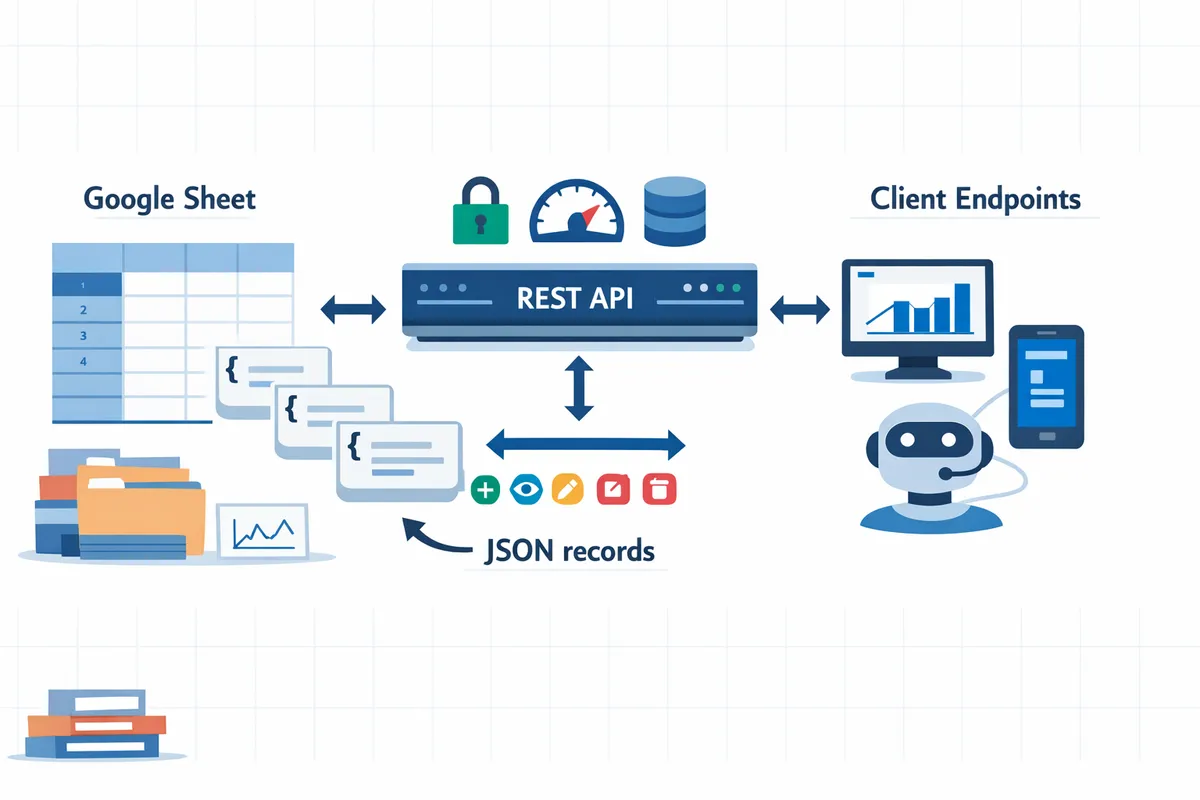
Setting up a Google Sheets backend requires explicit handling of auth, quotas, concurrency, validation, and monitoring.
A production-capable Sheets backend demands explicit engineering for authentication, quota management, concurrency control, schema validation, and monitoring. These operational concerns decide whether a spreadsheet backend stays reliable under real traffic or becomes a recurring fire drill.
DIY integration: auth, tokens, quotas, retries, and secrets 🔐
DIY builds must implement OAuth, which is an authorization protocol that issues short-lived access tokens to grant third-party apps limited access to user data, plus token refresh, rate-limit handling, retry logic, and secure credential storage. You must build the full OAuth onboarding flow for spreadsheet owners, persist refresh tokens securely, and rotate credentials when keys leak or people leave the team. Required engineering tasks include:
- Credential rotation and secure secret storage (vault, KMS, or equivalent).
- Token refresh logic and error handling for expired or revoked tokens.
- Quota tracking and per-client backoff to avoid 429 responses from Google.
- Idempotency for writes and optimistic locking or conflict resolution on concurrent updates.
- Retries with exponential backoff and jitter, plus escalation if retries fail.
- Audit logs and request tracing to investigate failed operations.
Race conditions and cache invalidation are common failure modes: concurrent app instances can attempt conflicting writes to the same row, and stale caches can serve out-of-date records if you do not invalidate on write. For a practical walkthrough of these DIY pitfalls and sample flows, see our guide on how to turn Google Sheets into a REST API in minutes.
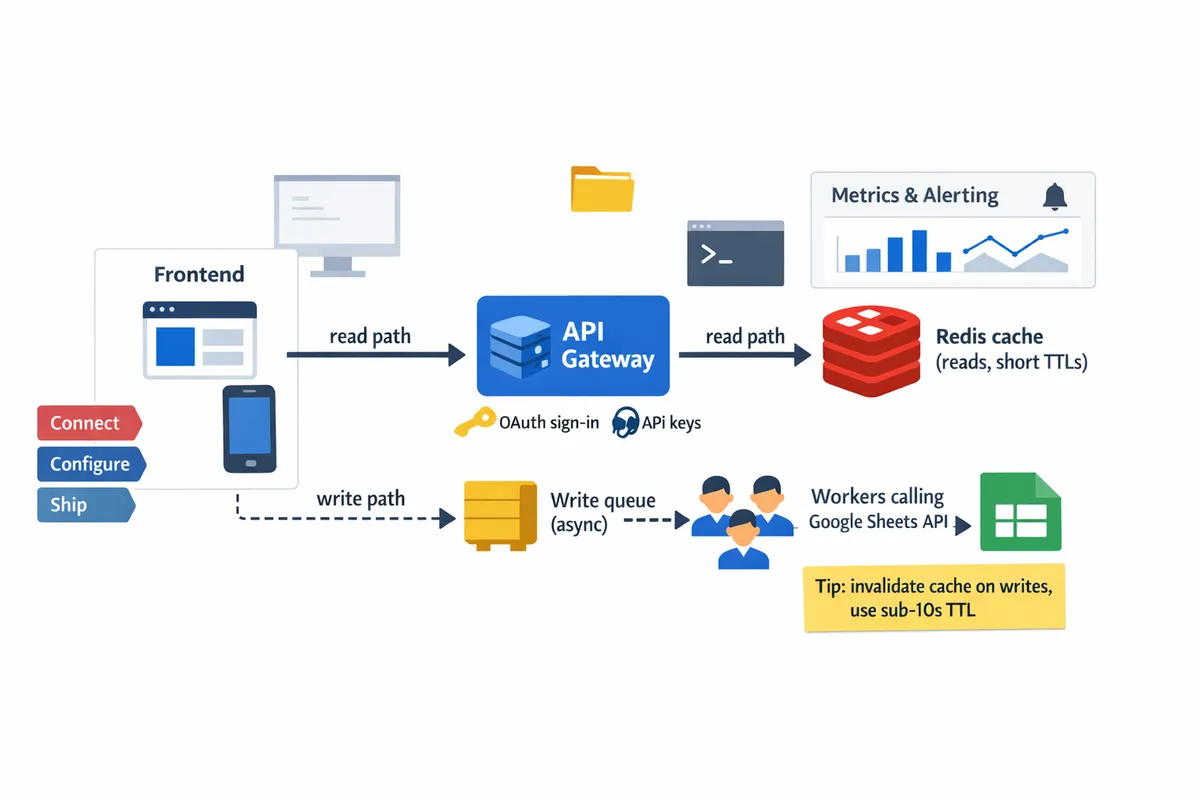
Minimal production architecture: gateway, cache, queue, workers, and observability 🧩
A minimal production-ready architecture includes an API gateway, Redis for caching, a write queue to serialize updates, worker processes that call the Google Sheets API, and metrics with alerting. Redis is an in-memory data store that provides fast caching and pub/sub, which reduces upstream Google API calls for read-heavy workloads. Build this architecture in five clear steps:
- Frontend or client talks to an API gateway that enforces auth and per-key quotas.
- API gateway checks a Redis cache (cache-aside) and returns cached reads when fresh.
- Writes enqueue to a durable queue (RabbitMQ, SQS, or Redis streams) instead of hitting Sheets synchronously.
- Worker processes dequeue writes, refresh tokens as needed, apply idempotency keys, and commit updates to the Google Sheets API.
- Emit metrics (request latencies, 429/5xx rates, queue depth) and wire alerts for error spikes and quota exhaustion.
Each layer prevents specific failure modes: the gateway centralizes quota enforcement, Redis reduces quota pressure, the queue serializes conflicting writes, and workers centralize token lifecycle and retries. For schema validation and migrations, include a lightweight validation step in the gateway so invalid rows never reach the queue. See our complete guide to CRUD, auth, and performance for patterns and validation examples.
💡 Tip: Use short TTLs (sub-10 seconds for near-real-time dashboards) and always invalidate caches on successful writes to avoid serving stale rows.
Sheet Gurus API removes the operational burden and provides instant, secure endpoints 🚀
Sheet Gurus API handles OAuth onboarding, API key management, per-sheet permissions, configurable rate limiting, optional Redis caching, idempotent endpoints, and webhooks so teams avoid building token refresh, retry logic, credential vaults, and monitoring pipelines. With Sheet Gurus API your team signs in with Google, selects a spreadsheet, and receives a live RESTful JSON endpoint that supports full CRUD and syncs edits back to the sheet.
Product capabilities (short bullets):
- Google sign-in and OAuth token lifecycle management handled by Sheet Gurus API.
- API key creation, rotation, and per-sheet permission scopes in the dashboard.
- Configurable rate limiting and automatic queuing and retry to map client limits to Google API quotas.
- Optional Redis caching and built-in invalidation hooks to reduce Sheets API calls.
- Idempotent write endpoints, webhooks for change events, and request logs for tracing.
How those capabilities remove DIY complexity:
- Credential storage and rotation: handled by Sheet Gurus API so you do not run a secrets vault.
- Token refresh and revocation: Sheet Gurus API manages refresh flows and retries, eliminating custom token logic.
- Quota and backoff: the platform enforces per-key and global limits and queues bursts instead of failing clients.
- Observability: request metrics, error alerts, and audit logs let you detect spikes without building a monitoring stack.
If your use case matches internal apps, dashboards, or AI agents that need spreadsheet-backed programmatic access, see our use-case collection on Google Sheets to API: 15 production-ready scenarios that show when a managed endpoint is the faster, lower-risk path.
For step-by-step setup options and a no-code route to a live endpoint, check our quick start guide on how to turn Google Sheets into a REST API in minutes (no backend required).
To run a Sheets-backed app in production, follow a migration and hardening roadmap that covers schema, security, performance, and observability.
Follow a staged migration and hardening roadmap that covers schema versioning, secure access, performance controls, and observability before you put a Sheets-backed app into production. These steps reduce the chance of emergency fixes caused by schema drift, quota exhaustion, or missing audit trails. The rest of this section gives a step-by-step migration plan, benchmarking guidance, concrete performance controls, monitoring checks, compliance notes, and a clear path to move to a database when needed.
Migration roadmap 🛣️
Use a three-phase migration: (1) stabilize schema and add validation, (2) build export and restore scripts plus a migrations changelog, (3) run parallel-read mode and cut over writes. Start by locking down a canonical sheet schema in a single owner-controlled spreadsheet and add explicit validation rules using Apps Script or Sheet Gurus API request validators. Example: add a schema_version column and a last_modified_iso timestamp, and require enumerated values for status columns so clients never receive unexpected types.
Phase details and automation patterns.
- Stabilize schema and validation. Add a migrations sheet that records {version, author, date, migration_script, verification_steps}. Use Apps Script validation rules or API-side request validators to reject writes that violate the schema.
- Export and restore. Automate daily CSV exports and a full snapshot export before any schema migration. Store snapshots in versioned folders or S3 and validate restores monthly with a scripted import. Use a small script (Python + gspread or node-googleapis) to export, run a diff, and seed a test database for verification.
- Parallel-read and cutover. Start in parallel-read mode where your app reads from the new endpoint and optionally writes to both systems for a trial window. After running integration tests and verifying data parity, switch primary writes to the new backend.
💡 Tip: Keep a migrations changelog in the spreadsheet itself and automate a nightly export. Always run a restore test before a production cutover.
See our guide on How to Turn Google Sheets into a REST API in Minutes (No Backend Required) for example scripts and a sample migrations sheet.
Benchmarking and cost comparison 📈
Benchmark API calls per minute, average and tail latency, projected monthly API costs, and developer maintenance time before deciding a database is necessary. Measure current production traffic over a typical week and under a load test that simulates 2x expected peak traffic. Collect these metrics: requests per minute (RPM) by endpoint, average latency and P95/P99, writes per minute, Google Sheets API quota usage, and cache hit rate.
How to convert metrics into a decision. Use k6 or locust to simulate traffic and record RPM and latency. Estimate monthly API costs by multiplying average RPM by Google API cost per 1,000 calls or by third-party provider billing. Add an estimate for developer time to maintain retry logic, token refresh, and incident work. Plot cost and latency against user growth to find the inflection point where a managed database plus a standard API becomes cheaper than ongoing Sheets ops.
Example rule-of-thumb thresholds (illustrative). If your app has sustained peaks above 500 reads per second, writes more than 100 per second, or datasets above ~100k rows with frequent writes, a database often becomes cheaper and more reliable than a Sheets-backed approach. Use those as starting thresholds and re-run benchmarks with real traffic.
Compare DIY complexity with a managed option. DIY requires building token refresh, quota monitoring, backoff strategies, and retries. Sheet Gurus API reduces that maintenance by exposing a managed endpoint and handling API key auth, rate limiting, and optional Redis caching for you.
See Google Sheet REST API: What It Is, How It Works, Limits, and the Fastest Way to Get One for a cost-vs-complexity checklist.
Performance hardening ⚙️
Harden performance with caching, per-key rate limits, write queuing, retries with jitter, and observability to protect sheets from quota exhaustion and noisy neighbors. Implement these controls in order so each layer addresses a specific failure mode.
Concrete controls and example settings.
- Redis caching rules. Use cache-aside for read-heavy endpoints, with short TTLs (5 to 30 seconds) for near-real-time dashboards and longer TTLs for archival reads. Invalidate cache immediately on writes using webhook triggers or API-side invalidation.
- Per-key rate limits. Enforce per-key QPS and burst windows to prevent one client from consuming the quota. Start with conservative limits such as 10 RPS per key and a global throttle to protect the upstream Google Sheets API.
- Request queuing for writes. Serialize writes through a queue worker that batches updates to reduce Sheets API calls and avoid conflicting concurrent writes. Example: batch up to 50 updates per 2 seconds and apply them in a single batch update API call.
- Retries with jitter and circuit breakers. Implement exponential backoff with full jitter for 429/5xx responses and a circuit breaker that opens when errors exceed a threshold for a short window.
- Observability controls. Emit structured logs (JSON), track SLI metrics (error rate, P95/P99 latency), monitor cache hit rate and queue length, and alert on quota usage exceedance.
How these controls stop common failures. Caching reduces read load and protects against quota spikes. Rate limits and queuing prevent noisy neighbors from causing 429 responses. Retries with jitter avoid synchronized retry storms.
Sheet Gurus API offers built-in per-sheet API keys, configurable rate limiting, optional Redis caching, and monitoring so teams do not have to build these controls from scratch.
Observability, compliance, and moving to a database 🧭
Define SLIs, build dashboards for quota and tail latency, and use an incremental cutover plan to migrate to a database when operational limits are reached. Track these key observability signals: quota usage (per Google API metric), error rate, P95 and P99 latency, cache hit ratio, and write queue depth.
Alert thresholds and compliance checks.
- Critical alerts. Trigger on sustained error rate >1% over five minutes, P95 latency above an agreed SLO, or Google Sheets API quota consumption above 80% of the allocated bucket.
- Audit and access control. Enforce API key rotation, per-sheet permissions, and immutable request logs for compliance audits. Avoid storing highly sensitive personal data in Sheets unless your compliance team signs off.
Migration path to a database with steps.
- Export a consistent snapshot and seed your database schema. Use CSV or bulk loader tools such as BigQuery load or an ETL tool like Airbyte for larger datasets.
- Run parallel reads and optionally dual writes for a validation window. Maintain a changelog column to reconcile differences.
- Validate data integrity with record counts, checksums, and sample queries. Backfill any missed writes from the changelog.
- Flip primary writes to the database, keep read replicas if needed, and deprecate sheet writes once parity is confirmed.
DIY requirements include building export scripts, CDC or change capture if you need near-real-time sync, and handling token rotation for long-lived integrations. Sheet Gurus API eases the transition by providing webhooks for change events and a managed endpoint that you can point an ETL tool at during the migration.
⚠️ Warning: Do not place regulated personal health information or payment card data directly in shared Google Sheets without your legal team approving controls and storage locations.
See our list of production use cases in Google Sheets to API: 15 Production-Ready Use Cases for Internal Tools, Portals, and AI Agents to decide which workflows are safe to keep in Sheets and which should move to a database.
The fastest production-ready path: Sheet Gurus API ✅
Use Sheet Gurus API to skip building OAuth flows, credential rotation, retry logic, rate limiters, and cache invalidation so you can get a production API in minutes. Connect → Configure → Ship: sign in with Google, choose the spreadsheet, configure per-sheet API keys and rate limits, optionally enable Redis caching, and receive a live CRUD endpoint that syncs back to the sheet.
Why teams pick this path. Building and maintaining the pieces above requires ongoing ops time: token refresh, quota monitoring, race condition fixes, and incident response. Sheet Gurus API operationalizes those concerns, offers webhooks for change events to simplify migrations, and provides dashboarding for quotas and latency so teams focus on product rather than plumbing.
Sheet Gurus API supports a hands-on 14-day free trial and offers up to 99.9% uptime for production endpoints.
Frequently Asked Questions
Google Sheets can work as a backend for small, low-traffic apps but requires explicit operational controls for production. This FAQ answers the practical questions founders and developers ask when evaluating a Sheets-backed service and shows where our Sheet Gurus API reduces the engineering burden.
Can I use Google Sheets as a backend for small internal tools? 🛠️
Yes. Google Sheets works well for prototypes and small internal tools with low write concurrency and modest dataset sizes. For example, a support dashboard reading a few columns across 10,000 rows can serve live charts with simple pagination and caching. Our Sheet Gurus API turns a spreadsheet into a live RESTful JSON endpoint in minutes, adds API key auth and per-sheet permissions, and removes the need to build OAuth flows and token refresh logic. See our 15 production-ready use cases for concrete examples of apps that start with Sheets and stay reliable.
How many concurrent users can Google Sheets support? 🤔
Sheets handles low-concurrency read scenarios reliably, but performance and Google API quotas degrade quickly under heavy concurrent writes or large read bursts. Google Sheets API quotas and write contention cause 429s and latency spikes when many clients write the same sheet or when thousands of API reads occur in short windows. Benchmark your workload by simulating expected read QPS and write bursts; measure 95th percentile latency and Google 429 rate. Our Sheet Gurus API helps here by enforcing per-key rate limits, queueing excess writes, and offering optional Redis caching to reduce upstream Google calls.
When should I stop using Google Sheets and move to a database? 🔁
Stop using Sheets when you need frequent concurrent writes, strict transactional integrity, very large datasets, or formal compliance controls. Trigger checklist:
- Frequent conflicting writes to the same rows.
- Need for multi-row atomic transactions or serializable isolation.
- Dataset sizes that cause Sheets to exceed practical query or response times.
- Regulatory requirements that forbid spreadsheet storage of sensitive records. Building a DIY migration involves credential rotation, token refresh, retry logic, cache invalidation, and schema migrations. Our website explains migration patterns and the steps to move from a sheet-backed API to a dedicated database while preserving integrations.
How do I secure a Sheets-backed API in production? 🔐
Use OAuth onboarding for spreadsheet owners, scoped API keys for service clients, and the principle of least privilege for every integration. OAuth is the protocol that lets spreadsheet owners grant limited access without exposing passwords, and API keys identify and rate-limit client apps. Enforce per-sheet permissions, rotate keys regularly, restrict network access with IP allowlists where possible, and require TLS for all API traffic. Audit access logs and enable alerts for abnormal request patterns. Our Sheet Gurus API provides Google sign-in, API key management, scoped per-sheet permissions, and request logs so teams avoid building these controls from scratch.
💡 Tip: Require double opt-in for external integrations and third-party access to reduce accidental data exposure.
⚠️ Warning: Avoid storing regulated personal health information in spreadsheets without a sanctioned, auditable data handling plan.
Link to our step-by-step setup in How to Turn Google Sheets into a REST API in Minutes for practical auth flows and permission models.
How do I handle conflicting writes and data validation? ⚖️
Use optimistic locking, server-side validation, and write serialization to reduce conflicts. Optimistic locking is a pattern that stores a version or timestamp with each row and rejects updates that don’t match the current version. Practical patterns: add a version column for optimistic checks; use idempotency keys to prevent duplicate writes; route writes through a server-side write queue to serialize conflicting updates; and maintain a changelog sheet for auditing and rollback. Implementing these patterns yourself requires token refresh logic, retry/backoff, and monitoring to detect persistent conflicts. Sheet Gurus API offers idempotent endpoints, webhook events for change streams, and built-in write queuing to simplify conflict resolution.
Can Sheets serve as structured data sources for AI agents and assistants? 🤖
Yes, Sheets can feed AI workflows when exposed by a reliable API with predictable latency and proper caching. MCP-style endpoints are APIs that let agents query structured facts in a predictable format; MCP stands for machine-consumable protocol that surfaces rows and metadata for agents. For real-time assistants, caching short TTLs and enforcing rate limits prevents quota exhaustion and keeps query latency low. Our Sheet Gurus API exposes sheets as MCP servers so agents like Claude can query facts directly while the platform handles rate limiting, caching, and token lifecycle.
How much time does it take to go from prototype to production with a managed API? ⏱️
A prototype can be live in hours; production hardening typically requires days to weeks depending on compliance and uptime targets. Realistic timeline:
- Hours: sign in, pick a sheet, and get a live CRUD endpoint with our Sheet Gurus API.
- Days: configure API keys, per-sheet permissions, and basic rate limits.
- 1–2 weeks: add monitoring, audit logging, SLAs, and long-term key rotation for production deployments. Try our 14-day free trial to validate an end-to-end flow and measure latency and quotas against your real traffic patterns.
For implementation details, see our guides on Google Sheets JSON API and the no-code migration patterns in No-Code Google Sheets REST API: From Prototype to Production (Auth, Rate Limits, Caching, AI Agents).
Next steps for a production-ready Sheets backend
Google Sheets can serve as a backend for low-traffic internal apps and prototypes, but production use requires operational controls. If your question is "can I use Google Sheets as a backend?", the short answer is yes for small-scale use cases, provided you add auth, rate limiting, caching, and monitoring.
Building those controls yourself requires credential management, token refresh, quota handling, retry logic, cache invalidation, and race-condition fixes. Sheet Gurus API turns Google Sheets into production-ready RESTful JSON APIs in minutes, requiring no backend code. Users sign in with Google, select a spreadsheet, and immediately receive a live API endpoint that supports full CRUD (create, read, update, delete) operations with changes syncing back to the original sheet in real time. The platform adds API‑level features that professional apps need—API key authentication with fine‑grained per‑sheet permissions, configurable rate limiting (per key or global), optional Redis caching to cut Google Sheets API calls and accelerate responses, and enterprise infrastructure with 99.9% uptime and average response times under 100 ms.
Create your first endpoint with the getting-started guide to see the three-step flow (Connect → Configure → Ship) and move a prototype to production. See our how-to guide on turning Sheets into a REST API and the 15 production-ready use cases for implementation patterns tied to General API Concepts: https://sheetgurusapi.com/blog/how-to-turn-google-sheets-into-a-rest-api-in-minutes-no-backend-required and https://sheetgurusapi.com/blog/google-sheets-to-api-15-production-ready-use-cases-for-internal-tools-portals-and-ai-agents
💡 Tip: Start with a single-sheet, scoped API key and short TTLs for caching to validate behavior before scaling.
Subscribe to our newsletter for weekly implementation tips and real-world recipes.